Favorites Empty in Navigation Pane - Fix

Fix Empty Favorites in Navigation Pane in Vista, Windows 7, and Windows 8

   Information
This tutorial will show you how to fix Favorites when it is empty under it without any favorite links in the Windows Explorer navigation pane in Vista, Windows 7, and Windows 8.

You must be logged in as an administrator to be able to do the steps in this tutorial.

   Tip
Double check to make sure that the Favorites links are not just hidden by mistake, and needed to be unhidden.

If you only deleted the Favorites links, then you could use the tutorial below to restore them instead:

How to Restore the Default Favorite Links in Windows 7 Navigation Pane


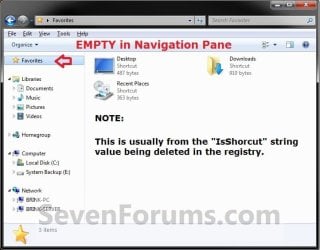
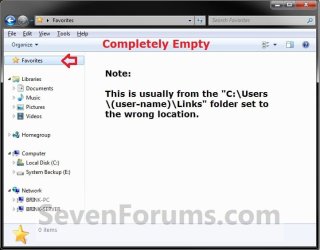
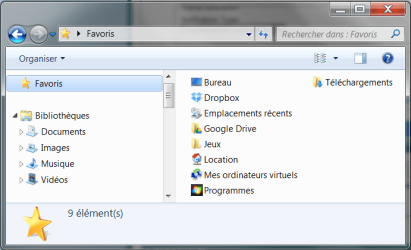
EXAMPLE: Favorites - Default and Empty
NOTE: If Favorites is completety empty in the Navigation Pane and in the main window pane in Windows Explorer, then you will need to also do what is in the TIP box below.
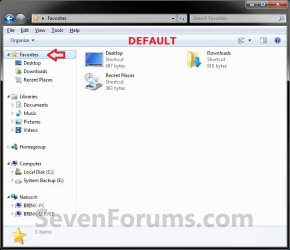
Default.jpg
Empty.jpg
Empty2.jpg


OPTION ONE

To Fix Empty Favorites with a REG File


1. Click/tap on the Download button below to download the file below.
Fix_Empty_Favorites.reg

Download


2. Save the .reg file to your desktop.

3. Double click/tap the downloaded .reg file to merge it.

4. If prompted, click/tap on Run, Yes (UAC Windows 7/8) or Continue (UAC Vista), Yes, and OK when prompted.

5. Log off and log on, or restart the computer to apply.

6. When done, you can delete the downloaded .reg file if you like.

   Tip
If Favorites is still empty afterwards, then download and merge the lnk (LNK) option in the tutorial below to restore all of the default association for shortcuts (lnk).

http://www.sevenforums.com/tutorials/19449-default-file-type-associations-restore.html

AND

Double check to make sure that your C:\Users\(user-name)\Links folder is set to the default location.


OPTION TWO

To Manually Fix Empty Favorites in Registry Editor


1. Open the Start Menu, and type regedit in the search box and press enter.

2. If prompted by UAC, then click on Yes (UAC Windows 7/8) or Continue (UAC Vista).

3. In regedit, navigate to the location below.
HKEY_CLASSES_ROOT\lnkfile
4. In the right pane of lnkfile, right click or press and hold on an empty space, and click/tap on New and String Value. (see screenshot below)
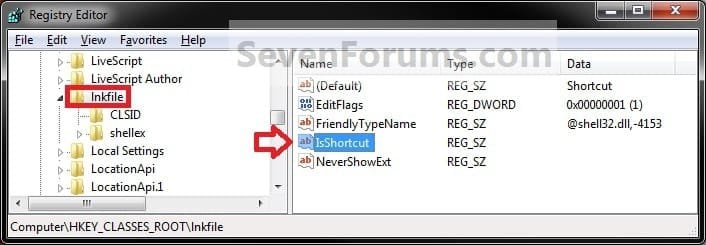
Reg1.jpg
5. Type in IsShortcut for the name, and press Enter. (see screenshot below)
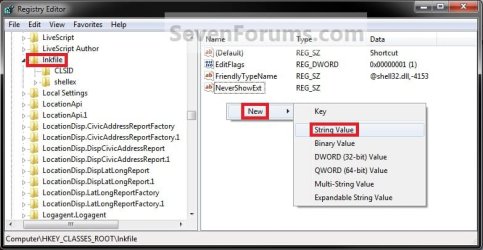
Reg2.jpg
6. Close regedit.

   Tip
If Favorites is still empty afterwards, then download and merge the lnk (LNK) option in the tutorial below to restore all of the default association for shortcuts (lnk).

http://www.sevenforums.com/tutorials/19449-default-file-type-associations-restore.html

AND

Double check to make sure that the C:\Users\(user-name)\Links folder is set to the default location.


That's it,
Shawn


Attachments

Last edited:
Hi ,

I deleted the links folder by mistake and recreated it manually but nothing worked ??
 

My Computer My Computer

OS
windows 7 professional 32 bit
lastbreath said:
Thank ... but I mange to solve it by myself ..

I'm happy to hear that you got it sorted. :)
 

My Computer My Computer

Computer type
PC/Desktop
Computer Manufacturer/Model Number
Self built custom
OS
64-bit Windows 11 Pro for Workstations
CPU
Intel i7-8700K OC'd to 5 GHz
Motherboard
ASUS ROG Maximus XI Formula Z390
Memory
64 GB (4x16GB) G.SKILL TridentZ RGB DDR4 3600 MHz
Graphics Card(s)
ASUS ROG-STRIX-GTX1080TI-O11G-GAMING
Sound Card
Integrated
Monitor(s) Displays
2 x Samsung Odyssey G7 27"
Screen Resolution
2560x1440
Hard Drives
1TB Samsung 990 PRO M.2,
4TB Samsung 990 PRO PRO M.2,
TerraMaster F8 SSD Plus NAS
PSU
Seasonic Prime Titanium 850W
Case
Thermaltake Core P3
Cooling
Corsair Hydro H115i
Keyboard
Logitech wireless K800
Mouse
Logitech MX Master 4
Internet Speed
2 Gb/s Download and 100 Mb/s Upload
Antivirus
Malwarebyte Anti-Malware Premium
Browser
Google Chrome
Other Info
Logitech Z625 speaker system,
Logitech BRIO 4K Pro webcam,
HP Color LaserJet Pro MFP M477fdn,
APC SMART-UPS RT 1000 XL - SURT1000XLI,
Galaxy S23 Plus phone
Hum... hum... And what if ?...

Hi

So...
What if I have no entry at all called : HKEY_CLASSES_ROOT\lnkfile ? :sarc:
Obviously : nomore IsShortcut within...:p

Please help me... :banghead:
I can't stand any more having my Links' folder not expanding in the navigation pane :cry:

You'll be so kind...
 

Attachments

  • Screencopy.png
    Screencopy.png
    26.9 KB · Views: 54,545

My Computer My Computer

Computer Manufacturer/Model Number
Dell
OS
Windows 7
CPU
I7 Q820
Memory
6 Go
Graphics Card(s)
ATI Mobility Radeon HD 4650
Hello BBluminou, and welcome to Seven Forums.

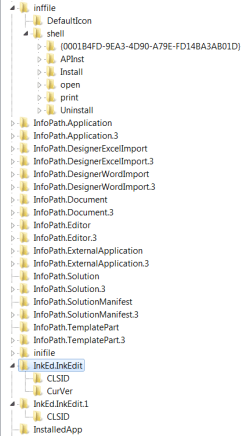
You should have lnkfile by default. You'll have to scroll down past all the short file extension keys listed at first at the HKEY_CLASSES_ROOT registry location until you come down to where the alphabet starts over for the longer key names. You'll then just scroll down to lnkfile.

If you like, you could use OPTION ONE to have the REG file fix this for you instead of trying to do it manually in OPTION TWO.

Hope this helps for now, :)

Shawn
 

My Computer My Computer

Computer type
PC/Desktop
Computer Manufacturer/Model Number
Self built custom
OS
64-bit Windows 11 Pro for Workstations
CPU
Intel i7-8700K OC'd to 5 GHz
Motherboard
ASUS ROG Maximus XI Formula Z390
Memory
64 GB (4x16GB) G.SKILL TridentZ RGB DDR4 3600 MHz
Graphics Card(s)
ASUS ROG-STRIX-GTX1080TI-O11G-GAMING
Sound Card
Integrated
Monitor(s) Displays
2 x Samsung Odyssey G7 27"
Screen Resolution
2560x1440
Hard Drives
1TB Samsung 990 PRO M.2,
4TB Samsung 990 PRO PRO M.2,
TerraMaster F8 SSD Plus NAS
PSU
Seasonic Prime Titanium 850W
Case
Thermaltake Core P3
Cooling
Corsair Hydro H115i
Keyboard
Logitech wireless K800
Mouse
Logitech MX Master 4
Internet Speed
2 Gb/s Download and 100 Mb/s Upload
Antivirus
Malwarebyte Anti-Malware Premium
Browser
Google Chrome
Other Info
Logitech Z625 speaker system,
Logitech BRIO 4K Pro webcam,
HP Color LaserJet Pro MFP M477fdn,
APC SMART-UPS RT 1000 XL - SURT1000XLI,
Galaxy S23 Plus phone
Hi

Thank you for answering but... for I've tried using the Search Box (CTRL+F) and I don't even have an entry called Inkfile ! :shock:

Does W7 x64 works the same way than x86's one ?

I did post a screencopy to show what I have in the registry at that place...
 

Attachments

  • Screencopy_2.png
    Screencopy_2.png
    9.8 KB · Views: 1,556

My Computer My Computer

Computer Manufacturer/Model Number
Dell
OS
Windows 7
CPU
I7 Q820
Memory
6 Go
Graphics Card(s)
ATI Mobility Radeon HD 4650
That's a L and not a I for LNKFILE/lnkfile. ;)
 

My Computer My Computer

Computer type
PC/Desktop
Computer Manufacturer/Model Number
Self built custom
OS
64-bit Windows 11 Pro for Workstations
CPU
Intel i7-8700K OC'd to 5 GHz
Motherboard
ASUS ROG Maximus XI Formula Z390
Memory
64 GB (4x16GB) G.SKILL TridentZ RGB DDR4 3600 MHz
Graphics Card(s)
ASUS ROG-STRIX-GTX1080TI-O11G-GAMING
Sound Card
Integrated
Monitor(s) Displays
2 x Samsung Odyssey G7 27"
Screen Resolution
2560x1440
Hard Drives
1TB Samsung 990 PRO M.2,
4TB Samsung 990 PRO PRO M.2,
TerraMaster F8 SSD Plus NAS
PSU
Seasonic Prime Titanium 850W
Case
Thermaltake Core P3
Cooling
Corsair Hydro H115i
Keyboard
Logitech wireless K800
Mouse
Logitech MX Master 4
Internet Speed
2 Gb/s Download and 100 Mb/s Upload
Antivirus
Malwarebyte Anti-Malware Premium
Browser
Google Chrome
Other Info
Logitech Z625 speaker system,
Logitech BRIO 4K Pro webcam,
HP Color LaserJet Pro MFP M477fdn,
APC SMART-UPS RT 1000 XL - SURT1000XLI,
Galaxy S23 Plus phone
A Miracle...:party:
God bless you, Brink !
You're just a genius to me who was hanging around from forums to forums for the past 18 months...
Thank you so much ! :D
 

My Computer My Computer

Computer Manufacturer/Model Number
Dell
OS
Windows 7
CPU
I7 Q820
Memory
6 Go
Graphics Card(s)
ATI Mobility Radeon HD 4650
You're most welcome. :)
 

My Computer My Computer

Computer type
PC/Desktop
Computer Manufacturer/Model Number
Self built custom
OS
64-bit Windows 11 Pro for Workstations
CPU
Intel i7-8700K OC'd to 5 GHz
Motherboard
ASUS ROG Maximus XI Formula Z390
Memory
64 GB (4x16GB) G.SKILL TridentZ RGB DDR4 3600 MHz
Graphics Card(s)
ASUS ROG-STRIX-GTX1080TI-O11G-GAMING
Sound Card
Integrated
Monitor(s) Displays
2 x Samsung Odyssey G7 27"
Screen Resolution
2560x1440
Hard Drives
1TB Samsung 990 PRO M.2,
4TB Samsung 990 PRO PRO M.2,
TerraMaster F8 SSD Plus NAS
PSU
Seasonic Prime Titanium 850W
Case
Thermaltake Core P3
Cooling
Corsair Hydro H115i
Keyboard
Logitech wireless K800
Mouse
Logitech MX Master 4
Internet Speed
2 Gb/s Download and 100 Mb/s Upload
Antivirus
Malwarebyte Anti-Malware Premium
Browser
Google Chrome
Other Info
Logitech Z625 speaker system,
Logitech BRIO 4K Pro webcam,
HP Color LaserJet Pro MFP M477fdn,
APC SMART-UPS RT 1000 XL - SURT1000XLI,
Galaxy S23 Plus phone
Neither option works on my computer

and I don't have a C:\Users\(user-name)\Links folder nor HKEY_CLASSES_ROOT\lnkfile. How can I fix this problem?
 

My Computer My Computer

Computer Manufacturer/Model Number
Lenovo T420
OS
Windows 7 Professional 64 bit
CPU
Intel(R) Core(TM) i7-2640M CPU @ 2.80GHz, 2801 Mhz
Memory
4 GB
Graphics Card(s)
NVIDIA Optimus Graphics
Sound Card
Conexant 20672 SnartAudio HD
Monitor(s) Displays
ThinkPad Display
Screen Resolution
1600x900
Hard Drives
Hitachi HTS 448GB
Cooling
Fan
Keyboard
UK
Mouse
Touchpad and Trackpoint
Internet Speed
144 Mbps
and I don't have a C:\Users\(user-name)\Links folder nor HKEY_CLASSES_ROOT\lnkfile. How can I fix this problem?


Hello Nikolaev,

Double check the yellow TIP box at the top of the tutorial to see if your C:\Users\(user-name)\Links folder may just be hidden (faded) once you set all hidden files to show.

lnkfile (Lnkfile) should be there. You will need to scroll down past the other file extenstions until the alphabet starts over.
 
Last edited:

My Computer My Computer

Computer type
PC/Desktop
Computer Manufacturer/Model Number
Self built custom
OS
64-bit Windows 11 Pro for Workstations
CPU
Intel i7-8700K OC'd to 5 GHz
Motherboard
ASUS ROG Maximus XI Formula Z390
Memory
64 GB (4x16GB) G.SKILL TridentZ RGB DDR4 3600 MHz
Graphics Card(s)
ASUS ROG-STRIX-GTX1080TI-O11G-GAMING
Sound Card
Integrated
Monitor(s) Displays
2 x Samsung Odyssey G7 27"
Screen Resolution
2560x1440
Hard Drives
1TB Samsung 990 PRO M.2,
4TB Samsung 990 PRO PRO M.2,
TerraMaster F8 SSD Plus NAS
PSU
Seasonic Prime Titanium 850W
Case
Thermaltake Core P3
Cooling
Corsair Hydro H115i
Keyboard
Logitech wireless K800
Mouse
Logitech MX Master 4
Internet Speed
2 Gb/s Download and 100 Mb/s Upload
Antivirus
Malwarebyte Anti-Malware Premium
Browser
Google Chrome
Other Info
Logitech Z625 speaker system,
Logitech BRIO 4K Pro webcam,
HP Color LaserJet Pro MFP M477fdn,
APC SMART-UPS RT 1000 XL - SURT1000XLI,
Galaxy S23 Plus phone
thanks for getting back so quickly Brink
there's nothing between Favorites and My Documents under my username, not even a grayed out box, and all my folder views are set to display hidden files (and do)
I copied the key name and pasted into regedit's find box and it found nothing
 

My Computer My Computer

Computer Manufacturer/Model Number
Lenovo T420
OS
Windows 7 Professional 64 bit
CPU
Intel(R) Core(TM) i7-2640M CPU @ 2.80GHz, 2801 Mhz
Memory
4 GB
Graphics Card(s)
NVIDIA Optimus Graphics
Sound Card
Conexant 20672 SnartAudio HD
Monitor(s) Displays
ThinkPad Display
Screen Resolution
1600x900
Hard Drives
Hitachi HTS 448GB
Cooling
Fan
Keyboard
UK
Mouse
Touchpad and Trackpoint
Internet Speed
144 Mbps

My Computer My Computer

Computer type
PC/Desktop
Computer Manufacturer/Model Number
Self built custom
OS
64-bit Windows 11 Pro for Workstations
CPU
Intel i7-8700K OC'd to 5 GHz
Motherboard
ASUS ROG Maximus XI Formula Z390
Memory
64 GB (4x16GB) G.SKILL TridentZ RGB DDR4 3600 MHz
Graphics Card(s)
ASUS ROG-STRIX-GTX1080TI-O11G-GAMING
Sound Card
Integrated
Monitor(s) Displays
2 x Samsung Odyssey G7 27"
Screen Resolution
2560x1440
Hard Drives
1TB Samsung 990 PRO M.2,
4TB Samsung 990 PRO PRO M.2,
TerraMaster F8 SSD Plus NAS
PSU
Seasonic Prime Titanium 850W
Case
Thermaltake Core P3
Cooling
Corsair Hydro H115i
Keyboard
Logitech wireless K800
Mouse
Logitech MX Master 4
Internet Speed
2 Gb/s Download and 100 Mb/s Upload
Antivirus
Malwarebyte Anti-Malware Premium
Browser
Google Chrome
Other Info
Logitech Z625 speaker system,
Logitech BRIO 4K Pro webcam,
HP Color LaserJet Pro MFP M477fdn,
APC SMART-UPS RT 1000 XL - SURT1000XLI,
Galaxy S23 Plus phone
Brilliant. Got all the defaults back in Favorites now. Thanks a bunch Brink.
 

My Computer My Computer

Computer Manufacturer/Model Number
Lenovo T420
OS
Windows 7 Professional 64 bit
CPU
Intel(R) Core(TM) i7-2640M CPU @ 2.80GHz, 2801 Mhz
Memory
4 GB
Graphics Card(s)
NVIDIA Optimus Graphics
Sound Card
Conexant 20672 SnartAudio HD
Monitor(s) Displays
ThinkPad Display
Screen Resolution
1600x900
Hard Drives
Hitachi HTS 448GB
Cooling
Fan
Keyboard
UK
Mouse
Touchpad and Trackpoint
Internet Speed
144 Mbps
You're most welcome Nikolaev. :)
 

My Computer My Computer

Computer type
PC/Desktop
Computer Manufacturer/Model Number
Self built custom
OS
64-bit Windows 11 Pro for Workstations
CPU
Intel i7-8700K OC'd to 5 GHz
Motherboard
ASUS ROG Maximus XI Formula Z390
Memory
64 GB (4x16GB) G.SKILL TridentZ RGB DDR4 3600 MHz
Graphics Card(s)
ASUS ROG-STRIX-GTX1080TI-O11G-GAMING
Sound Card
Integrated
Monitor(s) Displays
2 x Samsung Odyssey G7 27"
Screen Resolution
2560x1440
Hard Drives
1TB Samsung 990 PRO M.2,
4TB Samsung 990 PRO PRO M.2,
TerraMaster F8 SSD Plus NAS
PSU
Seasonic Prime Titanium 850W
Case
Thermaltake Core P3
Cooling
Corsair Hydro H115i
Keyboard
Logitech wireless K800
Mouse
Logitech MX Master 4
Internet Speed
2 Gb/s Download and 100 Mb/s Upload
Antivirus
Malwarebyte Anti-Malware Premium
Browser
Google Chrome
Other Info
Logitech Z625 speaker system,
Logitech BRIO 4K Pro webcam,
HP Color LaserJet Pro MFP M477fdn,
APC SMART-UPS RT 1000 XL - SURT1000XLI,
Galaxy S23 Plus phone
Fixed

I followed the 2 steps and it did not work, so I created a folder named

"my links"

in

C:\users\(my-user-name)\

and it became automatically a folder called "Links" with the special icon with a blue arrow, and now it works. The only difference is that now the links have at the end the legend "(NAME)-shortcut", but it works the same.

I am not sure if this would have worked alone or if I actually needed to add the .reg files, but it only started working when I did this.

Thank you very much!!!
 

My Computer My Computer

Computer type
PC/Desktop
OS
Windows 7 64 bits Ultimate

My Computer My Computer

Computer type
PC/Desktop
Computer Manufacturer/Model Number
Self built custom
OS
64-bit Windows 11 Pro for Workstations
CPU
Intel i7-8700K OC'd to 5 GHz
Motherboard
ASUS ROG Maximus XI Formula Z390
Memory
64 GB (4x16GB) G.SKILL TridentZ RGB DDR4 3600 MHz
Graphics Card(s)
ASUS ROG-STRIX-GTX1080TI-O11G-GAMING
Sound Card
Integrated
Monitor(s) Displays
2 x Samsung Odyssey G7 27"
Screen Resolution
2560x1440
Hard Drives
1TB Samsung 990 PRO M.2,
4TB Samsung 990 PRO PRO M.2,
TerraMaster F8 SSD Plus NAS
PSU
Seasonic Prime Titanium 850W
Case
Thermaltake Core P3
Cooling
Corsair Hydro H115i
Keyboard
Logitech wireless K800
Mouse
Logitech MX Master 4
Internet Speed
2 Gb/s Download and 100 Mb/s Upload
Antivirus
Malwarebyte Anti-Malware Premium
Browser
Google Chrome
Other Info
Logitech Z625 speaker system,
Logitech BRIO 4K Pro webcam,
HP Color LaserJet Pro MFP M477fdn,
APC SMART-UPS RT 1000 XL - SURT1000XLI,
Galaxy S23 Plus phone
Win Explorer Favorites empty and unresponsive

Hi everyone

I had the same problem for several days and none of the above worked for me and after a lot of googling I got very frustrated not to find anywhere with a solution. So I had to find the answer for myself.

The reason my Windows Explorer Favorites went blank and unresponsive was that I had inadvertently moved my user “Links” (C:\Users\”Username” \Links) folder to a remote inaccessible location such as an external drive (or in your case could have been a Network or a Flash drive etc.) and that location had been engraved in the registry hence the registry was looking at the wrong place for it each time. It took some time to work out where in registry I had to make the correction. The following is for Win7 Professional but for other OS it may be similar:

1) Delete all occurrences of the subfolder “Links” in the user folder of the user with the problem (i.e. under the path C:\Users\”Username”).

2) Run RegEdit as administrator. Export the whole Registry into a .reg file just in case you make any errors.

3) Go to Reg entry: HKEY_CURRENT_USER\Software\Microsoft\Windows\CurrentVersion\Explorer\Shell Folders. In the RH pane look for the string with a path ending with “Links” and correct it to: C:\Users\”Username”\Links where “Username” is the actual name of the user account with the problem.

4) Go to Reg entry: HKEY_CURRENT_USER\Software\Microsoft\Windows\CurrentVersion\Explorer\User Shell Folders. Again in the RH pane look for the string with a path ending with “Links” and correct it to: %USERPROFILE%\Links.

5) Go to Reg entry: HKEY_USERS\xyzxyzxyzxyzxyzxyzxyzxyzxyzxyzxyzxyzxyzxxyzx\Software\Microsoft\
Windows\CurrentVersion\Explorer\Shell Folders. Where the xyz are any sequence of numbers and characters that may be your specific case. Again in the RH pane look for the string with a path ending with “Links” and correct it to: C:\Users\”Username”\Links.

6) Go to Reg entry: HKEY_USERS\xyzxyzxyzxyzxyzxyzxyzxyzxyzxyzxyzxyzxyzxxyzx\Software\Microsoft\
Windows\CurrentVersion\Explorer\User Shell Folders. Again in the RH pane look for the string with a path ending with “Links” and correct it to: %USERPROFILE%\Links.

7) Exit the RegEdit. Make a new “Links” folder under the path C:\Users\”Username”\. Close all and reboot you PC.

If this works for you Happy Computing! and please say thanks.
 

My Computer My Computer

OS
win7 64
Hello Usef1, :)

If you like, you could also do this below from the Tip box at the bottom of the tutorial to restore the default location of your Links folder.


Double check to make sure that the C:\Users\(user-name)\Links folder is set to the default location.
 

My Computer My Computer

Computer type
PC/Desktop
Computer Manufacturer/Model Number
Self built custom
OS
64-bit Windows 11 Pro for Workstations
CPU
Intel i7-8700K OC'd to 5 GHz
Motherboard
ASUS ROG Maximus XI Formula Z390
Memory
64 GB (4x16GB) G.SKILL TridentZ RGB DDR4 3600 MHz
Graphics Card(s)
ASUS ROG-STRIX-GTX1080TI-O11G-GAMING
Sound Card
Integrated
Monitor(s) Displays
2 x Samsung Odyssey G7 27"
Screen Resolution
2560x1440
Hard Drives
1TB Samsung 990 PRO M.2,
4TB Samsung 990 PRO PRO M.2,
TerraMaster F8 SSD Plus NAS
PSU
Seasonic Prime Titanium 850W
Case
Thermaltake Core P3
Cooling
Corsair Hydro H115i
Keyboard
Logitech wireless K800
Mouse
Logitech MX Master 4
Internet Speed
2 Gb/s Download and 100 Mb/s Upload
Antivirus
Malwarebyte Anti-Malware Premium
Browser
Google Chrome
Other Info
Logitech Z625 speaker system,
Logitech BRIO 4K Pro webcam,
HP Color LaserJet Pro MFP M477fdn,
APC SMART-UPS RT 1000 XL - SURT1000XLI,
Galaxy S23 Plus phone
Hi Brink:geek:

Thanks for your reply. It may be useful to know. The problem though was not "changing folder default locations", it was why "Win Expl Favorites" was DEAD. And after dozens of unsolved open threads about this problem, some in this very site dating back to 3 years or more, suddenly you have realised that it was related to "Folder Default Location". The solution to a hard problem always sounds easy after someone else comes up with it and many suggest different versions of getting the same solution.
 

My Computer My Computer

OS
win7 64
Back
Top