

- Local time
- 1:42 AM
- Messages
- 715
I thought I understood how to insert a web page into Favorites in the Edge brownser. Once on the page, at top right of the page, click the Star:

You see this page
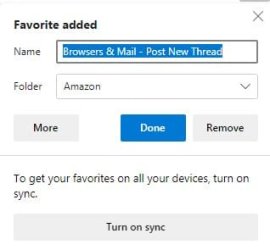
The name is added automatically.
You can select the folder you want it to go to.
I am not sure if sync should be turned on
Now click "Done" and it should be saved to the folder that was selected.
I did it this way and it may have been saved, but not in the folder where wanted it.
Anyone have a clue?
You see this page
The name is added automatically.
You can select the folder you want it to go to.
I am not sure if sync should be turned on
Now click "Done" and it should be saved to the folder that was selected.
I did it this way and it may have been saved, but not in the folder where wanted it.
Anyone have a clue?
My Computer
At a glance
Windows 7 ProIntel(R) Pentium(R) Duel CPU E2200 2.20 Ghz4 gb 2.96 UsableOnboard
- OS
- Windows 7 Pro
- CPU
- Intel(R) Pentium(R) Duel CPU E2200 2.20 Ghz
- Motherboard
- GA-G41M-ES2L
- Memory
- 4 gb 2.96 Usable
- Graphics Card(s)
- Onboard
- Sound Card
- Onboard
- Hard Drives
- 2 - 1TB WD Sata Drives

