Solved Favourite Icons

joelpeyton

New member
Local time
1:41 AM
Messages
4
Strange one this, mt favourie icons are being populated b y the wrong icons, couple of examples:

Wikipedia and Google are showing the ebay icon, and my bank HSBC is showing the scalextric icon.

Any ideas, is this to do with windows 7 or ie8?

Thanks in advance
 

My Computer

OS
Windows 7 Home Premium 32bit

My Computer

Computer type
PC/Desktop
OS
Windows 10 Home x64
CPU
INTEL Core i5-750 Quad-Core 3.37GHz
Motherboard
ASUS P7P55D
Memory
HyperX Fury Black Series 8GB (2 x 4GB) 1866Mhz
Graphics Card(s)
EVGA GeForce GTX 750 Superclocked 1GB 128-Bit GDDR5
Monitor(s) Displays
LG 32MA68HY 32" IPS
Screen Resolution
1920 x 1080
Hard Drives
Samsung 840 Evo 120GB, SEAGATE 500GB Barracuda® 7200.12, SATA 3 Gb/s, 7200 RPM, 16MB cache
PSU
ANTEC TruePower New TP-550, 80 PLUS, 550W
Case
ANTEC Three Hundred Illusion
Cooling
COOLER MASTER Hyper 212 Plus, 4 x 120mm 1 x 140mm Noctua's
Internet Speed
85 + Mbps
Antivirus
Avast
Browser
Vivaldi
These icons are for my bookmarks, so in my favourites folder, the address bar, generally wherever the favourite bookmark exists the icons for them are wrong.
 

My Computer

OS
Windows 7 Home Premium 32bit
these things are called favicons.

the only fix for ie8 that i know involves deleting your history.

  • Go to "Internet Options" and click "Delete" under Browsing history
  • Uncheck "Preserve Favorites website data" box
  • Check the following boxes: "Temporary Internet files", "Cookies", and "History"
  • Click the "Delete" button
  • You can now go back in and reset the check mark for the "Preserve Favorites website data" box by checking it and hitting delete again

please let us know if it works :)
 

My Computer

Computer Manufacturer/Model Number
mickey megabyte 1234
OS
ultimate 64 sp1
CPU
i5 2500K [email protected]
Motherboard
MSI P67A-GD53
Memory
8 gigs GSkill Ripjaws 1600
Graphics Card(s)
amd hd6950
Sound Card
creative x-fi gamer
Monitor(s) Displays
samsung 24"
Screen Resolution
1920x1080
Hard Drives
ocz vertex 2e 60 gig, samsung f3 1tb, buffalo 2tb ext
PSU
antec 550
Case
antec three hundred
Cooling
i'm a cooling fan
Keyboard
saitek eclipse ii
Mouse
logitech g3
Internet Speed
about 4 Mbps
Other Info
i love win7
Thanks for your response mickey, tried your suggestion out, unfortunatley it has not made a difference.

What I can't understand is that these favicons get there images from a folder on the server that the web files are located on, so how then is my computer assigning new images for these bookmarks. Even the image in the address bar is different?

Confused!!
 

My Computer

OS
Windows 7 Home Premium 32bit
Actually thats interesting, just noticed that one of them, a website for a flower shop was displaying the BBC favicon, now it has reverted back to the original.

Spookey.

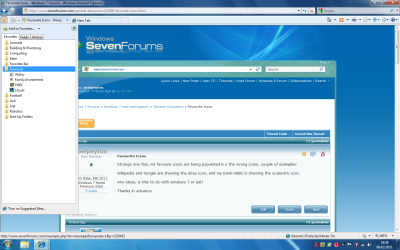
Here's an image for your perusal if interested.

Note that the HSBC link is displaying the Scalextric favicon

EDIT:
Just restarted my computer, mickeys solution has now worked.

Thanks
 

Attachments

  • Untitled.png
    Untitled.png
    124.7 KB · Views: 18
Last edited by a moderator:

My Computer

OS
Windows 7 Home Premium 32bit
glad you got it working in the end, and thanks for reporting back. :)
 

My Computer

Computer Manufacturer/Model Number
mickey megabyte 1234
OS
ultimate 64 sp1
CPU
i5 2500K [email protected]
Motherboard
MSI P67A-GD53
Memory
8 gigs GSkill Ripjaws 1600
Graphics Card(s)
amd hd6950
Sound Card
creative x-fi gamer
Monitor(s) Displays
samsung 24"
Screen Resolution
1920x1080
Hard Drives
ocz vertex 2e 60 gig, samsung f3 1tb, buffalo 2tb ext
PSU
antec 550
Case
antec three hundred
Cooling
i'm a cooling fan
Keyboard
saitek eclipse ii
Mouse
logitech g3
Internet Speed
about 4 Mbps
Other Info
i love win7
Back
Top