Solved FBI / Bundespolizei virus without Safe mode and system recovery

andreicho

New member
Local time
7:31 AM
Messages
5
Hi Gents,

I had the "German" version of the virus (Bundespolizei) 2 times in the last 1 year and I managed to get rid of it. But now...

One of my biggest problems is BitLocker - my hard drive is encrypted (but I have the codes)

I am having the following problem now:
1. The screen after a normal restart is as usual - no chance to do anything on the desktop. I only see very brief the CMD prompt opening obviously to start the virus
2. All safe modes are disabled - when I select one I give my password and then it starts and shuts down. This happens in any of the three types of Safe-modes.
3. As I live in Germany I had a look first in the German forums. I found a solution with FRST 32-bit. Unfortunately the description is in German (I can give you the link) but I can shortly explain - the computer goes into System recovery, then a CMD prompt is selected and FRST is started. Then I give my BitLocker code again to decrypt temporary my 2 drives and then opens a window for my user account. Here starts another problem - I have admin rights but it doesn't show my user name but Administrator only. I have no idea what password is that so I can't continue.

Do you have any ides if it is possible the BitLocker to be decrypted from outside of Windows so i can access the command prompt? From there on I can handle it.

I also would like to say that, because I am working, it is possible that I give you an answer to your request in the evening.

Thanks a lot for your support!!!

Best Regards,
andreicho
 

My Computer My Computer

At a glance

Windows 7 Enterprise 32-bitiCore 52GB
Computer type
Laptop
Computer Manufacturer/Model Number
Dell Latitude E5430
OS
Windows 7 Enterprise 32-bit
CPU
iCore 5
Memory
2GB
Antivirus
Symantec
Browser
Internet Explorer

My Computer My Computer

At a glance

Windows 7 Ultimate 32-Bit & Windows 7 Ultimat...Intel Core i7 CPU 950 @ 3.07GHzOCZ 6GB (3 x 2GB) 240-Pin DDR3 SDRAM DDR3 160...ATI Radeon HD 5700 Series
Computer Manufacturer/Model Number
Custom Built
OS
Windows 7 Ultimate 32-Bit & Windows 7 Ultimate 64-Bit
CPU
Intel Core i7 CPU 950 @ 3.07GHz
Motherboard
ASUS P6T DELUXE V2
Memory
OCZ 6GB (3 x 2GB) 240-Pin DDR3 SDRAM DDR3 1600 OCZ3X1600R2
Graphics Card(s)
ATI Radeon HD 5700 Series
Sound Card
OnBoard
Hard Drives
WD6400AACS-00M3B0 (640GB SATA )
PSU
CORSAIR 850w
Case
NZXT LEXA
Cooling
Intel Stock Heatsink Fan
Keyboard
Microsoft Wireless Laser Keyboard 7000
Mouse
Microsoft Wireless Laser Mouse 7000
Great link for any type of virus.

I haven't had any in a long while, but I do an image backup ( Trueimage from Acronis) weekly and in the event of a problem, can simply get back to normal.

Amazing how many people don't do a backup of OS.

I would add to your rep, but since I did recently, it won't allow it.

Sorry.:(

Paul
 

My Computer My Computer

At a glance

Windows 7 Professional X64Core i7 (2nd gen) i7-2600K / 3.40GHzDDR3 2400MHz (OC) 16gbIntel(R) HD Graphics 3000, -1988 Mb
Computer type
PC/Desktop
Computer Manufacturer/Model Number
Self-Built
OS
Windows 7 Professional X64
CPU
Core i7 (2nd gen) i7-2600K / 3.40GHz
Motherboard
ASUS P8Z77-V Intel 7 Series Motherboard
Memory
DDR3 2400MHz (OC) 16gb
Graphics Card(s)
Intel(R) HD Graphics 3000, -1988 Mb
Sound Card
8 ChannelsAudio Chipset Realtek ALC892
Monitor(s) Displays
LG 29UM65 Black 29"
Screen Resolution
2560 x 1080
Hard Drives
840 EVO 250 GB SSD ;2tb (2);Seagate;1tb Seagate; 750 gb Seagate; wd ext (2) 750 gb,WD 2tb X 2;WD 3TB Black
PSU
750 watt
Case
Thermaltake RX -1
Cooling
2120mm Fans Included 1Other Fan Ports 5x 200mm Fan Ports
Keyboard
Microsoft Digital Media Pro
Mouse
Microsoft Wireless 6000
Internet Speed
U-verse 18 mbps
Antivirus
MSE
Browser
Firefox, Chrome and my favorite: Pale Moon
Other Info
HdHomerun Dual Tuner.
SRS Audio Lab,
Pioneer BDR 208-DBK
PS3-What a difference in my Surround Sound Receiver!
HP 4540s - My new Toy.
Epson R280 Printer- To personalize my Dvds.
Canon MP 560 - For scanning.
andreicho,

I have admin rights but it doesn't show my user name but Administrator only. I have no idea what password is that so I can't continue.

When running FRST from System Recovery Options/Command Prompt, you go through the Advanced Boot Options menu > Select the Repair your computer menu item > Select your language settings > Select your User account, and if you did not set a password, you leave the entry blank.

Have you tried leaving the Password entry blank, and pressing OK?

...if it is possible the BitLocker to be decrypted from outside of Windows

Have not seen any info that allows you to do this, and have never used the program.
 

My Computer My Computer

At a glance

Windows 7 Home Premium
Computer type
PC/Desktop
Computer Manufacturer/Model Number
An ol' eMachines
OS
Windows 7 Home Premium
Internet Speed
Fine for me...I'm retired!

Thanks for the link VistaKing but it doesn't work due to 2 reasons:
1. I obviously have a modified version which blocks any Safe mode (tried all 3 of them) - when you enter safe mode it restarts the PC
2. I have BitLocker so if I use external Linux (like Kaspersky) it will not be able to do anything on my harddrive

Have you tried leaving the Password entry blank, and pressing OK?

Unfortunately I do not get to the point to start FRST because of this password that the PC expects and leaving it blank also don't works.
 

My Computer My Computer

At a glance

Windows 7 Enterprise 32-bitiCore 52GB
Computer type
Laptop
Computer Manufacturer/Model Number
Dell Latitude E5430
OS
Windows 7 Enterprise 32-bit
CPU
iCore 5
Memory
2GB
Antivirus
Symantec
Browser
Internet Explorer

My Computer My Computer

At a glance

Windows 7 Home Premium
Computer type
PC/Desktop
Computer Manufacturer/Model Number
An ol' eMachines
OS
Windows 7 Home Premium
Internet Speed
Fine for me...I'm retired!
Also unfortunate, it apppears you need to overcome BitLocker to get anywhere.

A couple of things to try:
http://www.sevenforums.com/tutorials/210058-bitlocker-drive-encryption-unlock-locked-os-drive.html

Also, do you have the installation CD for Windows 7 Enterprise?

This is long shot, but, there is a BitLocker Repair Tool to recover a drive:

http://technet.microsoft.com/en-us/library/ee523219%28v=ws.10%29.aspx

Have no clue if you can get this to work in your circumstances.

Thanks for the answer, cottonball!

Actually almost everything I find is related to type in the Command prompt including the links you sent me. The problem is that I can't get to this point... If I could I found some solutions to remove the virus.

Can anyone help please?
 

My Computer My Computer

At a glance

Windows 7 Enterprise 32-bitiCore 52GB
Computer type
Laptop
Computer Manufacturer/Model Number
Dell Latitude E5430
OS
Windows 7 Enterprise 32-bit
CPU
iCore 5
Memory
2GB
Antivirus
Symantec
Browser
Internet Explorer
Did you try HitmanPro.Kickstart, as follows, it does not request for you to go through the Command Prompt:

(You may want to print these instructions, so they are available to follow.)

:info: Load a USB flash drive with HitmanPro.Kickstart as follows...
Note: the contents of the USB flash drive are erased during this process!

Use a clean (non-infected) computer, and download:
HitmanPro.Kickstart - Anti ransomware, politievirus, bundestrojaner, Reveton, BKA, GVU - SurfRight

Under Download (on the right) select the program applicable to the infected system: 64-bit or 32-bit

When HitmanPro opens, click the KickStart icon at the bottom of the screen.

Plug in the USB flash drive.

When the USB flash drive is detected, a selection screen is presented.
Select the USB flash drive from the choices, and press: Install Kickstart
A warning that all contents of the selected flash drive will erase is presented.
Press: Yes

As the HitmanPro.Kickstart files are loaded, a progress indicator is shown on the screen.
Once the process is completed a screen is presented with the contents of HitmanPro.Kickstart

:ar: Remove the USB flash drive from the clean computer and press: Close


:info: Now, with the problem computer shut down, plug the USB flash drive into a USB port, and turn on the power.

When the computer starts, press the key that brings up the Boot Menu. (On some machines its F12, F10, or F2)

From there, select to boot from the USB drive. (It may say 'Removable Drive' in the options.)
Info: How to Remove Ransomware - Select Real Security

Once you select the USB flash drive to boot from, press: Enter

A KickStart prompt with USB boot options appears.
Select: 1 (Bypass the Master Boot Record (Default))

The system continues to boot from the hard drive and starts Windows.

If you get a message stating that Windows failed to start, etc., just select: Start Windows Normally

When Windows boots, you either get a logon screen, or the Desktop is started.
If you see a logon screen with your User name, logon with it.


In the next prompt, to start the program without installing to the local hard disk, select the option to do: One-time scan to check the computer

To start scanning for malware press: Next

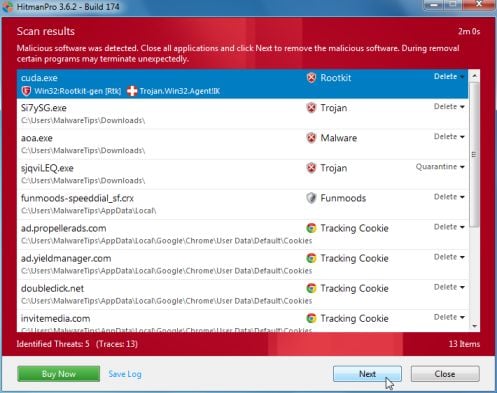
If malware is detected, the program shows what malware is present on the system using a red framed screen as shown below:


Select Next to quarantine the malware into a secure storage where it can no longer start.


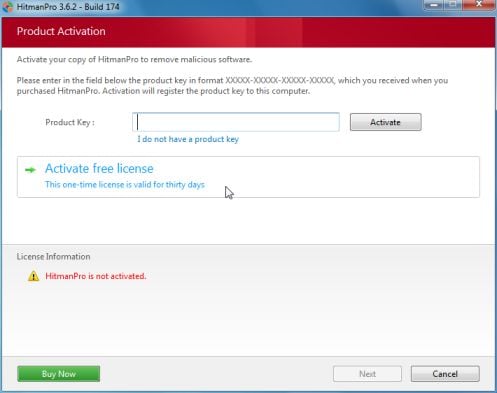
At the next screen, activate the 30-day free license:

After successful activation (30 days), press: Next

A screen indicating that the malware was successfully disabled or removed is presented.
Press: Next

To obtain a report of the scan results, press: Save log
Save the Notepad log!!
It has a name such as: HitmanPro_xxxxxxxx_xxxx


Remove the USB drive, and press: Reboot
If no malware is found, press: Close

After HitmanPro.Kickstart is done, you should be back into normal Windows.

:ar: Please post the HitmanPro log in your reply.
 

My Computer My Computer

At a glance

Windows 7 Home Premium
Computer type
PC/Desktop
Computer Manufacturer/Model Number
An ol' eMachines
OS
Windows 7 Home Premium
Internet Speed
Fine for me...I'm retired!
I got rid of it!

You need to make a bootable USB/DVD with Windows 7 (if you have windows 7 if not - with the one you have). You enter in System repair (sorry I have it in German and I am not sure if that is the right name in English). Then it asks for the Bitlocker code. After you finish you get temporary access to the drives BUT this time it doesn't ask for a Administrator password! Actually you get access to the repair possibilities and then you can choose Command Prompt! This wasn't possible before as I described above! The next step is to use a program like FRST 32bit (or 64) and it generates a log in which you can find files marked as "<===== ATTENTION" and also a list of the files changed in the last 30 days. The last modified file was created exactly at the date I had my failure. There it was - 2433f422 (or something similar - I was anxious to delete it :) ). I found 5 instances of the file by using:
dir 2433f422 /s /p

After deletion the stupid screen with you picture is off and you can boot normally but I recommend using some programs in safe mode to delete the registry entries first and everything is OK.

Remember - if you use bitlocker - keep your key safe. I sent it to my email account after the first problems i had.

Best Regards,
Andrey
 

My Computer My Computer

At a glance

Windows 7 Enterprise 32-bitiCore 52GB
Computer type
Laptop
Computer Manufacturer/Model Number
Dell Latitude E5430
OS
Windows 7 Enterprise 32-bit
CPU
iCore 5
Memory
2GB
Antivirus
Symantec
Browser
Internet Explorer
andreicho,

Good for you!! Also, good work!!

Would you mind sharing where you found the process to do the following:

...to make a bootable USB/DVD with Windows 7 (if you have windows 7 if not - with the one you have). You enter in System repair (sorry I have it in German and I am not sure if that is the right name in English). Then it asks for the Bitlocker code...

Even if it is in German (or any other language), it can be translated and be of help to others who may also have BitLocker and face the same issue.

Also, to make sure the malware is all gone, would you mind running the following:

:info: Download RogueKiller:
http://tigzy.geekstogo.com/roguekiller.php
Select the version that applies to the infected system.
Save to the Desktop.

After closing all windows and browsers, right-click the downloaded RogueKiller file and select: Run as Administrator
At the program console, wait for the Prescan to finish. (Under Status, it says: Prescan finished.)
Press: SCAN

When done, a report opens on the drive: RKreport.txt

:ar: Please provide the RKreport.txt (Mode: Scan) in your reply.

Thanks! :)
 

My Computer My Computer

At a glance

Windows 7 Home Premium
Computer type
PC/Desktop
Computer Manufacturer/Model Number
An ol' eMachines
OS
Windows 7 Home Premium
Internet Speed
Fine for me...I'm retired!
Hi cottonball,

Actually I friend of mine gave me the idea. I found some solutions in the net which included BitLocker but not my problem with the Administrator password. The other site (in German) that is very usefull and where I found very similar problem is:

Bundespolizei Trojaner - anscheinend neueste Version - kein abgesicherter Modus möglich - Trojaner-Board

Actually when I read it more carefully the solution is the same. When you use the links to the different tasks that you must perform there are perfect screenshots so any newbie can handle it.
But they do not handle problems with commercial computers and I wanted to keep it away from our IT because they can disable my admin rights when they see that my computer got sick :o

The report is added. What shall I do now? My weird working time last 2 weeks prevents me from answering promptly.

Thanks.
 

Attachments

My Computer My Computer

At a glance

Windows 7 Enterprise 32-bitiCore 52GB
Computer type
Laptop
Computer Manufacturer/Model Number
Dell Latitude E5430
OS
Windows 7 Enterprise 32-bit
CPU
iCore 5
Memory
2GB
Antivirus
Symantec
Browser
Internet Explorer
Back
Top