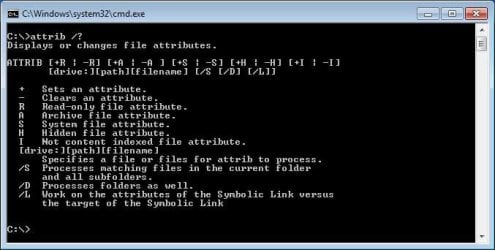
A = Archived, easy enough, I = Indexed, but I'm not sure what that means. Not Content-Indexed?
From TechGuy.org:
Marking a file or folder with this attribute indicates to Windows that it should be indexed. This means that its content is analysed and stored in an Index file, a lookup that Windows uses for File searches. Maintaining an index helps to ensure that searches are much faster, and indexing a file's content allows searches to realize that the file matches even if its title doesn't contain the search terms.
If a file has the "A" attribute, then it needs to be archived. Many backup programs clear or remove the "A" attribute from a file once the program has backed up the file.
test_file1.txt has the "A" attribute
test_file2.txt has the "A" attribute
test_file3.txt has the "A" attribute
Run a backup program and now you might see...
test_file1.txt does not have the "A" attribute
test_file2.txt does not have the "A" attribute
test_file3.txt does not have the "A" attribute
If you edit test_file2, the the operating system puts the "A" attribute back on.
test_file1.txt does not have the "A" attribute
test_file2.txt has the "A" attribute
test_file3.txt does not have the "A" attribute
Then the next time that the backup program runs - the program can be set to only backup files that have that "A" attribute. So, only test_file2.txt gets backed up.
The "I" attribute is a bit more confusing - especially when the "N" attribute started showing via Windows Explorer in Vista and later. There are many places on the internet that says the the "N" attribute means that the file is not indexed... but Microsoft seems to say that "N" stands for Normal. A file can only be Normal when all other attributes have been cleared.
The "I" attribute does not mean that the file's content needs to be indexed or that the file's content has been indexed - the "I" attribute means that the file's contents is notallowed to be indexed. (The file's content has been excluded from the indexing process.)
Edit:hopefully clarified that statement above after seeing bbearen's post
Edit2: If this box is unchecked...
...then the "I" attribute should be on the file. Which is why I went with the "not allowed" verbiage. Maybe it was not the best choice of words.
Maybe I clicked a bit fast in the video. Pause it if need be.
To the OP's question - I'm not sure why one file got the "I" attribute and the other one did not. Were the both the same file type? (MP4, FLV, ...)
The "I" attribute merely means that the file has not been content indexed; doesn't mean it can't be, doesn't mean it shouldn't be, just that it hasn't been.
My Computer
Computer Manufacturer/Model Number
Dell Inspiron 580
OS
7 Ultimate x64/7 Home Premium x64
CPU
Intel i3 550 3.2 GHz
Motherboard
Dell/Intel H57
Memory
Corsair 16 GB DDR3 (4 X 4GB)
Graphics Card(s)
Intel HD Graphics
Sound Card
Intel P55 HD Audio
Monitor(s) Displays
LG E2360 LED
Screen Resolution
1920 X 1080
Hard Drives
Seagate 1TB X 2 Internal,
Seagate 1TB eSATA (Backup)
PSU
Dell 300W
Case
Dell Inspiron
Cooling
Dell/Intel
Keyboard
Microsoft Wireless Comfort Keyboard 5000
Mouse
Microsoft Wireless Mouse 5000
Internet Speed
4,000 Mbit DSL
Other Info
Custom Installation -
OS separate on C:
Pagefile Separate on P:
Program Files Separate on U:
Users and ProgramData separate on V:
Bearren wrote:
> The "I" attribute merely means that
> the file has not been content indexed;
> doesn't mean it can't be,
> doesn't mean it shouldn't be,
> just that it hasn't been.
You made that up. I couldn't decide between "has not been" or "shall not be" either. As it turned out, "shall not be" was right. That makes sense. That's the more useful information.
FILE_ATTRIBUTE_NOT_CONTENT_INDEXED
The file or directory is not to be indexed by the content indexing service.
Windows will index files by the extension if the file type is selected to be indexed. Windows should index by attributes only, or Windows can index by content of the file.
internet options properties\general tab\advanced button\file attributes\"Allow this file to have contents indexed in addition to file properties"
I have chosen to have Windows index work on almost every file type or file extension. I do *not want Windows to index by the content of the file. I have chosen the option to omit indexing by content.
YET, if I create a shortcut to any 'program'.exe file the shortcut will include a check box for:
"File is ready for archiving"
and/or
"Allow this file to have contents indexed in addition to file properties"
I think Windows is creating a problem for me, by checking both options, and especially the second option; index the contents.
Something is automatically checking both indexing options when I install a Program or application like MS Outlook.
Has anyone had this problem? and/or Does anyone know how to correct the behavior?
thank you
My Computer
Computer type
PC/Desktop
Computer Manufacturer/Model Number
Home Build
OS
W8x64Pro
CPU
Intel 3rd Gen i5
Motherboard
asus p8z77-v
Memory
16GB samsung (8x2)
Graphics Card(s)
intel embedded
Monitor(s) Displays
lcd
Hard Drives
Two: SSD SATA 3; HHD SATA 2
Disk 0: W8P OS= C:; remaining is data folders
Disk 1: Data Storage