file browsing

groknet

New member
Local time
12:38 PM
Messages
10
HI
I have win 7 home computer and i can browse files from this computer
to other computers in my lan eg i can move files from the win 7 comp.

If i try to connect to the win 7 comp from other computers i can
see the name of the computer (hp) but i cant get into it.
The harddisk i shared with full permissions.

How can i enable filebrowsing to this computer?

Turning off the windows firewall does not help.
 

My Computer

OS
win 7 home 32
HI
I have win 7 home computer and i can browse files from this computer
to other computers in my lan eg i can move files from the win 7 comp.

If i try to connect to the win 7 comp from other computers i can
see the name of the computer (hp) but i cant get into it.
The harddisk i shared with full permissions.

How can i enable filebrowsing to this computer?

Turning off the windows firewall does not help.

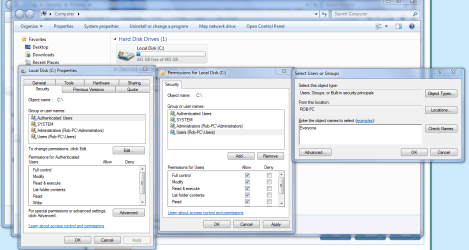
It sounds like you are trying to gain access to the entire harddrive of the Win7 machine, correct? If so it can be done by using the Security tab on the drive and allowing access for "Everyone". The picture below shows you how.

From a security stand point this isn't a very safe way to share files. You would be better off sharing the entire User folder instead.
 

Attachments

  • Sharing C drive EVERYONE.PNG
    Sharing C drive EVERYONE.PNG
    67.1 KB · Views: 12

My Computer

Computer type
PC/Desktop
Computer Manufacturer/Model Number
Home built
OS
Windows 7 Ult, Windows 8.1 Pro,
CPU
Q9650-4.275GHz, E8600 4.5GHz, E6750-3.8GHz
Motherboard
Evga 780i FTW
Memory
G.Skill PC2 9600 1200Mhz 5 5 5 15 2T
Graphics Card(s)
GTX480
Sound Card
Asus Xonar D2
Monitor(s) Displays
HannsG
Screen Resolution
1680X1050
Hard Drives
GSkill Phoenix Pro 120GB SSD
PSU
ThermalTake Toughpower 1000Watt modular
Case
ThermalTake XaserV
Cooling
Xigmatek S1283
Keyboard
Logitech G15
Mouse
Logitech G9
Internet Speed
T1
What does it tell you when you try to connect?

Do you have a password set up on your win 7 home you are trying to connect to?
 

My Computer

Computer Manufacturer/Model Number
CustomBuild001
OS
7 ultimate x64
CPU
Intel core i7 2600K
Motherboard
ASUS P8Z68-V PRO
Memory
Vengeance™ — 16GB Triple Channel DDR3 PC16000
Graphics Card(s)
GeForce GTX 560 Ti
Monitor(s) Displays
HannsG 22" widescreen (HDMI)
Screen Resolution
1680x1050
Hard Drives
Samsung 1TB x2(RAID1) Deskstar 160G, Buffalo ExHD 500GB
PSU
Corsair 850HX
Case
Antec Three Hundred Gaming Tower Case
Cooling
CPU Freezer 7 Pro Rev. 2...ANTEC 3phase cooling, 2 intake.
Keyboard
microsoft intellitype 6000 v3.0
Mouse
microsoft sidewinder
Internet Speed
50Mb
Other Info
64GB SSD in pipeline for Intel Smart Response Technology.
HI

It says \\HP is not accesible...
I dont have a password set - windows logs on autmatically when
i start the computer.


I have set up an FTP on this comp and with that i can access the computer
but i would like to able to file browse to this computer like i can on
other computers in my lan (those are xp and vista computers).
 

My Computer

OS
win 7 home 32
Im sure that you can't access a windows computer without a password setup on the remote system.

Set up a password on the system you are trying to access and try again...
 

My Computer

Computer Manufacturer/Model Number
CustomBuild001
OS
7 ultimate x64
CPU
Intel core i7 2600K
Motherboard
ASUS P8Z68-V PRO
Memory
Vengeance™ — 16GB Triple Channel DDR3 PC16000
Graphics Card(s)
GeForce GTX 560 Ti
Monitor(s) Displays
HannsG 22" widescreen (HDMI)
Screen Resolution
1680x1050
Hard Drives
Samsung 1TB x2(RAID1) Deskstar 160G, Buffalo ExHD 500GB
PSU
Corsair 850HX
Case
Antec Three Hundred Gaming Tower Case
Cooling
CPU Freezer 7 Pro Rev. 2...ANTEC 3phase cooling, 2 intake.
Keyboard
microsoft intellitype 6000 v3.0
Mouse
microsoft sidewinder
Internet Speed
50Mb
Other Info
64GB SSD in pipeline for Intel Smart Response Technology.
"Not Accessible" usually doesn't mean "Access Denied". Instead of connecting to: \\HP
Can you ping "HP" and try: \\ip_of_HP\c$

That should prompt you for a password...If you haven't set the everyone group up in the security tab
 

My Computer

OS
7 Pro
HI

It says \\HP is not accesible...
I dont have a password set - windows logs on autmatically when
i start the computer.


I have set up an FTP on this comp and with that i can access the computer
but i would like to able to file browse to this computer like i can on
other computers in my lan (those are xp and vista computers).

If you need access to the drive the question is already answered with a picture no less.
 

My Computer

Computer type
PC/Desktop
Computer Manufacturer/Model Number
Home built
OS
Windows 7 Ult, Windows 8.1 Pro,
CPU
Q9650-4.275GHz, E8600 4.5GHz, E6750-3.8GHz
Motherboard
Evga 780i FTW
Memory
G.Skill PC2 9600 1200Mhz 5 5 5 15 2T
Graphics Card(s)
GTX480
Sound Card
Asus Xonar D2
Monitor(s) Displays
HannsG
Screen Resolution
1680X1050
Hard Drives
GSkill Phoenix Pro 120GB SSD
PSU
ThermalTake Toughpower 1000Watt modular
Case
ThermalTake XaserV
Cooling
Xigmatek S1283
Keyboard
Logitech G15
Mouse
Logitech G9
Internet Speed
T1
ping

I can ping hp and get response but \\ip_of_HP\c$ makes
'network path not found'.

I have set full control to everyone but i still cant connect to it.

Only way is to connect to the ftp i have set up in the computer.

I have a lan with xp and vista computers and connection between those
is going fine so it puzzles me why i cant get it to the win 7 comp...
 

My Computer

OS
win 7 home 32
yes

Got it working.
What i had to do was creating a second user account -
no idea why but after that it works fine....
 

My Computer

OS
win 7 home 32
Back
Top