File - Delete from Command Prompt

How to Delete a File in Windows from the Command Prompt


   Information
This tutorial will show you how to permanently delete a File in Vista, Windows 7, or Windows 8 using the DEL or ERASE command from within a command prompt.

This can be handy if you cannot delete the file normally.
   Note
While you can run this command in a non-elevated or elevated command prompt, you would get the best results using a elevated command prompt.

   Warning
The file will be deleted immediately and not placed in the Recycle Bin first.

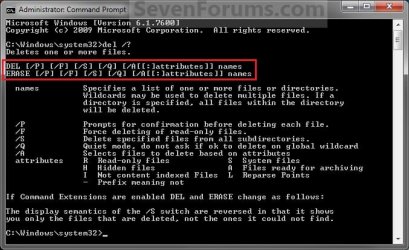
EXAMPLE: DEL and ERASE Command
NOTE: You can use either the DEL or ERASE command in the command prompt. They are the same command.
About_DEL.jpg


Here's How:
1. Do step 2, 3, or 4 for how you would like to delete your file(s).

2. To Use an Elevated Command Prompt in Windows
NOTE: This will allow you to delete any file(s) on the computer.
A) Open Folder Options, uncheck the Hide extensions for known file types box, and click on OK. (see screenshot below)
Folder_Options.jpg
B) Open an Elevated command prompt in Vista/Windows 7 or Windows 8, and go to step 5 below.
3. To Use a Command Prompt in Windows
NOTE: This will only allow you to delete any file(s) in your user folders.
A) Open Folder Options, uncheck the Hide extensions for known file types box, and click on OK. (see screenshot below)
Folder_Options.jpg
B) Open a command prompt in Vista/Windows 7 or Windows 8, and go to step 5 below.
4. To Use a Command Prompt at Boot
NOTE: This will allow you to delete any file(s) on the computer.
A) Open a command prompt at boot in Vista/Windows 7 or Windows 8.

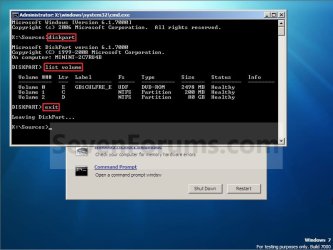
B) In the command prompt, type diskpart and press Enter. (see screenshot below)

C) In the command prompt, type list volume and press Enter. (see screenshot below)
NOTE: This will let you see what the drive letter is for the drive that you want to delete the file in since it may not always be the same drive letter that it is in Windows.

D) After making note of the drive letter, type exit, press Enter, and go to step 5 below. (see screenshot below)
Command-1.jpg
5. Do step 6, 7, 8, 9, or 10 for how you would like to delete your file(s).


6. To Delete a Specific File in Command Prompt
A) In the command prompt, type the command below, press Enter, and go to step 11 below.

NOTE: Substitute Full Path of File with extension within quotes below with your files's full path and name with the extension included within quotes instead.

Code:
DEL /F /S /Q /A "[COLOR=red][B]Full Path of File with extension[/B][/COLOR]"

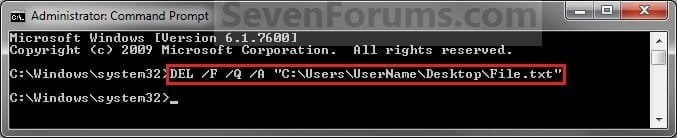
NOTE: For example, if I wanted to delete a text file named File with the file extension .txt on my desktop, I would type this command below.

Code:
DEL /F /S /Q /A "C:\Users\UserName\Desktop\File.txt"
7. To Delete All Files in a Folder without Confirmation in Command Prompt
NOTE: This will not ask you if it's ok (Y/N) to delete each file when deleting all files in a folder and the folder's subfolders.
A) In the command prompt, type the command below, press Enter, and go to step 11 below.

NOTE: Substitute Full Path of Folder within quotes below with the full path of the folder that you want to delete all files in.

Code:
DEL /F /S /Q /A "[COLOR=red][B]Full Path of Folder[/B][/COLOR]\*"

NOTE: For example, if I wanted to delete all files in my D:\Projects folder and subfolders, I would type this command below.

Code:
DEL /F /S /Q /A "D:\Projects\*"
8. To Delete All Files in a Folder with Confirmation in Command Prompt
NOTE: This will ask you if it's ok (Y/N) to delete each file when deleting all files in a folder and the folder's subfolders.
A) In the command prompt, type the command below, press Enter, and go to step 11 below.

NOTE: Substitute Full Path of Folder within quotes below with the full path of the folder that you want to delete all files in.

Code:
DEL /P /F /S /A "[COLOR=red][B]Full Path of Folder[/B][/COLOR]\*"

NOTE: For example, if I wanted to delete all files in my D:\Projects folder and subfolders, I would type this command below.

Code:
DEL /P /F /S /A "D:\Projects\*"
9. To Delete All Files with a Specified File Extension in a Folder without Confirmation in Command Prompt
NOTE: This will not ask you if it's ok (Y/N) to delete each file when deleting all files with a specified file extension in a folder and the folder's subfolders.
A) In the command prompt, type the command below, press Enter, and go to step 11 below.

NOTE: Substitute Full Path of Folder within quotes below with the full path of the folder that you want to delete all files in. Substitute extension with the file extension of the type of files that you want to delete in the folder and it's subfolders.

Code:
DEL /F /S /Q /A "[COLOR=red][B]Full Path of Folder[/B][/COLOR]\*.[B][COLOR=red]extension[/COLOR][/B]"

NOTE: For example, if I wanted to delete all txt (text) files in my D:\Projects folder and subfolders, I would type this command below.

Code:
DEL /F /S /Q /A "D:\Projects\*.txt"
10. To Delete All Files with a Specified File Extension in a Folder with Confirmation in Command Prompt
NOTE: This will ask you if it's ok (Y/N) to delete each file when deleting all files with a specified file extension in a folder and the folder's subfolders.
A) In the command prompt, type the command below, press Enter, and go to step 11 below.

NOTE: Substitute Full Path of Folder within quotes below with the full path of the folder that you want to delete all files in. Substitute extension with the file extension of the type of files that you want to delete in the folder and it's subfolders.

Code:
DEL /P /F /S /A "[COLOR=red][B]Full Path of Folder[/B][/COLOR]\*.[B][COLOR=red]extension[/COLOR][/B]"

NOTE: For example, if I wanted to delete all txt (text) files in my D:\Projects folder and subfolders, I would type this command below.

Code:
DEL /P /F /S /A "D:\Projects\*.txt"
11. The file(s) should now be deleted.

12. Close the command prompt.
NOTE: If you used a command prompt at boot, then also close the System Recovery Options window and restart the computer.

That's it,
Shawn


Attachments

  • Elevated_Command_Prompt.jpg
    Elevated_Command_Prompt.jpg
    16.9 KB · Views: 619
Last edited:
Hi Shawn, nice tutorial. But could you please explain why we need the /F /Q /A command?
What does it stand for?
 

My Computer

Computer Manufacturer/Model Number
Samsung NP530U4B-S02IN
OS
Windows® 8 Pro (64-bit)
CPU
Intel® Core™ i5 Processor 2467M (1.60GHz, 3MB L3 Cache)
Motherboard
Samsung Electronics
Memory
6GB DDR3 System Memory at 1,333MHz (on BD 4GB + 2GB x 1)
Graphics Card(s)
AMD Radeon™ HD7550M 1GB DDR3 (Ext. Graphic)
Sound Card
Realtek High Definition Audio
Monitor(s) Displays
35.56cm (14.0) SuperBright 300nit HD LED Display
Screen Resolution
1366x768
Hard Drives
1TB S-ATA II Hard Drive (5400RPM) with ExpressCache 16GB SSD
Internet Speed
sucks
Antivirus
Microsoft Security Essentials
Browser
Google Chrome (Sync enabled)
Hello Dinesh,

You can see a list and complete explanation of the switches in the example screenshot, but it's just to cover all bases to help make sure that the file is deleted. :)

/F Force deleting of read-only files.
/Q Quiet mode, do not ask if ok to delete
/A Allows file with set attributes (ex: hidden files) to be deleted
 

My Computer

Computer type
PC/Desktop
Computer Manufacturer/Model Number
Self built custom
OS
64-bit Windows 11 Pro for Workstations
CPU
Intel i7-8700K OC'd to 5 GHz
Motherboard
ASUS ROG Maximus XI Formula Z390
Memory
64 GB (4x16GB) G.SKILL TridentZ RGB DDR4 3600 MHz
Graphics Card(s)
ASUS ROG-STRIX-GTX1080TI-O11G-GAMING
Sound Card
Integrated
Monitor(s) Displays
2 x Samsung Odyssey G7 27"
Screen Resolution
2560x1440
Hard Drives
1TB Samsung 990 PRO M.2,
4TB Samsung 990 PRO PRO M.2,
TerraMaster F8 SSD Plus NAS
PSU
Seasonic Prime Titanium 850W
Case
Thermaltake Core P3
Cooling
Corsair Hydro H115i
Keyboard
Logitech wireless K800
Mouse
Logitech MX Master 4
Internet Speed
2 Gb/s Download and 100 Mb/s Upload
Antivirus
Malwarebyte Anti-Malware Premium
Browser
Google Chrome
Other Info
Logitech Z625 speaker system,
Logitech BRIO 4K Pro webcam,
HP Color LaserJet Pro MFP M477fdn,
APC SMART-UPS RT 1000 XL - SURT1000XLI,
Galaxy S23 Plus phone
Oh that's nice. Thanks. :)
 

My Computer

Computer Manufacturer/Model Number
Samsung NP530U4B-S02IN
OS
Windows® 8 Pro (64-bit)
CPU
Intel® Core™ i5 Processor 2467M (1.60GHz, 3MB L3 Cache)
Motherboard
Samsung Electronics
Memory
6GB DDR3 System Memory at 1,333MHz (on BD 4GB + 2GB x 1)
Graphics Card(s)
AMD Radeon™ HD7550M 1GB DDR3 (Ext. Graphic)
Sound Card
Realtek High Definition Audio
Monitor(s) Displays
35.56cm (14.0) SuperBright 300nit HD LED Display
Screen Resolution
1366x768
Hard Drives
1TB S-ATA II Hard Drive (5400RPM) with ExpressCache 16GB SSD
Internet Speed
sucks
Antivirus
Microsoft Security Essentials
Browser
Google Chrome (Sync enabled)
You're welcome. :)
 

My Computer

Computer type
PC/Desktop
Computer Manufacturer/Model Number
Self built custom
OS
64-bit Windows 11 Pro for Workstations
CPU
Intel i7-8700K OC'd to 5 GHz
Motherboard
ASUS ROG Maximus XI Formula Z390
Memory
64 GB (4x16GB) G.SKILL TridentZ RGB DDR4 3600 MHz
Graphics Card(s)
ASUS ROG-STRIX-GTX1080TI-O11G-GAMING
Sound Card
Integrated
Monitor(s) Displays
2 x Samsung Odyssey G7 27"
Screen Resolution
2560x1440
Hard Drives
1TB Samsung 990 PRO M.2,
4TB Samsung 990 PRO PRO M.2,
TerraMaster F8 SSD Plus NAS
PSU
Seasonic Prime Titanium 850W
Case
Thermaltake Core P3
Cooling
Corsair Hydro H115i
Keyboard
Logitech wireless K800
Mouse
Logitech MX Master 4
Internet Speed
2 Gb/s Download and 100 Mb/s Upload
Antivirus
Malwarebyte Anti-Malware Premium
Browser
Google Chrome
Other Info
Logitech Z625 speaker system,
Logitech BRIO 4K Pro webcam,
HP Color LaserJet Pro MFP M477fdn,
APC SMART-UPS RT 1000 XL - SURT1000XLI,
Galaxy S23 Plus phone
Updated to include more options. :)
 

My Computer

Computer type
PC/Desktop
Computer Manufacturer/Model Number
Self built custom
OS
64-bit Windows 11 Pro for Workstations
CPU
Intel i7-8700K OC'd to 5 GHz
Motherboard
ASUS ROG Maximus XI Formula Z390
Memory
64 GB (4x16GB) G.SKILL TridentZ RGB DDR4 3600 MHz
Graphics Card(s)
ASUS ROG-STRIX-GTX1080TI-O11G-GAMING
Sound Card
Integrated
Monitor(s) Displays
2 x Samsung Odyssey G7 27"
Screen Resolution
2560x1440
Hard Drives
1TB Samsung 990 PRO M.2,
4TB Samsung 990 PRO PRO M.2,
TerraMaster F8 SSD Plus NAS
PSU
Seasonic Prime Titanium 850W
Case
Thermaltake Core P3
Cooling
Corsair Hydro H115i
Keyboard
Logitech wireless K800
Mouse
Logitech MX Master 4
Internet Speed
2 Gb/s Download and 100 Mb/s Upload
Antivirus
Malwarebyte Anti-Malware Premium
Browser
Google Chrome
Other Info
Logitech Z625 speaker system,
Logitech BRIO 4K Pro webcam,
HP Color LaserJet Pro MFP M477fdn,
APC SMART-UPS RT 1000 XL - SURT1000XLI,
Galaxy S23 Plus phone
Sometime it is not possible to erase files even in cmd window while explorer.exe is active. EndTask explorer.exe solves this problem then restart after erasing!!
 

My Computer

Computer type
PC/Desktop
Computer Manufacturer/Model Number
Custom
OS
Win 7 Ultimate 64bit
CPU
i7
Motherboard
Asus
Memory
4Gb
Hard Drives
WD 1Tb
Antivirus
Microsoft Essentials
Browser
Firefox
Thanks...

It works great for me. I've search for this solution for a few days. Because I don't want to install any third party software, so this is just great...
 

My Computer

Computer type
Laptop
Computer Manufacturer/Model Number
Acer
OS
Windows 7 Professional x64
CPU
Intel core i3 2330M
Motherboard
Acer
Memory
6 gb
Graphics Card(s)
nVidia GeFORCE GT 630M
Hard Drives
Hitachi
Antivirus
Avast free
Browser
ie, chrome
So, just a heads up: that /Q modifier can really mess you up.
Just managed to delete 4 seconds worth of my C:\ drive by accidentally club-handing the \ & ↵ keys.
Wound up entering:
<DEL /F /S /Q /A "C:\>
This isn't so good.

Unless it's really necessary, (I'm guessing if you want to delete a truckload of files or something), you're probably better off NOT including that one.
 

My Computer

Computer type
PC/Desktop
OS
W7 Professional 64
Sorry to hear that grizzlyadaz, but yeah it's something you gotta be careful with. :(
 

My Computer

Computer type
PC/Desktop
Computer Manufacturer/Model Number
Self built custom
OS
64-bit Windows 11 Pro for Workstations
CPU
Intel i7-8700K OC'd to 5 GHz
Motherboard
ASUS ROG Maximus XI Formula Z390
Memory
64 GB (4x16GB) G.SKILL TridentZ RGB DDR4 3600 MHz
Graphics Card(s)
ASUS ROG-STRIX-GTX1080TI-O11G-GAMING
Sound Card
Integrated
Monitor(s) Displays
2 x Samsung Odyssey G7 27"
Screen Resolution
2560x1440
Hard Drives
1TB Samsung 990 PRO M.2,
4TB Samsung 990 PRO PRO M.2,
TerraMaster F8 SSD Plus NAS
PSU
Seasonic Prime Titanium 850W
Case
Thermaltake Core P3
Cooling
Corsair Hydro H115i
Keyboard
Logitech wireless K800
Mouse
Logitech MX Master 4
Internet Speed
2 Gb/s Download and 100 Mb/s Upload
Antivirus
Malwarebyte Anti-Malware Premium
Browser
Google Chrome
Other Info
Logitech Z625 speaker system,
Logitech BRIO 4K Pro webcam,
HP Color LaserJet Pro MFP M477fdn,
APC SMART-UPS RT 1000 XL - SURT1000XLI,
Galaxy S23 Plus phone
Heh, aah, well it's kinda funny really. You explained what the switches did, I got the picture I was playing with fire.
Just didn't anticipate I'd faceplant at the worst possible time.
Figured I'd try and get a warning out.


But, I CAN still access my restore points, so it's looking like more of an inconvenience than a loss anyway.
So, I dunno, I guess in spite of my misfortune at the moment, thanks for making the guide anyway. The net effect is vastly, vastly positive, so just keep that in mind. :)
Guys like you make the internet a great (if potentially dangerous) resource.
 

My Computer

Computer type
PC/Desktop
OS
W7 Professional 64
No problem. I'm just glad you were able to recover.
 

My Computer

Computer type
PC/Desktop
Computer Manufacturer/Model Number
Self built custom
OS
64-bit Windows 11 Pro for Workstations
CPU
Intel i7-8700K OC'd to 5 GHz
Motherboard
ASUS ROG Maximus XI Formula Z390
Memory
64 GB (4x16GB) G.SKILL TridentZ RGB DDR4 3600 MHz
Graphics Card(s)
ASUS ROG-STRIX-GTX1080TI-O11G-GAMING
Sound Card
Integrated
Monitor(s) Displays
2 x Samsung Odyssey G7 27"
Screen Resolution
2560x1440
Hard Drives
1TB Samsung 990 PRO M.2,
4TB Samsung 990 PRO PRO M.2,
TerraMaster F8 SSD Plus NAS
PSU
Seasonic Prime Titanium 850W
Case
Thermaltake Core P3
Cooling
Corsair Hydro H115i
Keyboard
Logitech wireless K800
Mouse
Logitech MX Master 4
Internet Speed
2 Gb/s Download and 100 Mb/s Upload
Antivirus
Malwarebyte Anti-Malware Premium
Browser
Google Chrome
Other Info
Logitech Z625 speaker system,
Logitech BRIO 4K Pro webcam,
HP Color LaserJet Pro MFP M477fdn,
APC SMART-UPS RT 1000 XL - SURT1000XLI,
Galaxy S23 Plus phone
need help in command prompt

hi,

can i know how to delete specific file extensions in whole of computer irrespective of number of drives without asking confirmation for deletion and also including hidden , read only type files?

For example , say i need to delete an .jpg file which is present in say all drives with read only or hidden property. please help

main points is :
1) need to delete particular file extension.
2) need to delete from whole computer permanently without asking confirmation.
 

My Computer

Computer type
Laptop
Computer Manufacturer/Model Number
hp
OS
windows 7 home basic
Hello Chow, and welcome to Ten Forums. :)

You could use the command below in an elevated command prompt, but you'll need to repeat it for each specific drive letter. Substitute C in the command for the drive letter.

DEL /F /S /Q /A "C:\*.jpg"
 

My Computer

Computer type
PC/Desktop
Computer Manufacturer/Model Number
Self built custom
OS
64-bit Windows 11 Pro for Workstations
CPU
Intel i7-8700K OC'd to 5 GHz
Motherboard
ASUS ROG Maximus XI Formula Z390
Memory
64 GB (4x16GB) G.SKILL TridentZ RGB DDR4 3600 MHz
Graphics Card(s)
ASUS ROG-STRIX-GTX1080TI-O11G-GAMING
Sound Card
Integrated
Monitor(s) Displays
2 x Samsung Odyssey G7 27"
Screen Resolution
2560x1440
Hard Drives
1TB Samsung 990 PRO M.2,
4TB Samsung 990 PRO PRO M.2,
TerraMaster F8 SSD Plus NAS
PSU
Seasonic Prime Titanium 850W
Case
Thermaltake Core P3
Cooling
Corsair Hydro H115i
Keyboard
Logitech wireless K800
Mouse
Logitech MX Master 4
Internet Speed
2 Gb/s Download and 100 Mb/s Upload
Antivirus
Malwarebyte Anti-Malware Premium
Browser
Google Chrome
Other Info
Logitech Z625 speaker system,
Logitech BRIO 4K Pro webcam,
HP Color LaserJet Pro MFP M477fdn,
APC SMART-UPS RT 1000 XL - SURT1000XLI,
Galaxy S23 Plus phone
Hi Brink,

DEL /F /S /Q /A "C:\*.jpg"

above command works but as you mentioned , i need to repeat for all drives.

I have a situation where I will be not knowing the number of drives and their Letters, so is there any command to delete from all drives of a computer?
 

My Computer

Computer type
Laptop
Computer Manufacturer/Model Number
hp
OS
windows 7 home basic
Not that I know of, but you could use "DiskPart" with "List Volume" to see the drive letters.
 

My Computer

Computer type
PC/Desktop
Computer Manufacturer/Model Number
Self built custom
OS
64-bit Windows 11 Pro for Workstations
CPU
Intel i7-8700K OC'd to 5 GHz
Motherboard
ASUS ROG Maximus XI Formula Z390
Memory
64 GB (4x16GB) G.SKILL TridentZ RGB DDR4 3600 MHz
Graphics Card(s)
ASUS ROG-STRIX-GTX1080TI-O11G-GAMING
Sound Card
Integrated
Monitor(s) Displays
2 x Samsung Odyssey G7 27"
Screen Resolution
2560x1440
Hard Drives
1TB Samsung 990 PRO M.2,
4TB Samsung 990 PRO PRO M.2,
TerraMaster F8 SSD Plus NAS
PSU
Seasonic Prime Titanium 850W
Case
Thermaltake Core P3
Cooling
Corsair Hydro H115i
Keyboard
Logitech wireless K800
Mouse
Logitech MX Master 4
Internet Speed
2 Gb/s Download and 100 Mb/s Upload
Antivirus
Malwarebyte Anti-Malware Premium
Browser
Google Chrome
Other Info
Logitech Z625 speaker system,
Logitech BRIO 4K Pro webcam,
HP Color LaserJet Pro MFP M477fdn,
APC SMART-UPS RT 1000 XL - SURT1000XLI,
Galaxy S23 Plus phone
I was trying to use the DEL command within a batch file. But how do I get the command to delete and not display either the command and the resulting files that are found. Echo Off does not appear to work.
I used
Code:
 [USER=353699]echo[/USER] OFF
DEL /S /Q *.bak
ECHO bak files Deleted
DEL /S /Q *.prjpcb.zip
ECHO Project History Zips Deleted


But this shows the files being found and deleted. I just want to show the ECHO items only and not all the files!
 

My Computer

Computer type
PC/Desktop
Computer Manufacturer/Model Number
Dell
OS
Windows 7 64bit
Back
Top