
File drag and drop in Explorer obscured by icon

ignatzatsonic

Aspiring Gnome
Guru
Gold Member
VIP
Local time
4:20 PM
Messages
12,011
I have an issue with copying or moving files between folders in Windows Explorer using Home Premium 7. I installed Windows 7 a year ago and faced this issue. I got rid of it, but don’t recall how. In the last few days, it has returned----I don’t know why.


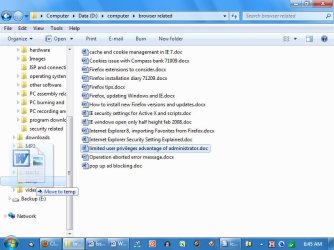
When I grab a file with the mouse and drag it to the left to another folder, an icon appears on top of that file. The icon is totally unnecessary and obscures my view of the destination folder. This often causes the file to drop into the wrong folder. The icon changes depending on the type of file being moved.

In the screenshot below, I am attempting to drag a Word file from the right side of Explorer to another folder on the left side. Notice the postage stamp-sized “Word” icon with the large “W” that covers up portions of the directory tree.

How do I get rid of that completely pointless icon?


I thought it was some setting in folder view options, but I have played with those settings to no effect.

Help??!!??
 

Attachments
  • word icon.JPG
    word icon.JPG
    68.3 KB · Views: 51

My Computer My Computer

At a glance

Windows 7 Home Premium SP1, 64-bitIntel Skylake i5-6600K, not overclocked8 GB HyperX DDR4-2666 (2 x 4 GB)none; graphics are integrated on CPU
Computer type
PC/Desktop
Computer Manufacturer/Model Number
Ignatz Special; 4 speed manual gearbox; factory air conditioning; one of one
OS
Windows 7 Home Premium SP1, 64-bit
CPU
Intel Skylake i5-6600K, not overclocked
Motherboard
AsRock Z170M Extreme 4, micro ATX
Memory
8 GB HyperX DDR4-2666 (2 x 4 GB)
Graphics Card(s)
none; graphics are integrated on CPU
Sound Card
onboard: Realtek ALC1150; external: USB Behringer UF0-202
Monitor(s) Displays
Dell S2340M 23 inch IPS
Screen Resolution
1600 x 900
Hard Drives
System: Crucial MX100 series SSD, 128 GB;
Data: Samsung Spinpoint 103SJ, 1 TB;
Backup: WD Caviar Green WD30EZRX-00D8PB0, 3 TB
PSU
Rosewill SilentNight 500 watt fanless, semi-modular
Case
Antec Solo II
Cooling
Noctua NH-U12S; Noctua F12 intake, Noctua S12A exhaust
Keyboard
Microsoft 200 6JH-00001 USB
Mouse
Dell or Microsoft optical wired; USB
Antivirus
Microsoft Security Essentials and Malwarebytes Premium
Browser
Pale Moon
Other Info
All fans PWM; speeds at idle: CPU circa 500 rpm; intake circa 600 rpm; exhaust circa 600 rpm; CPU temps 27 idle and 47 C load in a warm room (27 C/81 F) when running Intel Extreme Tuning Utility stress test.
It is actually a good feature. It tells you which folder it will be dropping thr file into.

By your picture if you released it at that point it would drop it in the temp folder.
You align the mouse to show folder name you want to drop it into.

Drop it misaligned as XP use to be and it could go in the folder you want or in the folder on either side. Or even drop between folders.

Mike

Go to this tutorial.
http://www.sevenforums.com/tutorials/1908-visual-effects-settings-change.html?filter[2]=Appearance

Show window content while dragging may be need to be unchecked. If that doesn't work put the check back in the box.


My Computer My Computer

At a glance

Windows7 Pro 64bit SP-1; Windows XP Pro 32bitIntel Core i7-870 Lynnfield 2.93GHz LGA 1156 ...8GB@1400MHz Crucial Ballistix DDR3-1600 4x2GBASUS ENGTX460 DirectCU/2DI/1GD5 1GB 256-bit G...
Computer Manufacturer/Model Number
Hopalong/ Godzilla
OS
Windows7 Pro 64bit SP-1; Windows XP Pro 32bit
CPU
Intel Core i7-870 Lynnfield 2.93GHz LGA 1156 95W Quad-Core
Motherboard
ASUS P7P55D-E PRO
Memory
8GB@1400MHz Crucial Ballistix DDR3-1600 4x2GB
Graphics Card(s)
ASUS ENGTX460 DirectCU/2DI/1GD5 1GB 256-bit GDDR5
Sound Card
VIA Onboard
Monitor(s) Displays
Asus VS248H-P 24"; Samsung SyncMaster 941BW 19"ws
Screen Resolution
1920x1080; 1440x900
Hard Drives
Samsung 830 120GB SSD
Intel 320 120GB SSD
Western Digital Caviar Black WD7501AALS 750GB 7200 RPM SATA 3.0Gb/s
Western Digital Caviar Black WD6401AALS 640GB 7200 RPM SATA 3.0Gb/s
PSU
COOLER MASTER Silent Pro RS850-AMBAJ3-US 850W Modular
Case
COOLER MASTER HAF 932 RC-932-KKN5-GP Black
Cooling
Scythe "Mugen-2 Rev.B" (2 ScytheKaze-Jyuni PWM fans)
Keyboard
Logitech K-320
Mouse
Kensington
Antivirus
Avast Inernet Suite
Browser
IE 9 ; Chrome
Click Start, type: Advanced system settings. Under Performance, click 'Settings'. Under Visual Effects/Custom, uncheck: 'Show window contents while dragging'. Click Apply and OK.

However, this will only change the appearance of the window when its dragged. The only way to completely turn it off would be to uncheck the box 'Use visual styles on windows and buttons'. But that would make 7 look like XP.
 

My Computer My Computer

At a glance

Windows 7 x64 pro/ Windows 7 x86 Pro/ XP SP3 x86
Computer Manufacturer/Model Number
Too many to describe...
OS
Windows 7 x64 pro/ Windows 7 x86 Pro/ XP SP3 x86
Hoppy:

I understand what Windows is trying to do, but being a Luddite, I tend to use my own eyes to ID the target folder—it needn’t tell me.

Bill:

I had to use your second method “uncheck visual styles” to get rid of it---which is fine by me. That was it---I had just completely forgotten how to do it.

For whatever reason, the checkmark next to “show Windows contents when dragging” was already unchecked----yet the contents (the icon) still showed.

I’m happy to let Windows 7 “look like” XP if I have to in order to get rid of that distraction.

I’ve made a Word file to remind me how to fix this on the next occurrence. I have been fiddling with desktop preferences/themes/wallpaper in the last few days and this may be how that setting went away, causing the issue to return.

Thanks to both of you.
 

My Computer My Computer

At a glance

Windows 7 Home Premium SP1, 64-bitIntel Skylake i5-6600K, not overclocked8 GB HyperX DDR4-2666 (2 x 4 GB)none; graphics are integrated on CPU
Computer type
PC/Desktop
Computer Manufacturer/Model Number
Ignatz Special; 4 speed manual gearbox; factory air conditioning; one of one
OS
Windows 7 Home Premium SP1, 64-bit
CPU
Intel Skylake i5-6600K, not overclocked
Motherboard
AsRock Z170M Extreme 4, micro ATX
Memory
8 GB HyperX DDR4-2666 (2 x 4 GB)
Graphics Card(s)
none; graphics are integrated on CPU
Sound Card
onboard: Realtek ALC1150; external: USB Behringer UF0-202
Monitor(s) Displays
Dell S2340M 23 inch IPS
Screen Resolution
1600 x 900
Hard Drives
System: Crucial MX100 series SSD, 128 GB;
Data: Samsung Spinpoint 103SJ, 1 TB;
Backup: WD Caviar Green WD30EZRX-00D8PB0, 3 TB
PSU
Rosewill SilentNight 500 watt fanless, semi-modular
Case
Antec Solo II
Cooling
Noctua NH-U12S; Noctua F12 intake, Noctua S12A exhaust
Keyboard
Microsoft 200 6JH-00001 USB
Mouse
Dell or Microsoft optical wired; USB
Antivirus
Microsoft Security Essentials and Malwarebytes Premium
Browser
Pale Moon
Other Info
All fans PWM; speeds at idle: CPU circa 500 rpm; intake circa 600 rpm; exhaust circa 600 rpm; CPU temps 27 idle and 47 C load in a warm room (27 C/81 F) when running Intel Extreme Tuning Utility stress test.
No problem.

I like some of the XP items better than Win7 and I like a lot of the new ones.

Everyone has their preference.:D
Mike
 

My Computer My Computer

At a glance

Windows7 Pro 64bit SP-1; Windows XP Pro 32bitIntel Core i7-870 Lynnfield 2.93GHz LGA 1156 ...8GB@1400MHz Crucial Ballistix DDR3-1600 4x2GBASUS ENGTX460 DirectCU/2DI/1GD5 1GB 256-bit G...
Computer Manufacturer/Model Number
Hopalong/ Godzilla
OS
Windows7 Pro 64bit SP-1; Windows XP Pro 32bit
CPU
Intel Core i7-870 Lynnfield 2.93GHz LGA 1156 95W Quad-Core
Motherboard
ASUS P7P55D-E PRO
Memory
8GB@1400MHz Crucial Ballistix DDR3-1600 4x2GB
Graphics Card(s)
ASUS ENGTX460 DirectCU/2DI/1GD5 1GB 256-bit GDDR5
Sound Card
VIA Onboard
Monitor(s) Displays
Asus VS248H-P 24"; Samsung SyncMaster 941BW 19"ws
Screen Resolution
1920x1080; 1440x900
Hard Drives
Samsung 830 120GB SSD
Intel 320 120GB SSD
Western Digital Caviar Black WD7501AALS 750GB 7200 RPM SATA 3.0Gb/s
Western Digital Caviar Black WD6401AALS 640GB 7200 RPM SATA 3.0Gb/s
PSU
COOLER MASTER Silent Pro RS850-AMBAJ3-US 850W Modular
Case
COOLER MASTER HAF 932 RC-932-KKN5-GP Black
Cooling
Scythe "Mugen-2 Rev.B" (2 ScytheKaze-Jyuni PWM fans)
Keyboard
Logitech K-320
Mouse
Kensington
Antivirus
Avast Inernet Suite
Browser
IE 9 ; Chrome
Hoppy:

I understand what Windows is trying to do, but being a Luddite, I tend to use my own eyes to ID the target folder—it needn’t tell me.

Bill:

I had to use your second method “uncheck visual styles” to get rid of it---which is fine by me. That was it---I had just completely forgotten how to do it.

For whatever reason, the checkmark next to “show Windows contents when dragging” was already unchecked----yet the contents (the icon) still showed.

I’m happy to let Windows 7 “look like” XP if I have to in order to get rid of that distraction.

I’ve made a Word file to remind me how to fix this on the next occurrence. I have been fiddling with desktop preferences/themes/wallpaper in the last few days and this may be how that setting went away, causing the issue to return.

Thanks to both of you.

"Show window contents while dragging" wouldn't have anything to do with this situation. That only refers to when you move an explorer window on your screen. Either it will show as an empty box while you drag, or you will see a transparent image of the contents (folders, files, etc.) as you drag. It doesn't apply here at all.

Also, the icon is not showing anything related to the folder you intend to drop in (don't understand all the bad information given in this thread). It just shows the type of file you are moving. In this case, it is a Word document, so it shows a Word icon. Simple as that.

Lastly, the icon is transparent, so to say it's "blocking" you from seeing where to drop the file makes no sense. You can see right through it, even in the screenshot you provided.
 

My Computer My Computer

At a glance

Windows 7 Ultimate RTM (Technet)3.00 gigahertz Intel Core2 Duo E84004GBATI Radeon X1950 Pro
Computer Manufacturer/Model Number
Custom
OS
Windows 7 Ultimate RTM (Technet)
CPU
3.00 gigahertz Intel Core2 Duo E8400
Motherboard
ASUSTeK Computer INC. P5K/EPU Rev 1.xx
Memory
4GB
Graphics Card(s)
ATI Radeon X1950 Pro
Sound Card
Built in HD Audio
Monitor(s) Displays
22" Gateway LCD
Screen Resolution
1920 x 1200
Hard Drives
ST3160023A [Hard drive] (160.04 GB) -- drive 0, rev 8.01, ST3500630AS [Hard drive] (500.11 GB) -- drive 2, rev 3.AAK
ST3500630AS [Hard drive] (500.11 GB) -- drive 1, rev 3.AAK
Keyboard
Logitech G11
Mouse
Microsoft Wireless Laser Mouse 5000
Internet Speed
13.44 Mbps
Well said, MacGyvr, agreed. The toggle for "Show window contents while dragging", indeed, does not affect the issue at hand.

I prefer the new way but, as previously mentioned, to each their own. I'm glad ignatzatsonic was able to resolve the issue experienced and make Win 7 work to his liking. :)

Heck, I use Classic Shell so my start menu looks like XP (I still get Aero and skins) along with Classic Explorer so my Explorer windows still have a bit of the XP functionality left in them, as well. ;)
 

My Computer My Computer

At a glance

Windows 7 Ultimate x64 SP1Core2 Duo4 GBGM965 on-board
Computer Manufacturer/Model Number
Toshiba L355D
OS
Windows 7 Ultimate x64 SP1
CPU
Core2 Duo
Motherboard
Intel
Memory
4 GB
Graphics Card(s)
GM965 on-board
Sound Card
RealTek on-board
Monitor(s) Displays
19"+17"(laptop)
Screen Resolution
1440x900 (x 2)
Hard Drives
500GB Ext. 200GB Internal
PSU
N/A
Case
N/A
Cooling
N/A
Back
Top