
Hi
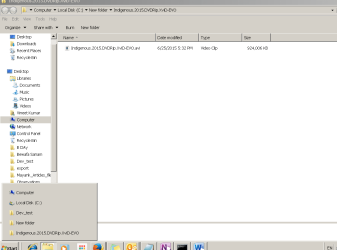
I am facing below problem : In file explorer, I see multiple folders i.e as I click the folder it gets add on rather than replace the previous one. This lead to multiple folder available in explorer list.
Issue is shown in the attachment. Expectation is that it should keep only "Indigeneous" folder in file explorer and not all its parent folders
I am facing below problem : In file explorer, I see multiple folders i.e as I click the folder it gets add on rather than replace the previous one. This lead to multiple folder available in explorer list.
Issue is shown in the attachment. Expectation is that it should keep only "Indigeneous" folder in file explorer and not all its parent folders
Attachments
My Computer
- Computer type
- Laptop
- OS
- Windows 7 64 bit

 v New Folder v Indgencus 2015 DVDRip.XVD-EVO