File Icons Missing or Incorrect

DemandedLogic

New member
Local time
6:52 PM
Messages
5
First of all this is the problem: Screenshot by Lightshot
I have tried:
  • Restoring
  • Rebuilding the Icon Cache
  • Restoring the registry file extension keys for some file extensions
  • Uninstalling all unneeded programs
  • Checked for viruses
  • Restarted my computer

I am mostly having the issue with the icons in FTP or SFTP clients but it also happens in the normal file explorer sometimes. The weird thing is, is that it is not always the same type of icon. Sometimes half of the icons for folders or files appear as recycling bins. Other times it appears as the broken icon. I almost reinstalled windows yesterday because of how annoyed I was.

Please help.
 

My Computer

Computer type
PC/Desktop
OS
Windows 7 Professional

My Computer

Computer type
PC/Desktop
Computer Manufacturer/Model Number
Golden Mk. I.4
OS
Windows 10 Pro x64 ; Xubuntu x64
CPU
Intel i7 860 @ 2.80 GHz O/C'ed to 4.0GHz
Motherboard
Gigabyte P55A-UD3R Rev.1. Award BIOS F13
Memory
16GB Corsair Vengance DDR3 @ 661 MHz Dual Channel (9-9-9-24)
Graphics Card(s)
EVGA NVidia GTX 560 1024MB
Sound Card
Realtek Integrated
Monitor(s) Displays
Dual Samsung SyncMaster 2494HS
Screen Resolution
1920*1080 and 1920*1080
Hard Drives
1*Samsung 840 EVO 120GB SSD;
1*OCZ Vertex 2 60GB SSD;
2*Samsung F3 SpinPoint 1TB in RAID0;
1*Samsung F1 SpinPoint 1TB;
2*Western Digital 1TB External USB 3.0
1*Western Digital 500GB External USB 3.0
1*Seagate 500GB External USB 2.0
PSU
Thermaltake ToughPower QFan 750W
Case
Thermaltake Element S VK60001W2Z
Cooling
Corsair H60 Water Cooling, 2*230mm and 2*80mm case fans
Keyboard
Logitech G110
Mouse
Logitech MX518
I have also tried those but I don't see how it will help since folders do not have a true extension.
 

My Computer

Computer type
PC/Desktop
OS
Windows 7 Professional

My Computer

Computer type
PC/Desktop
Computer Manufacturer/Model Number
Golden Mk. I.4
OS
Windows 10 Pro x64 ; Xubuntu x64
CPU
Intel i7 860 @ 2.80 GHz O/C'ed to 4.0GHz
Motherboard
Gigabyte P55A-UD3R Rev.1. Award BIOS F13
Memory
16GB Corsair Vengance DDR3 @ 661 MHz Dual Channel (9-9-9-24)
Graphics Card(s)
EVGA NVidia GTX 560 1024MB
Sound Card
Realtek Integrated
Monitor(s) Displays
Dual Samsung SyncMaster 2494HS
Screen Resolution
1920*1080 and 1920*1080
Hard Drives
1*Samsung 840 EVO 120GB SSD;
1*OCZ Vertex 2 60GB SSD;
2*Samsung F3 SpinPoint 1TB in RAID0;
1*Samsung F1 SpinPoint 1TB;
2*Western Digital 1TB External USB 3.0
1*Western Digital 500GB External USB 3.0
1*Seagate 500GB External USB 2.0
PSU
Thermaltake ToughPower QFan 750W
Case
Thermaltake Element S VK60001W2Z
Cooling
Corsair H60 Water Cooling, 2*230mm and 2*80mm case fans
Keyboard
Logitech G110
Mouse
Logitech MX518

My Computer

Computer Manufacturer/Model Number
Hewlett packard/p6512uk
OS
Microsoft Windows 7 Home Premium 64-bit 7600
CPU
IIx4 amd athelon 635 processor
Motherboard
FOXCONN 2AA9
Memory
2x2gb
Graphics Card(s)
ati radeon HD 5450
Sound Card
(1) Realtek High Definition Audio (2) AMD High Definition
Monitor(s) Displays
samsung lcd tv 32"
Screen Resolution
1360x 768
Hard Drives
(1) WDC WD10 01FAES-60Z2A0 SATA Disk Device (2) Maxtor OneTouch USB Device (3) ST310003 33AS USB Device (4) WD My Book 1111 USB Device
PSU
?
Cooling
air!
Keyboard
wireless hp
Mouse
wireless Hp,optical
Internet Speed
1.10mb/s
Antivirus
MSE
Browser
Firefox
In my original post I also said that I have rebuilt the icon cache. I forgot to mention that I have use /SFC scan now aswell. Any other ideas :( ?
 

My Computer

Computer type
PC/Desktop
OS
Windows 7 Professional
Ahh, yes you did mention that. I'm at a loss......all I can think of is a system restore, or repair install.
 

My Computer

Computer type
PC/Desktop
Computer Manufacturer/Model Number
Golden Mk. I.4
OS
Windows 10 Pro x64 ; Xubuntu x64
CPU
Intel i7 860 @ 2.80 GHz O/C'ed to 4.0GHz
Motherboard
Gigabyte P55A-UD3R Rev.1. Award BIOS F13
Memory
16GB Corsair Vengance DDR3 @ 661 MHz Dual Channel (9-9-9-24)
Graphics Card(s)
EVGA NVidia GTX 560 1024MB
Sound Card
Realtek Integrated
Monitor(s) Displays
Dual Samsung SyncMaster 2494HS
Screen Resolution
1920*1080 and 1920*1080
Hard Drives
1*Samsung 840 EVO 120GB SSD;
1*OCZ Vertex 2 60GB SSD;
2*Samsung F3 SpinPoint 1TB in RAID0;
1*Samsung F1 SpinPoint 1TB;
2*Western Digital 1TB External USB 3.0
1*Western Digital 500GB External USB 3.0
1*Seagate 500GB External USB 2.0
PSU
Thermaltake ToughPower QFan 750W
Case
Thermaltake Element S VK60001W2Z
Cooling
Corsair H60 Water Cooling, 2*230mm and 2*80mm case fans
Keyboard
Logitech G110
Mouse
Logitech MX518
I have restored back as far as possible before and still no change.
 

My Computer

Computer type
PC/Desktop
OS
Windows 7 Professional
Still waiting on a reply. The things I have been told to do have already been done.
 

My Computer

Computer type
PC/Desktop
OS
Windows 7 Professional
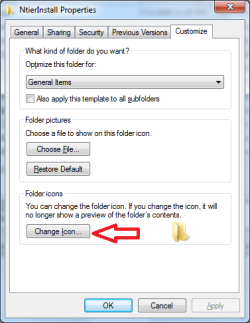
this might be over simplifying things but have you tried changing the icon?
 

Attachments

  • icon.png
    icon.png
    13.8 KB · Views: 0

My Computer

Computer type
PC/Desktop
Computer Manufacturer/Model Number
custom build
OS
windows 7 ultimate x64 and windows 8 pro x64
CPU
Intel Core i7-2700K Quad Core 3.50 GHz
Motherboard
MSI Z68A-GD55 (G3) Intel Z68 Motherboard
Memory
Two - Corsair Vengeance 4GB PC12800 DDR3 1600MHz
Graphics Card(s)
EVGA GeForce GTX 480 (Fermi) Video Card - 1536MB
Monitor(s) Displays
Two I-Inc 28" Class Widescreen LCD Monitors
Screen Resolution
1920 x 1200
Hard Drives
Patriot Pyro 2.5" Solid State Drive - 120GB, SATA III 6Gb/s
Seagate Barracuda 2TB Serial ATA Hard Drive - 2TB, 7200RPM, 64MB, SATA 6Gb/s
PSU
OCZ Firepower ZX850W ZX Series Modular Power Supply - 850W
Case
Cooler Master HAF 922M ATX Mid-Tower Case
Mouse
R.A.T. 7 gaming mouse
Internet Speed
20mbps down, 2.5mbps up
Browser
chrome
Other Info
Sony Optiarc BD-5300S-03 Internal 12x Blu-ray Burner Drive
Back
Top