
File sharing between win7 64 bit desktop & vista 32bit laptop

I am using windows firewall on both pc's and I have not downloaded any AV software, have only what came with the PC's, the win 7 is a new pc with only the things on it that came with, hardly any software. I am using free antivirus on both pc's, win7 has Avast & laptop have Avia
 

My Computer My Computer

At a glance

win 7 64 bit desktop & vista 32 bit laptop
OS
win 7 64 bit desktop & vista 32 bit laptop
Does the pc your trying to connect to have a password ?
 

My Computer My Computer

At a glance

Win7 H.Prem. 32bit+SP1
Computer Manufacturer/Model Number
Look in my Signature.
OS
Win7 H.Prem. 32bit+SP1
I put in the settting on both pc's to have it password protected as there are other people on the network. Vista has a password and the brief time the 2 pc's saw each other I was able to get into my laptop (vista32 bit) files from my win7 desktop but I have not put a password on the win 7 desktop yet. I would prefer no password but then others on the network could get into my files right? As of right now neither pc is seeing each other.
 

My Computer My Computer

At a glance

win 7 64 bit desktop & vista 32 bit laptop
OS
win 7 64 bit desktop & vista 32 bit laptop
are any of your pc connected to a router?
 

My Computer My Computer

At a glance

Win7 H.Prem. 32bit+SP1
Computer Manufacturer/Model Number
Look in my Signature.
OS
Win7 H.Prem. 32bit+SP1
yes the win7 desktop is connected to my D-Link router
 

My Computer My Computer

At a glance

win 7 64 bit desktop & vista 32 bit laptop
OS
win 7 64 bit desktop & vista 32 bit laptop
now after doing a disk clean up and scan on my laptop, the 2 pc's can see each other, I wonder how long it will last.
 

My Computer My Computer

At a glance

win 7 64 bit desktop & vista 32 bit laptop
OS
win 7 64 bit desktop & vista 32 bit laptop
It is very late here,closing down for nite will check in am & see if pc's still see each other
 

My Computer My Computer

At a glance

win 7 64 bit desktop & vista 32 bit laptop
OS
win 7 64 bit desktop & vista 32 bit laptop
Good morning.
I know nothing about D Link routers so here's how I setup my Laptop on my router.
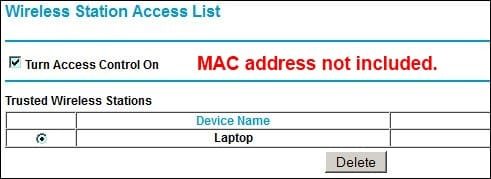
I wire connected Laptop to my Netgear DGN2000, accessed the setup page, changed the SSID and set a password for WPA2. I then went to the wireless settings, and added my Laptop's MAC address to the trusted list of the Access Control setting.

RR.JPG
 

My Computer My Computer

At a glance

Win7 H.Prem. 32bit+SP1
Computer Manufacturer/Model Number
Look in my Signature.
OS
Win7 H.Prem. 32bit+SP1
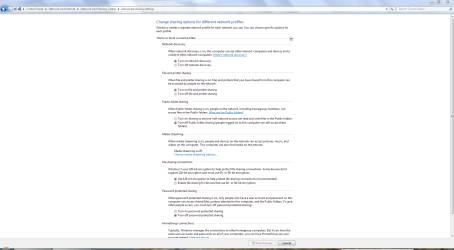
Have a look at this screenshot, in particular the information on password-protected sharing.

Share.PNG
 

My Computer My Computer

At a glance

Windows 7 Ultimate SP1 64-BitIntel Core i7 870 @ 2.93GHz8Gb Dual-Channel DDR3 @ 664MHznVidia GeForce GTX 460 1024MB dedicated RAM
Computer Manufacturer/Model Number
HP Pavilion Elite 495UK
OS
Windows 7 Ultimate SP1 64-Bit
CPU
Intel Core i7 870 @ 2.93GHz
Motherboard
MSI 2A9C (CPU1)
Memory
8Gb Dual-Channel DDR3 @ 664MHz
Graphics Card(s)
nVidia GeForce GTX 460 1024MB dedicated RAM
Sound Card
Realtek HD Audio
Monitor(s) Displays
HP2310i
Screen Resolution
1920 x 1080
Hard Drives
1x1954GB Hitachi HDS22020ALA 330 (RAID), 1x1954GB Hitachi External for backup and storage
PSU
460W
Case
HP Elite
Cooling
Air cooled
Keyboard
Logitech K750 solar-powered keyboard
Mouse
Logitech Wireless M180 mouse
Internet Speed
2Mb
Other Info
Pure Avanti Flow Internet Radio with iPod Dock, 64Gb iPod, HP USB Speakers, Sony MDR-V500 Headphones, Sony Vaio F-Series Laptop
Neither pc can see each other again and what is even stranger on my win 7 I have 2 computers listed mine with all the files and Owner-pc which has a password on it, says domain is listed as my win7. I'm gonna turn off the password and see what that is. My laptop is not listed on the win 7 & win7 is not listed on the laptop.
 

My Computer My Computer

At a glance

win 7 64 bit desktop & vista 32 bit laptop
OS
win 7 64 bit desktop & vista 32 bit laptop
I think I figured out what owner-pc is, I just hooked up with the free WIFI here trying it out, I am still hooked up to WIFI with my cable company, so yesterday I switched WIFI's to see if that made a difference, it didn't. Even tho I turned off the passwords I can't get into owner-pc as it's on the other domain. I restarted both pc's & for a brief min I saw both pc's on the laptop and got into win 7 then again poof it was gone. What is preventing this from both pc's seeing each other?
 

My Computer My Computer

At a glance

win 7 64 bit desktop & vista 32 bit laptop
OS
win 7 64 bit desktop & vista 32 bit laptop
Still no luck, changed the workgroup name on both pc's to see if that made a difference.
 

My Computer My Computer

At a glance

win 7 64 bit desktop & vista 32 bit laptop
OS
win 7 64 bit desktop & vista 32 bit laptop
Any suggestions? anyone? I'm at a loss beginning to wonder if it can be done. What would be blocking the 2 pc's from seeing each other?
 

My Computer My Computer

At a glance

win 7 64 bit desktop & vista 32 bit laptop
OS
win 7 64 bit desktop & vista 32 bit laptop
Only the win7 is connected to the router, the laptop is not. My son hooked up the win7, said he didn't need the cd that came with the router( the router was hooked up to old pc before) I can't find anything on the win7 that says it's hooked up so maybe it's not? Since both pc's have a wireless connection is must be possible to do this with just the wireless connection? as at times I've seen both pc's together but only for a few min then poof it's back to neither pc seeing each other. I've checked for everything even doing a disk clean up and virus scan on both pc's, checked for any programs that might interfere. what else could be causing this?
 

My Computer My Computer

At a glance

win 7 64 bit desktop & vista 32 bit laptop
OS
win 7 64 bit desktop & vista 32 bit laptop
I guess what I'm trying to say is that it would be helpful for the forum users to know how your network is set up. The router is there not only to allow your multiple computers to access your ISP with one account, but to help protect you from anonymous internet attacks. Both computers should be connected to the same side of your router. If it's a wireless router, you can have both wired and wireless computers connected to it, and still be considered as being connected to the same side. The other side of the router is what connects to you ISP for internet access.

As long as all of your computers are connected to the same side of the router, your little private network is set up to allow each of your computers to communicate with each other. Now you just got to get the operating systems/computers to cooperate.
 

My Computer My Computer

At a glance

Windows 7 Ultimate x64
OS
Windows 7 Ultimate x64
Just talked to my son who doesn't live here & found out he disconnected the router from the win 7 but didn't unplug it from the wall, so since I saw the lights on I thought it was connected to the pc but couldn't find it anywhere on the pc. That's not the problem. The free WIFI I'm using has a connection box right outside my apt & I'm told it's private for this complex only. What else could be causing this?
 

My Computer My Computer

At a glance

win 7 64 bit desktop & vista 32 bit laptop
OS
win 7 64 bit desktop & vista 32 bit laptop
Since I'm just trying the free WIFI I still can connect to my cable company WIFI, I just did that & so far both pc's are seeing each other, will watch it for a while & see if it stays.
 

My Computer My Computer

At a glance

win 7 64 bit desktop & vista 32 bit laptop
OS
win 7 64 bit desktop & vista 32 bit laptop
Since I'm just trying the free WIFI I still can connect to my cable company WIFI, I just did that & so far both pc's are seeing each other, will watch it for a while & see if it stays.

If you did what I think you did, I think you're okay now. As long as your machines are connected (whether wired or wireless) to the same router you have your little network set up and they should be able to easily see each other, and the router helps to protect your computers from internet nasties.

Since you appear to have a wireless router (and especially considering the fact that you're in an apartment) you should ensure that its wireless capability is set up securely. You don't want neighbors accidentally/intentionally connecting to your network without your knowledge, right?
 

My Computer My Computer

At a glance

Windows 7 Ultimate x64
OS
Windows 7 Ultimate x64
I still can connect to my cable company WIFI, I just did that...
In my previous post I'm assuming that "my cable company WIFI" that you mention is referring to a little box that your cable company installed inside your apartment for your personal use, right?
 

My Computer My Computer

At a glance

Windows 7 Ultimate x64
OS
Windows 7 Ultimate x64
Back
Top