sharing between win7 64bit and vista 32bit

budis

New member
Local time
12:06 AM
Messages
12
hi,
i need help.
i have one desktop pc and onw notebook.
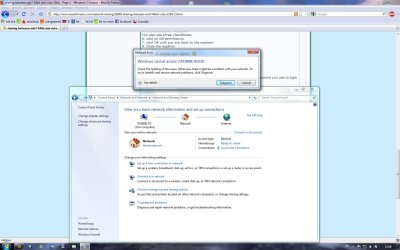
if i had OS vista on my desktop all was fine - sharing was OK,no problem. but now,when i boot new win7 ultimated 64bit a cant sharing files with my notebook (vista 32 bit). i set up sharing for everyone...but a cant connect to my notebook. when i try it - desktop, show me-attach file

can me someone help?
thx, budis
 

Attachments

  • error.jpg
    error.jpg
    21.4 KB · Views: 144

My Computer My Computer

At a glance

win 7 ultimate 64bit
OS
win 7 ultimate 64bit
budis

Hi and welcome

when you installed win 7 what kind of network did you set up? homegroup, or workgroup? Can you see the computers in network neighborhood, but just cant acces them?

We could use soome more info about you network setup and how you shared folders

thanks

ken
 

My Computer My Computer

At a glance

Win 8 Release candidate 8400[email protected]4 gigsNvidia 9600M
Computer Manufacturer/Model Number
HP Pavillion dv-7 1005 Tx
OS
Win 8 Release candidate 8400
CPU
[email protected]
Memory
4 gigs
Graphics Card(s)
Nvidia 9600M
Sound Card
HD built-in
Monitor(s) Displays
17" Wxga
Screen Resolution
1440x900
Cooling
none
Internet Speed
45Mb down 5Mb up
hi ken,
thank you for you for your help.

when i installed win 7 i set up workgroup. but then when i could not connect i tryed homegroup,but it dont help.

in network i can see my neighborhood.

thx
 

My Computer My Computer

At a glance

win 7 ultimate 64bit
OS
win 7 ultimate 64bit
hi ken,
thank you for you for your help.

when i installed win 7 i set up workgroup. but then when i could not connect i tryed homegroup,but it dont help.

in network i can see my neighborhood.

thx

I'll leave Ken to help you, but just want to mention that 32bit vs 64bit has no influence on networking or sharing.
(exception is trying to run 64bit exe in a network folder on 32bit OS)
 

My Computer My Computer

At a glance

Win7 Build 7600 x86Pentium II 300MHz32mb EDO RAMDiamond Viper
OS
Win7 Build 7600 x86
CPU
Pentium II 300MHz
Motherboard
Asus
Memory
32mb EDO RAM
Graphics Card(s)
Diamond Viper
Sound Card
Soundblaster 16
Monitor(s) Displays
14" AOC CRT 16K color
Screen Resolution
800x600
Hard Drives
300mb Quantum fireball
PSU
110 Watts
Cooling
Passive
Keyboard
Trust Ergonomic
Mouse
Generic
Internet Speed
256K u 128K d
thx squonksc,

so and how can i it set up?
can you help?

thx, budis
 

My Computer My Computer

At a glance

win 7 ultimate 64bit
OS
win 7 ultimate 64bit
thx squonksc,

so and how can i it set up?
can you help?

thx, budis

Like ken said.

Provide more info about computers, OS's, etc.

Turn off homegroup on all computers and revert to regular networking.

When you want to access shared folder on a computer, you need to log onto that computer with the username password of that computer.
(logon with different credentials)

greetz
 

My Computer My Computer

At a glance

Win7 Build 7600 x86Pentium II 300MHz32mb EDO RAMDiamond Viper
OS
Win7 Build 7600 x86
CPU
Pentium II 300MHz
Motherboard
Asus
Memory
32mb EDO RAM
Graphics Card(s)
Diamond Viper
Sound Card
Soundblaster 16
Monitor(s) Displays
14" AOC CRT 16K color
Screen Resolution
800x600
Hard Drives
300mb Quantum fireball
PSU
110 Watts
Cooling
Passive
Keyboard
Trust Ergonomic
Mouse
Generic
Internet Speed
256K u 128K d
desktop pc:
Intel® Core™2 Duo processor, E8400-3,00GHz,1333MHz,6MBL2 BOX,MB MSI, So775, iP45, 4xDDR2, PCIe, GbLAN,SATAII, ATX,2*4096MB Twinx DDRII 800 CL5 CORSAIR,2*HDD Seagate Barracuda 500GB/7200/SATA 2, 32MB,ST3500320AS,VGA MS PCX GF NX9600GT-T2D512-OC,512DDR3, 2xDVI, Fan,LG DVD +/- RW,SuperMultiDualLayer, S-ATA, LightScribe,CASE P4/4+2/450W/2xUSB/Black-Silver,PFC,CE,kit -WINDOWS 7 Ultimate, 64bit

notebook:
HP compaq 2230s - Intel Core 2 Duo Processor P6570 (2.1 GHz, 2 MB L2 cache, 800 MHz FSB) - Mobile Intel GM45 Express Chipset ICH9M-Enh. - 3072 MB DDRII 800MHz (2) - 320 GB 5.4krpm S-ATA - 12,1" TFT WXGA 1280 x 800 BrightView - WEBCAM - Mobile Intel Graphics Media Accelerator 4500MHD, up to 384 MB of shared - DVD+/-RW SuperMulti DL LightScribe Drive - Modem56K/LAN10/100/1000 - Intel 802.11 a/b/g/n - Bluetooth - - Fingerprint Reader - SD/MMC Card Reader - ports: 3x USB 2.0, HDMI, audio in/out, VGA, RJ-11, RJ-45 - 4-cell Li-Ion Battery(3h 50min) - Supports ExpressCard/34 - Windows Vista Home Premium 32bit

i have D-Link 802.11g/2.4GHz wireless router

in desktop i set up WORKGROUP and in tde notebook i make same.
how can i set up connection, when i want do it again?

now,i can see my notebook but i can not connect on it...

thx
 

My Computer My Computer

At a glance

win 7 ultimate 64bit
OS
win 7 ultimate 64bit
i use cable, to connect with router
 

My Computer My Computer

At a glance

win 7 ultimate 64bit
OS
win 7 ultimate 64bit
i use cable, to connect with router

To make a few things clear.

Seeing the other computer is a first step.
It does mean the network is setup right.

What is needed next, is to allow a user from one computer access to the other computer.

In your case I assume you don't want to restrict certain users, but only want to able to access the shares yourself.

Getting access to a shared folder on another computer is much like login in to a computer when you are sitting behind it.

You need a username and a password.

The computer you try to connect to already has that.
It's the username password you use to log on to it.

Ok, now we have that cleared I'll show you how to go about it.

To make this easy I will give an example.
Suppose your desktop's computer name is desktopPC
Suppose your username on the desktop is budis
Suppose you have a shared folder on the desktop named desktopshare

1. On the desktop pc open explorer and go to the shared folder (desktopshare).
2. Right click on it and select properties.
3. Chose the sharing tab
4. click on advanced sharing,
5. click on permissions.
In the list you see "everyone".
You also see three checkboxes,
6. click on full permissions.
7. click OK until you are back to the explorer.
8. Close the explorer.

Now go sit behing your laptop. :D

In network you see the desktop named desktopPC

1. double click on it
2. in the dialog that appears first click on "... different credentials..."
3. in the following dialog chose different user, fill in the user name and password you use to login to the desktop!
Click OK.

That's it.

Good luck
 

My Computer My Computer

At a glance

Win7 Build 7600 x86Pentium II 300MHz32mb EDO RAMDiamond Viper
OS
Win7 Build 7600 x86
CPU
Pentium II 300MHz
Motherboard
Asus
Memory
32mb EDO RAM
Graphics Card(s)
Diamond Viper
Sound Card
Soundblaster 16
Monitor(s) Displays
14" AOC CRT 16K color
Screen Resolution
800x600
Hard Drives
300mb Quantum fireball
PSU
110 Watts
Cooling
Passive
Keyboard
Trust Ergonomic
Mouse
Generic
Internet Speed
256K u 128K d
This what I did to resolve this issue.

I used a program called "Network Magic". Its a good program and if you have the money I recommend buying the full version (runs on up to three computers per purchase). But if you don't (like a didn't) I downloaded the trial version and installed it on both my laptop as well as my desktop. I configured my network the way I wanted using it (Printers, file sharing ext.). The cool thing is if you let the trial run out and then unistall it off of both computers it allows you computer to stay configured.

Hope this works 4 u :)

Please note: If you have a firewall other than Windows Firewall you probably will need to configure network magic to work with it. for more info visit Firewall Configuration
 
This what I did to resolve this issue.

I used a program called "Network Magic". Its a good program and if you have the money I recommend buying the full version (runs on up to three computers per purchase). But if you don't (like a didn't) I downloaded the trial version and installed it on both my laptop as well as my desktop. I configured my network the way I wanted using it (Printers, file sharing ext.). The cool thing is if you let the trial run out and then unistall it off of both computers it allows you computer to stay configured.

Hope this works 4 u :)

Please note: If you have a firewall other than Windows Firewall you probably will need to configure network magic to work with it. for more info visit Firewall Configuration

Thanks for bringing it to our attention but,
Why would anyone want to install a program to do something the OS already does?

Network sharing is easy to do on Win7, if one understands the basic principals.
Plus anyone with that knowledge can troubleshoot and help if it doesn't work.

A 3rd party program is both totally unnecessary and hard to troubleshoot if the helpers don't know it.

The procedure I provided to the OP is easy enough.

greetz
 

My Computer My Computer

At a glance

Win7 Build 7600 x86Pentium II 300MHz32mb EDO RAMDiamond Viper
OS
Win7 Build 7600 x86
CPU
Pentium II 300MHz
Motherboard
Asus
Memory
32mb EDO RAM
Graphics Card(s)
Diamond Viper
Sound Card
Soundblaster 16
Monitor(s) Displays
14" AOC CRT 16K color
Screen Resolution
800x600
Hard Drives
300mb Quantum fireball
PSU
110 Watts
Cooling
Passive
Keyboard
Trust Ergonomic
Mouse
Generic
Internet Speed
256K u 128K d
i use cable, to connect with router

To make a few things clear.

Seeing the other computer is a first step.
It does mean the network is setup right.

What is needed next, is to allow a user from one computer access to the other computer.

In your case I assume you don't want to restrict certain users, but only want to able to access the shares yourself.

Getting access to a shared folder on another computer is much like login in to a computer when you are sitting behind it.

You need a username and a password.

The computer you try to connect to already has that.
It's the username password you use to log on to it.

Ok, now we have that cleared I'll show you how to go about it.

To make this easy I will give an example.
Suppose your desktop's computer name is desktopPC
Suppose your username on the desktop is budis
Suppose you have a shared folder on the desktop named desktopshare

1. On the desktop pc open explorer and go to the shared folder (desktopshare).
2. Right click on it and select properties.
3. Chose the sharing tab
4. click on advanced sharing,
5. click on permissions.
In the list you see "everyone".
You also see three checkboxes,
6. click on full permissions.
7. click OK until you are back to the explorer.
8. Close the explorer.

Now go sit behing your laptop. :D

In network you see the desktop named desktopPC

1. double click on it
2. in the dialog that appears first click on "... different credentials..."
3. in the following dialog chose different user, fill in the user name and password you use to login to the desktop!
Click OK.

That's it.

Good luck


ok, i´ll try it...and than i´ll write back
thx
 

My Computer My Computer

At a glance

win 7 ultimate 64bit
OS
win 7 ultimate 64bit
hi,
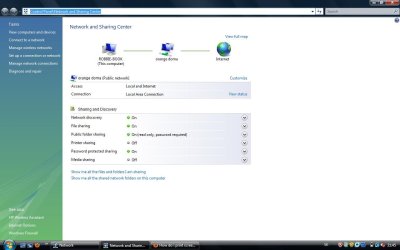
a tryed all what you write, but i can not connect to my notebook

a send my network and sharing center...
 

My Computer My Computer

At a glance

win 7 ultimate 64bit
OS
win 7 ultimate 64bit
desktop
 

Attachments

  • desktop.jpg
    desktop.jpg
    128.6 KB · Views: 73

My Computer My Computer

At a glance

win 7 ultimate 64bit
OS
win 7 ultimate 64bit
notebook
 

Attachments

  • book.jpg
    book.jpg
    58.7 KB · Views: 35

My Computer My Computer

At a glance

win 7 ultimate 64bit
OS
win 7 ultimate 64bit
have you some new tips? :)

thx budis
 

My Computer My Computer

At a glance

win 7 ultimate 64bit
OS
win 7 ultimate 64bit
so, i have some news...

i can connect from notebook to desktop, but not desktop to notebook.
a can not undestand it :( , but i need connect to book from desktop
 

My Computer My Computer

At a glance

win 7 ultimate 64bit
OS
win 7 ultimate 64bit
Yes thats true I understand that if you can avoid going through all the steps to install it, set it up, then uninstall it to avoid that. I haven't checked out network sharing yet on windows 7. I just thought that since he seems to be having trouble getting it setup (like i did when i first set up mine) that this program would be good to try.


This what I did to resolve this issue.

I used a program called "Network Magic". Its a good program and if you have the money I recommend buying the full version (runs on up to three computers per purchase). But if you don't (like a didn't) I downloaded the trial version and installed it on both my laptop as well as my desktop. I configured my network the way I wanted using it (Printers, file sharing ext.). The cool thing is if you let the trial run out and then unistall it off of both computers it allows you computer to stay configured.

Hope this works 4 u :)

Please note: If you have a firewall other than Windows Firewall you probably will need to configure network magic to work with it. for more info visit Firewall Configuration

Thanks for bringing it to our attention but,
Why would anyone want to install a program to do something the OS already does?

Network sharing is easy to do on Win7, if one understands the basic principals.
Plus anyone with that knowledge can troubleshoot and help if it doesn't work.

A 3rd party program is both totally unnecessary and hard to troubleshoot if the helpers don't know it.

The procedure I provided to the OP is easy enough.

greetz
 
Back
Top