File Sharing... DENIED

illy

New member
Local time
8:28 AM
Messages
1
I have a desktop running on a Windows 7 Pro OS and a laptop running on XP Pro; both are connected on a linksys router. Win7 machine is connected via lan cable and lappy: wirelessly

Password protection has been set to off in my Win7 machine.

I can access certain XP folders which I have permitted to everyone from my Win7 machine but not the other way around. An error message keeps popping up "Access is denied" "<something about a path not being correct>" everytime I access Win7 folders from my XP machine.

Both are in the same workgroup.

I can only access Win7 files that have been transferred in the Public folder

I want to access the files that I permitted to everyone on their location but how do I do that if I keep getting this error message. HELP :(
 

My Computer

OS
Windows 7 Pro, XP Pro
I have a desktop running on a Windows 7 Pro OS and a laptop running on XP Pro; both are connected on a linksys router. Win7 machine is connected via lan cable and lappy: wirelessly

Password protection has been set to off in my Win7 machine.

I can access certain XP folders which I have permitted to everyone from my Win7 machine but not the other way around. An error message keeps popping up "Access is denied" "<something about a path not being correct>" everytime I access Win7 folders from my XP machine.

Both are in the same workgroup.

I can only access Win7 files that have been transferred in the Public folder

I want to access the files that I permitted to everyone on their location but how do I do that if I keep getting this error message. HELP :(

Hi and welcome

DId you set win 7 up with homegroup or workgroup? what firewall, and antivirus?

the shared folders are owned by who?

Ken
 

My Computer

Computer Manufacturer/Model Number
HP Pavillion dv-7 1005 Tx
OS
Win 8 Release candidate 8400
CPU
[email protected]
Memory
4 gigs
Graphics Card(s)
Nvidia 9600M
Sound Card
HD built-in
Monitor(s) Displays
17" Wxga
Screen Resolution
1440x900
Cooling
none
Internet Speed
45Mb down 5Mb up
Hi illy, welcome to the forums.

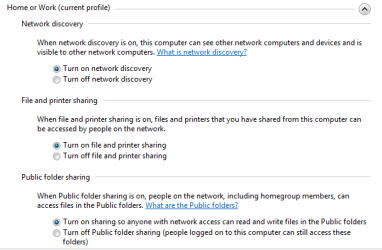
What settings do you have for the following?

Capture.PNG

Found in Network & Sharing Center -> Advance network settings
 

My Computer

Computer Manufacturer/Model Number
Compaq Desktop
OS
Windows 7 Ultimate x64
CPU
AMD Sempron Dual Core
Memory
3GB
Graphics Card(s)
NVIDIA GeForce 6150SE nForce 430
Screen Resolution
1024x768
Hard Drives
150GB Sata
Try creating the user account and password on the w7 machine that you are using on the XP laptop. Even if you don't use that account on the w7 box it may be helpful having there ... and if you're using the same account name on both systems make sure the passwords are the same too.
 

My Computer

Computer Manufacturer/Model Number
ultraplanet - model 23
OS
Windows 7
CPU
P4 3.0 HT
Motherboard
Intel DQ965GF
Memory
4 gigs of Crucial DDR2
Graphics Card(s)
nVidia GeForce 7800GT 256MB 256-bit w/ ACCELS1 Rev 2
Sound Card
on board
Monitor(s) Displays
HP 2509m
Screen Resolution
1920x1080
Hard Drives
2x 320gb Seagate Barracuda's - SATA 3Gbit/s - RAID-0 array
PSU
650 watt
Case
Antec
Cooling
Cool Master
Keyboard
Logitech diNovo Media Desktop
Mouse
see keyboard
Internet Speed
comcast cable
Other Info
7 Ultimate and 7 Pro twice each at home - Gigabit on the Network - Tomato on the Linksys - I freely share my wireless with my neighbors (8-10 additional devices)
Was there ever a resolution to this problem??
I am having the same exact problem and cannot figure it out for the life of me.
 

My Computer

OS
win7ultx64
Just about everyone has this problem. There is a solution to it every day, so try search for something like "access denied" in this forum section.
 

My Computer

Computer Manufacturer/Model Number
Too many to list.
OS
XP, Seven, 2008R2
CPU
AMD, Intel, VIA
Motherboard
Various
Memory
Corsair, Kingston, etc.
Graphics Card(s)
ATI, NVIDIA
Monitor(s) Displays
Samsung
Hard Drives
Maxtor, Western Digital
Keyboard
qwerty
Internet Speed
22 Mb/s @ home, 1 Gb/s @ server
Other Info
All of my systems still run fastest on XP 32-bit for the most part. Win7 is fun to play with, but I still prefer XP for raw speed, security, and functionality.
How to Set Up Folder or Drive Sharing in Windows 7 that Actually Works

How to Set Up Folder or Drive Sharing in Windows 7 so it Actually Works
1. Right-click on the folder or drive icon to be shared; then select “Properties” from the dialog box.
2. Select the “Security” tab.
3. Click the “Edit” button.
4. Click the “Add Button.
5. Click the “Advanced” button.
6. Click the “Find Now” button.
7. In the list that appears, select “Everyone;” then click “OK.”
8. The “Everyone” name will now appear in the “Select Users or Groups” dialog box. Click “OK.”
9. The “Permissions for <object> dialog box with reappear with “Everyone” in the “Group or user name” list. With “Everyone” highlighted, put check marks in the boxes to assign the permission you want. (I assign full control because my workgroup network is closed).
10. Click the “Apply” button; then the “OK” button.
11. In the <object> Properties dialog box, click “OK.”
12. Again right-click the drive or folder icon; then select “Share with;” then “Advanced sharing.”
13. In the <object> Properties dialog box click “Advanced Sharing.”
14. Put a check mark into the “Share this folder” checkbox at the top of the dialog box.
15. Enter the name you want into the “Share names” box (or accept the default); then click “Apply;” then click “OK.”
16. Click “Close.”
The drive or folder is now shared with everyone on your network and they have the permissions you granted.
 

My Computer

Computer type
PC/Desktop
OS
Windows 7 32 bit
Back
Top