File Sharing - How to Block Guests ?

lafargeotte

New member
Power User
Local time
11:56 AM
Messages
76
Location
France
Some advice needed please.

We have a small network which includes 3 PCs (Desktop Win 7 Ultimate x 64, Laptop Win 7 Ultimate x 86, and a Laptop Win XP Professional). These 3 PCs file share on the network (in all directions), the Laptops using Wi-Fi. The router is the latest Orange Livebox (French version), and we use this as our package includes free phone calls using the Livebox connection.

We run a small holiday rental which includes access to the internet for the guests using Wi-Fi.

What I would like to know is can the guests also see the files on our network PCs?

If they can, is there a way to prevent this? (Perhaps configuring our firewalls - Eset Smart Security on all 3 PCs).

I hope that I have explained clearly, and any advice would be much appreciated.

TIA,
Paul.
 

My Computer My Computer

Computer Manufacturer/Model Number
Custom Build
OS
Win7 Ultimate x64, Windows 8 Enterprise x64
CPU
AMD Phenom Quad Core 9865
Motherboard
Foxconn A6VMX
Memory
4GB
Graphics Card(s)
ATI RADEON HD3450
Sound Card
Realtek HD
Monitor(s) Displays
Samsung SyncMaster P2250
Screen Resolution
1920 x 1080
Hard Drives
Seagate ST380815AS (80GB) System Disk
Seagate ST31000528AS (1TB) - 2 Partitions (Programs & Storage)
Samsung HD1035SJ (1TB) - 3 Partitions (Downloads & BackUp)
PSU
450 watt
Case
Generic
Cooling
CPU & Case Fan
Keyboard
Logitech MK700
Mouse
Logitech M705
Internet Speed
20Gbs
Hi Paul,

Do you have a separate Wi-Fi network for your guests?
 

My Computer My Computer

Computer type
PC/Desktop
Computer Manufacturer/Model Number
Dwarf Dwf/11/2012 r09/2013
OS
Windows 8.1 Pro RTM x64
CPU
Intel Core-i5-3570K 4-core @ 3.4GHz (Ivy Bridge) (OC 4.4GHz)
Motherboard
ASRock Z77 Extreme4-M
Memory
4 x 4GB DDR3-1600 Corsair Vengeance CMZ8GX3M2A1600C9B (16GB)
Graphics Card(s)
MSI GeForce GTX770 Gaming OC 2GB
Sound Card
Realtek High Definition on board solution (ALC 898)
Monitor(s) Displays
ViewSonic VA1912w Widescreen (VGA)
Screen Resolution
1440x900
Hard Drives
OCZ Agility 3 SSD 120GB SATA III x2 (RAID 0)
Samsung HD501LJ 500GB SATA II x2
Hitachi HDS721010CLA332 1TB SATA II
Iomega 1.5TB Ext USB 2.0
WD 2.0TB Ext USB 3.0
PSU
XFX Pro Series 850W Semi-Modular
Case
Gigabyte IF233
Cooling
1 x 120mm Front Inlet 1 x 120mm Rear Exhaust
Keyboard
Microsoft Comfort Curve Keyboard 3000 (USB)
Mouse
Microsoft Comfort Mouse 3000 for Business (USB)
Internet Speed
NetGear DG834Gv3 ADSL Modem/Router (Ethernet) ~4.0 Mb/s (O2)
Antivirus
Avast! 8.0.1497
Browser
IE 11
Other Info
Optical Drive: HL-DT-ST BD-RE BH10LS30 SATA Bluray
Lexmark S305 Printer/Scanner/Copier (USB)
WEI Score: 8.1/8.1/8.5/8.5/8.25
Asus Eee PC 1011PX Netbook (Windows 7 x86 Starter)
Good idea Dwarf.

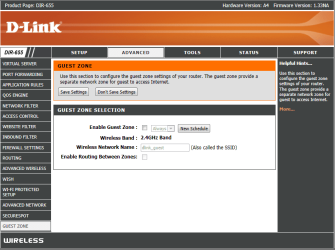
My Dlink DIR-655 router has a wireless guest zone under the advanced wireless settings. The guest zone uses a seperate SSID.

This keeps your guests from being part of your regular network so they can't see your files.
 

Attachments

  • Guest zone Dlink router.PNG
    Guest zone Dlink router.PNG
    35.5 KB · Views: 15

My Computer My Computer

Computer type
PC/Desktop
Computer Manufacturer/Model Number
Home built
OS
Windows 7 Ult, Windows 8.1 Pro,
CPU
Q9650-4.275GHz, E8600 4.5GHz, E6750-3.8GHz
Motherboard
Evga 780i FTW
Memory
G.Skill PC2 9600 1200Mhz 5 5 5 15 2T
Graphics Card(s)
GTX480
Sound Card
Asus Xonar D2
Monitor(s) Displays
HannsG
Screen Resolution
1680X1050
Hard Drives
GSkill Phoenix Pro 120GB SSD
PSU
ThermalTake Toughpower 1000Watt modular
Case
ThermalTake XaserV
Cooling
Xigmatek S1283
Keyboard
Logitech G15
Mouse
Logitech G9
Internet Speed
T1
Hi,

No separate Wi-Fi for guests.

Here is a screenshot of the 'Advanced' section in the router.
Capture.PNG

TIA,
Paul.
 

My Computer My Computer

Computer Manufacturer/Model Number
Custom Build
OS
Win7 Ultimate x64, Windows 8 Enterprise x64
CPU
AMD Phenom Quad Core 9865
Motherboard
Foxconn A6VMX
Memory
4GB
Graphics Card(s)
ATI RADEON HD3450
Sound Card
Realtek HD
Monitor(s) Displays
Samsung SyncMaster P2250
Screen Resolution
1920 x 1080
Hard Drives
Seagate ST380815AS (80GB) System Disk
Seagate ST31000528AS (1TB) - 2 Partitions (Programs & Storage)
Samsung HD1035SJ (1TB) - 3 Partitions (Downloads & BackUp)
PSU
450 watt
Case
Generic
Cooling
CPU & Case Fan
Keyboard
Logitech MK700
Mouse
Logitech M705
Internet Speed
20Gbs
I could be mistaken but if you setup password protected sharing you could also effectively block guests from accessing your shared files. Still not as convenient and safe as a router with a guest zone which I would highly recommend looking into for your situation
 

My Computer My Computer

Computer type
PC/Desktop
Computer Manufacturer/Model Number
Elsa
OS
windows 8.1 Pro x64
CPU
intel [email protected]
Motherboard
msi mpower max ac
Memory
2x8gb ripjaws x @2133
Graphics Card(s)
asus r9-290@1100/1300
Sound Card
creative sbz
Monitor(s) Displays
dell u3011
Hard Drives
840 evo 250 & 8.5tb
PSU
evga supernova p2-1000
Case
corsair air 540
Cooling
corsair h100
Keyboard
logitech g710+
Mouse
logitech g502
Internet Speed
50/10
Antivirus
avg
Browser
firefox
I could be mistaken but if you setup password protected sharing you could also effectively block guests from accessing your shared files. Still not as convenient and safe as a router with a guest zone which I would highly recommend looking into for your situation

From Windows Help:
By turning on password-protect sharing in Control Panel, you can limit Public folder access to people with a user account and password on your computer.


Does that not mean that only users on a particular PC can access the files?


If not, does password sharing mean that all PCs on the network need another or new password as well as their Windows login password?
 

My Computer My Computer

Computer Manufacturer/Model Number
Custom Build
OS
Win7 Ultimate x64, Windows 8 Enterprise x64
CPU
AMD Phenom Quad Core 9865
Motherboard
Foxconn A6VMX
Memory
4GB
Graphics Card(s)
ATI RADEON HD3450
Sound Card
Realtek HD
Monitor(s) Displays
Samsung SyncMaster P2250
Screen Resolution
1920 x 1080
Hard Drives
Seagate ST380815AS (80GB) System Disk
Seagate ST31000528AS (1TB) - 2 Partitions (Programs & Storage)
Samsung HD1035SJ (1TB) - 3 Partitions (Downloads & BackUp)
PSU
450 watt
Case
Generic
Cooling
CPU & Case Fan
Keyboard
Logitech MK700
Mouse
Logitech M705
Internet Speed
20Gbs
Oh dear. :( That is not very secure at all. I would say that the likelihood of guests being able to see your files (and, conversely, you being able to see theirs) is quite high. You should really be using separate networks in a business environment, in order to keep the staff side private and apart from your guests and other users. If you have confidential data (and I suspect that you do), then it is very important that you take steps in order to protect it. What you can do, if you don't have a guest facility on your router, is to attach another router to your main one via one of the Ethernet connections. This new router will then become the wireless connection for your guests. You can now make the primary router secure for the staff. On this router, enable SSID (don't broadcast it), WPA2/PSK and MAC filtering to ensure that only authorised devices can connect.

Simplified Diagram:

ISP
|
Main Router -- Your Private Network (wired/wireless [with SSID, WPA2/PSK and MAC filtering protection])
|
Second Router -- Guest Network (Open Access)

To generate passwords for WPA2/PSK, I suggest that you visit https://www.grc.com/passwords.htm and utilise the second selection, 63 random printable ASCII characters, for maximum security. Note that each time you refresh this link, you will get a different combination which will not be repeated.
 

My Computer My Computer

Computer type
PC/Desktop
Computer Manufacturer/Model Number
Dwarf Dwf/11/2012 r09/2013
OS
Windows 8.1 Pro RTM x64
CPU
Intel Core-i5-3570K 4-core @ 3.4GHz (Ivy Bridge) (OC 4.4GHz)
Motherboard
ASRock Z77 Extreme4-M
Memory
4 x 4GB DDR3-1600 Corsair Vengeance CMZ8GX3M2A1600C9B (16GB)
Graphics Card(s)
MSI GeForce GTX770 Gaming OC 2GB
Sound Card
Realtek High Definition on board solution (ALC 898)
Monitor(s) Displays
ViewSonic VA1912w Widescreen (VGA)
Screen Resolution
1440x900
Hard Drives
OCZ Agility 3 SSD 120GB SATA III x2 (RAID 0)
Samsung HD501LJ 500GB SATA II x2
Hitachi HDS721010CLA332 1TB SATA II
Iomega 1.5TB Ext USB 2.0
WD 2.0TB Ext USB 3.0
PSU
XFX Pro Series 850W Semi-Modular
Case
Gigabyte IF233
Cooling
1 x 120mm Front Inlet 1 x 120mm Rear Exhaust
Keyboard
Microsoft Comfort Curve Keyboard 3000 (USB)
Mouse
Microsoft Comfort Mouse 3000 for Business (USB)
Internet Speed
NetGear DG834Gv3 ADSL Modem/Router (Ethernet) ~4.0 Mb/s (O2)
Antivirus
Avast! 8.0.1497
Browser
IE 11
Other Info
Optical Drive: HL-DT-ST BD-RE BH10LS30 SATA Bluray
Lexmark S305 Printer/Scanner/Copier (USB)
WEI Score: 8.1/8.1/8.5/8.5/8.25
Asus Eee PC 1011PX Netbook (Windows 7 x86 Starter)
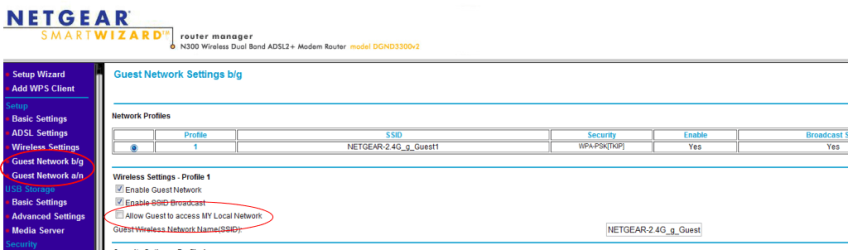
I agree with Chev get a router that allows you to have guests that can connect and use the internet but not access your local network ;)
 

Attachments

  • netgear guest.png
    netgear guest.png
    27 KB · Views: 16

My Computer My Computer

Computer type
PC/Desktop
Computer Manufacturer/Model Number
Self Built
OS
Windows 7 Ultimate 64bit
CPU
AMD Phenom Quad core 9950 black edition
Motherboard
Gigabyte
Memory
16Gb
Graphics Card(s)
2x XFX Radeon 5850
Sound Card
PCI Express X-Fi Titanium / Logitech G35
Monitor(s) Displays
2x HP 2410i
Screen Resolution
1920x1080
Hard Drives
2x 500Gb Seagate
1x 300Gb Seagate
1x 1Tb Seagate
2x 1Tb Hitatchi
PSU
Jean Tech Storm 700W
Case
Cooler Master COSMOS S
Cooling
Akasa Evo Blue Pro
Keyboard
Logitech G15
Mouse
Mad Catz M.M.O. 7
Internet Speed
12mb
Been reading elsewhere about admin sharing.

Would 'admin' shares work?
 

My Computer My Computer

Computer Manufacturer/Model Number
Custom Build
OS
Win7 Ultimate x64, Windows 8 Enterprise x64
CPU
AMD Phenom Quad Core 9865
Motherboard
Foxconn A6VMX
Memory
4GB
Graphics Card(s)
ATI RADEON HD3450
Sound Card
Realtek HD
Monitor(s) Displays
Samsung SyncMaster P2250
Screen Resolution
1920 x 1080
Hard Drives
Seagate ST380815AS (80GB) System Disk
Seagate ST31000528AS (1TB) - 2 Partitions (Programs & Storage)
Samsung HD1035SJ (1TB) - 3 Partitions (Downloads & BackUp)
PSU
450 watt
Case
Generic
Cooling
CPU & Case Fan
Keyboard
Logitech MK700
Mouse
Logitech M705
Internet Speed
20Gbs
Back
Top