File type icons not showing in explorer

oli356

New member
Member
Local time
9:09 PM
Messages
86
Hi all,

Built my new computer yesterday and installed Windows 7 64 bit, Enterprise.

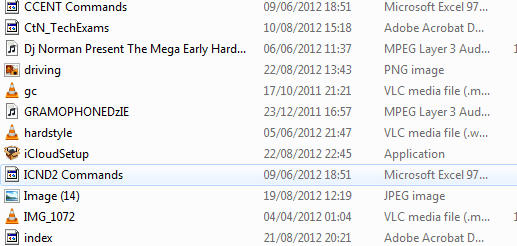
I have noticed that the file type icons aren't showing in explorer, while little it is extremely annoying as when searching for an excel document for example I just look for the icon.
It seems to work for some icons and not others- as shown in the image below.

Is there any fix for this?

Thanks
 

Attachments
  • icons.PNG
    icons.PNG
    10.5 KB · Views: 23

My Computer My Computer

At a glance

Windows 7 Home prem 64AMD Phenom II X4 955 Black Edition 3.2 GHz So...G.Skill RipJaw 4GB (2x2GB) DDR3 PC3-10666C8 1...Asus GeForce GTX 560Ti DirectCU II
OS
Windows 7 Home prem 64
CPU
AMD Phenom II X4 955 Black Edition 3.2 GHz Socket AM3
Motherboard
Asus M4A79XTD Evo AM3
Memory
G.Skill RipJaw 4GB (2x2GB) DDR3 PC3-10666C8 1333MHz
Graphics Card(s)
Asus GeForce GTX 560Ti DirectCU II
Sound Card
Asus Xonard)
Monitor(s) Displays
2* Samsung P2350
Screen Resolution
1920*1080
Hard Drives
Western Digital WD1001FALS 1TB Hard Drive SATAII 7200rpm 32MB Cache
PSU
Coolermaster RealPower 700W Modular PSU
Case
Cooler Master Storm Scout
Keyboard
Logitech G11
Mouse
Razer Deathadder 3500DPI
Internet Speed
50down 5up

My Computer My Computer

At a glance

Windows 7 Home Premium 64 bitIntel Core i7-4790G.SKILL 8GB (2 x 4GB) DDR3 F3-10666CL9D-8GBNTAMD Radeon R7 250
Computer type
PC/Desktop
Computer Manufacturer/Model Number
Custom Build
OS
Windows 7 Home Premium 64 bit
CPU
Intel Core i7-4790
Motherboard
GA-Z87X-D3H
Memory
G.SKILL 8GB (2 x 4GB) DDR3 F3-10666CL9D-8GBNT
Graphics Card(s)
AMD Radeon R7 250
Sound Card
Realtek ALC892
Monitor(s) Displays
Samsung UN32EH5000, Dell 1703FPT
Screen Resolution
1920 x 1080, 1280 x 1024
Hard Drives
WD5003AZEX
WD10EZEX
Samsung HD103SJ
Samsung 128 GB 840 PRO
PSU
SeaSonic M12II SS-500GM
Case
Fractal Design Define R4
Cooling
Zalman CNPS9900ALED
Keyboard
Logitech K800
Mouse
Logitech M705
Internet Speed
16 Mbps
Antivirus
Avast
Browser
Firefox
Other Info
Bose Companion 2 Multimedia Speakers
Didn't fix it :( I just decided to reinstall Windows.
 

My Computer My Computer

At a glance

Windows 7 Home prem 64AMD Phenom II X4 955 Black Edition 3.2 GHz So...G.Skill RipJaw 4GB (2x2GB) DDR3 PC3-10666C8 1...Asus GeForce GTX 560Ti DirectCU II
OS
Windows 7 Home prem 64
CPU
AMD Phenom II X4 955 Black Edition 3.2 GHz Socket AM3
Motherboard
Asus M4A79XTD Evo AM3
Memory
G.Skill RipJaw 4GB (2x2GB) DDR3 PC3-10666C8 1333MHz
Graphics Card(s)
Asus GeForce GTX 560Ti DirectCU II
Sound Card
Asus Xonard)
Monitor(s) Displays
2* Samsung P2350
Screen Resolution
1920*1080
Hard Drives
Western Digital WD1001FALS 1TB Hard Drive SATAII 7200rpm 32MB Cache
PSU
Coolermaster RealPower 700W Modular PSU
Case
Cooler Master Storm Scout
Keyboard
Logitech G11
Mouse
Razer Deathadder 3500DPI
Internet Speed
50down 5up
open a window/click organize ,then select folder and search options, in the window that opens select the view tab then check the box "display file icon on thumbnails"
 

My Computer My Computer

At a glance

Microsoft Windows 7 Home Premium 64-bit 7600IIx4 amd athelon 635 processor2x2gbati radeon HD 5450
Computer Manufacturer/Model Number
Hewlett packard/p6512uk
OS
Microsoft Windows 7 Home Premium 64-bit 7600
CPU
IIx4 amd athelon 635 processor
Motherboard
FOXCONN 2AA9
Memory
2x2gb
Graphics Card(s)
ati radeon HD 5450
Sound Card
(1) Realtek High Definition Audio (2) AMD High Definition
Monitor(s) Displays
samsung lcd tv 32"
Screen Resolution
1360x 768
Hard Drives
(1) WDC WD10 01FAES-60Z2A0 SATA Disk Device (2) Maxtor OneTouch USB Device (3) ST310003 33AS USB Device (4) WD My Book 1111 USB Device
PSU
?
Cooling
air!
Keyboard
wireless hp
Mouse
wireless Hp,optical
Internet Speed
1.10mb/s
Antivirus
MSE
Browser
Firefox
open a window/click organize ,then select folder and search options, in the window that opens select the view tab then check the box "display file icon on thumbnails"
That's a default so already ticked.

Though after my reinstall and doing the usual SSD tweaks I do it has done it again. Just seems to be on the Microsoft office files though (which obviously is a lot). It is also not on every file. For example the 2 excel documents on my desktop are fine while on another drive the excel documents (and word) have no icon - but then in a sub-folder they are fine!

EDIT: I just did option one in http://www.sevenforums.com/tutorials/49819-icon-cache-rebuild.html and now it is much worse. All the PDFs are broken, no excel ones are shown etc.

Why can't a new build for me ever go smoothly with no problems -.-
 

My Computer My Computer

At a glance

Windows 7 Home prem 64AMD Phenom II X4 955 Black Edition 3.2 GHz So...G.Skill RipJaw 4GB (2x2GB) DDR3 PC3-10666C8 1...Asus GeForce GTX 560Ti DirectCU II
OS
Windows 7 Home prem 64
CPU
AMD Phenom II X4 955 Black Edition 3.2 GHz Socket AM3
Motherboard
Asus M4A79XTD Evo AM3
Memory
G.Skill RipJaw 4GB (2x2GB) DDR3 PC3-10666C8 1333MHz
Graphics Card(s)
Asus GeForce GTX 560Ti DirectCU II
Sound Card
Asus Xonard)
Monitor(s) Displays
2* Samsung P2350
Screen Resolution
1920*1080
Hard Drives
Western Digital WD1001FALS 1TB Hard Drive SATAII 7200rpm 32MB Cache
PSU
Coolermaster RealPower 700W Modular PSU
Case
Cooler Master Storm Scout
Keyboard
Logitech G11
Mouse
Razer Deathadder 3500DPI
Internet Speed
50down 5up
you could try an uninstall of office but instead of selecting uninstall select repair.
 

My Computer My Computer

At a glance

Microsoft Windows 7 Home Premium 64-bit 7600IIx4 amd athelon 635 processor2x2gbati radeon HD 5450
Computer Manufacturer/Model Number
Hewlett packard/p6512uk
OS
Microsoft Windows 7 Home Premium 64-bit 7600
CPU
IIx4 amd athelon 635 processor
Motherboard
FOXCONN 2AA9
Memory
2x2gb
Graphics Card(s)
ati radeon HD 5450
Sound Card
(1) Realtek High Definition Audio (2) AMD High Definition
Monitor(s) Displays
samsung lcd tv 32"
Screen Resolution
1360x 768
Hard Drives
(1) WDC WD10 01FAES-60Z2A0 SATA Disk Device (2) Maxtor OneTouch USB Device (3) ST310003 33AS USB Device (4) WD My Book 1111 USB Device
PSU
?
Cooling
air!
Keyboard
wireless hp
Mouse
wireless Hp,optical
Internet Speed
1.10mb/s
Antivirus
MSE
Browser
Firefox
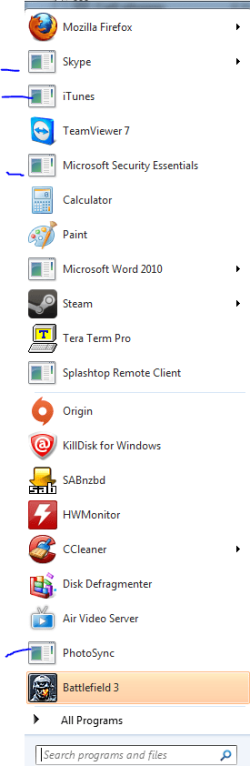
Could do, but as its for PDFs and all sorts now. For example when I click start it looks like this (attachment). No idea what is up.
 

Attachments

  • Capture.PNG
    Capture.PNG
    16.1 KB · Views: 10

My Computer My Computer

At a glance

Windows 7 Home prem 64AMD Phenom II X4 955 Black Edition 3.2 GHz So...G.Skill RipJaw 4GB (2x2GB) DDR3 PC3-10666C8 1...Asus GeForce GTX 560Ti DirectCU II
OS
Windows 7 Home prem 64
CPU
AMD Phenom II X4 955 Black Edition 3.2 GHz Socket AM3
Motherboard
Asus M4A79XTD Evo AM3
Memory
G.Skill RipJaw 4GB (2x2GB) DDR3 PC3-10666C8 1333MHz
Graphics Card(s)
Asus GeForce GTX 560Ti DirectCU II
Sound Card
Asus Xonard)
Monitor(s) Displays
2* Samsung P2350
Screen Resolution
1920*1080
Hard Drives
Western Digital WD1001FALS 1TB Hard Drive SATAII 7200rpm 32MB Cache
PSU
Coolermaster RealPower 700W Modular PSU
Case
Cooler Master Storm Scout
Keyboard
Logitech G11
Mouse
Razer Deathadder 3500DPI
Internet Speed
50down 5up
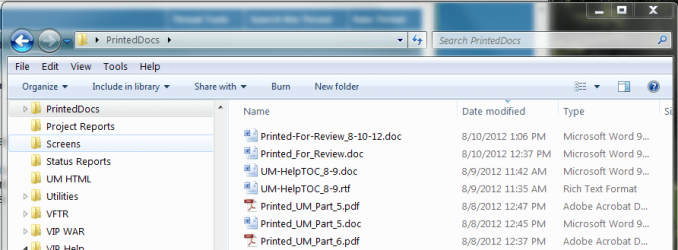
Um, could it be your selected options view in Exporer? Looks like you have:
> Explore to show "details"
> Explorer not to show extensions

I display extensions (begin editorial comment: really, why aren't you showing this?) and "Details" setting:

WinExplorer-details.PNG

On the toolbar, click the "More options" icon and from the drop list select "Medium Icons" or "Large Icons" such as this "Large Icons" (what a waste of screen space: /end editorial comment):

WinExplorer-large.PNG

Regards,
GEWB
 

My Computer My Computer

At a glance

Linux Mint / XP / Win7 Home, Pro, Ultimate / ...
Computer type
PC/Desktop
Computer Manufacturer/Model Number
(7 different computers booting up to 10 systems)
OS
Linux Mint / XP / Win7 Home, Pro, Ultimate / Win8.1 / Win10
Other Info
Four desktops, two laptops, one notebook and one tablet
I'm normally in list or details - for my picture folders I use large icons. I have 2 1080p monitors so generally my document folders cover a little over a quarter of one of these screens, hence why I use list so I can fit as much as I can in that small screen.

Have no need to display extensions for "known file types", keep the name of the file shorter and just look at the icon. Even if the icon was wrong I would rather have that than no icon like it was.

I did a system restore and that got everything working again, so hope it stays that way..
 

My Computer My Computer

At a glance

Windows 7 Home prem 64AMD Phenom II X4 955 Black Edition 3.2 GHz So...G.Skill RipJaw 4GB (2x2GB) DDR3 PC3-10666C8 1...Asus GeForce GTX 560Ti DirectCU II
OS
Windows 7 Home prem 64
CPU
AMD Phenom II X4 955 Black Edition 3.2 GHz Socket AM3
Motherboard
Asus M4A79XTD Evo AM3
Memory
G.Skill RipJaw 4GB (2x2GB) DDR3 PC3-10666C8 1333MHz
Graphics Card(s)
Asus GeForce GTX 560Ti DirectCU II
Sound Card
Asus Xonard)
Monitor(s) Displays
2* Samsung P2350
Screen Resolution
1920*1080
Hard Drives
Western Digital WD1001FALS 1TB Hard Drive SATAII 7200rpm 32MB Cache
PSU
Coolermaster RealPower 700W Modular PSU
Case
Cooler Master Storm Scout
Keyboard
Logitech G11
Mouse
Razer Deathadder 3500DPI
Internet Speed
50down 5up
Glad you found a solution!

Regards,
GEWB
 

My Computer My Computer

At a glance

Linux Mint / XP / Win7 Home, Pro, Ultimate / ...
Computer type
PC/Desktop
Computer Manufacturer/Model Number
(7 different computers booting up to 10 systems)
OS
Linux Mint / XP / Win7 Home, Pro, Ultimate / Win8.1 / Win10
Other Info
Four desktops, two laptops, one notebook and one tablet
Back
Top