

- Local time
- 4:19 PM
- Messages
- 568
I've moved log files, browsers cashe, etc., off from the SSD drive; in most cases this seemed to make sense on the long run. Just for checking the results, I've ran the Process Monitor v2.94 to see what else is written to the SSD drive during normal use of the system. Normal as in browser, email, some programs, Black Ops, etc.
In about an hour there had been over 7.5 million entries in the process monitor, out of which 7,559 were writes. These events totaled in 1.865 GBs, out of which the SSD received 20 MBs. The rest of the writes went to an HDD where the page file resides. It is not used normally, but process explorer utilizes the page file for cashing the entries.
While Black Ops, and the related Steam writing to the C drive had been anticipated, log files showing up in both places were not. Nor were these Firefox entries:
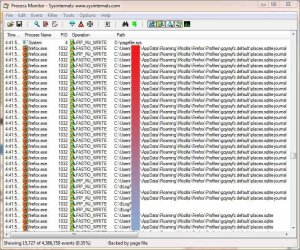
Especially, after digging through the FireFox "about:config" file and making this change:
The only other reference in the Firefox configuration is:
But that's for the Flash cookies and the location is utilized by IE as well. Speaking of the Devil....
IE allows to change the browser cashe location, but evidently doesn't really care about the new location either, just like Firefox:
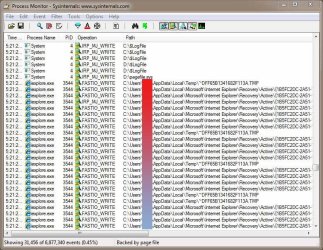
This raises as questions... Is it really worth of the effort of going through the "move log files from the SSD drive"? Short of moving the user folder to an HDD, is it really possible to move these folder writes off the SSD?
Thanks...
In about an hour there had been over 7.5 million entries in the process monitor, out of which 7,559 were writes. These events totaled in 1.865 GBs, out of which the SSD received 20 MBs. The rest of the writes went to an HDD where the page file resides. It is not used normally, but process explorer utilizes the page file for cashing the entries.
While Black Ops, and the related Steam writing to the C drive had been anticipated, log files showing up in both places were not. Nor were these Firefox entries:
Especially, after digging through the FireFox "about:config" file and making this change:
Code:
browser.cache.disk.parent_directory; D:\Firefox_Cashe
Code:
extensions.bprivacy.DataDir; C:\Users\UID\AppData\Roaming\MacromediaIE allows to change the browser cashe location, but evidently doesn't really care about the new location either, just like Firefox:
This raises as questions... Is it really worth of the effort of going through the "move log files from the SSD drive"? Short of moving the user folder to an HDD, is it really possible to move these folder writes off the SSD?
Thanks...
My Computer
- Computer type
- PC/Desktop
- Computer Manufacturer/Model Number
- Custom built at Home
- OS
- Windows 7 64-bit, Windows 8.1 64-bit, OSX El Capitan, Windows 10 (VMware)
- CPU
- Intel i5-3350P 3.1 GHz
- Motherboard
- Gigabyte GA-Z77X-UP5 TH
- Memory
- 16 GBs GSkill Sniper
- Graphics Card(s)
- Radeon HD 7850
- Sound Card
- VIA HD Audio
- Monitor(s) Displays
- Dell U2410 24"
- Screen Resolution
- 1920x1200
- Hard Drives
- 1 x Intel 520 240 GBs
1 x Seagate 1TBs SATA 2.0,
1 x Seagate 1TBs eSATA 2.0
- PSU
- Thermaltake 850W
- Case
- Antec P183
- Cooling
- Noctua NH-D14 Heatsink 2 x 120mm fans, 4 x 120mm case fans
- Keyboard
- Dell Multimedia keyboard
- Mouse
- Logitech Trackball
- Internet Speed
- 28.5 Mb/s


