Filehippo

cestode

New member
Hello everyone. I am a geriatric newbie struggling with PCs!
I used Filehippo to update software when I had XP. A hippo's head appeared in the notification area and its eyes opened on start up while it scanned for updates.

I have just updated to Windows 7. When I first install Filehippo, the icon appears in the notification area, However, when I switch off and reboot it is not there. I can, however, still run Filehippo manually from the desk top icon.
Any ideas how I can get the icon in the notification area to be visible and function even after rebooting?

Thanks

Cestode
 

My Computer

OS
windows 7
Hi cestode, by default Windows 7 will hide all Icons that are not active at a time.

To get it working again try this:
Click the Notification area and then click "Customise"
Find the Filehippo Icon and set it to "Show Icon and Notifications"
 

My Computer

Computer type
PC/Desktop
Computer Manufacturer/Model Number
Medion Erazer (note to self: insert model number) - with custom additions
OS
Windows 10 Pro x64
CPU
Intel Core i5 7400 @ 3.00GHz
Motherboard
OEM supllied with PC
Memory
8GB 2133Mhz DDR4 (OEM supplied)
Graphics Card(s)
Gygabyte Windforce GTX 1050Ti (Factory Overclocked)
Sound Card
Realtek
Monitor(s) Displays
Acer Al1980 + HKC
Screen Resolution
1360*768(HKC) / 1280*1024(Acer)
Hard Drives
1TB Toshiba
1TB WD Caviar Green
120GB Samsung Evo 840
PSU
OEM supplied (no power rating on case)
Case
OEM Supplied
Cooling
Stock
Keyboard
Logitech Wireless
Mouse
Logitect Wireless
Internet Speed
40Mb/s Down 10Mb/s Up
Antivirus
Defender
Browser
Firefox
Hello everyone. I am a geriatric newbie struggling with PCs!
I used Filehippo to update software when I had XP. A hippo's head appeared in the notification area and its eyes opened on start up while it scanned for updates.

I have just updated to Windows 7. When I first install Filehippo, the icon appears in the notification area, However, when I switch off and reboot it is not there. I can, however, still run Filehippo manually from the desk top icon.
Any ideas how I can get the icon in the notification area to be visible and function even after rebooting?

Thanks

Cestode

What might be of more help to you is to "pin it to the Taskbar". It will always be handy for you. Drag the desktop icon to the Taskbar and click your mouse.
 

My Computer

Computer type
PC/Desktop
Computer Manufacturer/Model Number
Custom Build
OS
Windows 7 Home Premium 32-Bit - Build 7600 SP1
CPU
Intel Core i3-2120 3.30Ghz
Motherboard
Asus P8Z68-V LX Intel Z68 Socket H2 ATX
Memory
Kingston 4 GB DDR3 1333 mhz
Graphics Card(s)
AMD Radeon HD6670
Sound Card
Sound Blaster Audigy SE 24-Bit
Monitor(s) Displays
Asus VE228
Screen Resolution
1440 X 900
Hard Drives
OCZ Vertex 3 120 GB Sata 3 SSD ==
Kingston SH103/S3 120 G Hyper X 120 GB SSD ==
Western Digital 500 GB Caviar Green 7200 RPM ==
PSU
Corsair CX600M == 600 Watt
Case
NZXT Apollo - Silver with Clear Side Panel
Cooling
Three 120 mm Fans
Keyboard
Microsoft Natural 4000
Mouse
Microsoft Custom Optical 3000
Internet Speed
AT&T Fiber Optic Wireless Network
Antivirus
Microsoft Security Essentials
Browser
Chrome
Other Info
120 mm Blue LED Fan -- Three Blue LED Lazer Light Sticks
Many thanks for such a prompt reply severedsolo.
I have tried your suggestions via customise notification area.
The Filehippo section is marked as show icon and notifications but alas the icon is not shown.
But thanks for your suggestion
Best
Cestode
 

My Computer

OS
windows 7
thanks to you too bigmck
I was a student in Houston at Rice for 2 years in the 1960s - a great time! As a brit I found the climate a bit tough though
Best
Cestode
 

My Computer

OS
windows 7
just right click and customize to show you can basicly limit all the little buggy icons off the desk top and even stop notifactions which is easier then system start up and disabling all of them from starting when windows start
 
Last edited:

My Computer

Computer type
PC/Desktop
Computer Manufacturer/Model Number
CoreI7-6700K MrFingerIII Special Builds
OS
Windows 10 Home Premium 64bit sp1
CPU
Intel I7-6700K @ 4.6 Ghz 1.344 volts everyday OC
Motherboard
Asrock Fatality K6 Z170 Socket 1151
Memory
32GB G-Skill TridentZ 3200mhz 16-18-18-38 DDR4
Graphics Card(s)
Sli Gigabyte Windforce GTX 980 G1
Sound Card
AC97 Creative Rage Tactic 3D Headphones Bluetooth
Monitor(s) Displays
27" Asus ROG Swift PG278Q G-Sync 48" Vizio Smart HD TV
Screen Resolution
2560x1440p 27"- 48" Currently Gaming at 2560x1440p Res 2K
Hard Drives
250GB Samsung Evo840SSD Seagate baracuda 500 GB WD Mybook 500Gb 1TB Seagate Barracuda
PSU
HX1050w Corsair Silver 80plus certified crosfire/sli
Case
Enthod Pro Full Tower
Cooling
Corsair H110i GT 280 mm High Performance WaterBlock
Keyboard
Logitech wireless keyboard
Mouse
Logitech wireless mouse
Internet Speed
Cox Cable 100+ mb
Antivirus
WebRoot Spysweeper with Antivirus
Browser
IE-10, Chrome, Opera
Other Info
My Other Rig is a AMD FX8320E @4.6Ghz 16GB Ballistic Sport Ram
Mobo Asrock Fatality 990FX 120GB OCZ SSD 1TB Seagate Barracuda Corsair H75 Cooling PSU Corsair CX750
GPU GTX Gigabyte 970G1
Has always worked just fine for me. :huh:

Did you set it as severedsolo said, and then rebooted your computer?

Do you have the when windows starts option checked from it's settings?

Capture.JPG
 

My Computer

Computer type
PC/Desktop
Computer Manufacturer/Model Number
Airbot 2.0
OS
Windows 7 Ultimate x64 SP1
CPU
Core i7 920 (D0) @ 4Ghz, *26c idle *65c full load on air
Motherboard
Asus P6X58D Premium - Sata 6Gb/s - USB 3.0
Memory
12GB DDR3 Corsair Dominator -CMD12GX3M6A1600C8 at 1600MHz
Graphics Card(s)
Zotac Geforce GTX 770
Sound Card
ASUS Xonar D2X
Monitor(s) Displays
1 LG 24" Flatron W2453V-PF 1 Samsung 24" P2450H both 2ms RT
Screen Resolution
1920x1080@60hz
Hard Drives
1 Samsung 250GB 840 Evo SSD
1 OCZ Vertex2 180GB SSD
1 TB Samsung Spinpoint F1 7200RPM 32MB cache
2 500GB WD Caviar Blacks 7200RPM 32MB cache (WD5001AALS)

Pioneer DVD Burner DVR-S18M
PSU
Corsair HX1000W
Case
Cooler Master HAF 932
Cooling
Case Fans *3 230mm, *1 140mm/CPU - *Tuniq Tower 120 Extreme
Keyboard
Logitech Wireless MK700
Mouse
Logitech Wireless MK700
Internet Speed
DL 15 Mbps UL 0.98 Mbps
Antivirus
None
Browser
Firefox Nightly
Other Info
Processor-7.7 *RAM- 7.9 *Graphics-7.9 *Gaming Graphics- 7.9 *SSD- 7.8 W.E.I final score= 7.7
*Phone- LG Nexus 5
Thanks solarstarshines and airbot. I have done all you suggested but to no avail.
When I first install Filehippo all works well. But when I reboot the PC, the notification icon disappears.
I think I'll have to revert to manual update checks
But thanks to all for great support
Cestode
 

My Computer

OS
windows 7
Not sure why it's not working right then. It does have an option there, in my screenshot above, that allows you let it close when it finds no updates. Not sure on if you are actually seeing the icon in the notification bar quickly and then it's disappearing, or you're not seeing it there at all after a reboot.

From your post above, it sounds as if you might be seeing it quickly then it's closing.

I would suggest uninstalling it, then re-download a new installer of it, and install it again. See if it works correctly then.
 

My Computer

Computer type
PC/Desktop
Computer Manufacturer/Model Number
Airbot 2.0
OS
Windows 7 Ultimate x64 SP1
CPU
Core i7 920 (D0) @ 4Ghz, *26c idle *65c full load on air
Motherboard
Asus P6X58D Premium - Sata 6Gb/s - USB 3.0
Memory
12GB DDR3 Corsair Dominator -CMD12GX3M6A1600C8 at 1600MHz
Graphics Card(s)
Zotac Geforce GTX 770
Sound Card
ASUS Xonar D2X
Monitor(s) Displays
1 LG 24" Flatron W2453V-PF 1 Samsung 24" P2450H both 2ms RT
Screen Resolution
1920x1080@60hz
Hard Drives
1 Samsung 250GB 840 Evo SSD
1 OCZ Vertex2 180GB SSD
1 TB Samsung Spinpoint F1 7200RPM 32MB cache
2 500GB WD Caviar Blacks 7200RPM 32MB cache (WD5001AALS)

Pioneer DVD Burner DVR-S18M
PSU
Corsair HX1000W
Case
Cooler Master HAF 932
Cooling
Case Fans *3 230mm, *1 140mm/CPU - *Tuniq Tower 120 Extreme
Keyboard
Logitech Wireless MK700
Mouse
Logitech Wireless MK700
Internet Speed
DL 15 Mbps UL 0.98 Mbps
Antivirus
None
Browser
Firefox Nightly
Other Info
Processor-7.7 *RAM- 7.9 *Graphics-7.9 *Gaming Graphics- 7.9 *SSD- 7.8 W.E.I final score= 7.7
*Phone- LG Nexus 5
I have not checked the 'close if no updates are found' box, Airbot.
The icon definitely does not appear except when I do a new download of Filehippo It just disappears if I do a reboot of the PC.
Thanks
Cestode
 

My Computer

OS
windows 7
I don't have an answer for it then. Sorry.
 

My Computer

Computer type
PC/Desktop
Computer Manufacturer/Model Number
Airbot 2.0
OS
Windows 7 Ultimate x64 SP1
CPU
Core i7 920 (D0) @ 4Ghz, *26c idle *65c full load on air
Motherboard
Asus P6X58D Premium - Sata 6Gb/s - USB 3.0
Memory
12GB DDR3 Corsair Dominator -CMD12GX3M6A1600C8 at 1600MHz
Graphics Card(s)
Zotac Geforce GTX 770
Sound Card
ASUS Xonar D2X
Monitor(s) Displays
1 LG 24" Flatron W2453V-PF 1 Samsung 24" P2450H both 2ms RT
Screen Resolution
1920x1080@60hz
Hard Drives
1 Samsung 250GB 840 Evo SSD
1 OCZ Vertex2 180GB SSD
1 TB Samsung Spinpoint F1 7200RPM 32MB cache
2 500GB WD Caviar Blacks 7200RPM 32MB cache (WD5001AALS)

Pioneer DVD Burner DVR-S18M
PSU
Corsair HX1000W
Case
Cooler Master HAF 932
Cooling
Case Fans *3 230mm, *1 140mm/CPU - *Tuniq Tower 120 Extreme
Keyboard
Logitech Wireless MK700
Mouse
Logitech Wireless MK700
Internet Speed
DL 15 Mbps UL 0.98 Mbps
Antivirus
None
Browser
Firefox Nightly
Other Info
Processor-7.7 *RAM- 7.9 *Graphics-7.9 *Gaming Graphics- 7.9 *SSD- 7.8 W.E.I final score= 7.7
*Phone- LG Nexus 5
Try to put the program into the startup programs. Find the program.exe e.g. in Program Files on C and do a "send to" desktop. That creates a shortcut of the program on the desktop. Then press "Start" and type: shell:startup and press enter. That will put the startup folder on your desktop. Drag the shortcut from before into that folder and close the folder. Now the icon should appear all the time in the notification area.
If it appears only in the notification box, click on the little arrow under it and drag the icon onto the taskbar.
 

My Computer

Computer Manufacturer/Model Number
HP, Dell, Gateway, Toshiba - 4 laptops and 2 desktops
OS
Vista, Windows7, Mint Mate, Zorin, Windows 8
CPU
from 1.6GHz Duo to i7
Monitor(s) Displays
2x HP w2207
Hard Drives
5x HDD, 7x SSD, 12x Externals
Keyboard
with trackball - no mices
Mouse
Trackball mice
Internet Speed
DSL 6000
thanks whs
That sounds a bit complicated for me but I'll try tomorrow morning and post the result
Best
Cestode
 

My Computer

OS
windows 7
thanks whs
That sounds a bit complicated for me but I'll try tomorrow morning and post the result
Best
Cestode
It is actually very simple. All you need to do is to move a shortcut of the program.exe into the startup folder. I have given a bit more verse assuming you might not have done a similar operation before. And dragging the shortcut from the notification box to the taskbar (if required), should be simple too.
 

My Computer

Computer Manufacturer/Model Number
HP, Dell, Gateway, Toshiba - 4 laptops and 2 desktops
OS
Vista, Windows7, Mint Mate, Zorin, Windows 8
CPU
from 1.6GHz Duo to i7
Monitor(s) Displays
2x HP w2207
Hard Drives
5x HDD, 7x SSD, 12x Externals
Keyboard
with trackball - no mices
Mouse
Trackball mice
Internet Speed
DSL 6000
Personally I'd drop FileHippo, PSI Secunia is far better but even then I wouldn't have it running in the background, as much as it wants to. I'd set it up that it runs once a week as a scheduled task.
That is not a bad idea. Just make sure you run Secunia either manually or as a scheduled task as Sympatico suggests. Else it can be somewhat a pain in the neck.
 

My Computer

Computer Manufacturer/Model Number
HP, Dell, Gateway, Toshiba - 4 laptops and 2 desktops
OS
Vista, Windows7, Mint Mate, Zorin, Windows 8
CPU
from 1.6GHz Duo to i7
Monitor(s) Displays
2x HP w2207
Hard Drives
5x HDD, 7x SSD, 12x Externals
Keyboard
with trackball - no mices
Mouse
Trackball mice
Internet Speed
DSL 6000
Secunia PSI will look for insecure, and end of life programs. But if an older version is not insecure, it won't tell you a new version is available. Fillehippo Update Checker tells you when a new version (or Beta version if you so choose) is available for Apps you have installed. Not quite a comparison. I generally check File Hippo every day since only takes a second, but I have the Update Checker exe, not installed. A Guy
 

My Computer

Computer type
PC/Desktop
OS
Windows 10 Home x64
CPU
INTEL Core i5-750 Quad-Core 3.37GHz
Motherboard
ASUS P7P55D
Memory
HyperX Fury Black Series 8GB (2 x 4GB) 1866Mhz
Graphics Card(s)
EVGA GeForce GTX 750 Superclocked 1GB 128-Bit GDDR5
Monitor(s) Displays
LG 32MA68HY 32" IPS
Screen Resolution
1920 x 1080
Hard Drives
Samsung 840 Evo 120GB, SEAGATE 500GB Barracuda® 7200.12, SATA 3 Gb/s, 7200 RPM, 16MB cache
PSU
ANTEC TruePower New TP-550, 80 PLUS, 550W
Case
ANTEC Three Hundred Illusion
Cooling
COOLER MASTER Hyper 212 Plus, 4 x 120mm 1 x 140mm Noctua's
Internet Speed
85 + Mbps
Antivirus
Avast
Browser
Vivaldi
I did what you suggested whs and confirmed that the .exe file was in the shell startup folder. However it has not cured the problem. The notification icon only appears after a fresh install of Filehippo but disappears on reboot. Thanks for the alternative software suggestion Sympatico and your comments A Guy.
I think I'll stick with Filehippo and do manual checks.
I really appreciate all your support
 

My Computer

OS
windows 7
OK, didn't want to leave you hanging if you want to go further. I set mine to start with windows. At 1st I got the icon for the hippo and his eyes blinked. But then the notification icon turned to the green one on the left in this pic

Update.jpg

Clicking on it did bring up the update page, but no hippo after a few seconds. Is it possible that yours is changing as well? I have no experience with it before, so can't say if this is a change.

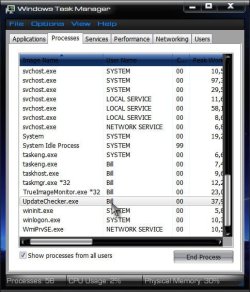
Also, when windows has started, with the checker setup per all the advice above (set to start with windows) do you show this process in task manager (Ctrl + Shift + Esc)?

Task.jpg

There are other update apps that I have tried, I like Filehippo, so I stuck to it, but it only shows updates for programs you have installed that Filehippo also carries. Here are some other update apps:

Free Sortware Update Monitors

A Guy
 

My Computer

Computer type
PC/Desktop
OS
Windows 10 Home x64
CPU
INTEL Core i5-750 Quad-Core 3.37GHz
Motherboard
ASUS P7P55D
Memory
HyperX Fury Black Series 8GB (2 x 4GB) 1866Mhz
Graphics Card(s)
EVGA GeForce GTX 750 Superclocked 1GB 128-Bit GDDR5
Monitor(s) Displays
LG 32MA68HY 32" IPS
Screen Resolution
1920 x 1080
Hard Drives
Samsung 840 Evo 120GB, SEAGATE 500GB Barracuda® 7200.12, SATA 3 Gb/s, 7200 RPM, 16MB cache
PSU
ANTEC TruePower New TP-550, 80 PLUS, 550W
Case
ANTEC Three Hundred Illusion
Cooling
COOLER MASTER Hyper 212 Plus, 4 x 120mm 1 x 140mm Noctua's
Internet Speed
85 + Mbps
Antivirus
Avast
Browser
Vivaldi
When I re-install Filehippo, A Guy, it behaves exactly as you describe. The hippo's eyes open in the notification area and turns into a green square if updates are available.
However, if I reboot, nothing happens - there is no hippo in the notification area.

I checked Task manager - update checker is not listed! And yet the update checker file is in the start up folder,as described by whs.
I remain confused!
 

My Computer

OS
windows 7
Back
Top