Filenames like ".emacs"

ratsrcute

New member
Member
Local time
2:13 PM
Messages
50
This isn't really a "performance & maintenance" question but there isn't really a category on the forum for it. I am hoping someone here will be smart enough to know the answer.

A GNU (open-source) program called "Emacs" requires a file in the root of the C: drive named ".emacs". This worked fine on XP, but Win 7 is throwing a bunch of obstacles in my way to creating this file. Can someone explain how to create and/or rename a file to something like this?

Thanks,
Mike
 

My Computer My Computer

OS
Win 7
Hi Mike and welcome to Windows 7 Forums :party:

I've not heard of this program, but, nonetheless, I've downloaded, extracted and run it, and it has created a folder named .emacs.d in the C:\Users\Dwarf\AppData\Roaming\ directory. Inside this folder is another folder, auto-save-list.

Note that Dwarf is my username and that yours, of course, will be different.
 

My Computer My Computer

Computer type
PC/Desktop
Computer Manufacturer/Model Number
Dwarf Dwf/11/2012 r09/2013
OS
Windows 8.1 Pro RTM x64
CPU
Intel Core-i5-3570K 4-core @ 3.4GHz (Ivy Bridge) (OC 4.4GHz)
Motherboard
ASRock Z77 Extreme4-M
Memory
4 x 4GB DDR3-1600 Corsair Vengeance CMZ8GX3M2A1600C9B (16GB)
Graphics Card(s)
MSI GeForce GTX770 Gaming OC 2GB
Sound Card
Realtek High Definition on board solution (ALC 898)
Monitor(s) Displays
ViewSonic VA1912w Widescreen (VGA)
Screen Resolution
1440x900
Hard Drives
OCZ Agility 3 SSD 120GB SATA III x2 (RAID 0)
Samsung HD501LJ 500GB SATA II x2
Hitachi HDS721010CLA332 1TB SATA II
Iomega 1.5TB Ext USB 2.0
WD 2.0TB Ext USB 3.0
PSU
XFX Pro Series 850W Semi-Modular
Case
Gigabyte IF233
Cooling
1 x 120mm Front Inlet 1 x 120mm Rear Exhaust
Keyboard
Microsoft Comfort Curve Keyboard 3000 (USB)
Mouse
Microsoft Comfort Mouse 3000 for Business (USB)
Internet Speed
NetGear DG834Gv3 ADSL Modem/Router (Ethernet) ~4.0 Mb/s (O2)
Antivirus
Avast! 8.0.1497
Browser
IE 11
Other Info
Optical Drive: HL-DT-ST BD-RE BH10LS30 SATA Bluray
Lexmark S305 Printer/Scanner/Copier (USB)
WEI Score: 8.1/8.1/8.5/8.5/8.25
Asus Eee PC 1011PX Netbook (Windows 7 x86 Starter)
Hi Mike and welcome to Windows 7 Forums :party:

I've not heard of this program, but, nonetheless, I've downloaded, extracted and run it, and it has created a folder named .emacs.d in the C:\Users\Dwarf\AppData\Roaming\ directory. Inside this folder is another folder, auto-save-list.

Note that Dwarf is my username and that yours, of course, will be different.

Hey, thanks a lot for the experiment. The auto-save-list and .emacs.d folders are different from the ".emacs" file, so that still leaves me with the question of how to create a file with a name like that (or if I'm even allowed to). (Your experiment may show that the .emacs file should go in c:\users\<name>\AppData rather than c:\.) Emacs will run fine without a .emacs, but you will lose the ability to customize the startup of the program, so your experiment may not have indicated anything about .emacs.

Thanks,
Mike
 

My Computer My Computer

OS
Win 7
Hi Mike,

How do you create this .emacs file? If you give me an example, I'll see what I can do.
 

My Computer My Computer

Computer type
PC/Desktop
Computer Manufacturer/Model Number
Dwarf Dwf/11/2012 r09/2013
OS
Windows 8.1 Pro RTM x64
CPU
Intel Core-i5-3570K 4-core @ 3.4GHz (Ivy Bridge) (OC 4.4GHz)
Motherboard
ASRock Z77 Extreme4-M
Memory
4 x 4GB DDR3-1600 Corsair Vengeance CMZ8GX3M2A1600C9B (16GB)
Graphics Card(s)
MSI GeForce GTX770 Gaming OC 2GB
Sound Card
Realtek High Definition on board solution (ALC 898)
Monitor(s) Displays
ViewSonic VA1912w Widescreen (VGA)
Screen Resolution
1440x900
Hard Drives
OCZ Agility 3 SSD 120GB SATA III x2 (RAID 0)
Samsung HD501LJ 500GB SATA II x2
Hitachi HDS721010CLA332 1TB SATA II
Iomega 1.5TB Ext USB 2.0
WD 2.0TB Ext USB 3.0
PSU
XFX Pro Series 850W Semi-Modular
Case
Gigabyte IF233
Cooling
1 x 120mm Front Inlet 1 x 120mm Rear Exhaust
Keyboard
Microsoft Comfort Curve Keyboard 3000 (USB)
Mouse
Microsoft Comfort Mouse 3000 for Business (USB)
Internet Speed
NetGear DG834Gv3 ADSL Modem/Router (Ethernet) ~4.0 Mb/s (O2)
Antivirus
Avast! 8.0.1497
Browser
IE 11
Other Info
Optical Drive: HL-DT-ST BD-RE BH10LS30 SATA Bluray
Lexmark S305 Printer/Scanner/Copier (USB)
WEI Score: 8.1/8.1/8.5/8.5/8.25
Asus Eee PC 1011PX Netbook (Windows 7 x86 Starter)
Hi Dwarf,
Some Emacs experts told me that you create it by running emacs, then typing

Ctrl-x Ctrl-f
at the prompt type
~/.emacs<Enter>
then type anything, then save by
Ctrl-x Ctrl-s
and it should be created, probably in the AppData directory. I will try this myself tonight but I am away from my Win 7 laptop right now.

After you create it, because you probably won't create valid lisp syntax Emacs will give an error when you next start it, but that won't harm anything and is not a sign anything went wrong with the simple existence of this file.

They said it should work as long as you create it from emacs and save it using the filename as above. My problem was trying to create it from Notepad, I think. Also apparently C:\ is not the right location, even though on Win XP I used that location.

Thanks for your help,
Mike
 

My Computer My Computer

OS
Win 7
Hi Mike,

Just tried what you said, and the file was created in the highlighted location (see image below).
Capture.PNG
 

My Computer My Computer

Computer type
PC/Desktop
Computer Manufacturer/Model Number
Dwarf Dwf/11/2012 r09/2013
OS
Windows 8.1 Pro RTM x64
CPU
Intel Core-i5-3570K 4-core @ 3.4GHz (Ivy Bridge) (OC 4.4GHz)
Motherboard
ASRock Z77 Extreme4-M
Memory
4 x 4GB DDR3-1600 Corsair Vengeance CMZ8GX3M2A1600C9B (16GB)
Graphics Card(s)
MSI GeForce GTX770 Gaming OC 2GB
Sound Card
Realtek High Definition on board solution (ALC 898)
Monitor(s) Displays
ViewSonic VA1912w Widescreen (VGA)
Screen Resolution
1440x900
Hard Drives
OCZ Agility 3 SSD 120GB SATA III x2 (RAID 0)
Samsung HD501LJ 500GB SATA II x2
Hitachi HDS721010CLA332 1TB SATA II
Iomega 1.5TB Ext USB 2.0
WD 2.0TB Ext USB 3.0
PSU
XFX Pro Series 850W Semi-Modular
Case
Gigabyte IF233
Cooling
1 x 120mm Front Inlet 1 x 120mm Rear Exhaust
Keyboard
Microsoft Comfort Curve Keyboard 3000 (USB)
Mouse
Microsoft Comfort Mouse 3000 for Business (USB)
Internet Speed
NetGear DG834Gv3 ADSL Modem/Router (Ethernet) ~4.0 Mb/s (O2)
Antivirus
Avast! 8.0.1497
Browser
IE 11
Other Info
Optical Drive: HL-DT-ST BD-RE BH10LS30 SATA Bluray
Lexmark S305 Printer/Scanner/Copier (USB)
WEI Score: 8.1/8.1/8.5/8.5/8.25
Asus Eee PC 1011PX Netbook (Windows 7 x86 Starter)
Awesome! I'm sure it will work for me when I next get a chance.

Now, perhaps you can explore the wonders of Emacs the editor. Maybe you'll like it. :D
 

My Computer My Computer

OS
Win 7
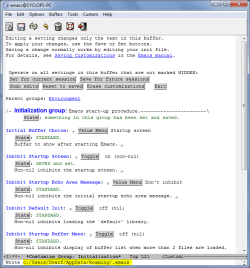
It does work. I firstly deleted the .emacs and the .emacs~ files to ensure that I was starting with a clean slate.
Capture.PNG
I then selected Customize Startup.
Capture1.PNG
Next, I toggled and saved the option Inhibit Startup Screen.
Capture2.png
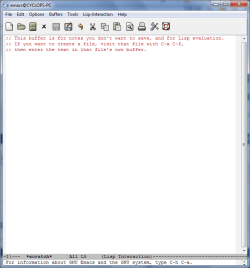
I then closed the application and restarted it.
Capture3.PNG
 

My Computer My Computer

Computer type
PC/Desktop
Computer Manufacturer/Model Number
Dwarf Dwf/11/2012 r09/2013
OS
Windows 8.1 Pro RTM x64
CPU
Intel Core-i5-3570K 4-core @ 3.4GHz (Ivy Bridge) (OC 4.4GHz)
Motherboard
ASRock Z77 Extreme4-M
Memory
4 x 4GB DDR3-1600 Corsair Vengeance CMZ8GX3M2A1600C9B (16GB)
Graphics Card(s)
MSI GeForce GTX770 Gaming OC 2GB
Sound Card
Realtek High Definition on board solution (ALC 898)
Monitor(s) Displays
ViewSonic VA1912w Widescreen (VGA)
Screen Resolution
1440x900
Hard Drives
OCZ Agility 3 SSD 120GB SATA III x2 (RAID 0)
Samsung HD501LJ 500GB SATA II x2
Hitachi HDS721010CLA332 1TB SATA II
Iomega 1.5TB Ext USB 2.0
WD 2.0TB Ext USB 3.0
PSU
XFX Pro Series 850W Semi-Modular
Case
Gigabyte IF233
Cooling
1 x 120mm Front Inlet 1 x 120mm Rear Exhaust
Keyboard
Microsoft Comfort Curve Keyboard 3000 (USB)
Mouse
Microsoft Comfort Mouse 3000 for Business (USB)
Internet Speed
NetGear DG834Gv3 ADSL Modem/Router (Ethernet) ~4.0 Mb/s (O2)
Antivirus
Avast! 8.0.1497
Browser
IE 11
Other Info
Optical Drive: HL-DT-ST BD-RE BH10LS30 SATA Bluray
Lexmark S305 Printer/Scanner/Copier (USB)
WEI Score: 8.1/8.1/8.5/8.5/8.25
Asus Eee PC 1011PX Netbook (Windows 7 x86 Starter)
Thanks! You are a helpful guy! I still haven't been able to get to my Win 7 laptop to try it! I feel like I'm the cobbler and the elves are making shoes in the middle of the night. Very convenient. :)
 

My Computer My Computer

OS
Win 7
Hello! It seems like you guys have solved the issue here, but I wanted to point out that GNU Emacs for Windows can accept the '.emacs' file as '_emacs'. As long as you have that file in your home directory:

emacs_home.PNG

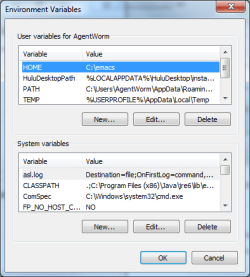
and you have your HOME variable set in the Environment Variables:

EnvironmentVariables.PNG

At this point it will load it up and you won't have to worry about having a file starting with a '.'

I hope this helps. :)
 

My Computer My Computer

OS
Windows 7 Ultimate x64
Back
Top