Solved Files in "Documents" Library removed from folders

HiLo

New member
Local time
1:31 PM
Messages
6
HELP!! I got tired of all the clutter in the "Documents" section of the Libraries. I created a new Library for my client files. I included a folder and many sub-folders from deep within the Documents library. It is working properly, the files and folders are now available in the new Library.

GREAT, BUT!!! Now every file (even I.E. favorites) that was in the Documents library is listed removed from their folders. This is over 13,000 files! :cry: In the "Documents" Library there is still "My Documents" file (I came from XP), and the files and folders are properly displayed there.

How do I get the Documents file to not show me every file I have removed from their folders?
 

My Computer My Computer

At a glance

Windows 7
OS
Windows 7
Hello and welcome to the Forum. Where did all this "clutter" come from. Are they files that you transferred from another PC?
 

My Computer My Computer

At a glance

Microsoft Windows 7 Home Premium 64-bit 7601 ...Intel(R) Core(TM) i7-3770 CPU @ 3.40GHz8.00 GBIntel(R) HD Graphics 4000
Computer type
PC/Desktop
OS
Microsoft Windows 7 Home Premium 64-bit 7601 Multiprocessor Free Service Pack 1
CPU
Intel(R) Core(TM) i7-3770 CPU @ 3.40GHz
Motherboard
ASUSTeK COMPUTER INC. P8H77-M
Memory
8.00 GB
Graphics Card(s)
Intel(R) HD Graphics 4000
Sound Card
On Board
Monitor(s) Displays
Dell 24"
Screen Resolution
1920 x 1080
Hard Drives
(1) INTEL SSDSC2CT180A3 ATA Device (2) ST500DM002-1BD142 ATA Device (3) WDC WD3200AAKS-75L9A0 ATA Device (4) Generic- Compact Flash USB Device (5) Generic- MS/MS-Pro USB Device (6) Generic- SD/MMC USB Device (7) Generic- SM/xD-Picture USB
PSU
500w Corsair
Case
Cooler Master
Cooling
3 Fans
Keyboard
Logitech MK300
Mouse
Logitech WOM
Internet Speed
75Mb
Antivirus
Norton 360
Browser
Firefox, Opera, IE
Some transferred from XP (and now deleted), but the list is long, here are a few.

AXIS Media Control - Recordings
AXIS Media Control - Snapshots
Bluetooth Exchange Folder
CoffeeCup
Cyber Link
Downloads
Fax
IGC

etc.

But that is not the issue, why are all my files (carefully placed in trees of folders) been placed outside of their folders in the Documents Library?
 

My Computer My Computer

At a glance

Windows 7
OS
Windows 7

My Computer My Computer

At a glance

Windows 10 Pro X64Intel Quad Core i7-4770 @ 3.4Ghz16.0GB PC3-12800 DDR3 SDRAM 1600 MHzIntel Integrated HD Graphics
Computer type
PC/Desktop
Computer Manufacturer/Model Number
Lenovo IdeaCenter 450
OS
Windows 10 Pro X64
CPU
Intel Quad Core i7-4770 @ 3.4Ghz
Memory
16.0GB PC3-12800 DDR3 SDRAM 1600 MHz
Graphics Card(s)
Intel Integrated HD Graphics
Sound Card
Realtek HD Audio
Monitor(s) Displays
HP 22" LCD
Screen Resolution
1680 x 1050
Hard Drives
250GB Samsung EVO SATA-3 SSD
2TB Seagate ST2000DM001 SATA-2
1.5TB Seagate ST3150041AS SATA
Keyboard
Dell USB
Mouse
Lenovo USB
Internet Speed
Cable via Road Runner 3MB Upload, 30MB Download
Antivirus
Windows Defender, MBAM Pro, MBAE
Browser
Seamonkey
Other Info
UEFI/GPT
PLDS DVD-RW DH16AERSH
I'm sure I haven't explained this well, and I'm not sure that I screenshot will display the problem. I'll try again to see if I can explain.

I had a DOCUMENTS library. I transferred my XP data, word processing, etc to this library. It had a large number of folders, Bluetooth, Fax etc. 90% of the time I need to go to a folder I call FILES, where client documents, etc are located.

This morning I created a LIBRARY titled FILES, so I now have LIBRARIES titled:
DOCUMENTS
FILES
MUSIC
PICTURES
VIDEOS

I associated the folder named FILES with the Library titled FILES. It is working properly.

BUT, now then I click on the DOCUMENTS Library every single file that was in the many Folders are now displayed minus their folders. I can click PROPERTIES for the files and the correct path is listed, and the file is ALSO still in the proper folder (and sub-folders) elsewhere. This is over 13,000 files (these are my files produced over 20 years of time). This even includes the contents of the IE FAVORITES folder.

Did I make this any clearer??
 

My Computer My Computer

At a glance

Windows 7
OS
Windows 7
I'm not sure this is any clearer to me but is it possible you have the same folders associated with more than one library?
 

My Computer My Computer

At a glance

Microsoft Windows 7 Home Premium 64-bit 7601 ...Intel(R) Core(TM) i7-3770 CPU @ 3.40GHz8.00 GBIntel(R) HD Graphics 4000
Computer type
PC/Desktop
OS
Microsoft Windows 7 Home Premium 64-bit 7601 Multiprocessor Free Service Pack 1
CPU
Intel(R) Core(TM) i7-3770 CPU @ 3.40GHz
Motherboard
ASUSTeK COMPUTER INC. P8H77-M
Memory
8.00 GB
Graphics Card(s)
Intel(R) HD Graphics 4000
Sound Card
On Board
Monitor(s) Displays
Dell 24"
Screen Resolution
1920 x 1080
Hard Drives
(1) INTEL SSDSC2CT180A3 ATA Device (2) ST500DM002-1BD142 ATA Device (3) WDC WD3200AAKS-75L9A0 ATA Device (4) Generic- Compact Flash USB Device (5) Generic- MS/MS-Pro USB Device (6) Generic- SD/MMC USB Device (7) Generic- SM/xD-Picture USB
PSU
500w Corsair
Case
Cooler Master
Cooling
3 Fans
Keyboard
Logitech MK300
Mouse
Logitech WOM
Internet Speed
75Mb
Antivirus
Norton 360
Browser
Firefox, Opera, IE
Sorry!

Yes, the Folder titled FILES is now listed in the new LIBRARY also titled FILES and it is still associated with the LIBRARY titled DOCUMENTS, although it is several layers deep (DOCUMENT--MY DOCUMENTS -- WORD PROCESSING -- FILES.

I'll try an illustration (simplified)

I have a LIBRARY titled DOCUMENTS, in it are FOLDERS titled MY DOCUMENTS and PUBLIC DOCUMENTS. The FOLDER titled MY DOCUMENTS has additional folders titled F1, F2, F3 and FAVORITES. Right now every file that is within any of the listed folders shows up in the proper folder (ie F2), plus the all show up in the LIBRARY titled DOCUMENTS in alphabetical order(!). The files listed in the DOCUMENTS LIBRARY are no longer in their proper folders, but the file "properties" lists the proper file location (ie C:\Users\eMachines\Documents\WordProcessing\F2 -- xyz.doc)
 

My Computer My Computer

At a glance

Windows 7
OS
Windows 7
I guess what I want to do is disassociate the 13,209 files that are in the DOCUMENTS LIBRARY. If I delete them they are also deleted from their "home" folders -- don't want to do that!
 

My Computer My Computer

At a glance

Windows 7
OS
Windows 7
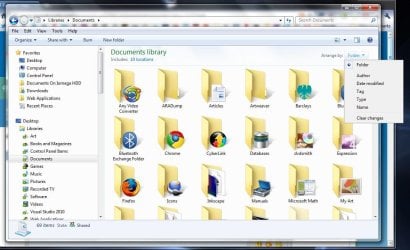
In the top right of the library pane select arrange by-> Folder

Capture.jpg
 

My Computer My Computer

At a glance

Microsoft Windows 7 Home Premium 64-bit Servi...Intel(R) Core(TM) i3 CPU M 330 @ 2.13GHz8 GB DDR3Intel(R) HD Graphics
Computer type
Laptop
Computer Manufacturer/Model Number
Hewlett-Packard/G62-107SA Notebook
OS
Microsoft Windows 7 Home Premium 64-bit Service Pack 1
CPU
Intel(R) Core(TM) i3 CPU M 330 @ 2.13GHz
Motherboard
Hewlett-Packard 1425
Memory
8 GB DDR3
Graphics Card(s)
Intel(R) HD Graphics
Sound Card
Realtek High Definition Audio
Monitor(s) Displays
Builtin
Screen Resolution
1366 x 768 x 32 bits (4294967296 colors) @ 60 Hz
Hard Drives
250 GB SATA Hard Disk Drive 7200 rpm
2TB Seagate GoFlex USB 2 Drive
1TB Iomega Prestige USB 2 Drive
1.5TB Iomega Prestige USB 2 Drive (Samsung)
2TB WD MyBook Live NAS.
Mouse
Logitech Anywhere MX
Internet Speed
152 Mbs download 10 Mbs upload
Antivirus
Norton 360
Browser
Chrome
THANK YOU! :D

I still don't understand how arranging the library contents by name removes all files from folders and does not display folders. But, I preferred the 3.1 File Manager!
 

My Computer My Computer

At a glance

Windows 7
OS
Windows 7
You are welcome. The files are not removed from the folders it is just the way the library views them. You should experiment with the various options in the right click menu. You can change the way the library looks by changing the Arrange By, Group By and Sort By options. These don't affect the way the files are stored, just the way the library presents them for you.
 

My Computer My Computer

At a glance

Microsoft Windows 7 Home Premium 64-bit Servi...Intel(R) Core(TM) i3 CPU M 330 @ 2.13GHz8 GB DDR3Intel(R) HD Graphics
Computer type
Laptop
Computer Manufacturer/Model Number
Hewlett-Packard/G62-107SA Notebook
OS
Microsoft Windows 7 Home Premium 64-bit Service Pack 1
CPU
Intel(R) Core(TM) i3 CPU M 330 @ 2.13GHz
Motherboard
Hewlett-Packard 1425
Memory
8 GB DDR3
Graphics Card(s)
Intel(R) HD Graphics
Sound Card
Realtek High Definition Audio
Monitor(s) Displays
Builtin
Screen Resolution
1366 x 768 x 32 bits (4294967296 colors) @ 60 Hz
Hard Drives
250 GB SATA Hard Disk Drive 7200 rpm
2TB Seagate GoFlex USB 2 Drive
1TB Iomega Prestige USB 2 Drive
1.5TB Iomega Prestige USB 2 Drive (Samsung)
2TB WD MyBook Live NAS.
Mouse
Logitech Anywhere MX
Internet Speed
152 Mbs download 10 Mbs upload
Antivirus
Norton 360
Browser
Chrome
sigh - worked like a charm ; )

Another [solved] for "windows 7 documents library shows all files instead of folders" - thank you!

Peace!

Devnullius
 

My Computer My Computer

At a glance

Windows 7 Enterprise
OS
Windows 7 Enterprise
You are welcome devnullius.
 

My Computer My Computer

At a glance

Microsoft Windows 7 Home Premium 64-bit Servi...Intel(R) Core(TM) i3 CPU M 330 @ 2.13GHz8 GB DDR3Intel(R) HD Graphics
Computer type
Laptop
Computer Manufacturer/Model Number
Hewlett-Packard/G62-107SA Notebook
OS
Microsoft Windows 7 Home Premium 64-bit Service Pack 1
CPU
Intel(R) Core(TM) i3 CPU M 330 @ 2.13GHz
Motherboard
Hewlett-Packard 1425
Memory
8 GB DDR3
Graphics Card(s)
Intel(R) HD Graphics
Sound Card
Realtek High Definition Audio
Monitor(s) Displays
Builtin
Screen Resolution
1366 x 768 x 32 bits (4294967296 colors) @ 60 Hz
Hard Drives
250 GB SATA Hard Disk Drive 7200 rpm
2TB Seagate GoFlex USB 2 Drive
1TB Iomega Prestige USB 2 Drive
1.5TB Iomega Prestige USB 2 Drive (Samsung)
2TB WD MyBook Live NAS.
Mouse
Logitech Anywhere MX
Internet Speed
152 Mbs download 10 Mbs upload
Antivirus
Norton 360
Browser
Chrome
Back
Top