Files on external drive cannot be accessed (owner + permissions hell!)

zapat3ro

New member
Local time
1:07 AM
Messages
7
Hi there,

I know similar issues have somehow been addressed elsewhere, but it seems my particular problem hasn't quite been faced by many others, so here we go:

I have thousands of files on an external drive. My computer recently crashed, so I had to fresh-install windows 7 (ultimate x64). While some files on the extenal hdd work fine, others won't work given that the owner and permissions are screwed. I can manually right-click any file and go to the properties>security tab and then add "Everyone" or my new user and then add full control and that's it, the file works fine.

BUT I can't be doing this manually for thousands of files!

So I've researched a bit and have installed the registry hack for "Take ownership" on right-clicking a file/folder (Add "Take Ownership" to Explorer Right-Click Menu in Win 7 or Vista - How-To Geek), I've ran a bunch of commands from an admin-level command prompt (icacls, takeown, grant, etc., as per here: Tools to Manage Access Control Lists - Tutorials,Articles,Algorithms,Tips,Examples about Security, Solved changing permissions on multiple files - Vista Forums).

All I now see is some weird user on most files, but no permissions set for me to access them (user is something like S-1-5-123445678890...). And so nothing seems to have been solved. I still have to manually right-click a file and use the security tab to add a new user, set permissions, etc.

How come it works through the gui and not on the command line? My hope is to do it for a whole folder (E:\music) which has literally hundreds and hundreds of folders and mp3 files. It would suck if I'm stuck doing it manually!

Thanks in advance for your help, if any!

:-)
 

My Computer My Computer

OS
Windows 7 x64
I saw some User like S-1-5-... on my XP machine when my Recycle Bin malfunctioned while trying to clear a drive. Had to get bit-unlocker to keep the Recycle Bin from locking up on a folder with that username every time I tried to empty the Recycle Bin. The problem eventually went away, maybe after I repartitioned the other drive.
 

My Computer My Computer

Computer Manufacturer/Model Number
HP Pavillion m7-1015dx
OS
Windows 7 Home Premium 64 bit
CPU
Intel Core i7 3610QM @2.3Ghz w 3.3 Ghz boost
Graphics Card(s)
Intel HD Graphics 4000
Screen Resolution
1600 x 900
Keyboard
Laptop
Mouse
M$ Optical
Internet Speed
10 mbps/1.0 mbps
You want to be able to write/delete/read so have full control of the drive?
Or just a folder (and everything [files/folders]) in it?

Right click the item you want to change permissions for. Then properties, then security. then button advanced.
Post screenshot
 

My Computer My Computer

Computer type
Laptop
Computer Manufacturer/Model Number
ACER ASPIRE 5742G
OS
Microsoft Windows 7 Home Premium 64-bits 7601 Multiprocessor Free Service Pack 1
CPU
Intel(R) Core(TM) i3 CPU M 370 @ 2.40GHz
Motherboard
Acer Aspire 5742G
Memory
4,00 GB
Graphics Card(s)
ATI Mobility Radeon HD 5400 Series
Sound Card
(1) AMD High Definition Audio Device (2) Realtek High Defi
Screen Resolution
1366 x 768 x 32 bits (4294967296 colors) @ 60 Hz
Hard Drives
WDC WD5000BEVT-22ZAT0
Open elevated command prompt http://www.sevenforums.com/tutorials/783-elevated-command-prompt.html

Code:
TAKEOWN /F  Q:\somefolder  /R  /D  Y

Do this if you wanna be the owner of Q:\somefolder and all objects in it (files/folders, als in subfolders)
Or:

Code:
TAKEOWN /F Q:\  /R  /D  Y
If you do that you become owner of all files/folder on Q drive.

Already done that?
 

My Computer My Computer

Computer type
Laptop
Computer Manufacturer/Model Number
ACER ASPIRE 5742G
OS
Microsoft Windows 7 Home Premium 64-bits 7601 Multiprocessor Free Service Pack 1
CPU
Intel(R) Core(TM) i3 CPU M 370 @ 2.40GHz
Motherboard
Acer Aspire 5742G
Memory
4,00 GB
Graphics Card(s)
ATI Mobility Radeon HD 5400 Series
Sound Card
(1) AMD High Definition Audio Device (2) Realtek High Defi
Screen Resolution
1366 x 768 x 32 bits (4294967296 colors) @ 60 Hz
Hard Drives
WDC WD5000BEVT-22ZAT0
Hi all,

Thanks for the replies!

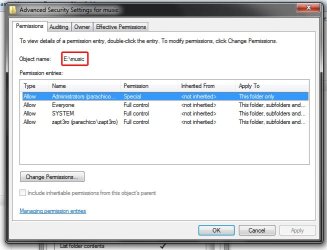
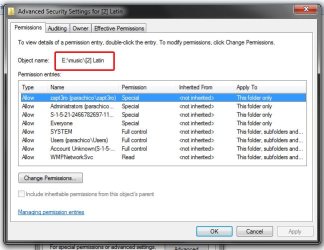
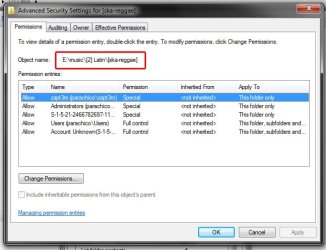
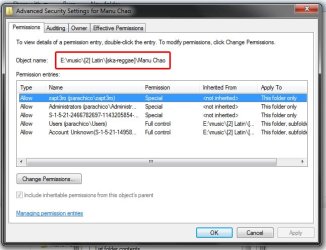
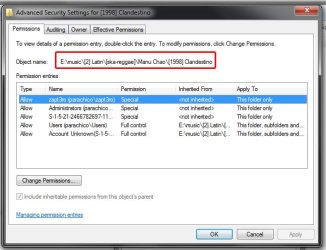
Here are screenshots of the folders. This is just an example, most of the files are organized like this :p

Oh yeah, and I'd like to eventually have full control of the files (write, copy, erase, etc.).
I'm just running the command you posted, Kaktussoft, I'll check how it turns out!
 

Attachments

  • main-folder.jpg
    main-folder.jpg
    40.5 KB · Views: 8
  • sub-folder(level1).jpg
    sub-folder(level1).jpg
    55 KB · Views: 7
  • sub-folder(level2).jpg
    sub-folder(level2).jpg
    45.5 KB · Views: 6
  • subfolder(level3).jpg
    subfolder(level3).jpg
    49.2 KB · Views: 4
  • sub-folder(level4).jpg
    sub-folder(level4).jpg
    49.6 KB · Views: 3
  • song(level5).jpg
    song(level5).jpg
    42.2 KB · Views: 4

My Computer My Computer

OS
Windows 7 x64
I have a Q: drive with 0 bytes on it. What is that?
 

My Computer My Computer

Computer Manufacturer/Model Number
HP Pavillion m7-1015dx
OS
Windows 7 Home Premium 64 bit
CPU
Intel Core i7 3610QM @2.3Ghz w 3.3 Ghz boost
Graphics Card(s)
Intel HD Graphics 4000
Screen Resolution
1600 x 900
Keyboard
Laptop
Mouse
M$ Optical
Internet Speed
10 mbps/1.0 mbps
I have a Q: drive with 0 bytes on it. What is that?
office 2010 click and run most likely. E is drive letter of external disk

What a mess with permissions!! Most permissions you made are explicit permissions , not inherted from folder above!! And the permissions are for that folder/file only. Not the way to do it!!

Do you want to be able to do everything on that disk? or just music folder and below?
 

My Computer My Computer

Computer type
Laptop
Computer Manufacturer/Model Number
ACER ASPIRE 5742G
OS
Microsoft Windows 7 Home Premium 64-bits 7601 Multiprocessor Free Service Pack 1
CPU
Intel(R) Core(TM) i3 CPU M 370 @ 2.40GHz
Motherboard
Acer Aspire 5742G
Memory
4,00 GB
Graphics Card(s)
ATI Mobility Radeon HD 5400 Series
Sound Card
(1) AMD High Definition Audio Device (2) Realtek High Defi
Screen Resolution
1366 x 768 x 32 bits (4294967296 colors) @ 60 Hz
Hard Drives
WDC WD5000BEVT-22ZAT0
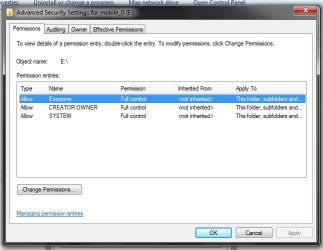
Right click on E drive itself. Then properties, then security. then button advanced.
Post screenshot
 

My Computer My Computer

Computer type
Laptop
Computer Manufacturer/Model Number
ACER ASPIRE 5742G
OS
Microsoft Windows 7 Home Premium 64-bits 7601 Multiprocessor Free Service Pack 1
CPU
Intel(R) Core(TM) i3 CPU M 370 @ 2.40GHz
Motherboard
Acer Aspire 5742G
Memory
4,00 GB
Graphics Card(s)
ATI Mobility Radeon HD 5400 Series
Sound Card
(1) AMD High Definition Audio Device (2) Realtek High Defi
Screen Resolution
1366 x 768 x 32 bits (4294967296 colors) @ 60 Hz
Hard Drives
WDC WD5000BEVT-22ZAT0
I know! this is probably the messiest set of files ever :sarc:

I'd like to keep full use of everything on the disc, but I seem to only have run into problems when using my mp3s on itunes, for example.
 

Attachments

  • main-drive.jpg
    main-drive.jpg
    39.1 KB · Views: 7

My Computer My Computer

OS
Windows 7 x64
Speaking as a second poster in this thread.
I tried to Takeown from an Elevated Command Prompt. It gave me an error, invalid argument error/option - 'Eric
Maybe spaces should be underscores? idk
It told me to try TAKOWN /? FOR HELP, and I don't see any Y listed.
This is so DOS and most of that is before my time.

C:\Users\1 Eric Bentsen>TAKEOWN /F C:\Users\1 Eric Bentsen /R /D Y
 

My Computer My Computer

Computer Manufacturer/Model Number
HP Pavillion m7-1015dx
OS
Windows 7 Home Premium 64 bit
CPU
Intel Core i7 3610QM @2.3Ghz w 3.3 Ghz boost
Graphics Card(s)
Intel HD Graphics 4000
Screen Resolution
1600 x 900
Keyboard
Laptop
Mouse
M$ Optical
Internet Speed
10 mbps/1.0 mbps
first take ownership of everything! do it in Elevated Command Prompt
Code:
TAKEOWN /F  E:\  /R  /D  Y
post back when done. errors?

of course use E instead of Q. sorry
 

My Computer My Computer

Computer type
Laptop
Computer Manufacturer/Model Number
ACER ASPIRE 5742G
OS
Microsoft Windows 7 Home Premium 64-bits 7601 Multiprocessor Free Service Pack 1
CPU
Intel(R) Core(TM) i3 CPU M 370 @ 2.40GHz
Motherboard
Acer Aspire 5742G
Memory
4,00 GB
Graphics Card(s)
ATI Mobility Radeon HD 5400 Series
Sound Card
(1) AMD High Definition Audio Device (2) Realtek High Defi
Screen Resolution
1366 x 768 x 32 bits (4294967296 colors) @ 60 Hz
Hard Drives
WDC WD5000BEVT-22ZAT0
to Cymbal Man Freq
Speaking as a second poster in this thread.
I tried to Takeown from an Elevated Command Prompt. It gave me an error, invalid argument error/option - 'Eric
Maybe spaces should be underscores? idk
It told me to try TAKOWN /? FOR HELP, and I don't see any Y listed.
This is so DOS and most of that is before my time.

C:\Users\1 Eric Bentsen>TAKEOWN /F C:\Users\1 Eric Bentsen /R /D Y
TAKEOWN /F "C:\Users\1 Eric Bentsen" /R /D Y

this will make your current logon name the owner of "C:\Users\1 Eric Bentsen" and all files/folders below it
are you logged on as 1 Eric Bentsen ?otherwise it's stupid to do!
 

My Computer My Computer

Computer type
Laptop
Computer Manufacturer/Model Number
ACER ASPIRE 5742G
OS
Microsoft Windows 7 Home Premium 64-bits 7601 Multiprocessor Free Service Pack 1
CPU
Intel(R) Core(TM) i3 CPU M 370 @ 2.40GHz
Motherboard
Acer Aspire 5742G
Memory
4,00 GB
Graphics Card(s)
ATI Mobility Radeon HD 5400 Series
Sound Card
(1) AMD High Definition Audio Device (2) Realtek High Defi
Screen Resolution
1366 x 768 x 32 bits (4294967296 colors) @ 60 Hz
Hard Drives
WDC WD5000BEVT-22ZAT0
I am logged on as that, there are no other users on the machine yet. I have a lot of permissions problems from imported folders and files. Why is it stupid? Should I do something else instead?
 

My Computer My Computer

Computer Manufacturer/Model Number
HP Pavillion m7-1015dx
OS
Windows 7 Home Premium 64 bit
CPU
Intel Core i7 3610QM @2.3Ghz w 3.3 Ghz boost
Graphics Card(s)
Intel HD Graphics 4000
Screen Resolution
1600 x 900
Keyboard
Laptop
Mouse
M$ Optical
Internet Speed
10 mbps/1.0 mbps
I know! this is probably the messiest set of files ever :sarc:

I'd like to keep full use of everything on the disc, but I seem to only have run into problems when using my mp3s on itunes, for example.
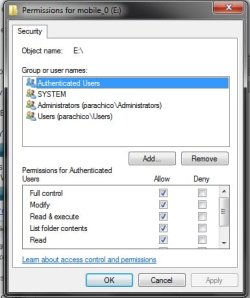
In the properties of E itself->security->add:

Authenticated Users
Users
Administrators

all with full control (temporary).

system is allready listed, let it as it is
remove CREATOR MAKER
remove EVERYONE

don't press APPLY or OK, but post screenshot
 

My Computer My Computer

Computer type
Laptop
Computer Manufacturer/Model Number
ACER ASPIRE 5742G
OS
Microsoft Windows 7 Home Premium 64-bits 7601 Multiprocessor Free Service Pack 1
CPU
Intel(R) Core(TM) i3 CPU M 370 @ 2.40GHz
Motherboard
Acer Aspire 5742G
Memory
4,00 GB
Graphics Card(s)
ATI Mobility Radeon HD 5400 Series
Sound Card
(1) AMD High Definition Audio Device (2) Realtek High Defi
Screen Resolution
1366 x 768 x 32 bits (4294967296 colors) @ 60 Hz
Hard Drives
WDC WD5000BEVT-22ZAT0
Like this?

I know! this is probably the messiest set of files ever :sarc:

I'd like to keep full use of everything on the disc, but I seem to only have run into problems when using my mp3s on itunes, for example.
In the properties of E itself->security->add:

Authenticated Users
Users
Administrators

all with full control (temporary).

system is allready listed, let it as it is
remove CREATOR MAKER
remove EVERYONE

don't press APPLY or OK, but post screenshot
 

Attachments

  • change.jpg
    change.jpg
    28.2 KB · Views: 7

My Computer My Computer

OS
Windows 7 x64
Like this?

I know! this is probably the messiest set of files ever :sarc:

I'd like to keep full use of everything on the disc, but I seem to only have run into problems when using my mp3s on itunes, for example.
In the properties of E itself->security->add:

Authenticated Users
Users
Administrators

all with full control (temporary).

system is allready listed, let it as it is
remove CREATOR MAKER
remove EVERYONE

don't press APPLY or OK, but post screenshot
yes, but now change some things. (although it works with this settings as well)
i want you to make it default.... just as creating a new volume.

administrator=ful control
system=full control.

authenticated users=see attachement. sorry it's in dutch and called geverifieerde gebruikers
users=gebruikers

put checkmarks in same order as attachment

Do it from security->advanced->change
save it and click advanced again. post that screenshot
 

Attachments

My Computer My Computer

Computer type
Laptop
Computer Manufacturer/Model Number
ACER ASPIRE 5742G
OS
Microsoft Windows 7 Home Premium 64-bits 7601 Multiprocessor Free Service Pack 1
CPU
Intel(R) Core(TM) i3 CPU M 370 @ 2.40GHz
Motherboard
Acer Aspire 5742G
Memory
4,00 GB
Graphics Card(s)
ATI Mobility Radeon HD 5400 Series
Sound Card
(1) AMD High Definition Audio Device (2) Realtek High Defi
Screen Resolution
1366 x 768 x 32 bits (4294967296 colors) @ 60 Hz
Hard Drives
WDC WD5000BEVT-22ZAT0
I am logged on as that, there are no other users on the machine yet. I have a lot of permissions problems from imported folders and files. Why is it stupid? Should I do something else instead?
If you're not that user..it's stupid...now it's fine
 

My Computer My Computer

Computer type
Laptop
Computer Manufacturer/Model Number
ACER ASPIRE 5742G
OS
Microsoft Windows 7 Home Premium 64-bits 7601 Multiprocessor Free Service Pack 1
CPU
Intel(R) Core(TM) i3 CPU M 370 @ 2.40GHz
Motherboard
Acer Aspire 5742G
Memory
4,00 GB
Graphics Card(s)
ATI Mobility Radeon HD 5400 Series
Sound Card
(1) AMD High Definition Audio Device (2) Realtek High Defi
Screen Resolution
1366 x 768 x 32 bits (4294967296 colors) @ 60 Hz
Hard Drives
WDC WD5000BEVT-22ZAT0
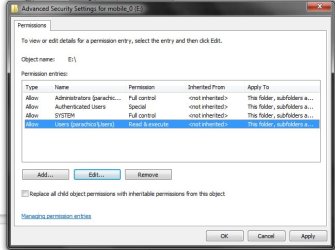
Ok, I got them, I think, based on the doc. Is this the way it's supposed to go? :p

Like this?

In the properties of E itself->security->add:

Authenticated Users
Users
Administrators

all with full control (temporary).

system is allready listed, let it as it is
remove CREATOR MAKER
remove EVERYONE

don't press APPLY or OK, but post screenshot
yes, but now change some things. (although it works with this settings as well)
i want you to make it default.... just as creating a new volume.

administrator=ful control
system=full control.

authenticated users=see attachement. sorry it's in dutch and called geverifieerde gebruikers
users=gebruikers

put checkmarks in same order as attachment

Do it from security->advanced->change
save it and click advanced again. post that screenshot
 

Attachments

  • dutch-settings.jpg
    dutch-settings.jpg
    42.4 KB · Views: 7

My Computer My Computer

OS
Windows 7 x64
Ok, I got them, I think, based on the doc. Is this the way it's supposed to go? :p

Like this?
yes, but now change some things. (although it works with this settings as well)
i want you to make it default.... just as creating a new volume.

administrator=ful control
system=full control.

authenticated users=see attachement. sorry it's in dutch and called geverifieerde gebruikers
users=gebruikers

put checkmarks in same order as attachment

Do it from security->advanced->change
save it and click advanced again. post that screenshot
autenticated users is wrong!! it shouldn't be special.
put checkmarks on item 2 ...9,11,12 only in left column.
post screnshot afterwards again
 

My Computer My Computer

Computer type
Laptop
Computer Manufacturer/Model Number
ACER ASPIRE 5742G
OS
Microsoft Windows 7 Home Premium 64-bits 7601 Multiprocessor Free Service Pack 1
CPU
Intel(R) Core(TM) i3 CPU M 370 @ 2.40GHz
Motherboard
Acer Aspire 5742G
Memory
4,00 GB
Graphics Card(s)
ATI Mobility Radeon HD 5400 Series
Sound Card
(1) AMD High Definition Audio Device (2) Realtek High Defi
Screen Resolution
1366 x 768 x 32 bits (4294967296 colors) @ 60 Hz
Hard Drives
WDC WD5000BEVT-22ZAT0
oops! is it like this?

Ok, I got them, I think, based on the doc. Is this the way it's supposed to go? :p

yes, but now change some things. (although it works with this settings as well)
i want you to make it default.... just as creating a new volume.

administrator=ful control
system=full control.

authenticated users=see attachement. sorry it's in dutch and called geverifieerde gebruikers
users=gebruikers

put checkmarks in same order as attachment

Do it from security->advanced->change
save it and click advanced again. post that screenshot
autenticated users is wrong!! it shouldn't be special.
put checkmarks on item 2 ...9,11,12 only in left column.
post screnshot afterwards again
 

Attachments

  • modify.jpg
    modify.jpg
    42 KB · Views: 36

My Computer My Computer

OS
Windows 7 x64
Back
Top