finding windows live mail contacts folder - hlep!

Part Tymer

New member
Local time
10:29 AM
Messages
4
I read an old post from 1-1/2 years ago and it said to click on contacts on the lower left of the screen. It just isn't there on my laptop, however it is on the desktop. What am I doing wrong? Any suggestions would be appreciated. I am strictly an end-user, so computer speak will not help me much. Step by step plain English is all I understand. :o

Thanks in advance for any replies.

P.S. I upgraded from Vista HP 64 to Win 7 HP64 and would like to export my contacts. Any ideas?
 

My Computer

Computer type
PC/Desktop
Computer Manufacturer/Model Number
custom build
OS
Win 7 Home Prem 64bit
Motherboard
ASUS
Memory
4G
Graphics Card(s)
Nvidia GT 620 DDR 3 2G
Hard Drives
1 internal Seagate 500G 1 external Seagate 500G
Antivirus
Avast
Browser
Firefox
The contacts in vista are not the same contacts like in Windows 7. The contacts in Vista went with windows mail. Windows mail is not in Windows 7. For Windows live mail, that is a program that you download from Microsoft that is incorporated in Windows Live Essentials. When you install Windows live Essentials you just check off Windows Live mail as one of the options and it will install.
Since you upgraded from Vista to Windows 7 if you used Windows Mail, it removed it when you did the upgrade and probably removed the Contact folder also.
The only way you could have moved your contacts over was to install WLM on the vista machine prior to the upgrade and once the upgrade was done you would still have Windows Live mail with all your contacts.
Unless someone else here can figure out how to pull the contacts in from windows.old you might have just lost them
 

My Computer

Computer type
PC/Desktop
Computer Manufacturer/Model Number
Dell Computers
OS
Windows 7 Pro 32/64 bit and Windows 10 Pro 32 Bit/64bit
Memory
4gigs
Graphics Card(s)
AMD Radeon HD and Nvidia
Monitor(s) Displays
Samsung 24". INC 19". Dell 22 ". Dell 17" & 19"
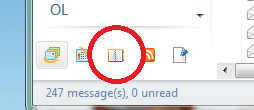
If you're looking for your contacts
the lower left part part of WEMail has 4 icons - the 3rd is contacts
wemcontacts.PNG

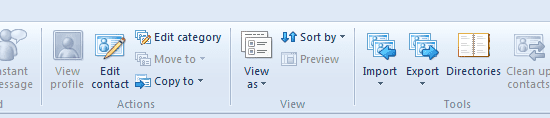
Once you are in the contacts window there is import and export on the ribbon
wemexp.PNG

Unfortunately, you have to manually check the fields you want to export - I haven't found "select all"
 

My Computer

Computer type
Laptop
Computer Manufacturer/Model Number
HP Pavilion dv6-6c10us
OS
x64 (6.3.9600) Win8.1 Pro & soon dual boot x64 (6.1.7601) Win7_SP1 HomePrem
CPU
AMD A6-3420M APU with Radeon(tm) HD Graphics
Motherboard
Hewlett-Packard 1805
Memory
6.00 GB
Graphics Card(s)
AMD Radeon(TM) HD 6520G
Sound Card
(1) AMD High Definition Audio Device (2) IDT High Definiti
Monitor(s) Displays
HP W2072a 20" LCD (1600 x 900) @ 60 Hz
Screen Resolution
1366 x 768 x 32 bits (4294967296 colors) @ 60 Hz
Hard Drives
ST640LM0 00 HM641JI SATA Disk Device
Keyboard
Logitech k520 wireless KB
Mouse
Logitech m320 wireless mouse (bundled with KB)
Internet Speed
15/5 | 54 MB Wireless 'n'
Antivirus
Realtime: Defender or Avast | On-demand: Malwarebytes, ESET
Browser
IE 11 on Win8, IE 10 on win 7
Other Info
Media: [Gimp, Audacity, VLC] || Comm: [WEmail 2012, Skype] || Productivity: [OpenOffice,| Textpad] || Utils: [Sysinternals, cCleaner, Speccy, Defraggler]
Maybe that's not what you are asking though.

How did you upgrade from Vista?
Do you have any backups of the Vista system? Just in case you need to pull the contacts from there.
 

My Computer

Computer type
Laptop
Computer Manufacturer/Model Number
HP Pavilion dv6-6c10us
OS
x64 (6.3.9600) Win8.1 Pro & soon dual boot x64 (6.1.7601) Win7_SP1 HomePrem
CPU
AMD A6-3420M APU with Radeon(tm) HD Graphics
Motherboard
Hewlett-Packard 1805
Memory
6.00 GB
Graphics Card(s)
AMD Radeon(TM) HD 6520G
Sound Card
(1) AMD High Definition Audio Device (2) IDT High Definiti
Monitor(s) Displays
HP W2072a 20" LCD (1600 x 900) @ 60 Hz
Screen Resolution
1366 x 768 x 32 bits (4294967296 colors) @ 60 Hz
Hard Drives
ST640LM0 00 HM641JI SATA Disk Device
Keyboard
Logitech k520 wireless KB
Mouse
Logitech m320 wireless mouse (bundled with KB)
Internet Speed
15/5 | 54 MB Wireless 'n'
Antivirus
Realtime: Defender or Avast | On-demand: Malwarebytes, ESET
Browser
IE 11 on Win8, IE 10 on win 7
Other Info
Media: [Gimp, Audacity, VLC] || Comm: [WEmail 2012, Skype] || Productivity: [OpenOffice,| Textpad] || Utils: [Sysinternals, cCleaner, Speccy, Defraggler]
Yes, I backed up the Vista system, including the Windows Mail. My first upgrade was over top of Vista, but there were a lot of issues, so I did a clean install of Win7. I messed around in the computer and found the "old file" and was able to import my Windows Mail contacts to Windows Live.

I still don't have those 4 icons on the lower left of my laptop. They do show on the desktop. No idea how to make them appear.

Thanks for the responses everyone. Appreciated.
 

My Computer

Computer type
PC/Desktop
Computer Manufacturer/Model Number
custom build
OS
Win 7 Home Prem 64bit
Motherboard
ASUS
Memory
4G
Graphics Card(s)
Nvidia GT 620 DDR 3 2G
Hard Drives
1 internal Seagate 500G 1 external Seagate 500G
Antivirus
Avast
Browser
Firefox
What version of WLM are you running?
 
Last edited:

My Computer

Computer type
Laptop
Computer Manufacturer/Model Number
HP Pavilion dv6-6c10us
OS
x64 (6.3.9600) Win8.1 Pro & soon dual boot x64 (6.1.7601) Win7_SP1 HomePrem
CPU
AMD A6-3420M APU with Radeon(tm) HD Graphics
Motherboard
Hewlett-Packard 1805
Memory
6.00 GB
Graphics Card(s)
AMD Radeon(TM) HD 6520G
Sound Card
(1) AMD High Definition Audio Device (2) IDT High Definiti
Monitor(s) Displays
HP W2072a 20" LCD (1600 x 900) @ 60 Hz
Screen Resolution
1366 x 768 x 32 bits (4294967296 colors) @ 60 Hz
Hard Drives
ST640LM0 00 HM641JI SATA Disk Device
Keyboard
Logitech k520 wireless KB
Mouse
Logitech m320 wireless mouse (bundled with KB)
Internet Speed
15/5 | 54 MB Wireless 'n'
Antivirus
Realtime: Defender or Avast | On-demand: Malwarebytes, ESET
Browser
IE 11 on Win8, IE 10 on win 7
Other Info
Media: [Gimp, Audacity, VLC] || Comm: [WEmail 2012, Skype] || Productivity: [OpenOffice,| Textpad] || Utils: [Sysinternals, cCleaner, Speccy, Defraggler]
minimize any open windows

Right click on teh contacts icon you mentioned was on your desktop,
seelect properties
then
press and hold the CTRL key press the prtsc
release both keys
Launch Paint (Start menu -> Accessories -> Paint
Ctrl-V to paste
..... You should see a screen capture of your desktop
look it over for any personal identifying information (name, email address, ... anything you do not want posted on the Internet. Use the eraser (pink) to scrub that off
Ctrl-S to save
remember the name you give it and the folder location

You can canel out of the Properties window you opened before.

Please see http://www.sevenforums.com/tutorials/9733-screenshots-files-upload-post-seven-forums.html for the preferred method of posting files and images on Sevenforums
 

My Computer

Computer type
Laptop
Computer Manufacturer/Model Number
HP Pavilion dv6-6c10us
OS
x64 (6.3.9600) Win8.1 Pro & soon dual boot x64 (6.1.7601) Win7_SP1 HomePrem
CPU
AMD A6-3420M APU with Radeon(tm) HD Graphics
Motherboard
Hewlett-Packard 1805
Memory
6.00 GB
Graphics Card(s)
AMD Radeon(TM) HD 6520G
Sound Card
(1) AMD High Definition Audio Device (2) IDT High Definiti
Monitor(s) Displays
HP W2072a 20" LCD (1600 x 900) @ 60 Hz
Screen Resolution
1366 x 768 x 32 bits (4294967296 colors) @ 60 Hz
Hard Drives
ST640LM0 00 HM641JI SATA Disk Device
Keyboard
Logitech k520 wireless KB
Mouse
Logitech m320 wireless mouse (bundled with KB)
Internet Speed
15/5 | 54 MB Wireless 'n'
Antivirus
Realtime: Defender or Avast | On-demand: Malwarebytes, ESET
Browser
IE 11 on Win8, IE 10 on win 7
Other Info
Media: [Gimp, Audacity, VLC] || Comm: [WEmail 2012, Skype] || Productivity: [OpenOffice,| Textpad] || Utils: [Sysinternals, cCleaner, Speccy, Defraggler]
I have no idea how to find the version number of Windows Live Mail. I think you mis-understood. The contacts folder appears in my WLM at the lower left on my desktop PC. I have WLM on a laptop, and it doesn't appear on the lower left anywhere when I have WLM open. Sorry for the confusion.
 

My Computer

Computer type
PC/Desktop
Computer Manufacturer/Model Number
custom build
OS
Win 7 Home Prem 64bit
Motherboard
ASUS
Memory
4G
Graphics Card(s)
Nvidia GT 620 DDR 3 2G
Hard Drives
1 internal Seagate 500G 1 external Seagate 500G
Antivirus
Avast
Browser
Firefox
Thank you, yes I misunderstood.

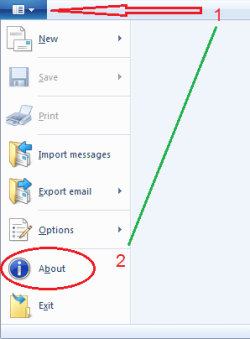
In the upper left corner of the WLM Window, there is a menu icon with a drop down arrow
Click on that and then click on About
 

Attachments

  • WLM about.png
    WLM about.png
    6.5 KB · Views: 8

My Computer

Computer type
Laptop
Computer Manufacturer/Model Number
HP Pavilion dv6-6c10us
OS
x64 (6.3.9600) Win8.1 Pro & soon dual boot x64 (6.1.7601) Win7_SP1 HomePrem
CPU
AMD A6-3420M APU with Radeon(tm) HD Graphics
Motherboard
Hewlett-Packard 1805
Memory
6.00 GB
Graphics Card(s)
AMD Radeon(TM) HD 6520G
Sound Card
(1) AMD High Definition Audio Device (2) IDT High Definiti
Monitor(s) Displays
HP W2072a 20" LCD (1600 x 900) @ 60 Hz
Screen Resolution
1366 x 768 x 32 bits (4294967296 colors) @ 60 Hz
Hard Drives
ST640LM0 00 HM641JI SATA Disk Device
Keyboard
Logitech k520 wireless KB
Mouse
Logitech m320 wireless mouse (bundled with KB)
Internet Speed
15/5 | 54 MB Wireless 'n'
Antivirus
Realtime: Defender or Avast | On-demand: Malwarebytes, ESET
Browser
IE 11 on Win8, IE 10 on win 7
Other Info
Media: [Gimp, Audacity, VLC] || Comm: [WEmail 2012, Skype] || Productivity: [OpenOffice,| Textpad] || Utils: [Sysinternals, cCleaner, Speccy, Defraggler]
On my PC (desktop computer) its Version 2012 (Build 16.4.3508.0205)
On my laptop its Version 2012 (Build 16.4.3505.0912)

My laptop is the one that doesn't show the folders at the bottom.

Thanks for the help learning.
 

My Computer

Computer type
PC/Desktop
Computer Manufacturer/Model Number
custom build
OS
Win 7 Home Prem 64bit
Motherboard
ASUS
Memory
4G
Graphics Card(s)
Nvidia GT 620 DDR 3 2G
Hard Drives
1 internal Seagate 500G 1 external Seagate 500G
Antivirus
Avast
Browser
Firefox
Your Desktop is a slightly newer version of WE 2012, but I would not expect that to cause this issue.

Let's try a simple repair using the WE utility wlarp

Exit all WE applications

Click on the Start menu orb and type
wlarp in the search box

at the top of the results, you should see
Programs (1)
wlarp

Click on that wlarp,
answer yes to the authorization prompt (UAC)

The Uninstall or Repair Windows Essentials Progams dialog is presented
Click on Repair all Windows Essentials Progams

This might take some time - let it run to completion, then restart your machine

See if that solves the missing icons issue.
 

My Computer

Computer type
Laptop
Computer Manufacturer/Model Number
HP Pavilion dv6-6c10us
OS
x64 (6.3.9600) Win8.1 Pro & soon dual boot x64 (6.1.7601) Win7_SP1 HomePrem
CPU
AMD A6-3420M APU with Radeon(tm) HD Graphics
Motherboard
Hewlett-Packard 1805
Memory
6.00 GB
Graphics Card(s)
AMD Radeon(TM) HD 6520G
Sound Card
(1) AMD High Definition Audio Device (2) IDT High Definiti
Monitor(s) Displays
HP W2072a 20" LCD (1600 x 900) @ 60 Hz
Screen Resolution
1366 x 768 x 32 bits (4294967296 colors) @ 60 Hz
Hard Drives
ST640LM0 00 HM641JI SATA Disk Device
Keyboard
Logitech k520 wireless KB
Mouse
Logitech m320 wireless mouse (bundled with KB)
Internet Speed
15/5 | 54 MB Wireless 'n'
Antivirus
Realtime: Defender or Avast | On-demand: Malwarebytes, ESET
Browser
IE 11 on Win8, IE 10 on win 7
Other Info
Media: [Gimp, Audacity, VLC] || Comm: [WEmail 2012, Skype] || Productivity: [OpenOffice,| Textpad] || Utils: [Sysinternals, cCleaner, Speccy, Defraggler]
Back
Top