Firefox crashes after upgrading to version 3.6.14

potassium

New member
Local time
2:18 PM
Messages
17
Hello everyone.

I had FireFox version 3.6.13 for a long time and today I received a notification to upgrade.
I did so, and since then the browser simply does not load.
Only the frame of the broweser loads for a second, and immediately it crashes with an error.
I have Windows 7.
I've Neutralized the anti virus AVG completely [/ b], I checked that the mozila enabled on Windows FireWall (I even deleted and added it again there).
I tried to load in safe mode.
I reboot the computer.
Non of it did not work, it does not load!
What can I do?
 

My Computer My Computer

OS
Vista Ultimate 32 bit
I would try to unistall all of Firefox, and then try to install it again. There is a great tool that I use to completely uninstall software. It's called Revo Unistaller Free version. It will scan your registry and hard disk to make sure it is COMPLETELY gone from your computer. After using this, install FF again. Other than that, try to do a system restore. Or, switch to another browser temporarily until Firefox fixes the problem. I would go and try to surf their forums for any remedies.
 
Last edited:

My Computer My Computer

Computer Manufacturer/Model Number
Dell Studiio 1555
OS
Windows 8 Pro
CPU
Core 2 Duo P8600 2.4 ghz
Memory
4GB DDR2
Graphics Card(s)
ATI Radeon 4570 512MB
Sound Card
IDT High Definition
Monitor(s) Displays
15.6"
Screen Resolution
1920x1080
Hard Drives
250GB 7200 RPM SATA
Yeah I would uninstall like Windows 911 has suggested, just come across this little bit of info regarding this new update to FF 3.6

The releases were originally due on February 14, but last week, Mozilla said that a single crash-on-startup bug was holding up the next release of Mozilla software.
The meeting notes from a February 16 meeting dissected the problem. The 3.6.14 release sometimes crashed in the startup process. The bug discussion thread and meeting notes showed that developers thought it is tied to "frankenbuilds" where the EXE is updated but some DLLs are not. There's speculation that the bug was actually be in the 3.6.13 updater, which would be a tricky bug to work around, but it was not entirely clear.

I don't think you'll need to delete your Firefox profile, just uninstall & then reinstall FF 3.6.14 from the Mozilla website.
 

My Computer My Computer

Computer Manufacturer/Model Number
Acer Aspire 5742
OS
Windows 7 Ultimate x64 SP1
CPU
Intel Core i3-370M @ 2.4GHz
Motherboard
Mobile Intel HM55 Express Chipset
Memory
6GB 1333MHz DDR3
Graphics Card(s)
Intel GMA HD
Monitor(s) Displays
15.6" HD Acer CineCrystal LED LCD
Screen Resolution
1366×768
Hard Drives
320GB (5400 RPM) SATA
PSU
65W
Mouse
Microsoft Wireless Optical Mouse 3000
Internet Speed
6Mbps
Other Info
WEI Score: 4.6
But i want to save my profile and bookmarks.
If i'll uninstall it will it erase it all?
 

My Computer My Computer

OS
Vista Ultimate 32 bit
It won't erase your profile and bookmarks if you make sure you don't click on that option during the uninstallation process. It will give you a choice if you want to erase that information or not while it's uninstalling.

If you're still worried, before you uninstall firefox, you could go to your Users folder - Users/yournamehere/Appdata/Roaming/Mozilla/Firefox

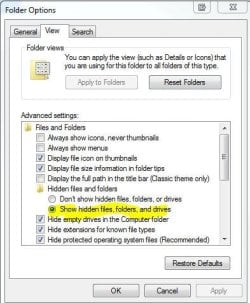
Appdatas hidden, you'll need to have this option enabled in Folder settings

Capture2.JPG

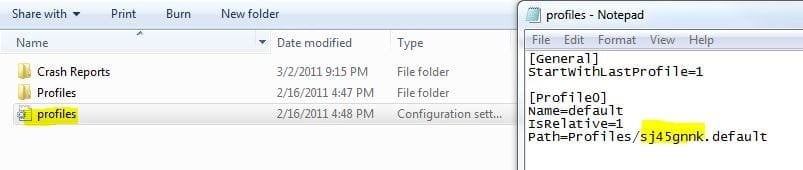
Copy the whole folder inside the "profiles" folder there (folder will be named with a few numbers and letters.default) and keep it wherever in storage. That way you can uninstall firefox and if you ever need your profile reinstated if it got (accidentally erased or something). You could just get your profile copy, go back to that location and replace the default newly installed firefox profile with your personal one. Then open up that .ini file that says "profile" there in Notepad.

Write in what your profile name is there at this part in the .ini file - Path=Profiles/sj45gnnk.default
Put in your personal profile "name" there instead - the one you just replaced in the location, and save it. So it would be like this - Path=Profiles/yourpersonalprofliefoldernamehere.default

Capture3.JPG

Then open up firefox.
 

My Computer My Computer

Computer type
PC/Desktop
Computer Manufacturer/Model Number
Airbot 2.0
OS
Windows 7 Ultimate x64 SP1
CPU
Core i7 920 (D0) @ 4Ghz, *26c idle *65c full load on air
Motherboard
Asus P6X58D Premium - Sata 6Gb/s - USB 3.0
Memory
12GB DDR3 Corsair Dominator -CMD12GX3M6A1600C8 at 1600MHz
Graphics Card(s)
Zotac Geforce GTX 770
Sound Card
ASUS Xonar D2X
Monitor(s) Displays
1 LG 24" Flatron W2453V-PF 1 Samsung 24" P2450H both 2ms RT
Screen Resolution
1920x1080@60hz
Hard Drives
1 Samsung 250GB 840 Evo SSD
1 OCZ Vertex2 180GB SSD
1 TB Samsung Spinpoint F1 7200RPM 32MB cache
2 500GB WD Caviar Blacks 7200RPM 32MB cache (WD5001AALS)

Pioneer DVD Burner DVR-S18M
PSU
Corsair HX1000W
Case
Cooler Master HAF 932
Cooling
Case Fans *3 230mm, *1 140mm/CPU - *Tuniq Tower 120 Extreme
Keyboard
Logitech Wireless MK700
Mouse
Logitech Wireless MK700
Internet Speed
DL 15 Mbps UL 0.98 Mbps
Antivirus
None
Browser
Firefox Nightly
Other Info
Processor-7.7 *RAM- 7.9 *Graphics-7.9 *Gaming Graphics- 7.9 *SSD- 7.8 W.E.I final score= 7.7
*Phone- LG Nexus 5
Aaron ... awesome! If I could rep you, I would (gotta spread it around and I haven't been around much lately).

Well said and succinctly presented. A must have reference for all FF users. Thanks! :)
 

My Computer My Computer

Computer Manufacturer/Model Number
Toshiba L355D
OS
Windows 7 Ultimate x64 SP1
CPU
Core2 Duo
Motherboard
Intel
Memory
4 GB
Graphics Card(s)
GM965 on-board
Sound Card
RealTek on-board
Monitor(s) Displays
19"+17"(laptop)
Screen Resolution
1440x900 (x 2)
Hard Drives
500GB Ext. 200GB Internal
PSU
N/A
Case
N/A
Cooling
N/A
Indeed, great answer.
Will do it when get back home.
Thanks!
 

My Computer My Computer

OS
Vista Ultimate 32 bit

My Computer My Computer

Computer type
PC/Desktop
Computer Manufacturer/Model Number
Custom Build
OS
Windows 7 Home Premium 64 bit
CPU
Intel Core i7-4790
Motherboard
GA-Z87X-D3H
Memory
G.SKILL 8GB (2 x 4GB) DDR3 F3-10666CL9D-8GBNT
Graphics Card(s)
AMD Radeon R7 250
Sound Card
Realtek ALC892
Monitor(s) Displays
Samsung UN32EH5000, Dell 1703FPT
Screen Resolution
1920 x 1080, 1280 x 1024
Hard Drives
WD5003AZEX
WD10EZEX
Samsung HD103SJ
Samsung 128 GB 840 PRO
PSU
SeaSonic M12II SS-500GM
Case
Fractal Design Define R4
Cooling
Zalman CNPS9900ALED
Keyboard
Logitech K800
Mouse
Logitech M705
Internet Speed
16 Mbps
Antivirus
Avast
Browser
Firefox
Other Info
Bose Companion 2 Multimedia Speakers
Back
Top