Solved Firefox drop down spacing

joeyc100

New member
Member
VIP
Local time
11:53 AM
Messages
102
I'm running Firefox with Win7x86 on a Biostar desktop I5 motherboard. All was fine until the latest Firefox update 88. or 89. when the bookmarks (star with a pan underneath) drop down list became doublespaced. I would like to get back to single spacing -- too much vertical slider activity.
Any ideas?
Joey.
 

My Computer

Computer type
Laptop
Computer Manufacturer/Model Number
asus x541sa
OS
windows 7 ultimatex64

My Computers

System One System Two

Thanks, I will try that.
 

My Computer

Computer type
Laptop
Computer Manufacturer/Model Number
asus x541sa
OS
windows 7 ultimatex64
The reason I dropped Edge/Chrome was because of double spacing. Microsoft did nothing about Edge spacing even with many complaints. Firefox was compact single spaced like IE and fit the window until v89.
Trying to get any help from Mozilla's Forum appears useless. Around 90% of all the posts go unanswered, and there are many complaints about v89's changes.
I still continue with IE11 until I hit a website that refuses it or does poorly.
And I will stay with Win7 until a proton decays.
 

My Computer

Computer type
Laptop
Computer Manufacturer/Model Number
asus x541sa
OS
windows 7 ultimatex64
All was fine until the latest Firefox update 88. or 89. when the bookmarks (star with a pan underneath) drop down list became doublespaced. I would like to get back to single spacing -- too much vertical slider activity.

I also didn't like the way FF89 changed the bookmark spacing, and found this script that fixes the problem. Cut and paste the script into a text file, and name it userchrome.css. Follow the 3 steps in the "HOWTO" section at the top of the script, which tell you where to place the file and how to enable it in Firefox.

In fact, I think it went overboard and scrunched the bookmarks too close together, so I edited line 71 of the script to be "padding: 2px 2px !important;" instead of "0 2px" and it spaced the bookmarks back out to just the right amount to my eye. You can adjust the first number to suit your taste.

It also reverts the excess white space added to the tabs row and the URL row.
 

My Computer

Computer type
PC/Desktop
Computer Manufacturer/Model Number
Dell Optiplex 7050
OS
Windows 7/8.1/10 multiboot
CPU
Intel Core i7-7700
Motherboard
Dell, Intel Q270 chipset
Memory
48GB (2x16GB Crucial DDR4-3200 + 2x8GB Hynix DDR4-2400)
Graphics Card(s)
Intel HD630 + AMD Radeon R7 450 PCIe
Monitor(s) Displays
Asus VC279 (27")
Screen Resolution
1920x1080
Hard Drives
Toshiba M.2 NVMe (256GB),
Samsung 960 Evo (500GB),
WD Red Plus 80EFBX (8TB)
Thanks.
That's an awful lot for just the Bookmarks drop down menu (I don't mean the sidebar menu which would involve an extra click every time you wanted a favorite -- I want one click for the dropdown menu only) . I already tried the mods in userChrome.css for the sidebar and they work, but that's not what I want.
Joey.
 

My Computer

Computer type
Laptop
Computer Manufacturer/Model Number
asus x541sa
OS
windows 7 ultimatex64
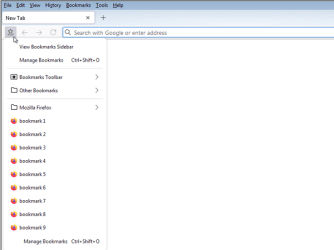
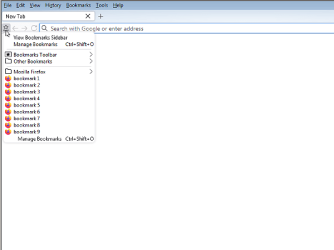
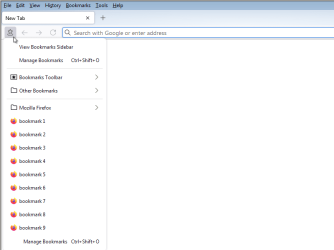
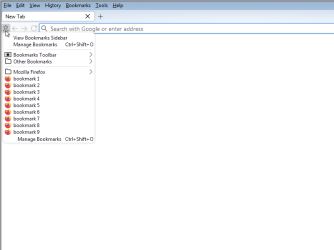
Hmm, okay. I guess I misread what you were looking for. Maybe somebody else knows what you meant. I thought you were referring to the bookmarks (star with a pan underneath) drop down list being doublespaced.

ff89-a.png

That's what the github script I referenced addresses:

ff89-b.png
 

Attachments

  • ff89-a.png
    ff89-a.png
    30.3 KB · Views: 0
  • ff89-b.png
    ff89-b.png
    29.4 KB · Views: 0

My Computer

Computer type
PC/Desktop
Computer Manufacturer/Model Number
Dell Optiplex 7050
OS
Windows 7/8.1/10 multiboot
CPU
Intel Core i7-7700
Motherboard
Dell, Intel Q270 chipset
Memory
48GB (2x16GB Crucial DDR4-3200 + 2x8GB Hynix DDR4-2400)
Graphics Card(s)
Intel HD630 + AMD Radeon R7 450 PCIe
Monitor(s) Displays
Asus VC279 (27")
Screen Resolution
1920x1080
Hard Drives
Toshiba M.2 NVMe (256GB),
Samsung 960 Evo (500GB),
WD Red Plus 80EFBX (8TB)
My opening screen is the home screen with news.google.com as the home page. The star-with-pan appears on the top right side of the screen adjacent to the 3-line menu (other unused icons have been removed) of the home page. When clicked on the home page, this star icon produces the double spaced bookmarks drop down list which was single spaced prior to v89. Of all of the .css mods that are in the file, which affects this drop down list? I have modified the about:config items.
Joey.
 

My Computer

Computer type
Laptop
Computer Manufacturer/Model Number
asus x541sa
OS
windows 7 ultimatex64
The star-with-pan appears on the top right side of the screen adjacent to the 3-line menu (other unused icons have been removed) of the home page.

Yeah, I know. I just moved it to the left side of the URL bar so I wouldn't have to screenshot the whole window.


Of all of the .css mods that are in the file, which affects this drop down list?

See here.

I hope you're not thinking of deleting all the other lines. Some UI style specifications are interrelated -- that's why they're called Cascading Style Sheets.
 

My Computer

Computer type
PC/Desktop
Computer Manufacturer/Model Number
Dell Optiplex 7050
OS
Windows 7/8.1/10 multiboot
CPU
Intel Core i7-7700
Motherboard
Dell, Intel Q270 chipset
Memory
48GB (2x16GB Crucial DDR4-3200 + 2x8GB Hynix DDR4-2400)
Graphics Card(s)
Intel HD630 + AMD Radeon R7 450 PCIe
Monitor(s) Displays
Asus VC279 (27")
Screen Resolution
1920x1080
Hard Drives
Toshiba M.2 NVMe (256GB),
Samsung 960 Evo (500GB),
WD Red Plus 80EFBX (8TB)
I edited the .css file to just:

/* Compact tabs ***********************************************************************************/
#main-window[uidensity="compact"] {
--tab-min-height: 22px !important;
}
#main-window[uidensity="compact"] .tab-close-button {
width: 24px !important;
height: 20px !important;
padding: 3px 5px !important;
}
/* Compact application/menu button ****************************************************************/
#main-window[uidensity="compact"] .subview-subheader,
#main-window[uidensity="compact"] panelview .toolbarbutton-1,
#main-window[uidensity="compact"] .subviewbutton,
#main-window[uidensity="compact"] .widget-overflow-list .toolbarbutton-1 {
margin: 0 !important;
min-height: 0 !important;
padding: 2px 2px !important;
}

and it worked perfectly. The 2px 2px that you suggested gives a great format for the favorites.
Thanks for all of your help.
Joey.
p.s. I can't figure out how to mark this as solved....
 

My Computer

Computer type
Laptop
Computer Manufacturer/Model Number
asus x541sa
OS
windows 7 ultimatex64
Please take a screenshot of the issue. That'll be helpful.
 

My Computers

System One System Two

Back
Top