Solved Firefox:How NOT to upgrade?

titi2

New member
Member
VIP
Local time
9:22 AM
Messages
151
I used Firefox Version 3 something. I DO NOT wish to upgrade to newer Firefox version since my Win 7 Prof. keeps freezing on me.
This is what I've done so far. I went to Firefox/options/advanced/update and deselected all the options. That won't work.
Every time I start Firefox the computer keeps asking me if I want to run a newer version of Firefox. I have to click No all the time. How can I open Firefox without being asked if I want to run a newer version (upgrade).
Your help is greatly appreciated. Thanks.
 

My Computer My Computer

OS
Windows 7 Professional, SP1
Memory
1.25GB
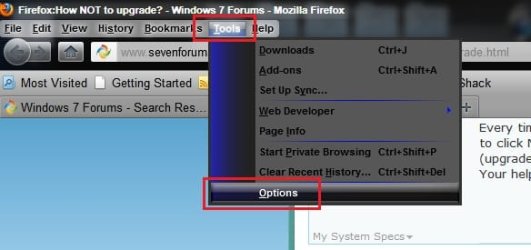
Go to Tools > Options > Advanced
3.jpg
1.JPG

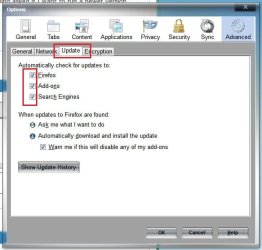
Now click the "update" tab, and uncheck these three ... press OK !
2.JPG

EDIT : After everything, I'd suggest you to use the newest version of at least those programs which connect to the web directly .... if your windows freezes due to the web browser's latest version, dont forget that you are a member of SevenForums .... just have another discussion on that issue, it will be solved !!
 

My Computer My Computer

Computer type
PC/Desktop
Computer Manufacturer/Model Number
Self Assembled
OS
Microsoft Windows 10 Pro Insider Preview 64-bit
CPU
Intel(R) Core(TM) i3-4130 CPU @ 3.40GHz
Motherboard
Gigabyte Technology Co., Ltd. B85M-D3H
Memory
Corsair Vengence 4GB x2 (8.00GB Dual-Channel DDR3 @ 798MHz)
Graphics Card(s)
2047MB GeForce GTS 450 (ZOTAC International)
Sound Card
Onboard (Realtek High Definition Audio)
Monitor(s) Displays
LG Flatron E2040T
Screen Resolution
1600x900
Hard Drives
Western Digital 1 TB
Seagate 500 GB
PSU
Corsair VS550
Case
Cooler Master K380
Cooling
Cooler Master Seidon 120V Plus
Keyboard
Logitech MK260r
Mouse
Logitech MK260r
Internet Speed
PMPL Broadband
Antivirus
Windows Defender + MBAM
Browser
Firefox
Other Info
Dell Studio 15" Laptop
Hi,
Thanks for your quick response. I ALREADY did that. It didn't work. Every time I start Firefox, it keeps asking me to run an upgraded version. I, of course, click No. How to keep the browser from asking me please. Thanks.
 

My Computer My Computer

OS
Windows 7 Professional, SP1
Memory
1.25GB
Hmm...is it actually asking you in a little popup window that appears when you start the browser? Or is it just a web page offering you the latest update?
 

My Computer My Computer

Computer type
PC/Desktop
Computer Manufacturer/Model Number
Custom-built
OS
Windows 7 Professional SP1 32-bit
CPU
Intel Core 2 Duo E6600 2.4GHz
Motherboard
Asus PL5D2
Memory
4GB DDR2-667 (4x1GB in dual-channel config)
Graphics Card(s)
nVidia GeForce 9800 GT
Sound Card
Creative X-Fi XtremeMusic
Monitor(s) Displays
Acer P236H
Screen Resolution
1920x1200 (DVI)
Hard Drives
OCZ SSD Vertex Plus 60GB SATA (Firmware 3.55), 64MB cache
Hitachi HD321KJ SATA, 320GB, 7200rpm, 16MB cache
PSU
Antec TruePower 2.0
Case
Cooler Master Centurion
Cooling
Too many fans
Keyboard
Standard
Mouse
Microsoft wireless optical mouse
Internet Speed
AT&T U-verse (18mbit/sec)
Antivirus
Microsoft Security Essentials
Browser
Firefox
Other Info
Other devices:
Compaq CQ-60 laptop
Google Nexus 7 (2012) tablet
Nvidia SHIELD tablet (US/LTE)
Hardkernel ODROID-XU single-board computer (Samsung Exynos 5420)
Re Firefox.
You are strongly advised to update to the latest version offered asap....

Why do I need to update?

Firefox is constantly evolving as our community finds ways to make it better, and as we adjust to the latest security threats. Keeping your Firefox up-to-date is the best way to make sure that you are using the smartest, fastest and – most importantly – safest version of Firefox available.
Firefox Update
 

My Computer My Computer

Computer Manufacturer/Model Number
LAPTOP. HP Pavilion dv7-4010TX .
OS
Win 7 Ultimate 64-bit. SP1.
CPU
Intel i7 -720QM.[1.6GHz Turbo Boost 2.8GHz. 6MB Cache.]
Memory
8 DDR 3 RAM. 1066MHZ
Graphics Card(s)
ATI 1024 MB. DDR3. Radeon HD5650
Monitor(s) Displays
17.3" High Definition Brightview LCD. LED Backlit.
Screen Resolution
1600 x 900.
Hard Drives
640GB
Case
Laptop / notebook.
Mouse
Logitech Anywhere mouse. MX.
Internet Speed
ADSL [ but too slow ]
I had similar problems with FF 6.xx and 7.xx. Their site appears to be down at the moment, but http://www.palemoon.org/ solved my problems and also allowed me to run a newer version of Firefox. :)
 

My Computer My Computer

Computer Manufacturer/Model Number
Self
OS
Main - Windows 7 Pro SP1 64-Bit; 2nd - Windows Server 2008 R2
CPU
Main - Core i7 2600K; 2nd - Core i7 920
Motherboard
Main - Asus P8Z68-V Pro/Gen3; 2nd - Gigabyte GA-EX58-UDR3
Memory
Main - 16GB Corsair Vengeance; 2nd - 12GB Corsair Vengeance
Graphics Card(s)
Main - XFX Radeon 6870 1GB; 2nd - XFX Radeon 4870 1GB
Sound Card
Both: Onboard Realtek Azalia
Monitor(s) Displays
Main - Hann 25" + I-INC 25" + Acer 23"; 2nd - Upgrading Soon
Screen Resolution
Main - 1920x1080 (All Three Monitors); 2nd - Upgrading Soon
Hard Drives
Main - (1) Crucial M4 128GB (Boot)
Main - (1) Seagate 2TB 64MB Cache (Data)
Main - (1) Seagate 2TB 64MB Cache (Data Backup)
2nd - (1) Intel X25-M SSD 80GB (Boot)
2nd - (3) Seagate 1TB 32MB Cache (Data Backup)
2nd - (1) Seagate 320GB (Because)
PSU
Main - OCZ 600W Modular; 2nd - OCZ 600W
Case
Main - Thermaltake Element G; 2nd - NZXT something or other
Cooling
Main - Corsair H80; 2nd - Prolimatech Megahalems
Keyboard
Main - Razer Reclusa; 2nd - Old MS Keyboard
Mouse
Main - Logitech MX Revolution; 2nd - Old MS Mouse
Internet Speed
20Mbps Time-Warner Cable
Thanks for suggesting to use Palemoon or upgrade Firefox to newer version. I did download and try Firefox 7 version. That 's when the Browser either freezes or crashes on me (with Firefox message: It's embarrasing...)I uninstalled the newer version and reintall the older version.
The pop-up window on top says User Account Control then Do you want the computer to make changes... or something to that effect.
My question is I have to live with that or there is a way to keep the pop-up away?
Your help and patience's greatly appreciated.
titi2
 

My Computer My Computer

OS
Windows 7 Professional, SP1
Memory
1.25GB
What exactly is triggering the UAC popup?

Did you try Pale Moon, the latest FF, or both?

On the chance that you're getting the UAC popup at the same time you're getting the "This is embarassing..." message, I would suspect some sort of spyware or virus trying to hijack your browser. What security measures are you using? :)
 

My Computer My Computer

Computer Manufacturer/Model Number
Self
OS
Main - Windows 7 Pro SP1 64-Bit; 2nd - Windows Server 2008 R2
CPU
Main - Core i7 2600K; 2nd - Core i7 920
Motherboard
Main - Asus P8Z68-V Pro/Gen3; 2nd - Gigabyte GA-EX58-UDR3
Memory
Main - 16GB Corsair Vengeance; 2nd - 12GB Corsair Vengeance
Graphics Card(s)
Main - XFX Radeon 6870 1GB; 2nd - XFX Radeon 4870 1GB
Sound Card
Both: Onboard Realtek Azalia
Monitor(s) Displays
Main - Hann 25" + I-INC 25" + Acer 23"; 2nd - Upgrading Soon
Screen Resolution
Main - 1920x1080 (All Three Monitors); 2nd - Upgrading Soon
Hard Drives
Main - (1) Crucial M4 128GB (Boot)
Main - (1) Seagate 2TB 64MB Cache (Data)
Main - (1) Seagate 2TB 64MB Cache (Data Backup)
2nd - (1) Intel X25-M SSD 80GB (Boot)
2nd - (3) Seagate 1TB 32MB Cache (Data Backup)
2nd - (1) Seagate 320GB (Because)
PSU
Main - OCZ 600W Modular; 2nd - OCZ 600W
Case
Main - Thermaltake Element G; 2nd - NZXT something or other
Cooling
Main - Corsair H80; 2nd - Prolimatech Megahalems
Keyboard
Main - Razer Reclusa; 2nd - Old MS Keyboard
Mouse
Main - Logitech MX Revolution; 2nd - Old MS Mouse
Internet Speed
20Mbps Time-Warner Cable
profdlp,

As soon as I click on Firefox to open it (UAC pop-up). The newer version crashes my computer with the message..."this is embarassing...". The older version doesn't crash my computer but every time I open it, the UAC pops up with the message "Do you want to run the newer version...Publisher:firefox " or something like that.
This is more or less of an annoyance to me. How can I keep the UAC message from popping up when I use the older version.
BTW I use the Security Program with comes with Win7 and I also have Malware.
Thanks for your help.
 

My Computer My Computer

OS
Windows 7 Professional, SP1
Memory
1.25GB
Gotcha. :)

The UAC is the User Account Control built into Windows and warns you about "silent" changes being made to your system. What you're getting is just the upgrade nag screen built into Firefox. You can turn it off in Tools>>Options>>Advanced>>Upgrade, though you should keep in mind that you will be using an older browser with lots of security holes and performance issues which have been fixed in the later versions.

I had a similar problem and Pale Moon solved it for me. My add-ons all work and it's pretty fast, too. I'd recommend giving that a shot rather than sticking with the old version. :)
 

My Computer My Computer

Computer Manufacturer/Model Number
Self
OS
Main - Windows 7 Pro SP1 64-Bit; 2nd - Windows Server 2008 R2
CPU
Main - Core i7 2600K; 2nd - Core i7 920
Motherboard
Main - Asus P8Z68-V Pro/Gen3; 2nd - Gigabyte GA-EX58-UDR3
Memory
Main - 16GB Corsair Vengeance; 2nd - 12GB Corsair Vengeance
Graphics Card(s)
Main - XFX Radeon 6870 1GB; 2nd - XFX Radeon 4870 1GB
Sound Card
Both: Onboard Realtek Azalia
Monitor(s) Displays
Main - Hann 25" + I-INC 25" + Acer 23"; 2nd - Upgrading Soon
Screen Resolution
Main - 1920x1080 (All Three Monitors); 2nd - Upgrading Soon
Hard Drives
Main - (1) Crucial M4 128GB (Boot)
Main - (1) Seagate 2TB 64MB Cache (Data)
Main - (1) Seagate 2TB 64MB Cache (Data Backup)
2nd - (1) Intel X25-M SSD 80GB (Boot)
2nd - (3) Seagate 1TB 32MB Cache (Data Backup)
2nd - (1) Seagate 320GB (Because)
PSU
Main - OCZ 600W Modular; 2nd - OCZ 600W
Case
Main - Thermaltake Element G; 2nd - NZXT something or other
Cooling
Main - Corsair H80; 2nd - Prolimatech Megahalems
Keyboard
Main - Razer Reclusa; 2nd - Old MS Keyboard
Mouse
Main - Logitech MX Revolution; 2nd - Old MS Mouse
Internet Speed
20Mbps Time-Warner Cable
profdlp,

Thanks for your advice. Much appreciated.

titi2
 

My Computer My Computer

OS
Windows 7 Professional, SP1
Memory
1.25GB
Back
Top