
Solved Firefox keeps flickering. . .

PwnFrnzy

Hardware & Perfomance
Pro User
Local time
5:13 AM
Messages
500
Location
California, US
So I turn on my crap computer today just like I o everyday and open Firefox, about 30 seconds after opening I open my bookmarks and it flickers for a second. I'm like "Okay, minor glitch."
I open Seven Forums and I sign in and click the general discussion link and Firefox says "Not Responding" and goes white, then when it comes back I click general discussion again and Firefox flickers again, then I click a few more times with flickers until it finally opens the General Discussion page.
So I open another tab, "Not Responding" for about 10 seconds and I open Cnet, and I click on the Seven Forums tab and it flickers again, clicking a few more times with flickers until opening the Seven Forums tab.
So I keep getting flickers when I click a link/tab and random times when it goes to "Not Responding" for about 10 seconds. I thought a reinstall would work, but add-ons are a (female dog) to install.
It seems Firefox becomes more and more worse as the version number increases, any help?
 

My Computer

Computer type
PC/Desktop
Computer Manufacturer/Model Number
Frankenstein PC
OS
Windows 7 Home Premium 64-bit SP1
CPU
Intel core i7 920 @ 2.67Ghz; Bloomfield 45nm Technology
Motherboard
Intel Corporation DX58SO (J1PR)
Memory
16GB Dual-Channel DDR3 @ 540MHz (7-7-7-19)
Graphics Card(s)
4095MB NVIDIA GeForce GTX 960 (EVGA)
Sound Card
N/A Integrated Audio
Monitor(s) Displays
Acer S231HLbid LED Monitor 23"
Screen Resolution
1920x1080 1080p 60Hz
Hard Drives
BOOT: 59GB ADATA SP900 (SSD)
STORAGE 1: 977GB Hitachi HDS721010CLA (SATA) @7200RPM;
STORAGE 2: 465GB Western Digital WDC WD5000AAKS-65YGA0 (SATA) @ 7200RPM;
PSU
EVGA SuperNOVA 750 G1 80+ Gold (120-G1-0750-XR)
Case
Cooler Master Elite Gaming Case Black 430
Cooling
Cooler Master Hyper 212 Heatsink. Front and rear 120mm fan
Keyboard
Rosewill RIKB-11003
Mouse
James Donkey 112S
Internet Speed
200/40
Antivirus
Avast! Antivirus Free
Browser
Cyberfox x64 / FireFox / PaleMoon x64; kept up-to-date
Other Info
Windows Installed on March 21, 2014
Hi, PwnFrzny! :)

Which version are you using? Are you using the beta, pre-beta or the release version, 3.6.13?

Have you tried a new profile? Re-installing add-ons should not be difficult unless you've customized them after the fact. Please keep us informed.
 

My Computer

Computer Manufacturer/Model Number
Toshiba L355D
OS
Windows 7 Ultimate x64 SP1
CPU
Core2 Duo
Motherboard
Intel
Memory
4 GB
Graphics Card(s)
GM965 on-board
Sound Card
RealTek on-board
Monitor(s) Displays
19"+17"(laptop)
Screen Resolution
1440x900 (x 2)
Hard Drives
500GB Ext. 200GB Internal
PSU
N/A
Case
N/A
Cooling
N/A
Yes, I'm using a current release version (3.6.13).
I closed and re-opened Firefox, it seems to have lessened the amount of times the problems consist, but I still get the problem here and there.
 

My Computer

Computer type
PC/Desktop
Computer Manufacturer/Model Number
Frankenstein PC
OS
Windows 7 Home Premium 64-bit SP1
CPU
Intel core i7 920 @ 2.67Ghz; Bloomfield 45nm Technology
Motherboard
Intel Corporation DX58SO (J1PR)
Memory
16GB Dual-Channel DDR3 @ 540MHz (7-7-7-19)
Graphics Card(s)
4095MB NVIDIA GeForce GTX 960 (EVGA)
Sound Card
N/A Integrated Audio
Monitor(s) Displays
Acer S231HLbid LED Monitor 23"
Screen Resolution
1920x1080 1080p 60Hz
Hard Drives
BOOT: 59GB ADATA SP900 (SSD)
STORAGE 1: 977GB Hitachi HDS721010CLA (SATA) @7200RPM;
STORAGE 2: 465GB Western Digital WDC WD5000AAKS-65YGA0 (SATA) @ 7200RPM;
PSU
EVGA SuperNOVA 750 G1 80+ Gold (120-G1-0750-XR)
Case
Cooler Master Elite Gaming Case Black 430
Cooling
Cooler Master Hyper 212 Heatsink. Front and rear 120mm fan
Keyboard
Rosewill RIKB-11003
Mouse
James Donkey 112S
Internet Speed
200/40
Antivirus
Avast! Antivirus Free
Browser
Cyberfox x64 / FireFox / PaleMoon x64; kept up-to-date
Other Info
Windows Installed on March 21, 2014
Hi, again, PwnFrnzy. :)

Have you attempted to use a fresh profile?

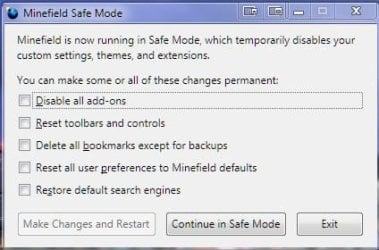
Hold the "Shift" key as you start FF and select a few options available. Sorry, I'm tracking the BCS game right now and will present a screenshot and a bit more information after the game is over. :D

Congrats to Auburn ... great game! :)

PwnFrnzy, try "Continue in Safe Mode" and see if the issue persists. If it doesn't, you'll need to disable your add-ons one at a time (or disable them all and re-enable them one at a time) until the issue is no longer present, or returns, depending on the method you choose. You will then have found the culprit.

ScreenShot00376.jpg
 
Last edited:

My Computer

Computer Manufacturer/Model Number
Toshiba L355D
OS
Windows 7 Ultimate x64 SP1
CPU
Core2 Duo
Motherboard
Intel
Memory
4 GB
Graphics Card(s)
GM965 on-board
Sound Card
RealTek on-board
Monitor(s) Displays
19"+17"(laptop)
Screen Resolution
1440x900 (x 2)
Hard Drives
500GB Ext. 200GB Internal
PSU
N/A
Case
N/A
Cooling
N/A

My Computer

Computer Manufacturer/Model Number
HCL
OS
Winbdows 7 ultimate x64 | Ubuntu 12.04 x64 LTS
CPU
Core 2 Duo e7400 @ 2.90GHz
Motherboard
Gigabyte G31M-ES2L
Memory
3GB DDR2
Graphics Card(s)
Asus Nvidia GTX 560Ti 1GB
Sound Card
On-board
Monitor(s) Displays
HCL eZeeBee 18.5" LCD
Screen Resolution
1366x768 @ 60Hz
Hard Drives
Western Digital 320GB
PSU
Corsair CX500 V2 500W
Cooling
Stock
Keyboard
Stock
Mouse
Stock
Internet Speed
15-25kBps D/L | 10kBps U/L | Hey Don't laugh
No add-ons or plug-ins were installed before the problems, I however had been using a cleaner called "Advanced System Care" ans had reversed all of it's changes due to it's questionable Registry cleaner/editor. I then re ran it to see if the problems would b4e resolved but it's still glitching and has started to open new Firefox windows randomly on the tab that I'm working on/viewing.
I have tried the two options you have both presented, but both have also failed.
If re-installing Firefox fails, I believe that a clean and re-install of Windows would be the only way to resolve the problem.
 

My Computer

Computer type
PC/Desktop
Computer Manufacturer/Model Number
Frankenstein PC
OS
Windows 7 Home Premium 64-bit SP1
CPU
Intel core i7 920 @ 2.67Ghz; Bloomfield 45nm Technology
Motherboard
Intel Corporation DX58SO (J1PR)
Memory
16GB Dual-Channel DDR3 @ 540MHz (7-7-7-19)
Graphics Card(s)
4095MB NVIDIA GeForce GTX 960 (EVGA)
Sound Card
N/A Integrated Audio
Monitor(s) Displays
Acer S231HLbid LED Monitor 23"
Screen Resolution
1920x1080 1080p 60Hz
Hard Drives
BOOT: 59GB ADATA SP900 (SSD)
STORAGE 1: 977GB Hitachi HDS721010CLA (SATA) @7200RPM;
STORAGE 2: 465GB Western Digital WDC WD5000AAKS-65YGA0 (SATA) @ 7200RPM;
PSU
EVGA SuperNOVA 750 G1 80+ Gold (120-G1-0750-XR)
Case
Cooler Master Elite Gaming Case Black 430
Cooling
Cooler Master Hyper 212 Heatsink. Front and rear 120mm fan
Keyboard
Rosewill RIKB-11003
Mouse
James Donkey 112S
Internet Speed
200/40
Antivirus
Avast! Antivirus Free
Browser
Cyberfox x64 / FireFox / PaleMoon x64; kept up-to-date
Other Info
Windows Installed on March 21, 2014
Hi, again, PwnFrnzy! :)

I'm not sure I understand what you mean by "has started to open new Firefox windows randomly on the tab that I'm working on/viewing", do you mean you are getting a lot of pop-up? If so, perhaps you have been infected by malware? Don't worry - if so, it can be easily taken care of, usually.

I look forward to your next reply, PwnFrnzy. BTW, about your sig; it's fine! Stick around a while and one of the GFX members will present you with a masterpiece (not that there is anything at all wrong with yours). :D
 

My Computer

Computer Manufacturer/Model Number
Toshiba L355D
OS
Windows 7 Ultimate x64 SP1
CPU
Core2 Duo
Motherboard
Intel
Memory
4 GB
Graphics Card(s)
GM965 on-board
Sound Card
RealTek on-board
Monitor(s) Displays
19"+17"(laptop)
Screen Resolution
1440x900 (x 2)
Hard Drives
500GB Ext. 200GB Internal
PSU
N/A
Case
N/A
Cooling
N/A
A pop-up does not come up, I always have multiple tabs open while browsing, then I would click on one of the other tabs while Firefox flickers into a seizure, then a moment later the tab Iwas trying to switch to would open in a different Window. I've been on for 5 minutes so far and there has been no issue. If it comes up again I will do the re-install, since my last post was made while I was at school.
But I will run a scan with Malwarebytes anyway to see if something comes up.

I doubt I will get a "masterpiece" signature like you said, but hopefully I will get lucky.
 

My Computer

Computer type
PC/Desktop
Computer Manufacturer/Model Number
Frankenstein PC
OS
Windows 7 Home Premium 64-bit SP1
CPU
Intel core i7 920 @ 2.67Ghz; Bloomfield 45nm Technology
Motherboard
Intel Corporation DX58SO (J1PR)
Memory
16GB Dual-Channel DDR3 @ 540MHz (7-7-7-19)
Graphics Card(s)
4095MB NVIDIA GeForce GTX 960 (EVGA)
Sound Card
N/A Integrated Audio
Monitor(s) Displays
Acer S231HLbid LED Monitor 23"
Screen Resolution
1920x1080 1080p 60Hz
Hard Drives
BOOT: 59GB ADATA SP900 (SSD)
STORAGE 1: 977GB Hitachi HDS721010CLA (SATA) @7200RPM;
STORAGE 2: 465GB Western Digital WDC WD5000AAKS-65YGA0 (SATA) @ 7200RPM;
PSU
EVGA SuperNOVA 750 G1 80+ Gold (120-G1-0750-XR)
Case
Cooler Master Elite Gaming Case Black 430
Cooling
Cooler Master Hyper 212 Heatsink. Front and rear 120mm fan
Keyboard
Rosewill RIKB-11003
Mouse
James Donkey 112S
Internet Speed
200/40
Antivirus
Avast! Antivirus Free
Browser
Cyberfox x64 / FireFox / PaleMoon x64; kept up-to-date
Other Info
Windows Installed on March 21, 2014
Yeah, PwnFrnzy, I always have multiple tabs and multiple browser windows open whenever I browse, too.

I'm happy the issue appears to be somewhat abated at the moment. It appears you know what to do if, in fact, it might be malware induced and, please, keep us informed. :)

As far as the "masterpiece sig" ... we'll see ... :cool:
 

My Computer

Computer Manufacturer/Model Number
Toshiba L355D
OS
Windows 7 Ultimate x64 SP1
CPU
Core2 Duo
Motherboard
Intel
Memory
4 GB
Graphics Card(s)
GM965 on-board
Sound Card
RealTek on-board
Monitor(s) Displays
19"+17"(laptop)
Screen Resolution
1440x900 (x 2)
Hard Drives
500GB Ext. 200GB Internal
PSU
N/A
Case
N/A
Cooling
N/A
It seems the problem has disappeared, it's been almost 2 hours and the issue I previously had is no longer coming up, odd.
Thanks for the support!
 

My Computer

Computer type
PC/Desktop
Computer Manufacturer/Model Number
Frankenstein PC
OS
Windows 7 Home Premium 64-bit SP1
CPU
Intel core i7 920 @ 2.67Ghz; Bloomfield 45nm Technology
Motherboard
Intel Corporation DX58SO (J1PR)
Memory
16GB Dual-Channel DDR3 @ 540MHz (7-7-7-19)
Graphics Card(s)
4095MB NVIDIA GeForce GTX 960 (EVGA)
Sound Card
N/A Integrated Audio
Monitor(s) Displays
Acer S231HLbid LED Monitor 23"
Screen Resolution
1920x1080 1080p 60Hz
Hard Drives
BOOT: 59GB ADATA SP900 (SSD)
STORAGE 1: 977GB Hitachi HDS721010CLA (SATA) @7200RPM;
STORAGE 2: 465GB Western Digital WDC WD5000AAKS-65YGA0 (SATA) @ 7200RPM;
PSU
EVGA SuperNOVA 750 G1 80+ Gold (120-G1-0750-XR)
Case
Cooler Master Elite Gaming Case Black 430
Cooling
Cooler Master Hyper 212 Heatsink. Front and rear 120mm fan
Keyboard
Rosewill RIKB-11003
Mouse
James Donkey 112S
Internet Speed
200/40
Antivirus
Avast! Antivirus Free
Browser
Cyberfox x64 / FireFox / PaleMoon x64; kept up-to-date
Other Info
Windows Installed on March 21, 2014
Thanks, PwnFrnzy, for the update. I'm keepin' my fingers crossed! :)

If it returns, we'll be here to help! :D
 

My Computer

Computer Manufacturer/Model Number
Toshiba L355D
OS
Windows 7 Ultimate x64 SP1
CPU
Core2 Duo
Motherboard
Intel
Memory
4 GB
Graphics Card(s)
GM965 on-board
Sound Card
RealTek on-board
Monitor(s) Displays
19"+17"(laptop)
Screen Resolution
1440x900 (x 2)
Hard Drives
500GB Ext. 200GB Internal
PSU
N/A
Case
N/A
Cooling
N/A
I have this same problem, too. On a new computer with Windows 7, Firefox 3.6.13, no add-ons.

It just randomly says "Not Responding" for anywhere from 5-30 seconds and sometimes freezes permanently. While this is happening, the Firefox windows almost turn completely white.

It seems like it happens randomly. I'll have FF open for a number of hours with no issues at all, and then it randomly starts. Once it starts, I know to save all my work ASAP because it's going to keep freezing and unfreezing until it finally freezes for good and I have to kill the process.
 

My Computer

OS
Windows 7 64 bit Home Premium

My Computer

Computer type
PC/Desktop
Computer Manufacturer/Model Number
Packard Bell
OS
Windows 7 Home Premium 64bit
CPU
Intel(R) Core(TM) i3-2120 CPU @ 3.30GHz
Motherboard
Packard Bell IPISB-AG
Memory
3.00 GB
Graphics Card(s)
(1) Intel(R) HD Graphics (2) VNC Mirror Driver
Sound Card
Realtek High Definition Audio
Monitor(s) Displays
AIO LCD
Screen Resolution
1920 x 1080
Hard Drives
WDC WD10EADX-22TDHB0 ATA Device
Fixed hard disk media
4 partitions
931.51 GB
Keyboard
Wireless
Mouse
Wireless
Antivirus
Microsoft Security Essentials
Browser
IE; Firefox
Other Info
Also:
Samsung N220 Plus Netbook - Windows 7 Home
HP laptop
iPad 5
None of that info is specific to Windows 7. I've used Firefox since it first came out without issue until Windows 7.

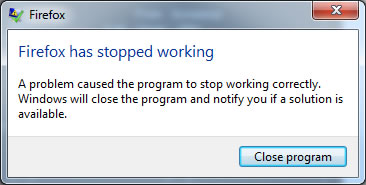
I wasn't able to get a screenshot of the faded white screen, but I got one of the error message this time:

Z8A74.jpg


It seems that many people are reporting this issue online but a fix has not been found yet (other than to use another browser).

Are there any reported conflicts between Firefox and Windows 7? Is it a compatibility thing? Do I have to run it in like XP or Vista compatibility mode or something? Cuz obviously there's something not jiving with Windows 7.
 

My Computer

OS
Windows 7 64 bit Home Premium
It just happened again (imagine that). I got a screenshot of it this time. See how everything in the background turned white? That happened about 10 seconds before it crashed.

I am Ari Gold pissed right now. It just randomly happened while I was working on something and I lost some work I was working on in another browser.

This is infuriating, rendering FF essentially unusable in Windows 7 because it may crash at any time without warning. Does anyone have a fix for this problem yet?

oti1ll.jpg


edit - for those of you who don't watch Entourage, this is Ari Gold pissed (language warning)

http://www.youtube.com/watch?v=NkC92MraU8s
 

My Computer

OS
Windows 7 64 bit Home Premium
If I were you, I would change my Windows 7 Theme.

Looks like that is the problem to me...
 

My Computer

Computer type
PC/Desktop
Computer Manufacturer/Model Number
Packard Bell
OS
Windows 7 Home Premium 64bit
CPU
Intel(R) Core(TM) i3-2120 CPU @ 3.30GHz
Motherboard
Packard Bell IPISB-AG
Memory
3.00 GB
Graphics Card(s)
(1) Intel(R) HD Graphics (2) VNC Mirror Driver
Sound Card
Realtek High Definition Audio
Monitor(s) Displays
AIO LCD
Screen Resolution
1920 x 1080
Hard Drives
WDC WD10EADX-22TDHB0 ATA Device
Fixed hard disk media
4 partitions
931.51 GB
Keyboard
Wireless
Mouse
Wireless
Antivirus
Microsoft Security Essentials
Browser
IE; Firefox
Other Info
Also:
Samsung N220 Plus Netbook - Windows 7 Home
HP laptop
iPad 5
If I were you, I would change my Windows 7 Theme.

Looks like that is the problem to me...

How does the theme affect Firefox compatibility?

I've only had Windows 7 for like a week. There were a few themes but I just picked this one cuz the colors were ok.
 

My Computer

OS
Windows 7 64 bit Home Premium
How does the theme affect Firefox compatibility?

I've only had Windows 7 for like a week. There were a few themes but I just picked this one cuz the colors were ok.
Theme management was in the background of your screen print. I just wondered if FF had some problem with it.

I would think that it's worth a try changing it, albeit temporarily - you can always go back to it if it doesn't make any difference. :)
 

My Computer

Computer type
PC/Desktop
Computer Manufacturer/Model Number
Packard Bell
OS
Windows 7 Home Premium 64bit
CPU
Intel(R) Core(TM) i3-2120 CPU @ 3.30GHz
Motherboard
Packard Bell IPISB-AG
Memory
3.00 GB
Graphics Card(s)
(1) Intel(R) HD Graphics (2) VNC Mirror Driver
Sound Card
Realtek High Definition Audio
Monitor(s) Displays
AIO LCD
Screen Resolution
1920 x 1080
Hard Drives
WDC WD10EADX-22TDHB0 ATA Device
Fixed hard disk media
4 partitions
931.51 GB
Keyboard
Wireless
Mouse
Wireless
Antivirus
Microsoft Security Essentials
Browser
IE; Firefox
Other Info
Also:
Samsung N220 Plus Netbook - Windows 7 Home
HP laptop
iPad 5
How does the theme affect Firefox compatibility?

I've only had Windows 7 for like a week. There were a few themes but I just picked this one cuz the colors were ok.
Theme management was in the background of your screen print. I just wondered if FF had some problem with it.

I would think that it's worth a try changing it, albeit temporarily - you can always go back to it if it doesn't make any difference. :)

Oh, that was theme management for a WordPress blog, not for Windows or Firefox :p That was just the webpage I was on when it crashed.
 

My Computer

OS
Windows 7 64 bit Home Premium
Are you using a Firefox theme by chance? I got a lot of problems updating Firefox that seemed to go away if I uninstalled, then installed Gradient iCool. Other themes may also make things weird. I'd try the vanilla FF install and see what happens. Or maybe back off to 3.6.9 which I'm using on W7 with no problem.

Of course now I only use FF as backup browser. My default is Chromium. So I don't run FF often enough to get hit with a lot of glitches. Still, 3.6.9 has been pretty stable from what I can see.
 

My Computer

Computer Manufacturer/Model Number
HP Media Center
OS
Windows 7 32 bit
CPU
AMD 5200+ dual core
Memory
2 GB
Graphics Card(s)
NVidia GeForce 6150SE 128 MB
Monitor(s) Displays
CRT
Screen Resolution
1280x1024
Hard Drives
500 GB Sata internal :

SIIG USB 3.0 docking stations w/WD Caviar Black 6 Gb/s drives
Keyboard
PS/2
Mouse
PS/2 Wheel Mouse
Other Info
SIIG USB 3.0 PCIexpress card.
Back
Top