
Solved (Firefox) My Issue "Firefox is already running.........."

Swizz

New member
Local time
3:22 AM
Messages
181
Hello all...

I wonder if somebody could help me out with my issue, as minor as it may sound to some. First off the bat I would like to say that I have the latest flash and newest version of Firefox.

From what I am currently aware of I am having an issue with, Youtube. When I close Youtube and then attempt to open another browser of Firefox, to start fresh... it will stall for 3/4 seconds then a box will appear stating "Firefox is already running, but is not responding. The old Firefox process must be closed to open a new window" When I have been given the option to close it, everything goes back to normal. But why is this happening only to, Youtube?

I would like to add..If I have 2 Or more Firefox browsers open at the same time, the message does not appear, but when I individually close them all, the message will appear once more, when I open a new browser, after visiting Youtube. I would also like to add that Chrome, Opera and IE , is not experiencing this problem.

I have also tried Safe mode, but with the same results.

Any help/advice will be appreciated
 

My Computer My Computer

Computer type
PC/Desktop
Computer Manufacturer/Model Number
Custom
OS
Windows 7 Ultimate x64
CPU
Intel i5-4670k @ 4.30GHz
Motherboard
GByte Z87X-UD4H MOBO
Memory
8gb
Graphics Card(s)
3GB EVGA NVIDIA GeForce GTX 780 OC
Sound Card
ASUS Xonar Essence STX
Monitor(s) Displays
ASUS VG248QE 144hz
Screen Resolution
1920x1080
Hard Drives
Samsung SSD 840 Pro Series 256gb & Seagate 3TB Performance SATA 3 Hard Drive ST3000DM001 7200rpm
PSU
XFX 750w P1-750B-BEFX
Case
Silverstone SST-FT02B-W
Cooling
Noctua NH-D14 Dual
Internet Speed
150mb
Antivirus
ESET Smart Security 8 / Malwarebytes
Browser
Firefox/Chrome
I've seen the same issue and closing Firefox releases the RAM it has been using, gives the program a clean start when next opened. I find it a minor hassle when downloading and viewing videos. I also normally have 2 instances of Firefox open and sometimes two or more tabs with different sites open. Usually see the issue when Task Manager reports more than 500KB in use but also involved is Adobe Flash Player, might be 2 instances running with one quite a bit larger than the other. Ending process on FF usually also ends AFP.
 

My Computer My Computer

Computer type
PC/Desktop
Computer Manufacturer/Model Number
Customs, Dell, Gateway, HP, Toshiba, Acer, ASUS
OS
Windows 7 Ultimate 64-bit, Windows 8.1 64-bit, Mac OS X 10.10, Linux Mint 17, Windows 10 Pro TP
Keyboard
Microsoft
Mouse
Microsoft
This has only started to happen since I received a message early this morning around 1am to update Flash (It's a strange one because I have removed Flash, but still it persist)

Is this happening to your-self, Berton? If so how long has it been occurring for you? Or are you merely aware of it, from seeing it from somebody else? You have to excuse me I am trying to gather as much information as I can.

Are there any fixes for this?

Cheers.
 

My Computer My Computer

Computer type
PC/Desktop
Computer Manufacturer/Model Number
Custom
OS
Windows 7 Ultimate x64
CPU
Intel i5-4670k @ 4.30GHz
Motherboard
GByte Z87X-UD4H MOBO
Memory
8gb
Graphics Card(s)
3GB EVGA NVIDIA GeForce GTX 780 OC
Sound Card
ASUS Xonar Essence STX
Monitor(s) Displays
ASUS VG248QE 144hz
Screen Resolution
1920x1080
Hard Drives
Samsung SSD 840 Pro Series 256gb & Seagate 3TB Performance SATA 3 Hard Drive ST3000DM001 7200rpm
PSU
XFX 750w P1-750B-BEFX
Case
Silverstone SST-FT02B-W
Cooling
Noctua NH-D14 Dual
Internet Speed
150mb
Antivirus
ESET Smart Security 8 / Malwarebytes
Browser
Firefox/Chrome
I have seen this happen before with different, older versions of FF. It's usually a web page (sometimes YouTube) that left something open. I suspect that it's due to a third party pixel element that remains active. It doesn't happen with any regularity for me to chase it. It happens far more often with SWMBO's use of IE11. I just end the process with task manager and continue on. BTW, v35 of FF just presented itself for update this afternoon. Since I've seen this issue with other versions, I'm not convinced it's just a fault with FF. I run FF with AdBlockPlus and Ghostery active, but IE doesn't have these active on this system.
 

My Computer My Computer

Computer type
PC/Desktop
Computer Manufacturer/Model Number
ASUS
OS
Windows 7 Home Premium 64 bit SP1
CPU
i5-2320 @3.00 GHz
Memory
6GB
Graphics Card(s)
NVIDIA GeForce 7300 LE
Monitor(s) Displays
Acer S200HQL 19.5 LED
Screen Resolution
1280 x 800 (1900 x 900 max)
Hard Drives
Drive 1: 1 TB SATA internal: C drive
Drive 2: 250 GB SATA internal: User Data Backup
Drive 3: 500 GB SATA USB: Full System Backup 1, Father
Drive 4: 500 GB SATA USB: Full System Backup 2, Son
Drive 5: 40 GB IDE USB: Kindle, ASUS Tabl
Keyboard
ASUS KB34211
Mouse
Logitech m325 cordless
Internet Speed
27Mb down, 3 Mb up cable modem w/Netgear R6400 WiFi
Antivirus
NIS, Spybot S&D, CCleaner, Malwarebytes, MSERT, MRT
Browser
FF v44.0.2;IE11 v11.0.9600.18015,uv11.0.23;Chrome v44.0.2403
Other Info
FF has AdBlockPlus and Ghostery plugins,
FlashPlayer removal

This has only started to happen since I received a message early this morning around 1am to update Flash (It's a strange one because I have removed Flash, but still it persist)

Is this happening to your-self, Berton? If so how long has it been occurring for you? Or are you merely aware of it, from seeing it from somebody else? You have to excuse me I am trying to gather as much information as I can.

Are there any fixes for this?

Cheers.

How did you remove flash player? What do you see if you type about:plugins in your Firefox address bar then press Enter?

See this post:

http://www.sevenforums.com/browsers...nstalled-firefox-post2984654.html#post2984654

Try viewing video using the html5 player and see if the same thing happens.

https://www.youtube.com/html5 - Request HTML5 player.

I take that you've read the following:

How to Fix the

https://support.mozilla.org/en-US/k...efox+is+already+running+but+is+not+responding

Personally I'd suggest backing up elements of your Firefox Profile that you need to keep then going for the full removal of Firefox option (including any leftovers) before rebooting and dong a fresh Firefox install then add your backed up profile elements.

As a test you could try running this portable version (uses own profile) to see if the same thing happens.

https://8pecxstudios.com/cyberfox-portable-edition

You need Intel 32bit portable version (x86) if you want a Java enabled browser.
 
Last edited:

My Computer My Computer

Computer type
Laptop
Computer Manufacturer/Model Number
ASUS
OS
Microsoft Windows 7 Home Premium 64-bit 7601 Multiprocessor Free Service Pack 1
CPU
AMD C-60 APU with Radeon(tm) HD Graphics
Motherboard
ASUSTeK COMPUTER INC. X501U
Memory
4.00 GB
Graphics Card(s)
AMD Radeon HD 6290 Graphics
Sound Card
(1) AMD High Definition Audio Device (2) Realtek High Defi
Screen Resolution
1366 x 768 x 32 bits (4294967296 colors) @ 60 Hz
Hard Drives
Hitachi HTS545050A7E380 SATA Disk Device
Antivirus
Comodo CIS & FW, SecureAplus App Whitelisting, Threatfire
Browser
Cyberfox 64bit, Opera 64bit, Airfox
Other Info
Spy-The-Spy, HitmanPro.Alert, Norton Connect Safe, MJRegWatcher, BitDefender TrafficLight, Voodoo Shield, Zemana AntiMalware
Hello there, Callender, thank you for your time..Yes I have tried the Task Manager, even though it can be useful' I see it as sweeping dirt under the rug, and not actually tackling the problem.

The forth link that you have provided, I have seen this and I have also been a little weary about conducting this operation.

When I get back home in few hours time Or even tomorrow.. I will uninstall Firefox and save my bookmarks. Reboot, then re-install.

I will be updating as soon as Firefox has been re-installed .

Cheers guys.
 

My Computer My Computer

Computer type
PC/Desktop
Computer Manufacturer/Model Number
Custom
OS
Windows 7 Ultimate x64
CPU
Intel i5-4670k @ 4.30GHz
Motherboard
GByte Z87X-UD4H MOBO
Memory
8gb
Graphics Card(s)
3GB EVGA NVIDIA GeForce GTX 780 OC
Sound Card
ASUS Xonar Essence STX
Monitor(s) Displays
ASUS VG248QE 144hz
Screen Resolution
1920x1080
Hard Drives
Samsung SSD 840 Pro Series 256gb & Seagate 3TB Performance SATA 3 Hard Drive ST3000DM001 7200rpm
PSU
XFX 750w P1-750B-BEFX
Case
Silverstone SST-FT02B-W
Cooling
Noctua NH-D14 Dual
Internet Speed
150mb
Antivirus
ESET Smart Security 8 / Malwarebytes
Browser
Firefox/Chrome
Not having a problem, am watching a YouTube video as I type this. I'm on Firefox 34.0.5 but there is a newer version available.
 

My Computer My Computer

Computer type
PC/Desktop
Computer Manufacturer/Model Number
Customs, Dell, Gateway, HP, Toshiba, Acer, ASUS
OS
Windows 7 Ultimate 64-bit, Windows 8.1 64-bit, Mac OS X 10.10, Linux Mint 17, Windows 10 Pro TP
Keyboard
Microsoft
Mouse
Microsoft
Reinstall Firefox?

Hello there, Callender, thank you for your time..Yes I have tried the Task Manager, even though it can be useful' I see it as sweeping dirt under the rug, and not actually tackling the problem.

The forth link that you have provided, I have seen this and I have also been a little weary about conducting this operation.

When I get back home in few hours time Or even tomorrow.. I will uninstall Firefox and save my bookmarks. Reboot, then re-install.

I will be updating as soon as Firefox has been re-installed .

Cheers guys.

Well reinstalling Firefox cleanly isn't straight forward. Maybe let us know the results of the plugin check = does it only show one flash player .dll ?

Once FF is removed check the following and delete if found before the reinstall:

C:\Program Files (x86)\Mozilla Firefox

Refresh the window to make sure that it has gone.

Copy this:

%APPDATA%

into the Start > Run dialog box and press enter.

Open Mozilla Folder and delete the Firefox Folder.

Refresh the window to make sure that it has gone.

You didn't say how you removed flash player. If you used Add/ Remove Programs then it hasn't been fully removed.

https://helpx.adobe.com/flash-player/kb/uninstall-flash-player-windows.html

Download the removal tool and run it following all of the instuctions listed here including deleting the leftovers.

Then you can reboot and clean install Firefox then flash player.
 

My Computer My Computer

Computer type
Laptop
Computer Manufacturer/Model Number
ASUS
OS
Microsoft Windows 7 Home Premium 64-bit 7601 Multiprocessor Free Service Pack 1
CPU
AMD C-60 APU with Radeon(tm) HD Graphics
Motherboard
ASUSTeK COMPUTER INC. X501U
Memory
4.00 GB
Graphics Card(s)
AMD Radeon HD 6290 Graphics
Sound Card
(1) AMD High Definition Audio Device (2) Realtek High Defi
Screen Resolution
1366 x 768 x 32 bits (4294967296 colors) @ 60 Hz
Hard Drives
Hitachi HTS545050A7E380 SATA Disk Device
Antivirus
Comodo CIS & FW, SecureAplus App Whitelisting, Threatfire
Browser
Cyberfox 64bit, Opera 64bit, Airfox
Other Info
Spy-The-Spy, HitmanPro.Alert, Norton Connect Safe, MJRegWatcher, BitDefender TrafficLight, Voodoo Shield, Zemana AntiMalware
I jumped the gun, when I said that I would simply reinstall..It will be a complete clean install, by going into the APPDATA folder, first, then deleting the Mozilla Folder. And as you instructed also deleting any left overs by going to C:\Program Files (x86)\Mozilla Firefox.

I have the uninstall_flash_player tool, when I need to remove flash.

Thanks boss.
 

My Computer My Computer

Computer type
PC/Desktop
Computer Manufacturer/Model Number
Custom
OS
Windows 7 Ultimate x64
CPU
Intel i5-4670k @ 4.30GHz
Motherboard
GByte Z87X-UD4H MOBO
Memory
8gb
Graphics Card(s)
3GB EVGA NVIDIA GeForce GTX 780 OC
Sound Card
ASUS Xonar Essence STX
Monitor(s) Displays
ASUS VG248QE 144hz
Screen Resolution
1920x1080
Hard Drives
Samsung SSD 840 Pro Series 256gb & Seagate 3TB Performance SATA 3 Hard Drive ST3000DM001 7200rpm
PSU
XFX 750w P1-750B-BEFX
Case
Silverstone SST-FT02B-W
Cooling
Noctua NH-D14 Dual
Internet Speed
150mb
Antivirus
ESET Smart Security 8 / Malwarebytes
Browser
Firefox/Chrome
Sorry, almost forgot about what you asked me to do earlier on. When I type "about:plugins" I see this...


OpenH264 Video Codec provided by Cisco Systems, Inc.

File: 1.1
Path: C:\Users\Home PC\AppData\Roaming\Mozilla\Firefox\Profiles\rr07ro2j.default\gmp-gmpopenh264\1.1
Version: 1.1
State: Enabled
Play back web video and use video chats.

MIME Type Description Suffixes
Shockwave Flash

File: NPSWF32_16_0_0_257.dll
Path: C:\Windows\SysWOW64\Macromed\Flash\NPSWF32_16_0_0_257.dll
Version: 16.0.0.257
State: Enabled
Shockwave Flash 16.0 r0

MIME Type Description Suffixes
application/x-shockwave-flash Adobe Flash movie swf
application/futuresplash FutureSplash movie spl
Adobe Acrobat

File: nppdf32.dll,nppdf32.dll
Path: C:\Program Files (x86)\Adobe\Reader 11.0\Reader\browser\nppdf32.dll,C:\Program Files (x86)\Adobe\Reader 11.0\Reader\AIR\nppdf32.dll
Version: 11.0.10.32
State: Enabled
Adobe PDF Plug-In For Firefox and Netscape 11.0.10

MIME Type Description Suffixes
application/pdf Acrobat Portable Document Format pdf
application/vnd.adobe.pdfxml Adobe PDF in XML Format pdfxml
application/vnd.adobe.x-mars Adobe PDF in XML Format mars
application/vnd.fdf Acrobat Forms Data Format fdf
application/vnd.adobe.xfdf XML Version of Acrobat Forms Data Format xfdf
application/vnd.adobe.xdp+xml Acrobat XML Data Package xdp
application/vnd.adobe.xfd+xml Adobe FormFlow99 Data File xfd
application/pdf Acrobat Portable Document Format pdf
application/vnd.adobe.pdfxml Adobe PDF in XML Format pdfxml
application/vnd.adobe.x-mars Adobe PDF in XML Format mars
application/vnd.fdf Acrobat Forms Data Format fdf
application/vnd.adobe.xfdf XML Version of Acrobat Forms Data Format xfdf
application/vnd.adobe.xdp+xml Acrobat XML Data Package xdp
application/vnd.adobe.xfd+xml Adobe FormFlow99 Data File xfd
Google Update

File: npGoogleUpdate3.dll
Path: C:\Program Files (x86)\Google\Update\1.3.25.11\npGoogleUpdate3.dll
Version: 1.3.25.11
State: Enabled
Google Update

MIME Type Description Suffixes
application/x-vnd.google.update3webcontrol.3
application/x-vnd.google.oneclickctrl.9
NVIDIA 3D Vision

File: npnv3dv.dll
Path: C:\Program Files (x86)\NVIDIA Corporation\3D Vision\npnv3dv.dll
Version: 7.17.13.4052
State: Disabled
NVIDIA 3D Vision plugin for Mozilla browsers

MIME Type Description Suffixes
image/jps JPEG-based stereo image jps
image/pns PNG-based stereo image pns
image/mpo Multi-Picture Format image mpo
NVIDIA 3D VISION

File: npnv3dvstreaming.dll
Path: C:\Program Files (x86)\NVIDIA Corporation\3D Vision\npnv3dvstreaming.dll
Version: 7.17.13.4052
State: Disabled
NVIDIA 3D Vision Streaming plugin for Mozilla browsers

MIME Type Description Suffixes
application/mozilla-3dv-streaming-plugin npnv3dvstreaming rts
Yahoo Application State Plugin

File: npYState.dll
Path: C:\Program Files (x86)\Yahoo!\Shared\npYState.dll
Version: 1.0.0.7
State: Disabled
Yahoo Application State Plugin version 1.0.0.7

MIME Type Description Suffixes
application/x-vnd.yahoo.applicationstate npYState npYState
 

My Computer My Computer

Computer type
PC/Desktop
Computer Manufacturer/Model Number
Custom
OS
Windows 7 Ultimate x64
CPU
Intel i5-4670k @ 4.30GHz
Motherboard
GByte Z87X-UD4H MOBO
Memory
8gb
Graphics Card(s)
3GB EVGA NVIDIA GeForce GTX 780 OC
Sound Card
ASUS Xonar Essence STX
Monitor(s) Displays
ASUS VG248QE 144hz
Screen Resolution
1920x1080
Hard Drives
Samsung SSD 840 Pro Series 256gb & Seagate 3TB Performance SATA 3 Hard Drive ST3000DM001 7200rpm
PSU
XFX 750w P1-750B-BEFX
Case
Silverstone SST-FT02B-W
Cooling
Noctua NH-D14 Dual
Internet Speed
150mb
Antivirus
ESET Smart Security 8 / Malwarebytes
Browser
Firefox/Chrome
I finally had a little time for myself :) And in the progress I did what was requested, of the above.
FireFox and Flash have now been reinstalled after deleting what was asked. I did notice for some reason even with a clean install, that I received all of my previous bookmarks and the plugins have returned too. Not like I am complaining about it :) But is that normal?

Youtube is behaving so much more better now. No more pop up message when I close it, either :)

Cheers fellas.
 

My Computer My Computer

Computer type
PC/Desktop
Computer Manufacturer/Model Number
Custom
OS
Windows 7 Ultimate x64
CPU
Intel i5-4670k @ 4.30GHz
Motherboard
GByte Z87X-UD4H MOBO
Memory
8gb
Graphics Card(s)
3GB EVGA NVIDIA GeForce GTX 780 OC
Sound Card
ASUS Xonar Essence STX
Monitor(s) Displays
ASUS VG248QE 144hz
Screen Resolution
1920x1080
Hard Drives
Samsung SSD 840 Pro Series 256gb & Seagate 3TB Performance SATA 3 Hard Drive ST3000DM001 7200rpm
PSU
XFX 750w P1-750B-BEFX
Case
Silverstone SST-FT02B-W
Cooling
Noctua NH-D14 Dual
Internet Speed
150mb
Antivirus
ESET Smart Security 8 / Malwarebytes
Browser
Firefox/Chrome
Firefox clean install

I finally had a little time for myself :) And in the progress I did what was requested, of the above.

FireFox and Flash have now been reinstalled after deleting what was asked. I did notice for some reason even with a clean install, that I received all of my previous bookmarks and the plugins have returned too. Not like I am complaining about it :) But is that normal?

Youtube is behaving so much more better now. No more pop up message when I close it, either :)

Cheers fellas.

Bookmarks and plugins reappeared? That's not normal but don't worry about it if it's working. It just means that there were some files somewhere that didn't get deleted when you removed Firefox.

Here's a couple of ideas. Use them if you like.

Enable HTML5 video playback in Firefox as mentioned in an earlier post. That way you don't need flash player for Youtube.

If you want to just keep using Flash Player it's better to have it activated on demand per element rather than activating it for the whole page or website because it does pose a security risk.

If you're interested here's the plugin that you need:

Click To Play Per Element - Firefox

Note the following. In order for this to work:

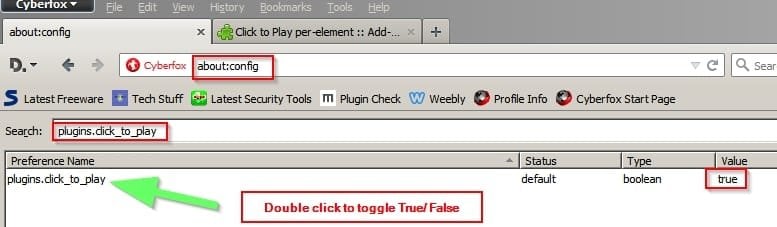
In about:config "plugins.click_to_play" must be "true".
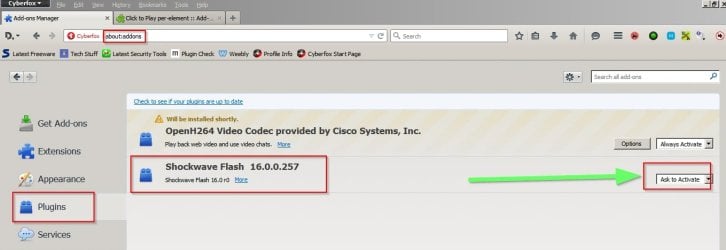
On about:addons (plugins page) required plugin must be "Ask to activate".

Type about:config in the address bar and press Enter.

In the search box type plugins.click_to_play

Double click as shown to change the value to True

about_config.jpg

Close the window.

Type about:addons in the address bar and press Enter.

In the window that opens select Plugins

Set Shockwave Flash to Ask To Activate

Then you're good to go. No more unwanted auto-loading of flash content! :)

Add-ons Manager.jpg
 

My Computer My Computer

Computer type
Laptop
Computer Manufacturer/Model Number
ASUS
OS
Microsoft Windows 7 Home Premium 64-bit 7601 Multiprocessor Free Service Pack 1
CPU
AMD C-60 APU with Radeon(tm) HD Graphics
Motherboard
ASUSTeK COMPUTER INC. X501U
Memory
4.00 GB
Graphics Card(s)
AMD Radeon HD 6290 Graphics
Sound Card
(1) AMD High Definition Audio Device (2) Realtek High Defi
Screen Resolution
1366 x 768 x 32 bits (4294967296 colors) @ 60 Hz
Hard Drives
Hitachi HTS545050A7E380 SATA Disk Device
Antivirus
Comodo CIS & FW, SecureAplus App Whitelisting, Threatfire
Browser
Cyberfox 64bit, Opera 64bit, Airfox
Other Info
Spy-The-Spy, HitmanPro.Alert, Norton Connect Safe, MJRegWatcher, BitDefender TrafficLight, Voodoo Shield, Zemana AntiMalware
Very informative, thank you again, Callender *two thumbs up*
 

My Computer My Computer

Computer type
PC/Desktop
Computer Manufacturer/Model Number
Custom
OS
Windows 7 Ultimate x64
CPU
Intel i5-4670k @ 4.30GHz
Motherboard
GByte Z87X-UD4H MOBO
Memory
8gb
Graphics Card(s)
3GB EVGA NVIDIA GeForce GTX 780 OC
Sound Card
ASUS Xonar Essence STX
Monitor(s) Displays
ASUS VG248QE 144hz
Screen Resolution
1920x1080
Hard Drives
Samsung SSD 840 Pro Series 256gb & Seagate 3TB Performance SATA 3 Hard Drive ST3000DM001 7200rpm
PSU
XFX 750w P1-750B-BEFX
Case
Silverstone SST-FT02B-W
Cooling
Noctua NH-D14 Dual
Internet Speed
150mb
Antivirus
ESET Smart Security 8 / Malwarebytes
Browser
Firefox/Chrome
I did notice for some reason even with a clean install, that I received all of my previous bookmarks and the plugins have returned too. Not like I am complaining about it :) But is that normal?
I've seen that happen on the few re-installs I've had to do.
 

My Computer My Computer

Computer type
PC/Desktop
Computer Manufacturer/Model Number
Customs, Dell, Gateway, HP, Toshiba, Acer, ASUS
OS
Windows 7 Ultimate 64-bit, Windows 8.1 64-bit, Mac OS X 10.10, Linux Mint 17, Windows 10 Pro TP
Keyboard
Microsoft
Mouse
Microsoft
Ah.. well that's reassuring, thanks again, bud
 

My Computer My Computer

Computer type
PC/Desktop
Computer Manufacturer/Model Number
Custom
OS
Windows 7 Ultimate x64
CPU
Intel i5-4670k @ 4.30GHz
Motherboard
GByte Z87X-UD4H MOBO
Memory
8gb
Graphics Card(s)
3GB EVGA NVIDIA GeForce GTX 780 OC
Sound Card
ASUS Xonar Essence STX
Monitor(s) Displays
ASUS VG248QE 144hz
Screen Resolution
1920x1080
Hard Drives
Samsung SSD 840 Pro Series 256gb & Seagate 3TB Performance SATA 3 Hard Drive ST3000DM001 7200rpm
PSU
XFX 750w P1-750B-BEFX
Case
Silverstone SST-FT02B-W
Cooling
Noctua NH-D14 Dual
Internet Speed
150mb
Antivirus
ESET Smart Security 8 / Malwarebytes
Browser
Firefox/Chrome
You're welcome.
 

My Computer My Computer

Computer type
PC/Desktop
Computer Manufacturer/Model Number
Customs, Dell, Gateway, HP, Toshiba, Acer, ASUS
OS
Windows 7 Ultimate 64-bit, Windows 8.1 64-bit, Mac OS X 10.10, Linux Mint 17, Windows 10 Pro TP
Keyboard
Microsoft
Mouse
Microsoft
I would just add that maybe you could try installing Cyberfox 64 bit which is like Firefox but can access all available memory. You can also use the same plugins.
 

My Computer My Computer

Computer type
PC/Desktop
Computer Manufacturer/Model Number
Custom Build
OS
Windows 7 Home Premium 64 bit
CPU
Intel Core 2 Quad
Motherboard
Gigabyte
Memory
8 GB
Graphics Card(s)
Nividia Geforce GT 520
Hard Drives
Seagate
Western Digital
Antivirus
Norton
Browser
Firefox
Back
Top