
Solved Firefox searchplugins - Create search for sevenforums.com

SmithUnwesson

HEEDLESS REPRESSION
Power User
Local time
8:23 PM
Messages
60
Location
Down South
Hello 7,

I am attempting to create a selection in the Firefox search engines that works with sevenforums advanced search.

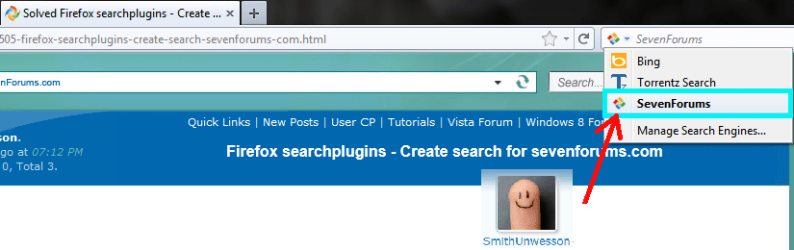
The screenshot below shows that I have successfully created the selection:

Capture.PNG

I've created this by editing the criteria that was in the default bing-search.xml, then I saved the SevenForums-search.xml to the profile folder located at:

%AppData%Roaming\Mozilla\Firefox\Profiles\~~~~.~~~~\searchplugins\SevenForums-search.xml

But it doesn't work :sarc:

It only leads me to the main SevenForums page. I believe this is due to the actual search-link that I need to use.

Does anyone know the correct data that needs to be in this .xml file for this to work?

Thanks!
 

My Computer

Computer Manufacturer/Model Number
Dell
OS
Windows 7 Ultimate 64bit
CPU
i3
Memory
4Gb
Graphics Card(s)
Intel(R) HD Graphics
Hard Drives
350G built-in, 1T Seagate External, 2T Buffalo External
Case
I prefer upper, but I will settle for lower
Internet Speed
Yes, I would like some please...
Other Info
Ham & Eggs - A days work for a chicken, but a lifetime of commitment for a pig.
This works on FireFox:
Firefox Search Plugins Generator

Not sure about getting to advanced search. You may have to fiddle with it a bit.

edit: I've used that generator but it's been over a year. So I forget the gory details. :)
 

My Computer

Computer Manufacturer/Model Number
HP Media Center
OS
Windows 7 32 bit
CPU
AMD 5200+ dual core
Memory
2 GB
Graphics Card(s)
NVidia GeForce 6150SE 128 MB
Monitor(s) Displays
CRT
Screen Resolution
1280x1024
Hard Drives
500 GB Sata internal :

SIIG USB 3.0 docking stations w/WD Caviar Black 6 Gb/s drives
Keyboard
PS/2
Mouse
PS/2 Wheel Mouse
Other Info
SIIG USB 3.0 PCIexpress card.
Thanks MilesAhead,

I have tried multiple formats and cannot seem to come up with the proper wording to get this to work... Thanks for the site link though, this will come in very handy for future projects :)
 

My Computer

Computer Manufacturer/Model Number
Dell
OS
Windows 7 Ultimate 64bit
CPU
i3
Memory
4Gb
Graphics Card(s)
Intel(R) HD Graphics
Hard Drives
350G built-in, 1T Seagate External, 2T Buffalo External
Case
I prefer upper, but I will settle for lower
Internet Speed
Yes, I would like some please...
Other Info
Ham & Eggs - A days work for a chicken, but a lifetime of commitment for a pig.
Try this one:

Semantic Void :: Mozilla Firefox Search Plugin Creator

I got this
Code:
<search
version='7.1'
name='Win7Forums'
description='Windows Seven Forums'
action='http://www.sevenforums.com/search.php'
searchForm='http://www.sevenforums.com/search.php'
method='GET'
>
<input name="searchid" user >
<input name="sourceid" value="Mozilla-search">
</search>
<browser
update="http://www.sevenforums.com"
updateCheckDays="http://www.sevenforums.com"
>

Not sure if I did it right.
 

My Computer

Computer Manufacturer/Model Number
HP Media Center
OS
Windows 7 32 bit
CPU
AMD 5200+ dual core
Memory
2 GB
Graphics Card(s)
NVidia GeForce 6150SE 128 MB
Monitor(s) Displays
CRT
Screen Resolution
1280x1024
Hard Drives
500 GB Sata internal :

SIIG USB 3.0 docking stations w/WD Caviar Black 6 Gb/s drives
Keyboard
PS/2
Mouse
PS/2 Wheel Mouse
Other Info
SIIG USB 3.0 PCIexpress card.
I found a solution, although it wasn't nearly as simple as I'd hoped it would be. I followed the information provided here. The information provided by PCWiz isn't correct in several places, but it guided my in the right direction.

The final result gave me a search bar plugin for a Google CSE (Custom Search Engine)
Untitled.png

My final code is as follows:

Code:
<SearchPlugin xmlns="http://www.mozilla.org/2006/browser/search/">
<ShortName>SevenForums</ShortName>
<Description>Search SevenForums</Description>
<InputEncoding>UTF-8</InputEncoding>
<Image width="16" height="16" type="image/x-icon"></Image>
<Url type="text/html" method="get" template="http://www.sevenforums.com/gtsearch.php?">
<Param name="cx" value="[COLOR=DeepSkyBlue]partner-pub-7156303416008077%3Ahfslqp-2rmq[/COLOR]"/>
<Param name="q" value="{searchTerms}"/>
<Param name="sa" value="Search"/>
<Param name="cof" value="FORID%[COLOR=DeepSkyBlue]3A9[/COLOR]?"/>
</Url>
<SearchForm>http://www.sevenforums.com/gtsearch</SearchForm>
</SearchPlugin>
Anyone wishing to use this for their own personal search plugin needs to copy the code above into a text file and save it as "sevenforums.xml" Next, edit the code on line 7 to show your specific UserID. The text that needs to be edited for your UserID is highlighted in blue.

You can easily find this information by performing a search on sevenforums, then copy the needed data from the resulting url in the navigation toolbar.

If you have used the default installation settings with firefox, you can place the saved .xml file in either one or both of these directories:

To enable access to the search plugin for a specific user:
%AppData%\Roaming\Mozilla\Firefox\Profiles\~~~~.~~~~\searchplugins\sevenforums.xml

To enable access to the search plugin for all users:
%Program Files%\Mozilla Firefox\searchplugins\sevenforums.xml

I hope others find this useful :) I will try to tweak this over time to see if I can make it better.

Happy Travels,
Tim
 

My Computer

Computer Manufacturer/Model Number
Dell
OS
Windows 7 Ultimate 64bit
CPU
i3
Memory
4Gb
Graphics Card(s)
Intel(R) HD Graphics
Hard Drives
350G built-in, 1T Seagate External, 2T Buffalo External
Case
I prefer upper, but I will settle for lower
Internet Speed
Yes, I would like some please...
Other Info
Ham & Eggs - A days work for a chicken, but a lifetime of commitment for a pig.
Thanks for posting the solution. I added a few to the Firefox Plugin Dropdown awhile back. It's been so long I forgot how I did it though.

I switched to Chromium as my default browser 8 or 10 months ago. Instead of having to select from a drop down you do the searches out of the address bar. You can set a few letters as prefix to let it know which engine. For example I just added Windows Seven Forums advanced search in a few seconds.

Do the search. Then go into Settings, Manage Search Engines. Add a name. The letter prefix for the entry then paste in the search string from the result page and just change the search term to "%s" and it's done.

The main drawback is sometimes Chromium just keeps collecting them. I just cleaned out about 16 that accumulated. But the overall system is a lot simpler.

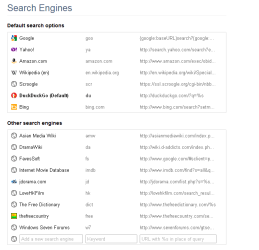
edit: here's a screen shot of the search settings page:

search.png


About the only thing it doesn't give you out of the address bar is multiple engine simultaneous search. But I have no need of it so I haven't really looked to see if there is an extension for it.
 

My Computer

Computer Manufacturer/Model Number
HP Media Center
OS
Windows 7 32 bit
CPU
AMD 5200+ dual core
Memory
2 GB
Graphics Card(s)
NVidia GeForce 6150SE 128 MB
Monitor(s) Displays
CRT
Screen Resolution
1280x1024
Hard Drives
500 GB Sata internal :

SIIG USB 3.0 docking stations w/WD Caviar Black 6 Gb/s drives
Keyboard
PS/2
Mouse
PS/2 Wheel Mouse
Other Info
SIIG USB 3.0 PCIexpress card.
Nice! I haven't used anything but Firefox for a couple years now. I've gotten so used to it that I don't want to learn something new all over again. I am getting really tired of the MASSIVE footprint that the newer versions have. I did try to switch over to Chrome at one point, but switched back as soon as I noticed the saved passwords are unencrypted. How unbelievable is that!? And their forum basically said "We know, but we aren't changing it." Craziness... I will stick with my Mozilla Apps for now :D

Tim
 
Last edited:

My Computer

Computer Manufacturer/Model Number
Dell
OS
Windows 7 Ultimate 64bit
CPU
i3
Memory
4Gb
Graphics Card(s)
Intel(R) HD Graphics
Hard Drives
350G built-in, 1T Seagate External, 2T Buffalo External
Case
I prefer upper, but I will settle for lower
Internet Speed
Yes, I would like some please...
Other Info
Ham & Eggs - A days work for a chicken, but a lifetime of commitment for a pig.
Everyone has their preference. There are things about chrome proper I don't like. I tried Iron. But that didn't work with all extensions, at least back when I tried it. Chromium is the open source root of Chrome. Most of the Chrome annoyances, like with the tracking, are eliminated.

What decided it for me was the sheer speed. I used to run Firefox portable out of a Ram Disk just because it took forever to load if the HD was busy. Chromium open to a blank page is lightning fast. No need for a Ram Disk. Once it's up then I click on Home Button to get Speed Dial. That way the Speed Dial doesn't slow the loading from disk.

There are a few FF AddOns I still wish I had on Chromium. Like SyncPlaces. But only a few. :)
 

My Computer

Computer Manufacturer/Model Number
HP Media Center
OS
Windows 7 32 bit
CPU
AMD 5200+ dual core
Memory
2 GB
Graphics Card(s)
NVidia GeForce 6150SE 128 MB
Monitor(s) Displays
CRT
Screen Resolution
1280x1024
Hard Drives
500 GB Sata internal :

SIIG USB 3.0 docking stations w/WD Caviar Black 6 Gb/s drives
Keyboard
PS/2
Mouse
PS/2 Wheel Mouse
Other Info
SIIG USB 3.0 PCIexpress card.
Smithunwesson - that is a nice tweak. I'm not switching from Firefox anytime soon - I have my userchrome tweaks just how I like! But I have been using "site:sevenforums.com [search terms]" in normal google search and I think I prefer the look and extra features you get with it (like being able to quickly choose time parameters).

So, I copied your icon image data and used it in a renamed google.xml file changing: <Param name="q" value="{searchTerms}"/> to this:
<Param name="q" value="site:sevenforums.com {searchTerms}"/>

Also changed the Shortname and the Description, of course.

And it worked!

1. Make a "7forums.xml" file in C:\Program Files\Mozilla Firefox\searchplugins

2. With this code:
Code:
<SearchPlugin xmlns="http://www.mozilla.org/2006/browser/search/">
<ShortName>7forums</ShortName>
<Description>Google 7forums</Description>
<InputEncoding>UTF-8</InputEncoding>
<Image width="16" height="16" type="image/x-icon"></Image>
<Url type="application/x-suggestions+json" method="GET" template="http://suggestqueries.google.com/complete/search?output=firefox&client=firefox&hl={moz:locale}&q={searchTerms}"/>
<Url type="text/html" method="GET" template="http://www.google.com/search">
  <Param name="q" value="site:sevenforums.com {searchTerms}"/>
  <Param name="ie" value="utf-8"/>
  <Param name="oe" value="utf-8"/>
  <Param name="aq" value="t"/>
  <!-- Dynamic parameters -->
  <Param name="rls" value="{moz:distributionID}:{moz:locale}:{moz:official}"/>
  <MozParam name="client" condition="defaultEngine" trueValue="firefox-a" falseValue="firefox"/>
</Url>
<SearchForm>http://www.google.com/</SearchForm>
</SearchPlugin>
4. After saving it, go here:

%appdata%\Mozilla\Firefox\Profiles\xxxxxxxx.default

5. Delete "search.json".

6. Restart Firefox.

Jeez, that is a lot of code for a little icon!

P.S. credit coming to you in a minute! Cheers!
 

My Computer

OS
Windows 7
@debugged
Thanks for the rep! Some coming your way as well :cool: I like the results with your xml version much better. I think I may try to tweak this a little more and see if I can come up with a Bing version too. Eventually I hope to make one that links directly into SevenForums with "advanced search" results listed.

@MilesAhead
I think I may try Chromium now that I know it is open source. I'd never looked at that one before. "Faster" is always an appealing term considering what I have to deal with using Firefox 7. I haven't read much about the changes to firefox recently, but the 'plugin-container.exe' is a major nuisance. Every time I browse a site that uses flash, it starts running in the background and eats up tons of memory... The little I have read about it proves that just about everyone using FF has the same complaint. Maybe its time to jump ship!
 

My Computer

Computer Manufacturer/Model Number
Dell
OS
Windows 7 Ultimate 64bit
CPU
i3
Memory
4Gb
Graphics Card(s)
Intel(R) HD Graphics
Hard Drives
350G built-in, 1T Seagate External, 2T Buffalo External
Case
I prefer upper, but I will settle for lower
Internet Speed
Yes, I would like some please...
Other Info
Ham & Eggs - A days work for a chicken, but a lifetime of commitment for a pig.
Someone on another board showed me an excellent tip for chromium and multimedia.
In this setting page:
chrome://settings/content

under Plugins click Block All

When I want to listen to a music clip or watch a video clip, I just right click on the gray square and click "run this plugin." No hassle with white listing sites and all that. Just takes an extra click.
 

My Computer

Computer Manufacturer/Model Number
HP Media Center
OS
Windows 7 32 bit
CPU
AMD 5200+ dual core
Memory
2 GB
Graphics Card(s)
NVidia GeForce 6150SE 128 MB
Monitor(s) Displays
CRT
Screen Resolution
1280x1024
Hard Drives
500 GB Sata internal :

SIIG USB 3.0 docking stations w/WD Caviar Black 6 Gb/s drives
Keyboard
PS/2
Mouse
PS/2 Wheel Mouse
Other Info
SIIG USB 3.0 PCIexpress card.

My Computer

Computer Manufacturer/Model Number
HP Media Center
OS
Windows 7 32 bit
CPU
AMD 5200+ dual core
Memory
2 GB
Graphics Card(s)
NVidia GeForce 6150SE 128 MB
Monitor(s) Displays
CRT
Screen Resolution
1280x1024
Hard Drives
500 GB Sata internal :

SIIG USB 3.0 docking stations w/WD Caviar Black 6 Gb/s drives
Keyboard
PS/2
Mouse
PS/2 Wheel Mouse
Other Info
SIIG USB 3.0 PCIexpress card.
Back
Top