Firefox Tabs

Cindy

New member
Local time
3:58 PM
Messages
311
Location
England/South
I have only just installed Firefox 3.5.1 (to see if i like it better then Maxthon) i find one thing not that happy with - to open a new link in a new tab i have to (press Ctrl/click the link or middle click on my mouse (Razer Death Adder), so i tried search at the plugins for Firefox site but cant find a plugin that will let me just click a link and have it open a new page in a new tab, is there one please ? any advice appreciated :)

C X
 

My Computer

Computer Manufacturer/Model Number
Home Build
OS
Windows 7 Ultimate RC1 / XP Black 2009
CPU
Core2Duo E8400
Motherboard
MSI
Memory
3GB
Graphics Card(s)
ATI Radeon HD 3850
Hard Drives
W/D 250GB x2
Case
Thermaltake Tsunami Dream
Keyboard
Logitech G15
Mouse
Razer Death Adder
Internet Speed
6.5 - 7 MB
Go to tools/options/tabs and click on the appropriate box
 

My Computer

Computer type
PC/Desktop
Computer Manufacturer/Model Number
Self Built Custom Computer.
OS
Windows 10 Pro x64
CPU
i7-4770K
Motherboard
Asus Z87 Sabertooth
Memory
16Gig DDR3-2400
Graphics Card(s)
Gigabyte GT740
Sound Card
Onboard
Monitor(s) Displays
Benq 27" - Dell 23' - Benq 22"
Screen Resolution
1680x1050
Hard Drives
Samsung 840 Pro 128g SSD
1xWestern Digital Caviar Green 1tb
2xWestern Digital Caviar Green 2 tb
PSU
Seasonic 760 watt Platinum
Case
Coolermaster Haf - X
Cooling
Noctua NH-C12P CPU Cooler
Keyboard
Logitech illuminated keyboard
Mouse
Logitech Perfomance MX
Internet Speed
Cable = speeds to 20Mbps downsteam and 512kbps upsteam
Antivirus
Avast Internet Security
Browser
Firefox
Hi Brian :)

I did but still have to use Ctrl or mid click mouse ?

ScreenHunter_01Jul220824.jpg
 
Last edited:

My Computer

Computer Manufacturer/Model Number
Home Build
OS
Windows 7 Ultimate RC1 / XP Black 2009
CPU
Core2Duo E8400
Motherboard
MSI
Memory
3GB
Graphics Card(s)
ATI Radeon HD 3850
Hard Drives
W/D 250GB x2
Case
Thermaltake Tsunami Dream
Keyboard
Logitech G15
Mouse
Razer Death Adder
Internet Speed
6.5 - 7 MB

My Computer

Computer Manufacturer/Model Number
Generic
OS
Clients: XP/Win7/ubuntu
CPU
E8400
Motherboard
Gigabyte EP35-DS3R
Memory
4Gb HyperX
Graphics Card(s)
ATI 4850
Sound Card
Onboard
Monitor(s) Displays
Samsung P970
Screen Resolution
1280 by 1024
Hard Drives
Samsung SATA-II 500Gb x 3
PSU
Corsair HX520
Case
chieftec
Cooling
Zalman
Keyboard
Logitech
Mouse
Logitech
Internet Speed
512kb
Hi Quill :)

OK thanks will try that and post back :)
 

My Computer

Computer Manufacturer/Model Number
Home Build
OS
Windows 7 Ultimate RC1 / XP Black 2009
CPU
Core2Duo E8400
Motherboard
MSI
Memory
3GB
Graphics Card(s)
ATI Radeon HD 3850
Hard Drives
W/D 250GB x2
Case
Thermaltake Tsunami Dream
Keyboard
Logitech G15
Mouse
Razer Death Adder
Internet Speed
6.5 - 7 MB
btw if you show your tabs all the time in the blank space and you double click and it will give you a clear tab ;)
 

My Computer

Computer Manufacturer/Model Number
Built
OS
Windows 7 RC build 7100x64 // 7260x32
CPU
Quad core 2.33GHz
Motherboard
Asus P5Q SE
Memory
4 gig DRR2
Graphics Card(s)
8400 GS gigabyte
Sound Card
built in with motherboard
Monitor(s) Displays
LG Flaton l1739s
Screen Resolution
1440x900 x2
Hard Drives
500 gig HDD // and a 500 gig out
PSU
500Watt
Case
ATX black case
Cooling
Cpu fan \ case fan
Keyboard
logitech
Mouse
logitech
Internet Speed
1500
I got a No No ?

ScreenHunter_03Jul220833.jpg
 

My Computer

Computer Manufacturer/Model Number
Home Build
OS
Windows 7 Ultimate RC1 / XP Black 2009
CPU
Core2Duo E8400
Motherboard
MSI
Memory
3GB
Graphics Card(s)
ATI Radeon HD 3850
Hard Drives
W/D 250GB x2
Case
Thermaltake Tsunami Dream
Keyboard
Logitech G15
Mouse
Razer Death Adder
Internet Speed
6.5 - 7 MB

My Computer

Computer Manufacturer/Model Number
Self built PC
OS
Windows 7 x64 RTM
CPU
AMD Phenom II X4 965 Black Edition
Motherboard
MSI 790FX-GD70
Memory
OCZ Gold (3 x 2GB)
Graphics Card(s)
Powercolor AX 5970 2GB
Sound Card
Auzen XFi Prelude 7.1
Monitor(s) Displays
Asus VK191T 19"
Screen Resolution
1440x900 75HZ
Hard Drives
2x 1TB WD Black SATA
PSU
HEC XP1080 1080W
Case
Old but reliable Chieftec
Cooling
6 fans
Keyboard
Logitech EX100 Keyboard
Mouse
Logitech EX100 Mouse
Internet Speed
Crappy DSL connection :P
Other Info
www.tipidpc.com
Thank you for answering Pinoy55 :)

I will do that now :D

Cindy
mwah1.gif
 

My Computer

Computer Manufacturer/Model Number
Home Build
OS
Windows 7 Ultimate RC1 / XP Black 2009
CPU
Core2Duo E8400
Motherboard
MSI
Memory
3GB
Graphics Card(s)
ATI Radeon HD 3850
Hard Drives
W/D 250GB x2
Case
Thermaltake Tsunami Dream
Keyboard
Logitech G15
Mouse
Razer Death Adder
Internet Speed
6.5 - 7 MB
Hi, I guess the build on addons is older. You can get the latest build from the developer

Tab Mix Plus Dev-Build 0.3.7.4pre-Tab Mix Plus

The direct path to the file is here:

Tab Mix Plus Dev-Build 0.3.7.4pre.090516

Alternatively, you can change the max version nunber in the install.rdf, which you'll find in the .xpi file.

You can use any extractor (7-zip, Winzip, winrar) to open an xpi. the double click the install.rdf, open it with a text editor and look for :

em:maxVersion

Change the value to something like 3.5.2

Anothet option is to use the Nightly Tester Tools :: Add-ons for Firefox or MR Tech Toolkit :: Add-ons for Firefox

These will both let you override the max version number, so older addons can work with new builds of fx
 

My Computer

Computer Manufacturer/Model Number
Generic
OS
Clients: XP/Win7/ubuntu
CPU
E8400
Motherboard
Gigabyte EP35-DS3R
Memory
4Gb HyperX
Graphics Card(s)
ATI 4850
Sound Card
Onboard
Monitor(s) Displays
Samsung P970
Screen Resolution
1280 by 1024
Hard Drives
Samsung SATA-II 500Gb x 3
PSU
Corsair HX520
Case
chieftec
Cooling
Zalman
Keyboard
Logitech
Mouse
Logitech
Internet Speed
512kb
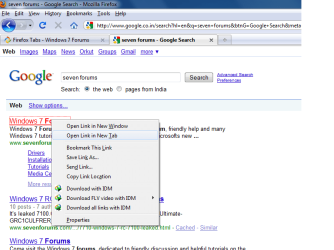
I dont understand why do you need to do a ctrl+click to open a link in a new tab.
For example: If i want to open www.sevenforums.com in a new tab, all i do i just right click on it and click Open i a new tab and it opens right away without pressing the Ctrl key.

Untitled.png
 

My Computer

Computer Manufacturer/Model Number
Samsung NP530U4B-S02IN
OS
Windows® 8 Pro (64-bit)
CPU
Intel® Core™ i5 Processor 2467M (1.60GHz, 3MB L3 Cache)
Motherboard
Samsung Electronics
Memory
6GB DDR3 System Memory at 1,333MHz (on BD 4GB + 2GB x 1)
Graphics Card(s)
AMD Radeon™ HD7550M 1GB DDR3 (Ext. Graphic)
Sound Card
Realtek High Definition Audio
Monitor(s) Displays
35.56cm (14.0) SuperBright 300nit HD LED Display
Screen Resolution
1366x768
Hard Drives
1TB S-ATA II Hard Drive (5400RPM) with ExpressCache 16GB SSD
Internet Speed
sucks
Antivirus
Microsoft Security Essentials
Browser
Google Chrome (Sync enabled)
Indeed this is the method I always use, its quick and easy.
 

My Computer

Computer Manufacturer/Model Number
self built
OS
Windows 7 Professional 64-bit
CPU
Intel E8400 3GHz
Motherboard
Intel DX48BT2
Memory
Kingston PC3-10700H 4Gb
Graphics Card(s)
XFX Radeon HD 5850 BlackEd.
Sound Card
Asus Xonar DG
Monitor(s) Displays
2x Samsung SM-T220HD 22"
Screen Resolution
1680x1050 on two monitors
Hard Drives
OCZ Vertex 2 120gb 3.5" (OS)
Seagate Momentus XT 500gb
Samsung F3 1Tb (games)
2x Samsung F1 1Tb
PSU
Thermaltake ToughPower 850w
Case
Thermaltake Armor
Cooling
Scythe Mugen II
Keyboard
Microsoft Comfort Curve USB
Mouse
Razer Diamondback 3G
Internet Speed
8128/443
Quill Thank you i will try this :)

@ dinesh / swarfega - Say i have one tab open and then i click a link in tab bar or bookmarks a tab next to the one i have open does not open but stays at one tab (overwriting if you like the first tab) >

first tab

ScreenHunter_01Jul221333.jpg


I click a link and get this

ScreenHunter_02Jul221333.jpg
 

My Computer

Computer Manufacturer/Model Number
Home Build
OS
Windows 7 Ultimate RC1 / XP Black 2009
CPU
Core2Duo E8400
Motherboard
MSI
Memory
3GB
Graphics Card(s)
ATI Radeon HD 3850
Hard Drives
W/D 250GB x2
Case
Thermaltake Tsunami Dream
Keyboard
Logitech G15
Mouse
Razer Death Adder
Internet Speed
6.5 - 7 MB
Cindy - you'll need the 3.7.4pre release that you can download from the forums - the 'stable' release is only for Fx 3.0.x

Also, you *can* set the options to open links in a new tab in TM+ - I prefer to middle clicking (MX Revolution, using the search button re-bound as my middle click) but it is easy enough to do so in TM+.

@Everyone else - the point she is making is that in Maxthon you can make regular clicks open in a new tab - right clicking and then selecting an option is not what she is looking for anymore than middle clicking.
 

My Computers

System One System Two

  • Computer type
    PC/Desktop
    Computer Manufacturer/Model Number
    The Beast Model A (homebrew)
    OS
    Windows 11 21H2 Current build
    CPU
    AMD Ryzen 9 3950X
    Motherboard
    MSI MEG X570 GODLIKE
    Memory
    4 * 32 GB - Corsair Vengeance 3600 MHz
    Graphics Card(s)
    EVGA GeForce RTX 3080 Ti XC3 ULTRA GAMING (12G-P5-3955-KR)
    Sound Card
    Realtek® ALC1220 Codec
    Monitor(s) Displays
    2x Eve Spectrum ES07D03 4K Gaming Monitor (Matte) | Eve Spec
    Screen Resolution
    3x 3840 x 2160
    Hard Drives
    3x Samsung 980 Pro NVMe PCIe 4 M.2 2 TB SSD (MZ-V8P2T0B/AM) } 3x Sabrent Rocket NVMe 4.0 1 TB SSD
    PSU
    PC Power & Cooling’s Silencer Series 1050 Watt, 80 Plus Plat
    Case
    Fractal Design Define 7 XL Dark ATX Full Tower Case
    Cooling
    SteelSeries Apex Pro Wired Gaming Keyboard
    Keyboard
    SteelSeries Apex Pro
    Mouse
    Logitech MX Master 3S | MX Master 3 for business
    Internet Speed
    AT&T LightSpeed Gigabit Duplex Ftth
    Antivirus
    Windows Defender + MB 3
    Browser
    Nightly (default) + Firefox (stable),Chrome, Edge
  • Computer type
    PC/Desktop
    System Manufacturer/Model Number
    Dell Latitude E5470
    OS
    ChromeOS Flex Dev Channel (current)
    CPU
    Intel(R) Core(TM) i5-6300U CPU @ 2.40GHz, 2501 Mhz, 2 Core(s), 4 Logical Processor(s)
    Motherboard
    Dell
    Memory
    16 GB
    Graphics Card(s)
    Intel(R) HD Graphics 520
    Sound Card
    Intel(R) HD Graphics 520 + RealTek Audio
    Monitor(s) Displays
    Dell laptop display 15"
    Screen Resolution
    1920 * 1080
    Hard Drives
    Toshiba 128GB M.2 22300 drive
    INTEL Cherryville 520 Series SSDSC2CW180A 180 GB SATA III SSD
    PSU
    Dell
    Case
    Dell
    Cooling
    Dell
    Keyboard
    Dell
    Mouse
    Logitech MX Master 3S (shared w. Sys 1) | Dell TouchPad
    Internet Speed
    AT&T LightSpeed Gigabit Duplex Ftth
Thank you johngalt thats exactly what i was trying to say
Kiss-On-Cheek.gif
= Rep defo

Thank you Quill
Kiss-On-Cheek.gif
= Rep
Nightly Tester Tools and Tab Mix Plus 0.3.7.4 works just fine also have FoxTab - very nice >

ScreenHunter_06Jul221729.jpg
 

My Computer

Computer Manufacturer/Model Number
Home Build
OS
Windows 7 Ultimate RC1 / XP Black 2009
CPU
Core2Duo E8400
Motherboard
MSI
Memory
3GB
Graphics Card(s)
ATI Radeon HD 3850
Hard Drives
W/D 250GB x2
Case
Thermaltake Tsunami Dream
Keyboard
Logitech G15
Mouse
Razer Death Adder
Internet Speed
6.5 - 7 MB
Not a solution, but another way to do things. Don't forget you can drag-and-drop just about any link or image on a web page or from Bookmarks to the tab bar, and it will open in a new tab.
 

My Computer

Computer type
PC/Desktop
Computer Manufacturer/Model Number
Me
OS
Win 7 Ultimate x64
CPU
FX-8350 @ 4.6 GHz so far
Motherboard
Asus M5A97 EVO
Memory
ADATA XPG V1 Series Black 8GB DDR3 1600
Graphics Card(s)
Sapphire R9 270x Dual-X
Sound Card
Xonar DGX w/ Corsair Vengence 1300
Monitor(s) Displays
Acer S232HL Abid
Screen Resolution
1920x1080
Hard Drives
120 GB OCZ Vertex 3
500 GB Seagate 7200.12
PSU
Antec Earthwatts 650W Green
Case
Antec Three Hundred
Cooling
Cooler Master 212 EVO
Keyboard
Logitech G510
Mouse
Logitech G500s
Internet Speed
35000/3000
You only need to click mouse wheel to open link in new tab.

If you want to disable Compatibility check for addons without installing nightly testing tools just follow these simple steps:

1. Open Firefox and type in the addressbar about:config and you will see the below screenshot. Click the button “I’ll be careful, I promise” to proceed.

2. Now you will see the Firefox config page. Right-Click on a blank area of the page and select “New” in the menu and select “Boolean” type the preference name as “extensions.checkCompatibility” and click ok.
3. Another screen will popup with a select option of “True” or “False”, Select “False” in this screen.

Restart Firefox

You can now install and use addons not yet approved/updated for newest Firefox

another tip:
While you are on the about:config page you may also want to find the entry for "GIO" and set to "false" if you don't want to be tracked by anyone using new locator system
 

My Computer

Computer Manufacturer/Model Number
billdo build
OS
Windows 7 x64 rtm
CPU
Intel Q9550 @3.7Ghz
Motherboard
Gigabyte ep45 UD3P
Memory
8GB OCZ Reaper
Graphics Card(s)
Geforce 9800gtx+
Sound Card
M-Audio 192
Monitor(s) Displays
24" Sammy
Screen Resolution
1920x1200
Hard Drives
System HD:2x Super Talent SX ssd 64GB raid 0(128GB)--
- Storage HD: WD 640GB AAK
PSU
650
Case
Generic box w/little window and pretty blue lights
Cooling
Air
Keyboard
Razor Lycosa
Mouse
Logitech MX518
Internet Speed
unpredictable cable
Other Info
Monkeys are EVIL!!!!!!
just download google chrome, it will solve all your problem.

each have there own advantages, but please let's not turn this into a Firefox vs Chrome thread.There are plenty of trolls that have already done that
 

My Computer

Computer Manufacturer/Model Number
billdo build
OS
Windows 7 x64 rtm
CPU
Intel Q9550 @3.7Ghz
Motherboard
Gigabyte ep45 UD3P
Memory
8GB OCZ Reaper
Graphics Card(s)
Geforce 9800gtx+
Sound Card
M-Audio 192
Monitor(s) Displays
24" Sammy
Screen Resolution
1920x1200
Hard Drives
System HD:2x Super Talent SX ssd 64GB raid 0(128GB)--
- Storage HD: WD 640GB AAK
PSU
650
Case
Generic box w/little window and pretty blue lights
Cooling
Air
Keyboard
Razor Lycosa
Mouse
Logitech MX518
Internet Speed
unpredictable cable
Other Info
Monkeys are EVIL!!!!!!
Back
Top