Solved Firefox update messes up my SF links

gregrocker

New member
Guru
Local time
7:07 AM
Messages
50,634
Yesterday's Firefox Update has changed my ability to drag intact one of my 275 SF links from Bookmark's tab into a post here.

Before I could drag the Bookmark title and edit it just like the other text, only it was in blue. Now it immediately converts it to the URL so that I can't edit the link title until it is posted. And the link title is no longer my custom title but the one originally given the webpage.

Is it possible to roll back this update and skip it altogether?
 

My Computer My Computer

At a glance

XP / Win7 x64 ProIntel Quad-Core Q9450 @ 3.2GHz2x2GB GSkill DDR2NVIDIA GeForce 8600 GTS (EVGA)
OS
XP / Win7 x64 Pro
CPU
Intel Quad-Core Q9450 @ 3.2GHz
Motherboard
Asus P5-E
Memory
2x2GB GSkill DDR2
Graphics Card(s)
NVIDIA GeForce 8600 GTS (EVGA)
Monitor(s) Displays
Dell 2408WFP
Screen Resolution
1920x1200
Thanks, haven't seen the versions downloads list before.

I notice there are a lot of sub-updates between versions. Should I just ignore those and jump back to 12?
folder.gif
12.0/24-Apr-2012 08:12 -
folder.gif
12.0b1/15-Mar-2012 13:05 -
folder.gif
12.0b2/21-Mar-2012 11:12 -
folder.gif
12.0b3/28-Mar-2012 12:18 -
folder.gif
12.0b4/04-Apr-2012 04:26 -
folder.gif
12.0b5/11-Apr-2012 13:51 -
folder.gif
12.0b6/17-Apr-2012 23:49 -
folder.gif
13.0/05-Jun-2012 08:41 -
folder.gif
13.0b1/25-Apr-2012 19:49 -
folder.gif
13.0b2/02-May-2012 03:17 -
folder.gif
13.0b3/09-May-2012 13:06 -
folder.gif
13.0b4/16-May-2012 17:57 -
folder.gif
13.0b5/23-May-2012 21:44 -
folder.gif
13.0b6/29-May-2012 10:00 -
folder.gif
13.0b7/01-Jun-2012 00:55 -
folder.gif
14.0b6/05-Jun-2012 19:29
Then if I turn off Updates to avoid whatever futzed by links what else will I be missing?


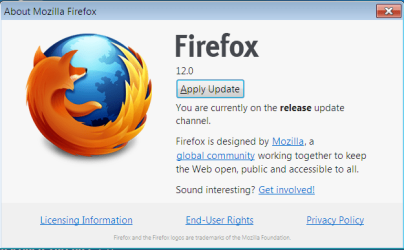
Went ahead and reinstalled 12 without the silent Maintenance Service. I notice in About box it appears to be applying a bunch of updates then settles on an Apply Update button shown below. Do you think I should go ahead or will it bump me up to v.13?
 

Attachments

  • Capture.PNG
    Capture.PNG
    25.7 KB · Views: 2
Don't Apply the update it gives you there. If you click on the Apply Update, it will upgrade you to version 13. FF decided to implement the updates via the About Firefox menu a couple versions ago. So, clicking on that will prompt it to download the latest available update and will apply it upon your request. Being that they seem to be doing whole number releases anymore, the updates no longer go in incremental x.x as they used to. But, that may change back again. You never know.

Just stick with the 12.0 you installed. All of the "b" versions were beta versions from different developer channels, thus never officially released versions. You should be good to go at this point as there were no incremental updates between 12.0 and 13.0 that you'd need to install. 12.0 was directly previous to 13.0.

You probably didn't disable automatic downloading of updates in FF12 when you installed. Make sure automatic update is set to off or a simple check for them but no install. Then, just keep an eye out for the next release you'd like to upgrade to and directly download/install from the website when it comes out. You shouldn't really miss anything in between. Mozilla is pretty noisy about what/when it updates.
 

My Computer My Computer

At a glance

XP / Win7 x64 ProIntel Quad-Core Q9450 @ 3.2GHz2x2GB GSkill DDR2NVIDIA GeForce 8600 GTS (EVGA)
OS
XP / Win7 x64 Pro
CPU
Intel Quad-Core Q9450 @ 3.2GHz
Motherboard
Asus P5-E
Memory
2x2GB GSkill DDR2
Graphics Card(s)
NVIDIA GeForce 8600 GTS (EVGA)
Monitor(s) Displays
Dell 2408WFP
Screen Resolution
1920x1200
OK I'm trying to drag links now. It's important they retain my edited names as they appear in Bookmarks so I can customize the name even more quickly after dragging them in. In three years time this has become an important part of my productivity here:

Mark Partition Active

Great it works and retains its name I chose for it instead of being the full URL as it was in v.13., so I can quickly customize it like so:

Mark Win7 Partition Active

and I don't need to post it first before editing. I wonder however why the forum's didn't change the abbreviation in the link as it has always done to the full Windows 7.

Thanks for the easiest fix. I hope I don't get too far behind on security updates although I never get infected. I might try a few versions later to see if the issue still exists. They probably couldn't care less to hear about it since it's an unusual usage.
 
Good deal. You might want to file a bug report at https://bugzilla.mozilla.org/ so the developers are aware of the issue. After that, I guess all you can do is hope that the next release somehow fixes the issue with dragging links. I got stuck on 3.6.x a while back when they upgraded to 4.0 and introduced hardware acceleration which rendered text blurry for a lot of people. Enough people complained that it was fixed in a couple releases after that, but I had to hold out on some security fixes in the meantime while I did. You should be fine with a defense-in-depth approach to antivirus, as I assume you have.
 

My Computer My Computer

At a glance

XP / Win7 x64 ProIntel Quad-Core Q9450 @ 3.2GHz2x2GB GSkill DDR2NVIDIA GeForce 8600 GTS (EVGA)
OS
XP / Win7 x64 Pro
CPU
Intel Quad-Core Q9450 @ 3.2GHz
Motherboard
Asus P5-E
Memory
2x2GB GSkill DDR2
Graphics Card(s)
NVIDIA GeForce 8600 GTS (EVGA)
Monitor(s) Displays
Dell 2408WFP
Screen Resolution
1920x1200
I filed a bug report so hopefully they'll take notice. They may consider it arcane but I said enough about how I use the feature - and how Firefox is the only browser I could get to do this - that it may interest someone.

Thanks again! :geek:
 
There you go. It can't be fixed unless they're aware of it. That's all you can do.

No problem.
 

My Computer My Computer

At a glance

XP / Win7 x64 ProIntel Quad-Core Q9450 @ 3.2GHz2x2GB GSkill DDR2NVIDIA GeForce 8600 GTS (EVGA)
OS
XP / Win7 x64 Pro
CPU
Intel Quad-Core Q9450 @ 3.2GHz
Motherboard
Asus P5-E
Memory
2x2GB GSkill DDR2
Graphics Card(s)
NVIDIA GeForce 8600 GTS (EVGA)
Monitor(s) Displays
Dell 2408WFP
Screen Resolution
1920x1200
I think you can try typing w7 and it'll expand to Windows 7 (although I've not used that feature for links). Dammit, I can't get it to not expand. Quote this post and you'll see what I mean. I've got to find that BBC codes link and save it once and for all for future reference!!

If more of the userbase was more diligent in updating for security issues they wouldn't be so compelled to make autoupdating the new default.
 

My Computer My Computer

At a glance

Windows 7 Ultimate x64
OS
Windows 7 Ultimate x64
Back
Top