Firewall Blocking Malwarebytes

huffman

New member
Pro User
Local time
2:59 PM
Messages
715
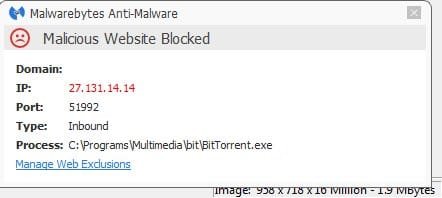
When I got up this morning I had a popup indicating that Malwarebytes was being blocked by the Microsoft Firewall.

I have never seen this before but I tried to unblock it but Malwarebyes is NOT listed the programs being blocked by the Firewall.

I guess I could uninstall Malwarebytes and then reinstall it but I don't believe this would cure the problem.

Does anyone have a suggestion??
 

My Computer

OS
Windows 7 Pro
CPU
Intel(R) Pentium(R) Duel CPU E2200 2.20 Ghz
Motherboard
GA-G41M-ES2L
Memory
4 gb 2.96 Usable
Graphics Card(s)
Onboard
Sound Card
Onboard
Hard Drives
2 - 1TB WD Sata Drives
BTW here is the popup I am seeing:

mal.jpg
 

My Computer

OS
Windows 7 Pro
CPU
Intel(R) Pentium(R) Duel CPU E2200 2.20 Ghz
Motherboard
GA-G41M-ES2L
Memory
4 gb 2.96 Usable
Graphics Card(s)
Onboard
Sound Card
Onboard
Hard Drives
2 - 1TB WD Sata Drives
Hi:

That sounds rather unusual.
MBAM and the native Windows firewall usually play together just fine.
And if things *were* working OK previously, but now you are getting a "conflict", something must have changed on the system to create that.

>>Are you running the current MBAM version (2.2.0.1024)?
>>Aside from the Windows firewall, what are your other security applications?
>>Can you please provide a screen shot or the exact wording of the message?

Yes, you could try a proper clean reinstall of MBAM. The "best practices" for that are here: MBAM Clean Removal Process 2x.
>Be sure to have your license info handy before you start.
>Be sure to reboot when prompted by the removal tool.
>It's a good idea to reboot again AFTER the reinstall.

Another thing to try would be setting mutual exclusions between MBAM and your AV and firewall.
This is NOT normally needed for the Windows firewall or MSE.
So, while it may resolve your issue, I'm not sure why you would need to do this, unless something else is amiss or creating conflicts (e.g. too many security applications).
If you want to go that route, let me know, and I will provide instructions.

Please let us know how it goes,

MM
 

My Computer

Computer type
PC/Desktop
Computer Manufacturer/Model Number
Dell Studio XPS 8500
OS
OEM Windows 7 Ult (x64) SP1
CPU
Intel Core-i7 3770 @ 3.4 GHz
Motherboard
"Dell" branded
Memory
16 GB DDR3 SDRAM @ 1333 MHz
Graphics Card(s)
NVidia GeForce GT620 1 GB
Sound Card
THX TruStudio PC
Monitor(s) Displays
Dell U2410 Full HD
Hard Drives
2.0 TB SATA2 @ 7200 RPM
PSU
350W
Keyboard
MS 4000 Ergon - Wired
Mouse
Logitech Anywhere MX
Internet Speed
Cable HSI w/Turbo (router)
Antivirus
KIS-MBAM Premium-MBAE Premium
Browser
Fx (current version); IE
Other Info
And a Win7/64 Pro laptop; And a Win10/64 Pro desktop.
Ahhhhhhhhhhh.
Our posts crossed in cyberspace....


That is an entirely different "problem".
That is NOT Windows firewall blocking MBAM.
That is the MBAM web/IP blocking module generating IP blocks when using P2P software.

That is not a problem at all.
That is a normal expected behavior when running torrents or other P2P.
MBAM is just doing its job.
This explains why and how to *safely* deal with the blocks: Why does Malwarebytes Anti-Malware block BitTorrent or other Peer-to-Peer Programs?

Please let us know if this explains/resolves your issue.

Thanks,
MM
 

My Computer

Computer type
PC/Desktop
Computer Manufacturer/Model Number
Dell Studio XPS 8500
OS
OEM Windows 7 Ult (x64) SP1
CPU
Intel Core-i7 3770 @ 3.4 GHz
Motherboard
"Dell" branded
Memory
16 GB DDR3 SDRAM @ 1333 MHz
Graphics Card(s)
NVidia GeForce GT620 1 GB
Sound Card
THX TruStudio PC
Monitor(s) Displays
Dell U2410 Full HD
Hard Drives
2.0 TB SATA2 @ 7200 RPM
PSU
350W
Keyboard
MS 4000 Ergon - Wired
Mouse
Logitech Anywhere MX
Internet Speed
Cable HSI w/Turbo (router)
Antivirus
KIS-MBAM Premium-MBAE Premium
Browser
Fx (current version); IE
Other Info
And a Win7/64 Pro laptop; And a Win10/64 Pro desktop.
When I got up this morning I had a popup indicating that Malwarebytes was being blocked by the Microsoft Firewall.
?
Your image doesn't say windows firewall is blocking anything :/
 

My Computer

Computer type
PC/Desktop
Computer Manufacturer/Model Number
Custom assembled by me :}
OS
Win-7-Pro64bit 7-H-Prem-64bit
CPU
i7-5930K 2nd i9-9940x both water blocked VRM's too
Motherboard
ASUS SABERTOOTH X99 2nd ASUS x299 Apex
Memory
Trident-z 3200C14 2nd Trident-z 3600C16
Graphics Card(s)
EVGA 1080ti ftw3 2nd Titan Xp both water blocked
Sound Card
Built-in Realtek
Monitor(s) Displays
1-AOC G2460PG 24"G-Sync 144Hz/ 2nd 1-ASUS VG248QE 24" 144Hz
Screen Resolution
1920 x 1080 144Hz
Hard Drives
2-Samsung M.2 Evo & Evo Plus
2-Samsung 850 EVO 500GB SSD's/ 3-2.5 W.D. Black 1tb-&3-1tb/3-3.5 WD Black 1tb hdd's
PSU
EVGA SuperNOVA 1000-P2 2nd 1200-P2
Case
2-Corsair Obsidian Series 450D Black ATX Mid Tower
Cooling
Custom water loops
Keyboard
Logitech G710+/ 2nd Logitech G910
Mouse
2-RedDragon M901 Perdition 16400 dpi Gaming mouse = wired
Internet Speed
Comcast Ping 19ms 89.31mbps download speed 6.12mbps upload
Antivirus
Malwarebytes Pro/ Superantispyware Pro
Browser
FireFox & Pale moon
Other Info
2nd ASUS X299 Apex/Intel i9-9940x with Custom water loop/7H-Prem-x64/Corsair 450D case/Ram Trident-z 3600C16 4x8gb / Samsung970Evo plus 500gb SSD/Dual ssd EZ swap evo/PSU EVGA SuperNova 1200w-P2 80+Platinum/GPU Titan Xp /8-ML-140 on push-pull on 2-280GTX rads
MoxieMomma is absolutely correct. MalwareByes is blocking a seed or peer attempting to connect to your bittorrent program. It's very likely a false positive, and you can whitelist the IP in malwarebytes if you wish, but, as MM stated, this is not a "problem" it's simply MalwareBytes doing it's job!
 

My Computer

Computer type
PC/Desktop
Computer Manufacturer/Model Number
HP Pavillion Elite HPE-590t
OS
Win7 Home Premium x64
CPU
Intel Core i7 Extreme 990X @ 3.47GHz x6
Motherboard
PEGATRON CORPORATION 2A86
Memory
16GB DDR3
Graphics Card(s)
NVidia GeForce GTX460
Monitor(s) Displays
Samsung SyncMaster 2443ewx
Screen Resolution
1920x1200
Hard Drives
160 GB SSD @ 2 TB 7200 Internal
750 GB HP, 2 TB WD, 2 TB Samsung External & 3 TB G-Tech firewire external
I see now that MWBs is doing the blocking. I followed instructions on how to disable. I expect it is still blocking but just NOT telling me it.

I hope this is NOT the case.
 

My Computer

OS
Windows 7 Pro
CPU
Intel(R) Pentium(R) Duel CPU E2200 2.20 Ghz
Motherboard
GA-G41M-ES2L
Memory
4 gb 2.96 Usable
Graphics Card(s)
Onboard
Sound Card
Onboard
Hard Drives
2 - 1TB WD Sata Drives
I see now that MWBs is doing the blocking. I followed instructions on how to disable. I expect it is still blocking but just NOT telling me it.

I hope this is NOT the case.

Did you disable the notifications or did you disable malicious IP/website blocking?

If you disabled the notifications, please be aware that there is no way (at this time) to selectively disable ONLY the IP block notifications. So, you will have no way of knowing if other, non-critical notifications from MBAM are also being blocked. You'll probably want to keep an eye on your daily protection & scan logs (Dashboard > History > Application Logs) to monitor for other events.

If you disabled the entire website blocking module, then you have created a significant security vulnerability.
The use of torrents ("legal" or not) is a good way to get infected. The MBAM IP/website blocking module is there to protect you from this common malware vector. MBAM (the acronym/abbreviation we use is not "MWBs") will nag you about having disabled this key protection component (as would your AV if you disabled any of its key components).

Cheers,
 

My Computer

Computer type
PC/Desktop
Computer Manufacturer/Model Number
Dell Studio XPS 8500
OS
OEM Windows 7 Ult (x64) SP1
CPU
Intel Core-i7 3770 @ 3.4 GHz
Motherboard
"Dell" branded
Memory
16 GB DDR3 SDRAM @ 1333 MHz
Graphics Card(s)
NVidia GeForce GT620 1 GB
Sound Card
THX TruStudio PC
Monitor(s) Displays
Dell U2410 Full HD
Hard Drives
2.0 TB SATA2 @ 7200 RPM
PSU
350W
Keyboard
MS 4000 Ergon - Wired
Mouse
Logitech Anywhere MX
Internet Speed
Cable HSI w/Turbo (router)
Antivirus
KIS-MBAM Premium-MBAE Premium
Browser
Fx (current version); IE
Other Info
And a Win7/64 Pro laptop; And a Win10/64 Pro desktop.
It's very likely a false positive, and you can whitelist the IP in malwarebytes if you wish,

Respectfully disagree.
It is likely NOT a F/P.
A F/P means that MBAM is blocking an IP that is "clean".
Given the way that torrents work, it is much more likely that it is a legitimate block and that MBAM is doing its job correctly.
Moreover, there is no need to "whitelist" such blocked IPs, as the blocks generally have no impact on the P2P performance.
IOW the IP block popup notifications are merely a "cosmetic" issue.
"Whitelisting" those IPs would be unsafe and defeats the purpose of running the malicious website protection module.

This explains why: Why does Malwarebytes Anti-Malware block BitTorrent or other Peer-to-Peer Programs?

If you really think that a particular IP block arising from your torrent software *might be* a False Positive, then I suggest starting with THIS PINNED TOPIC for instructions and then submitting the requested info in a new post in the website blocking F/P section of the MBAM forum HERE.
The research team will review the info and determine whether or not it might be safe to remove the block on a particular IP.

Cheers,

MM
 

My Computer

Computer type
PC/Desktop
Computer Manufacturer/Model Number
Dell Studio XPS 8500
OS
OEM Windows 7 Ult (x64) SP1
CPU
Intel Core-i7 3770 @ 3.4 GHz
Motherboard
"Dell" branded
Memory
16 GB DDR3 SDRAM @ 1333 MHz
Graphics Card(s)
NVidia GeForce GT620 1 GB
Sound Card
THX TruStudio PC
Monitor(s) Displays
Dell U2410 Full HD
Hard Drives
2.0 TB SATA2 @ 7200 RPM
PSU
350W
Keyboard
MS 4000 Ergon - Wired
Mouse
Logitech Anywhere MX
Internet Speed
Cable HSI w/Turbo (router)
Antivirus
KIS-MBAM Premium-MBAE Premium
Browser
Fx (current version); IE
Other Info
And a Win7/64 Pro laptop; And a Win10/64 Pro desktop.
The IP comes from Bangladesh ... don't think I'd let it through!
 

My Computer

Computer type
PC/Desktop
Computer Manufacturer/Model Number
Bruce ... somewhere in his 40's
OS
Windows 7 Ultimate 32bit SP1
CPU
Intel(R) Core(TM)2 Quad CPU @ 2.40GHz, 2400 MHz
Motherboard
INTEL/D975XBX2
Memory
4 GB
Graphics Card(s)
ATI Radeon HD 2600 Pro
Monitor(s) Displays
Samsung SyncMaster 914v
Screen Resolution
1280 x 1024
Hard Drives
2/500GB each ... ST3500630AS ATA Device.
One is not connected
PSU
Rocketfish 700 W
Case
G.Skill Gigabyte Chassis
Keyboard
Standard PS/2 Keyboard
Mouse
Microsoft PS/2 Mouse
Internet Speed
DSL
Antivirus
Avira Internet Security
Browser
IE 11
Other Info
ATI HDMI Audio
The use of torrents ("legal" or not) is a good way to get infected.

That's not correct. Use of torrents themselves has nothing to do with getting infected or not. It's what the torrent carries what might be dangerous (pretty much in the same way as any download obtained in any other imaginable way).

About that particular block, the fact that the antivirus blacklists it may mean there is a seedbox running there, serving many other unrelated torrents, some of them possibly malicious. It's not unreasonable to leave the thing blocked just to be on the safe side, but generally this type of things tend to be false positives, as long as it's just the torrent client the one making the connection.

To be extra careful, the ideal thing to do is to harden your torrent client. Run it in a separate user account, so if that ever finds a vulnerability the damage is vastly restricted. Blocking the connection outright is not a crazy idea too.
 

My Computer

Computer type
Laptop
Computer Manufacturer/Model Number
Toshiba Sattelite A665-S6092
OS
Windows 7 Ultimate x64
CPU
Intel Core i7-740QM
Memory
8 GB DDR3
Graphics Card(s)
NVIDIA GeForce 330GT
Screen Resolution
1366x768
Hard Drives
Samsung 840 SSD 500GB
1TB USB3 external HD
Cooling
Coolermaster Notepal U3 notebook cooling pad
Internet Speed
3mbps ASDL
Antivirus
ClamWin 0.98.7
Browser
Opera 12.17 x86 (main), Firefox 38 (sec), IE11 (last resort)
I surly must be crazy because if Malwarebytes doesn't like something I don't want it on my computer.

Then again I don't use P2P or Torrents of any kind.
 

My Computer

Computer type
PC/Desktop
Computer Manufacturer/Model Number
Home made Desktop
OS
Windows 10 Pro. 64/ version 1709 Windows 7 Pro/64
CPU
Intel i7-6800K @ 4.3
Motherboard
ASUS X-99 Deluxe II
Memory
Corsair Platinum 16 gig @2400
Graphics Card(s)
EVGA GTX 1070 OC
Monitor(s) Displays
Asus 27" LED LCD/VE278Q
Screen Resolution
1920-1080 or 1280-720 HDMI
Hard Drives
INTEL SSD 730-240 Gb Sata 3.0/
PSU
EVGA Platium 1200W
Case
Phanteks Luxe Tempered Glass 8 fans/ one radiator
Cooling
XSPC/ Water Cooled CPU
Keyboard
Das 4 Professional
Mouse
Logitech M705/MX Anywhere 2-S
Internet Speed
100 mbits
Antivirus
Microsoft Security Essentials/ Malwarebytes Premium 3.0/ SAS
Browser
I.E. 11 default/Firefox/ ISP Time Warner Cable/Spectrum
Other Info
LG BluRay Burner/
Sound system-KLipsch-THX/
Icy Dock ssd Hot Swap bays.
Hi::D

The use of torrents ("legal" or not) is a good way to get infected.

That's not correct. Use of torrents themselves has nothing to do with getting infected or not. It's what the torrent carries what might be dangerous (pretty much in the same way as any download obtained in any other imaginable way).

I don't use torrents or any P2P, but it seems like a bit of an artificial distinction to separate the "what" from the "how", especially for basic computer users.
While advanced users may be able to deploy specific strategies to "harden" their torrents, it's well described and reported all over security fora (and has been for years) that they are indeed a means of becoming infected, especially for users who don't take added precautions.

And it's simply NOT true (and a dangerous assumption) that the IPs blocked by MBAM in real-time are "false positives", including the IP reported by the OP. They are being blocked for a reason.
This explains why: Why does Malwarebytes Anti-Malware block BitTorrent or other Peer-to-Peer Programs?

And their blocks are largely cosmetic, having no impact on the torrent/P2P performance.
Ignoring or whitelisting those IPs would be considered "softening", not hardening, one's defenses.
In fact, for most basic computer users, adding ANYTHING to the MBAM malware or IP whitelists (except perhaps for one's AV and other security applications) should be done with extreme caution.
A safer approach is to submit the files (for malware) or the IPs/URLs (for IP/website) to the MBAM Research Team for evaluation BEFORE ignoring or whitelisting or excluding them.

I make no claim to being an expert in either torrents or computer security. I am just a home user.
And my replies here are posted from that perspective and from that of a volunteer helper at MBAM forum, to explain the behavior reported by the OP in this thread, with "safe" advice.

As such, I do not wish to participate in a heated debate about the virtues or lack thereof for torrents or other P2P software.:D

Cheers,
MM
 

My Computer

Computer type
PC/Desktop
Computer Manufacturer/Model Number
Dell Studio XPS 8500
OS
OEM Windows 7 Ult (x64) SP1
CPU
Intel Core-i7 3770 @ 3.4 GHz
Motherboard
"Dell" branded
Memory
16 GB DDR3 SDRAM @ 1333 MHz
Graphics Card(s)
NVidia GeForce GT620 1 GB
Sound Card
THX TruStudio PC
Monitor(s) Displays
Dell U2410 Full HD
Hard Drives
2.0 TB SATA2 @ 7200 RPM
PSU
350W
Keyboard
MS 4000 Ergon - Wired
Mouse
Logitech Anywhere MX
Internet Speed
Cable HSI w/Turbo (router)
Antivirus
KIS-MBAM Premium-MBAE Premium
Browser
Fx (current version); IE
Other Info
And a Win7/64 Pro laptop; And a Win10/64 Pro desktop.
Very well said MoxieMomma.
It's been known for years that P2P and or torrents are one of the best ways to get infected. It's not news; well yes it is to some.
That is why I, them, we and others post warnings about using such method of downloading.
That is why security programs give pop up's to warn users.

I have been downloading off the internet for years and never had to use a P2P or torrent.
 

My Computer

Computer type
PC/Desktop
Computer Manufacturer/Model Number
Home made Desktop
OS
Windows 10 Pro. 64/ version 1709 Windows 7 Pro/64
CPU
Intel i7-6800K @ 4.3
Motherboard
ASUS X-99 Deluxe II
Memory
Corsair Platinum 16 gig @2400
Graphics Card(s)
EVGA GTX 1070 OC
Monitor(s) Displays
Asus 27" LED LCD/VE278Q
Screen Resolution
1920-1080 or 1280-720 HDMI
Hard Drives
INTEL SSD 730-240 Gb Sata 3.0/
PSU
EVGA Platium 1200W
Case
Phanteks Luxe Tempered Glass 8 fans/ one radiator
Cooling
XSPC/ Water Cooled CPU
Keyboard
Das 4 Professional
Mouse
Logitech M705/MX Anywhere 2-S
Internet Speed
100 mbits
Antivirus
Microsoft Security Essentials/ Malwarebytes Premium 3.0/ SAS
Browser
I.E. 11 default/Firefox/ ISP Time Warner Cable/Spectrum
Other Info
LG BluRay Burner/
Sound system-KLipsch-THX/
Icy Dock ssd Hot Swap bays.
Where you get the torrent from, like where you get ANYTHING from, is what matters. A fantastic example, a few years back, a television show, Pioneer 1, was distributed via torrent. If you wanted to see the show, you torrented it. Most (if not all) torrent clients have built in hash-checking, assuring that what you download is only the original, uncorrupted files that were originally seeded. Even if one person in that swarm is infected/is a spammer, etc, you cannot catch anything from them, as any corrupted pieces will not pass the hash check.

Now, if you grab anything and everything off of public torrent sites, without regard for who the uploader is, any any comments that may be made about the files, yes, you are very likely to get infected. But, same can be said if you download what you want from some random website that you don't know and trust. It's always about getting your documents from trusted sources.
 

My Computer

Computer type
PC/Desktop
Computer Manufacturer/Model Number
HP Pavillion Elite HPE-590t
OS
Win7 Home Premium x64
CPU
Intel Core i7 Extreme 990X @ 3.47GHz x6
Motherboard
PEGATRON CORPORATION 2A86
Memory
16GB DDR3
Graphics Card(s)
NVidia GeForce GTX460
Monitor(s) Displays
Samsung SyncMaster 2443ewx
Screen Resolution
1920x1200
Hard Drives
160 GB SSD @ 2 TB 7200 Internal
750 GB HP, 2 TB WD, 2 TB Samsung External & 3 TB G-Tech firewire external
Back
Top