
Solved Firewall tests

If you are really serious about security. forgot consumer products you run on your computer. Go hardware like I do on several corporate networks. We use hardware firewalls, IDS/IPS, and anti-virus/malware. Only bare-bones security software runs on client machines.

However, on a consumer network you rarely ever need more then a properly configured router. Unless you want to spend every waking moment trying to configure a complex set of firewall rules.
 

My Computer

Computer type
PC/Desktop
Computer Manufacturer/Model Number
Alienware Aurora ALX R4
OS
Windows 10 Pro (x64)
CPU
Intel Core i7-3930K (3.2GHz - 4.5GHz)
Motherboard
Alienware Aurora-R4 x79
Memory
4x Samsung 4GB PC3-12800 DDR3 (16GB 1600MHz)
Graphics Card(s)
Nvidia Geforce GTX 690
Sound Card
SteelSeries Siberia Elite
Monitor(s) Displays
Dell UltraSharp U3011
Screen Resolution
2560x1600
Hard Drives
Samsung 850 Pro 256 GB, Seagate 1TB Desktop Hybrid HDD, 2x Western Digital 4TB Green HDD
PSU
875W Some Dell PSU <.<
Case
Alienware Aurora ALX
Cooling
Custom Liquid Cooling (EK CPU & GPU blocks) dual EK 480RAD
Keyboard
Logitech G710+ Mechanical
Mouse
Logitech G700s
Internet Speed
Verizon Fios (50 mbps average)
Other Info
Server: Intel NUC D54250WYK: i5-4250U, 16GB, 256 GB mSATA, Windows Server 2012 R2
Yes, i know the site and the leak test. As far as i know all firewalls fail the GRC test except ZoneAlarm which is, however, a real pain in the neck and not just inconvenient to use.

Where did mine fail?

View attachment 175729

View attachment 175730

View attachment 175731

View attachment 175732

-------------
Those are the port scans. How about the Leak Test? Different story probably.

Leak test, ports and ping all passed, even though I score only 200/340 on Commodo Test, even though tried multiple times to set it up as stated.

LT.jpg

A Guy
 

My Computer

Computer type
PC/Desktop
OS
Windows 10 Home x64
CPU
INTEL Core i5-750 Quad-Core 3.37GHz
Motherboard
ASUS P7P55D
Memory
HyperX Fury Black Series 8GB (2 x 4GB) 1866Mhz
Graphics Card(s)
EVGA GeForce GTX 750 Superclocked 1GB 128-Bit GDDR5
Monitor(s) Displays
LG 32MA68HY 32" IPS
Screen Resolution
1920 x 1080
Hard Drives
Samsung 840 Evo 120GB, SEAGATE 500GB Barracuda® 7200.12, SATA 3 Gb/s, 7200 RPM, 16MB cache
PSU
ANTEC TruePower New TP-550, 80 PLUS, 550W
Case
ANTEC Three Hundred Illusion
Cooling
COOLER MASTER Hyper 212 Plus, 4 x 120mm 1 x 140mm Noctua's
Internet Speed
85 + Mbps
Antivirus
Avast
Browser
Vivaldi
If you are really serious about security. forgot consumer products you run on your computer. Go hardware like I do on several corporate networks. We use hardware firewalls, IDS/IPS, and anti-virus/malware. Only bare-bones security software runs on client machines.

However, on a consumer network you rarely ever need more then a properly configured router. Unless you want to spend every waking moment trying to configure a complex set of firewall rules.
.............................................

I completely agree for 100.0000%. I said it before somewhere in a reply posting. If you walk around with 25 dollars (or whatever) in your purse you don't have a heavily armed security gorilla with you, a few steps back. The situation becomes different if you are transporting a few millions.
...........................................
 

My Computer

Computer Manufacturer/Model Number
Acer Extensa 5235
OS
Windows 7 Home Premium 32bit, Linux Mint Julia, in dual boot mode
CPU
Intel Celeron 900 @2.2 GHz
Motherboard
Acer BA50-MV(U2E1)
Memory
DDR3 2048 Mbytes
Sound Card
Conexant HD Audio
Sure! I configured it. It's wpa2 with stealth ports. I have Norton internet security too. I'm just saying the best firewall is a properly configured router. At least for incoming anyway.
..........................................
No point in arguing with that. Still, it is always a good idea to check whether or not your 'whatever ' is properly configured. It can't do any harm and if you have the 'checks' at hand it is done quickly. And that is the reason i started this thread. To find out what checks are available. I did a lot of gooooogling and it's amazing how many of those web pages that have checks give you the notice
"no longer available".
 

My Computer

Computer Manufacturer/Model Number
Acer Extensa 5235
OS
Windows 7 Home Premium 32bit, Linux Mint Julia, in dual boot mode
CPU
Intel Celeron 900 @2.2 GHz
Motherboard
Acer BA50-MV(U2E1)
Memory
DDR3 2048 Mbytes
Sound Card
Conexant HD Audio
Leak test, ports and ping all passed, even though I score only 200/340 on Commodo Test, even though tried multiple times to set it up as stated.

View attachment 175853

A Guy
.........................................
Some years ago Comodo used to fail the test, as far as i can remember. I'm not sure though. I thought only ZoneAlarm passed the test at that time.

And i really wonder. Is the Comodo test not rigged? They say it is not.
The trouble, of course, with all these programs is that you don't know what is programmed into these programs. You can't ever check; even if you have access to the program line by line it will take days of work to see what is done, and that's true even if you have written the program yourself. It takes days to check your own creativity if you have to change something.
 
Last edited:

My Computer

Computer Manufacturer/Model Number
Acer Extensa 5235
OS
Windows 7 Home Premium 32bit, Linux Mint Julia, in dual boot mode
CPU
Intel Celeron 900 @2.2 GHz
Motherboard
Acer BA50-MV(U2E1)
Memory
DDR3 2048 Mbytes
Sound Card
Conexant HD Audio
Btw, there is an interesting, sometimes heated discussion going on at "Best firewall" started by seekermeister
two weeks ago. You can see again all these personal opinions. We need checks, objective checks. Especially to see whether or not the firewall you are using is configured properly and especially if you are not a security expert
with a lot of experience but use the machine as a tool.
 

My Computer

Computer Manufacturer/Model Number
Acer Extensa 5235
OS
Windows 7 Home Premium 32bit, Linux Mint Julia, in dual boot mode
CPU
Intel Celeron 900 @2.2 GHz
Motherboard
Acer BA50-MV(U2E1)
Memory
DDR3 2048 Mbytes
Sound Card
Conexant HD Audio
Unfortunately, these so called firewall test are not actually testing the firewall. The Comodo Leaktest for example is not actually testing the firewall like GRC is. The Comodo Leaktest is testing for things that are not even part of a firewall.

For example, all of these injection test are outside the realm for a firewall.
Code:
10. Injection: SetWinEventHook
11. Injection: SetWindowsHookEx
12. Injection: SetThreadContext
13. Injection: Services
14. Injection: ProcessInject
15. Injection: KnownDlls
16. Injection: DupHandles
17. Injection: CreateRemoteThread
18. Injection: APC dll injection
19. Injection: AdvancedProcessTermination

What the Comodo Leaktest is really testing is HIPS, Host-based Intrusion Prevention not a firewall.
 

My Computer

Computer type
PC/Desktop
Computer Manufacturer/Model Number
Alienware Aurora ALX R4
OS
Windows 10 Pro (x64)
CPU
Intel Core i7-3930K (3.2GHz - 4.5GHz)
Motherboard
Alienware Aurora-R4 x79
Memory
4x Samsung 4GB PC3-12800 DDR3 (16GB 1600MHz)
Graphics Card(s)
Nvidia Geforce GTX 690
Sound Card
SteelSeries Siberia Elite
Monitor(s) Displays
Dell UltraSharp U3011
Screen Resolution
2560x1600
Hard Drives
Samsung 850 Pro 256 GB, Seagate 1TB Desktop Hybrid HDD, 2x Western Digital 4TB Green HDD
PSU
875W Some Dell PSU <.<
Case
Alienware Aurora ALX
Cooling
Custom Liquid Cooling (EK CPU & GPU blocks) dual EK 480RAD
Keyboard
Logitech G710+ Mechanical
Mouse
Logitech G700s
Internet Speed
Verizon Fios (50 mbps average)
Other Info
Server: Intel NUC D54250WYK: i5-4250U, 16GB, 256 GB mSATA, Windows Server 2012 R2
Thank for all your replies.
On a rainy, quiet Sunday morning i did some digging with Google and i came across three websites that set me straight or at least left me wondering. If i would have read them before posting this thread i would probably never have posted it.
The three are:
www.matousec.com: Security software testing, analyses, research and reviews. ---->projects ------>proactive security challenge

http://techsupportalert.com/ ----->enter 'matousec' in the search box.

The Older Geek*|* -------> enter 'how to test your firewall' in the search box.

Pages and pages of text.
The second link above has some heavy criticism of what the matousec site says and how it tests. Quote:
"Some of the site's claims are misleading".
In one of the three sites it says that leak tests, including the one from Gibson Research, are outdated, i.e. useless.

All of them have, btw, lists of best AVs and firewalls.

So now i am wondering about everything: tests, best "whatever", etc.
The worst part is that even testing the security of a system seems rigged, biased or may be influenced by commercial interests or testing is carried out for properties that are not claimed by the programs tested (and then handed out bad marks). You simply don't know any longer what you can trust and what not.
 
Last edited:

My Computer

Computer Manufacturer/Model Number
Acer Extensa 5235
OS
Windows 7 Home Premium 32bit, Linux Mint Julia, in dual boot mode
CPU
Intel Celeron 900 @2.2 GHz
Motherboard
Acer BA50-MV(U2E1)
Memory
DDR3 2048 Mbytes
Sound Card
Conexant HD Audio
I think most of the more experienced users on this site will say that the "Best ...." articles and blogs on the net are often biased from one way or another, the best of anything is the one that works for you, based on your own experience and your set-up.

If you ask 10 of the regulars here, you will probably find 10 different set-ups, with the only common item being sensible surfing - if you don't visit dodgy sites you are a lot less likely to be attacked
 

My Computers

System One System Two

  • Computer type
    PC/Desktop
    Computer Manufacturer/Model Number
    ChillBlast - Custom to my design
    OS
    Windows 11 Pro x64 [Latest Release and Release Preview]
    CPU
    Ryzen 9 5950X, 3.8 - 5.2 MHz
    Motherboard
    Asus Prime X570-Pro
    Memory
    64GB [2 x 32GB] DDR4 3200MHz
    Graphics Card(s)
    4GB NVIDIA GEFORCE GTX 1650 Ti
    Sound Card
    On-board SPDIF to 5.1 System + HDMI [5.1 system]
    Monitor(s) Displays
    32" UHD 32 Bit HDR Monitor + 43" UHD 4K 32Bit HDR TV
    Screen Resolution
    2 x 3840 x 2160 @60Hz
    Hard Drives
    1TB M2 SSD OS, 500GB Fast Access SSD, 2 x 8TB Data + Various Externals from 1TB to 4TB, 10TB NAS
    PSU
    NZXT C750 80 PLUS Gold 750W Modular PSU
    Case
    Workstation Case [Matt Black]
    Cooling
    NZXT Kraken X63 280mm CPU Cooler +2x Quiet Case fans
    Keyboard
    Logitech Wireless MX Keys & K400 + others
    Mouse
    Logitech Wireless MX Master 3S
    Internet Speed
    920 MB Down 50 MB Up
    Antivirus
    BitDefender Total Security Pro
    Browser
    Chrome (always run latest Non-Beta)
    Other Info
    Also run ...
    Laptop - Quad 8GB - Windows 10 Pro x64
    Nexus 7 Android tablet x2
    Samsung 10.2" tablet
    Blackview TAB 8 4G Android Tablet c/w Keyboard
    Wacom Intuos Pro Medium Pen Pad
    Wacom Intuos Pro Small Pen Pad
    Wacom Expresskeys Remote
    Loopdeck+ Graphics Controller
    Shuttle Pro v2 Control
  • Computer type
    Laptop
    System Manufacturer/Model Number
    Dell XPS 17 10750H
    OS
    Windows 11 Pro x64 Latest RP
    CPU
    Intel I7 10750H 5.0GHz
    Motherboard
    Dell XPS
    Memory
    32GB [2x16GB] DDR4 2933 MHz
    Graphics Card(s)
    nVidia GTX1650Ti 4 GB GDDR6
    Sound Card
    Stock [Realtek] 4 Speaker
    Monitor(s) Displays
    17" IPS UHD+ Infinity Edge Touchscreen
    Screen Resolution
    3840 x 2400
    Hard Drives
    2TB M2 NVMe, 4TB External + various 500GB & 1TB External NVMe (also have access to spinner HDD from
    PSU
    Stock
    Case
    Stock XPS Aluminium & Carbon Fibre
    Cooling
    Stock - Active Fan Control
    Keyboard
    Backlit + Various Logitech
    Mouse
    Stock Track Pad + Logitech MX Trackball
    Internet Speed
    72 MB Down 18MB Up
    Browser
    Chrome
    Other Info
    Also run ...
    Laptop - Quad 8GB - Windows 10 Pro x64
    Nexus 7 Android tablet x2
    10.2" tablet
    Sony Z3 Android Smartphone
    Wacom Intuos Pro Medium Pen Pad
    Wacom Intuos Pro Small Pen Pad
    Wacom Expresskeys Remote
    Loopdeck+ Graphics Controller
    Shuttle Pro v2 Control Pad
    10TB NAS
You want to test a firewall? GRC. It test only the firewall. fancy port scanner you say? Well yes that is how you test a firewall. A firewall blocks ports, allows/blocks communications on said ports. That is all a firewall does. Simple right?

Now, my personally evaluation. If you are behind a NAT Router, almost every consumer router is a NAT Router. Then you are perfectly safe from almost anything that is not an accomplished hacker. But I seriously doubt you as a home user would ever be targeted by anyone high level enough to warrant their attention.
 

My Computer

Computer type
PC/Desktop
Computer Manufacturer/Model Number
Alienware Aurora ALX R4
OS
Windows 10 Pro (x64)
CPU
Intel Core i7-3930K (3.2GHz - 4.5GHz)
Motherboard
Alienware Aurora-R4 x79
Memory
4x Samsung 4GB PC3-12800 DDR3 (16GB 1600MHz)
Graphics Card(s)
Nvidia Geforce GTX 690
Sound Card
SteelSeries Siberia Elite
Monitor(s) Displays
Dell UltraSharp U3011
Screen Resolution
2560x1600
Hard Drives
Samsung 850 Pro 256 GB, Seagate 1TB Desktop Hybrid HDD, 2x Western Digital 4TB Green HDD
PSU
875W Some Dell PSU <.<
Case
Alienware Aurora ALX
Cooling
Custom Liquid Cooling (EK CPU & GPU blocks) dual EK 480RAD
Keyboard
Logitech G710+ Mechanical
Mouse
Logitech G700s
Internet Speed
Verizon Fios (50 mbps average)
Other Info
Server: Intel NUC D54250WYK: i5-4250U, 16GB, 256 GB mSATA, Windows Server 2012 R2
You want to test a firewall? GRC. It test only the firewall. fancy port scanner you say? Well yes that is how you test a firewall. A firewall blocks ports, allows/blocks communications on said ports. That is all a firewall does. Simple right?

Now, my personally evaluation. If you are behind a NAT Router, almost every consumer router is a NAT Router. Then you are perfectly safe from almost anything that is not an accomplished hacker. But I seriously doubt you as a home user would ever be targeted by anyone high level enough to warrant their attention.

I never will argue with your last sentence and i am not worried about break-ins. I guess, the whole issue for me is (was?) more a matter of intellectual curiosity
about how all these things can be tested and checked objectively. My scientific
curiosity :(
 

My Computer

Computer Manufacturer/Model Number
Acer Extensa 5235
OS
Windows 7 Home Premium 32bit, Linux Mint Julia, in dual boot mode
CPU
Intel Celeron 900 @2.2 GHz
Motherboard
Acer BA50-MV(U2E1)
Memory
DDR3 2048 Mbytes
Sound Card
Conexant HD Audio
But another question. If the GRC port scanner states that all my ports are in "stealth" then why does the firewall
penetration test fails, i.e. the firewall is penetrated?
 

My Computer

Computer Manufacturer/Model Number
Acer Extensa 5235
OS
Windows 7 Home Premium 32bit, Linux Mint Julia, in dual boot mode
CPU
Intel Celeron 900 @2.2 GHz
Motherboard
Acer BA50-MV(U2E1)
Memory
DDR3 2048 Mbytes
Sound Card
Conexant HD Audio
And what test is that? What are you using to test firewall penetration? If it is some program you are running on your computer, then I doubt it is testing the router firewall but the one on your computer. Even then it would be like a robber stealing from his own family (aka., already has the keys and access). The only way to test firewall penetration is from external sources. Over the internet for your router, from another computer for internal systems.

You cannot test firewall penetration from the other side of the air-tight hatch way. Remember that saying, other side of the air-tight hatch way. Security becomes pretty easy then. The hatch is to keep attackers out but if the attacker is already on the other side. Then....you lost.
 

My Computer

Computer type
PC/Desktop
Computer Manufacturer/Model Number
Alienware Aurora ALX R4
OS
Windows 10 Pro (x64)
CPU
Intel Core i7-3930K (3.2GHz - 4.5GHz)
Motherboard
Alienware Aurora-R4 x79
Memory
4x Samsung 4GB PC3-12800 DDR3 (16GB 1600MHz)
Graphics Card(s)
Nvidia Geforce GTX 690
Sound Card
SteelSeries Siberia Elite
Monitor(s) Displays
Dell UltraSharp U3011
Screen Resolution
2560x1600
Hard Drives
Samsung 850 Pro 256 GB, Seagate 1TB Desktop Hybrid HDD, 2x Western Digital 4TB Green HDD
PSU
875W Some Dell PSU <.<
Case
Alienware Aurora ALX
Cooling
Custom Liquid Cooling (EK CPU & GPU blocks) dual EK 480RAD
Keyboard
Logitech G710+ Mechanical
Mouse
Logitech G700s
Internet Speed
Verizon Fios (50 mbps average)
Other Info
Server: Intel NUC D54250WYK: i5-4250U, 16GB, 256 GB mSATA, Windows Server 2012 R2
And what test is that? What are you using to test firewall penetration? If it is some program you are running on your computer, then I doubt it is testing the router firewall but the one on your computer. Even then it would be like a robber stealing from his own family (aka., already has the keys and access). The only way to test firewall penetration is from external sources. Over the internet for your router, from another computer for internal systems.

You cannot test firewall penetration from the other side of the air-tight hatch way. Remember that saying, other side of the air-tight hatch way. Security becomes pretty easy then. The hatch is to keep attackers out but if the attacker is already on the other side. Then....you lost.
................................

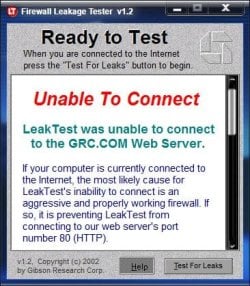
Both tests (port scanner and leaktest) are from GRC. The leaktest is downloaded.
But you gave me an idea. The test is apparently only for outgoing traffic.
I gave the order to download it and once on my computer i gave the program
the order to connect to port 80 of the GRC server. The message comes back:
Firewall penetrated. Then i say "So what? I gave all the orders". So what does the test prove? IMO, only that my computer follows my orders. Or is my thinking completely off course?
Heise Securities (see my thread "Some security checks and issues") gives
email checks with a variety of viruses whereby YOU give them your email address. Then they send you an email with a link. If YOU ckick on the link they send you an email with the requested virus hidden somewhere or in an attachment. You can then check how your email program and your AV program reacts to it. This is all done from the outside (the GRC leak test is from the inside as you pointed out).
Heise has various other checks but surprisingly none for firewalls. I guess they just don't want to stick out their neck. They do have a ping test though.

Actually who cares about outbound traffic? A malicious program must first come in from the outside as you pointed out. Once in, it can give orders for outbound traffic that you are not aware of. This is never tested by the GRC leak test or other programs i am aware of. So again, what use are these leak tests? No use at all, i think. Wrong thinking?
 
Last edited:

My Computer

Computer Manufacturer/Model Number
Acer Extensa 5235
OS
Windows 7 Home Premium 32bit, Linux Mint Julia, in dual boot mode
CPU
Intel Celeron 900 @2.2 GHz
Motherboard
Acer BA50-MV(U2E1)
Memory
DDR3 2048 Mbytes
Sound Card
Conexant HD Audio
Actually who cares about outbound traffic? A malicious program must first come in from the outside as you pointed out. Once in, it can give orders for outbound traffic that you are not aware of. This is never tested by the GRC leak test or other programs i am aware of. So again, what use are these leak tests? No use at all, i think. Wrong thinking?

The outbound test (leaktest) is to check your total security - yes you have let the program onto the system but what about those programs you let in without your knowledge? or do things that are not expected. Your system should at least inform you of any program that is attempting to access the web that has not been given your express permission.
 

My Computers

System One System Two

  • Computer type
    PC/Desktop
    Computer Manufacturer/Model Number
    ChillBlast - Custom to my design
    OS
    Windows 11 Pro x64 [Latest Release and Release Preview]
    CPU
    Ryzen 9 5950X, 3.8 - 5.2 MHz
    Motherboard
    Asus Prime X570-Pro
    Memory
    64GB [2 x 32GB] DDR4 3200MHz
    Graphics Card(s)
    4GB NVIDIA GEFORCE GTX 1650 Ti
    Sound Card
    On-board SPDIF to 5.1 System + HDMI [5.1 system]
    Monitor(s) Displays
    32" UHD 32 Bit HDR Monitor + 43" UHD 4K 32Bit HDR TV
    Screen Resolution
    2 x 3840 x 2160 @60Hz
    Hard Drives
    1TB M2 SSD OS, 500GB Fast Access SSD, 2 x 8TB Data + Various Externals from 1TB to 4TB, 10TB NAS
    PSU
    NZXT C750 80 PLUS Gold 750W Modular PSU
    Case
    Workstation Case [Matt Black]
    Cooling
    NZXT Kraken X63 280mm CPU Cooler +2x Quiet Case fans
    Keyboard
    Logitech Wireless MX Keys & K400 + others
    Mouse
    Logitech Wireless MX Master 3S
    Internet Speed
    920 MB Down 50 MB Up
    Antivirus
    BitDefender Total Security Pro
    Browser
    Chrome (always run latest Non-Beta)
    Other Info
    Also run ...
    Laptop - Quad 8GB - Windows 10 Pro x64
    Nexus 7 Android tablet x2
    Samsung 10.2" tablet
    Blackview TAB 8 4G Android Tablet c/w Keyboard
    Wacom Intuos Pro Medium Pen Pad
    Wacom Intuos Pro Small Pen Pad
    Wacom Expresskeys Remote
    Loopdeck+ Graphics Controller
    Shuttle Pro v2 Control
  • Computer type
    Laptop
    System Manufacturer/Model Number
    Dell XPS 17 10750H
    OS
    Windows 11 Pro x64 Latest RP
    CPU
    Intel I7 10750H 5.0GHz
    Motherboard
    Dell XPS
    Memory
    32GB [2x16GB] DDR4 2933 MHz
    Graphics Card(s)
    nVidia GTX1650Ti 4 GB GDDR6
    Sound Card
    Stock [Realtek] 4 Speaker
    Monitor(s) Displays
    17" IPS UHD+ Infinity Edge Touchscreen
    Screen Resolution
    3840 x 2400
    Hard Drives
    2TB M2 NVMe, 4TB External + various 500GB & 1TB External NVMe (also have access to spinner HDD from
    PSU
    Stock
    Case
    Stock XPS Aluminium & Carbon Fibre
    Cooling
    Stock - Active Fan Control
    Keyboard
    Backlit + Various Logitech
    Mouse
    Stock Track Pad + Logitech MX Trackball
    Internet Speed
    72 MB Down 18MB Up
    Browser
    Chrome
    Other Info
    Also run ...
    Laptop - Quad 8GB - Windows 10 Pro x64
    Nexus 7 Android tablet x2
    10.2" tablet
    Sony Z3 Android Smartphone
    Wacom Intuos Pro Medium Pen Pad
    Wacom Intuos Pro Small Pen Pad
    Wacom Expresskeys Remote
    Loopdeck+ Graphics Controller
    Shuttle Pro v2 Control Pad
    10TB NAS
The outbound test (leaktest) is to check your total security - yes you have let the program onto the system but what about those programs you let in without your knowledge? or do things that are not expected. Your system should at least inform you of any program that is attempting to access the web that has not been given your express permission.
...............

I agree but it is more of a double security should something slip through onto your computer.
Still the emphasis should be on incoming traffic and that is checked by the firewall as well as the real time AV **. A good, solid check on incoming traffic and there will be no problem with unauthorized outgoing traffic.
As far as i understand those leak tests check the outgoing traffic and as logicearth pointed out, then it may be too late. Letting something in on purpose and then getting the message "your firewall failed" seems a bit ....well, i don't know .... silly. The download of the leak test is aparently not considered harmful by any AV because YOU have give it the order for outbound traffic and the program does not connect on its own.

** and of course the router firewall - i almost forgot
 
Last edited:

My Computer

Computer Manufacturer/Model Number
Acer Extensa 5235
OS
Windows 7 Home Premium 32bit, Linux Mint Julia, in dual boot mode
CPU
Intel Celeron 900 @2.2 GHz
Motherboard
Acer BA50-MV(U2E1)
Memory
DDR3 2048 Mbytes
Sound Card
Conexant HD Audio
Well Wishes

To all that are striving for 100%. I wish you well. Meanwhile I haven't got the time to agonize over something that is not perfect nor ever will be.
 

My Computer

Computer Manufacturer/Model Number
BGC (Bob's Garage Crew)
OS
win 7 X64 Ultimate SP1
CPU
I3770K
Motherboard
Asus P8Z77-V Deluxe
Memory
G Skill F3-14900CL9-4GBXL x 4
Graphics Card(s)
NVIDIA GeForce GTX670 + Intel 4000
Sound Card
Realtek HD 5.1 (MOB)
Monitor(s) Displays
Asus VW224T (1)
Screen Resolution
1920 x 1080
Hard Drives
SATA Corsair Force GT 2.5" 180GB (System) Sata 3
OCZ Vertex3 120GB
OCZ Vertex 2 120GB 2.5" SATA II
ST31000524AS 1000.2GB
WD15EARS (External)
PSU
CoolerMaster 1000 Watt
Case
CoolerMaster HAF X
Cooling
CPU -- CoolerMaster 520N
Keyboard
MS Wireless 3000 V2
Mouse
MS Wireless 3000 V2
Internet Speed
Cable
Antivirus
Norton Internet Security
Browser
IE9
Other Info
AMI Bios 1805
OC'd 3%
I also like my firewall to tell me when legit programs, I installed, are calling out. Some programs have no business calling out, it isn't necessary for the proper operation of that program. Generally speaking, once told yes or no, they don't bother me again. A Guy
 

My Computer

Computer type
PC/Desktop
OS
Windows 10 Home x64
CPU
INTEL Core i5-750 Quad-Core 3.37GHz
Motherboard
ASUS P7P55D
Memory
HyperX Fury Black Series 8GB (2 x 4GB) 1866Mhz
Graphics Card(s)
EVGA GeForce GTX 750 Superclocked 1GB 128-Bit GDDR5
Monitor(s) Displays
LG 32MA68HY 32" IPS
Screen Resolution
1920 x 1080
Hard Drives
Samsung 840 Evo 120GB, SEAGATE 500GB Barracuda® 7200.12, SATA 3 Gb/s, 7200 RPM, 16MB cache
PSU
ANTEC TruePower New TP-550, 80 PLUS, 550W
Case
ANTEC Three Hundred Illusion
Cooling
COOLER MASTER Hyper 212 Plus, 4 x 120mm 1 x 140mm Noctua's
Internet Speed
85 + Mbps
Antivirus
Avast
Browser
Vivaldi
To all that are striving for 100%. I wish you well. Meanwhile I haven't got the time to agonize over something that is not perfect nor ever will be.

Hammerhead, it's a learning process (a well as curiosity) and this IT isn't an exact science so experience does count. And i learned a lot from my own thread, not only from the replies to it but also from my own digging and especially from having to formulate my replies and questions (something that very often helps to solve a problem). Of course there is no 100.0000% security but you can always try to get closer. And checking how secure it is can never do any harm.
The thread was actually started because i got frustrated by my internet supplier telling me my computer was infected by a "redirecter" when i wanted to change my password and saw that this could be done on a non-encrypted page. Believe it or not. And that while they also have an https site for logging in. The http site is given in first place when you google. I then checked my computer rigorously with all kinds of AV and looked around for checks on firewalls. It took me hours.
 
Last edited:

My Computer

Computer Manufacturer/Model Number
Acer Extensa 5235
OS
Windows 7 Home Premium 32bit, Linux Mint Julia, in dual boot mode
CPU
Intel Celeron 900 @2.2 GHz
Motherboard
Acer BA50-MV(U2E1)
Memory
DDR3 2048 Mbytes
Sound Card
Conexant HD Audio
Thank for all your replies.
On a rainy, quiet Sunday morning i did some digging with Google and i came across three websites that set me straight or at least left me wondering. If i would have read them before posting this thread i would probably never have posted it.
The three are:
www.matousec.com: Security software testing, analyses, research and reviews. ---->projects ------>proactive security challenge
(...)
Keep in mind that Matousec tests mainly implemented HIPS module in listed firewalls.

That's why i.e Look 'n' Stop Firewall (extra light and strong pure firewall without HIPS module) in Matousec tests is noted so bad.

Discussion about that you will find here: Matousec - COMODO 100% again - Wilders Security Forums

Another new FW test you wanna look into it (it's firewall outbound test):
Google Translate [Automated Google translation]
 

My Computer

Computer type
PC/Desktop
Computer Manufacturer/Model Number
Self Built
OS
Windows 7 Home Premium x32 SP1
CPU
x2 2.6 GHz
Motherboard
Asus
Memory
A-Data 2GB DDR2-800
Graphics Card(s)
ATI X1250
Sound Card
SB 5.1 Live!
Hard Drives
WD and Seagate FAP
PSU
Tagan TG-480-U01
Keyboard
BTC 6300
Mouse
Logitech VX Nano
Antivirus
None
Back
Top