I do a lot of setups and installations on new PCs and Laptops for friends and family, as I guess a lot of others will do.
I discovered this website that lists a lot of the freeware I install on my own and friends systems after setting up Windows.
You'll see a box on the right of the page with all their "Recommended" software to install. I suggest clicking the "Clear All" link and then clicking on the check boxes below (putting a tick in the box) against all the software you want to install. These will appear in the top box now headed "My Selected". If you are not sure what an application does or what it is used for, if you click on the names of the software listed a separate page will appear for each one giving information and Users comments.
It covers most App categories and there were some programs listed I wasn't even aware of!!
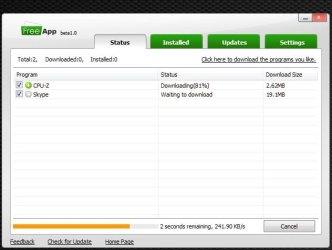
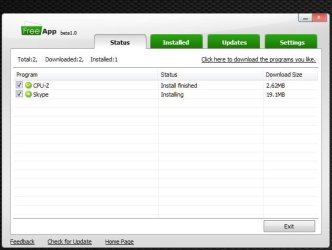
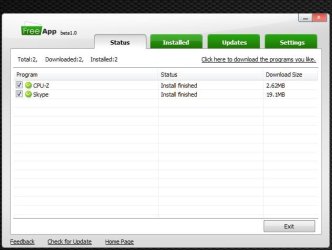
I tried it on my own PC with a couple of bits of software and it worked well. Very quickly downloads the app and installs it silently.
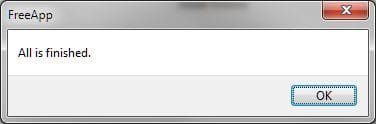
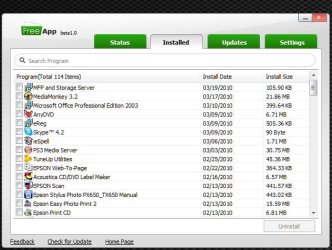
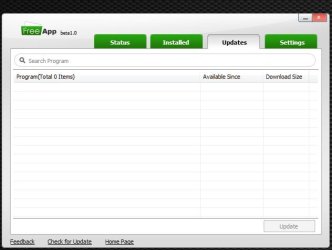
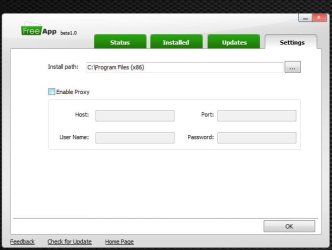
I've posted some screenshots below to give an overview of the installer app:
I shall be using this utility on the next friend's install I get. Should save me loads of time!
My Computer
At a glance
Windows 7 Home Premium x64Intel Core 2 Quad Q6600 @ 2.40GHz4Gb (2x Corsair CM2X2048-6400C5)NVIDIA GeForce 9600 GT 512Mb
Computer Manufacturer/Model Number
Self Build
OS
Windows 7 Home Premium x64
CPU
Intel Core 2 Quad Q6600 @ 2.40GHz
Motherboard
Asus P5B-E
Memory
4Gb (2x Corsair CM2X2048-6400C5)
Graphics Card(s)
NVIDIA GeForce 9600 GT 512Mb
Sound Card
Realtek High Definition Audio Device
Monitor(s) Displays
Mirai 22" Widescreen and LG 19" Standard
Screen Resolution
1680 x 1050 and 1280 x 1024
Hard Drives
Western Digital 500Gb SATA x 2
Samsung 1Tb SATA
PSU
Hiper Modular 530W
Case
Akasa Ecplise 62 Midi
Cooling
Artic Cooling Freezer Pro 7
Keyboard
Advent Standard with Hotkeys
Mouse
PC Line PCL-FL1 Wired Laser
Internet Speed
ISP: Fast.co.uk up to 8Mb
Other Info
Netgear Router plus 5 Way LAN Switch, Samsung Ethernet Laser Printer, Epson PX650 Colour PSC, plus 2 more Desktop PCs, 3 Laptops and 2 Netbooks in same Home Network.
Home LAN through Linksys hub to 4 port and wireless switch/router. Networked HP 2600n. Wife's computer running Windows 7, and spare laptop running Ubuntu "Karmic Kola" (9.10).
Yes agreed. Maybe use the two in conjunction. Refer to the Forum list for what to get, make notes and then add them all to the installer and leave it to do the work in one go.
My Computer
At a glance
Windows 7 Home Premium x64Intel Core 2 Quad Q6600 @ 2.40GHz4Gb (2x Corsair CM2X2048-6400C5)NVIDIA GeForce 9600 GT 512Mb
Computer Manufacturer/Model Number
Self Build
OS
Windows 7 Home Premium x64
CPU
Intel Core 2 Quad Q6600 @ 2.40GHz
Motherboard
Asus P5B-E
Memory
4Gb (2x Corsair CM2X2048-6400C5)
Graphics Card(s)
NVIDIA GeForce 9600 GT 512Mb
Sound Card
Realtek High Definition Audio Device
Monitor(s) Displays
Mirai 22" Widescreen and LG 19" Standard
Screen Resolution
1680 x 1050 and 1280 x 1024
Hard Drives
Western Digital 500Gb SATA x 2
Samsung 1Tb SATA
PSU
Hiper Modular 530W
Case
Akasa Ecplise 62 Midi
Cooling
Artic Cooling Freezer Pro 7
Keyboard
Advent Standard with Hotkeys
Mouse
PC Line PCL-FL1 Wired Laser
Internet Speed
ISP: Fast.co.uk up to 8Mb
Other Info
Netgear Router plus 5 Way LAN Switch, Samsung Ethernet Laser Printer, Epson PX650 Colour PSC, plus 2 more Desktop PCs, 3 Laptops and 2 Netbooks in same Home Network.
Yes agreed. Maybe use the two in conjunction. Refer to the Forum list for what to get, make notes and then add them all to the installer and leave it to do the work in one go.
Home LAN through Linksys hub to 4 port and wireless switch/router. Networked HP 2600n. Wife's computer running Windows 7, and spare laptop running Ubuntu "Karmic Kola" (9.10).
Not sure about the "Ninite" utility swarfega as I haven't tried it myself.
The "FreeApp" utility did allow me to change the default "C:\Program Files (x86)" folder to just "C:\" as I install all apps in the Root folder of C: drive on my PC as I have done for as many years as I care to remember. I have never seen the point of the Program Files folder and have never had any issues with any programs being installed in the root folder.
My Computer
At a glance
Windows 7 Home Premium x64Intel Core 2 Quad Q6600 @ 2.40GHz4Gb (2x Corsair CM2X2048-6400C5)NVIDIA GeForce 9600 GT 512Mb
Computer Manufacturer/Model Number
Self Build
OS
Windows 7 Home Premium x64
CPU
Intel Core 2 Quad Q6600 @ 2.40GHz
Motherboard
Asus P5B-E
Memory
4Gb (2x Corsair CM2X2048-6400C5)
Graphics Card(s)
NVIDIA GeForce 9600 GT 512Mb
Sound Card
Realtek High Definition Audio Device
Monitor(s) Displays
Mirai 22" Widescreen and LG 19" Standard
Screen Resolution
1680 x 1050 and 1280 x 1024
Hard Drives
Western Digital 500Gb SATA x 2
Samsung 1Tb SATA
PSU
Hiper Modular 530W
Case
Akasa Ecplise 62 Midi
Cooling
Artic Cooling Freezer Pro 7
Keyboard
Advent Standard with Hotkeys
Mouse
PC Line PCL-FL1 Wired Laser
Internet Speed
ISP: Fast.co.uk up to 8Mb
Other Info
Netgear Router plus 5 Way LAN Switch, Samsung Ethernet Laser Printer, Epson PX650 Colour PSC, plus 2 more Desktop PCs, 3 Laptops and 2 Netbooks in same Home Network.
Wow Big thumbs up to this, I never thought of this, I always used decrapifier for junk when I would buy a laptop for people as gifts. This is pretty cool since it eases my pain of installing the things I need.