
First scan from Ccleaner

janeydoll

New member
Local time
7:01 PM
Messages
50
I just did my first registry scan with ccleaner and wanted someone to see the results and tell me if they are all safe to delete.


Code:
Unused File Extension    WMPCD    HKCR\WMPCD
[SIZE=2]Unused File Extension    .3g2    HKCU\Software\Microsoft\Windows\CurrentVersion\Explorer\FileExts\.3g2[/SIZE]
[SIZE=2]Unused File Extension    .3gp    HKCU\Software\Microsoft\Windows\CurrentVersion\Explorer\FileExts\.3gp[/SIZE]
[SIZE=2]Unused File Extension    .3gp2    HKCU\Software\Microsoft\Windows\CurrentVersion\Explorer\FileExts\.3gp2[/SIZE]
[SIZE=2]Unused File Extension    .3gpp    HKCU\Software\Microsoft\Windows\CurrentVersion\Explorer\FileExts\.3gpp[/SIZE]
[SIZE=2]Unused File Extension    .aac    HKCU\Software\Microsoft\Windows\CurrentVersion\Explorer\FileExts\.aac[/SIZE]
[SIZE=2]Unused File Extension    .ac3    HKCU\Software\Microsoft\Windows\CurrentVersion\Explorer\FileExts\.ac3[/SIZE]
[SIZE=2]Unused File Extension    .adts    HKCU\Software\Microsoft\Windows\CurrentVersion\Explorer\FileExts\.adts[/SIZE]
[SIZE=2]Unused File Extension    .amc    HKCU\Software\Microsoft\Windows\CurrentVersion\Explorer\FileExts\.amc[/SIZE]
[SIZE=2]Unused File Extension    .amr    HKCU\Software\Microsoft\Windows\CurrentVersion\Explorer\FileExts\.amr[/SIZE]
[SIZE=2]Unused File Extension    .ani    HKCU\Software\Microsoft\Windows\CurrentVersion\Explorer\FileExts\.ani[/SIZE]
[SIZE=2]Unused File Extension    .arj    HKCU\Software\Microsoft\Windows\CurrentVersion\Explorer\FileExts\.arj[/SIZE]
[SIZE=2]Unused File Extension    .b64    HKCU\Software\Microsoft\Windows\CurrentVersion\Explorer\FileExts\.b64[/SIZE]
[SIZE=2]Unused File Extension    .bz2    HKCU\Software\Microsoft\Windows\CurrentVersion\Explorer\FileExts\.bz2[/SIZE]
[SIZE=2]Unused File Extension    .cab    HKCU\Software\Microsoft\Windows\CurrentVersion\Explorer\FileExts\.cab[/SIZE]
[SIZE=2]Unused File Extension    .caf    HKCU\Software\Microsoft\Windows\CurrentVersion\Explorer\FileExts\.caf[/SIZE]
[SIZE=2]Unused File Extension    .cbr    HKCU\Software\Microsoft\Windows\CurrentVersion\Explorer\FileExts\.cbr[/SIZE]
[SIZE=2]Unused File Extension    .cbz    HKCU\Software\Microsoft\Windows\CurrentVersion\Explorer\FileExts\.cbz[/SIZE]
[SIZE=2]Unused File Extension    .cdda    HKCU\Software\Microsoft\Windows\CurrentVersion\Explorer\FileExts\.cdda[/SIZE]
[SIZE=2]Unused File Extension    .cur    HKCU\Software\Microsoft\Windows\CurrentVersion\Explorer\FileExts\.cur[/SIZE]
[SIZE=2]Unused File Extension    .dif    HKCU\Software\Microsoft\Windows\CurrentVersion\Explorer\FileExts\.dif[/SIZE]
[SIZE=2]Unused File Extension    .dll    HKCU\Software\Microsoft\Windows\CurrentVersion\Explorer\FileExts\.dll[/SIZE]
[SIZE=2]Unused File Extension    .dv    HKCU\Software\Microsoft\Windows\CurrentVersion\Explorer\FileExts\.dv[/SIZE]
[SIZE=2]Unused File Extension    .gsm    HKCU\Software\Microsoft\Windows\CurrentVersion\Explorer\FileExts\.gsm[/SIZE]
[SIZE=2]Unused File Extension    .gz    HKCU\Software\Microsoft\Windows\CurrentVersion\Explorer\FileExts\.gz[/SIZE]
[SIZE=2]Unused File Extension    .lha    HKCU\Software\Microsoft\Windows\CurrentVersion\Explorer\FileExts\.lha[/SIZE]
[SIZE=2]Unused File Extension    .lzh    HKCU\Software\Microsoft\Windows\CurrentVersion\Explorer\FileExts\.lzh[/SIZE]
[SIZE=2]Unused File Extension    .mdb    HKCU\Software\Microsoft\Windows\CurrentVersion\Explorer\FileExts\.mdb[/SIZE]
[SIZE=2]Unused File Extension    .mim    HKCU\Software\Microsoft\Windows\CurrentVersion\Explorer\FileExts\.mim[/SIZE]
[SIZE=2]Unused File Extension    .mme    HKCU\Software\Microsoft\Windows\CurrentVersion\Explorer\FileExts\.mme[/SIZE]
[SIZE=2]Unused File Extension    .modd    HKCU\Software\Microsoft\Windows\CurrentVersion\Explorer\FileExts\.modd[/SIZE]
[SIZE=2]Unused File Extension    .mp4    HKCU\Software\Microsoft\Windows\CurrentVersion\Explorer\FileExts\.mp4[/SIZE]
[SIZE=2]Unused File Extension    .obd    HKCU\Software\Microsoft\Windows\CurrentVersion\Explorer\FileExts\.obd[/SIZE]
[SIZE=2]Unused File Extension    .obt    HKCU\Software\Microsoft\Windows\CurrentVersion\Explorer\FileExts\.obt[/SIZE]
[SIZE=2]Unused File Extension    .ods    HKCU\Software\Microsoft\Windows\CurrentVersion\Explorer\FileExts\.ods[/SIZE]
[SIZE=2]Unused File Extension    .psy    HKCU\Software\Microsoft\Windows\CurrentVersion\Explorer\FileExts\.psy[/SIZE]
[SIZE=2]Unused File Extension    .qt    HKCU\Software\Microsoft\Windows\CurrentVersion\Explorer\FileExts\.qt[/SIZE]
[SIZE=2]Unused File Extension    .ra    HKCU\Software\Microsoft\Windows\CurrentVersion\Explorer\FileExts\.ra[/SIZE]
[SIZE=2]Unused File Extension    .rar    HKCU\Software\Microsoft\Windows\CurrentVersion\Explorer\FileExts\.rar[/SIZE]
[SIZE=2]Unused File Extension    .rf    HKCU\Software\Microsoft\Windows\CurrentVersion\Explorer\FileExts\.rf[/SIZE]
[SIZE=2]Unused File Extension    .rjs    HKCU\Software\Microsoft\Windows\CurrentVersion\Explorer\FileExts\.rjs[/SIZE]
[SIZE=2]Unused File Extension    .rmm    HKCU\Software\Microsoft\Windows\CurrentVersion\Explorer\FileExts\.rmm[/SIZE]
[SIZE=2]Unused File Extension    .rmp    HKCU\Software\Microsoft\Windows\CurrentVersion\Explorer\FileExts\.rmp[/SIZE]
[SIZE=2]Unused File Extension    .rms    HKCU\Software\Microsoft\Windows\CurrentVersion\Explorer\FileExts\.rms[/SIZE]
[SIZE=2]Unused File Extension    .rmx    HKCU\Software\Microsoft\Windows\CurrentVersion\Explorer\FileExts\.rmx[/SIZE]
[SIZE=2]Unused File Extension    .rnx    HKCU\Software\Microsoft\Windows\CurrentVersion\Explorer\FileExts\.rnx[/SIZE]
[SIZE=2]Unused File Extension    .rp    HKCU\Software\Microsoft\Windows\CurrentVersion\Explorer\FileExts\.rp[/SIZE]
[SIZE=2]Unused File Extension    .rsml    HKCU\Software\Microsoft\Windows\CurrentVersion\Explorer\FileExts\.rsml[/SIZE]
[SIZE=2]Unused File Extension    .rt    HKCU\Software\Microsoft\Windows\CurrentVersion\Explorer\FileExts\.rt[/SIZE]
[SIZE=2]Unused File Extension    .rv    HKCU\Software\Microsoft\Windows\CurrentVersion\Explorer\FileExts\.rv[/SIZE]
[SIZE=2]Unused File Extension    .sd2    HKCU\Software\Microsoft\Windows\CurrentVersion\Explorer\FileExts\.sd2[/SIZE]
[SIZE=2]Unused File Extension    .sdp    HKCU\Software\Microsoft\Windows\CurrentVersion\Explorer\FileExts\.sdp[/SIZE]
[SIZE=2]Unused File Extension    .sdv    HKCU\Software\Microsoft\Windows\CurrentVersion\Explorer\FileExts\.sdv[/SIZE]
[SIZE=2]Unused File Extension    .sef    HKCU\Software\Microsoft\Windows\CurrentVersion\Explorer\FileExts\.sef[/SIZE]
[SIZE=2]Unused File Extension    .smi    HKCU\Software\Microsoft\Windows\CurrentVersion\Explorer\FileExts\.smi[/SIZE]
[SIZE=2]Unused File Extension    .smil    HKCU\Software\Microsoft\Windows\CurrentVersion\Explorer\FileExts\.smil[/SIZE]
[SIZE=2]Unused File Extension    .ssm    HKCU\Software\Microsoft\Windows\CurrentVersion\Explorer\FileExts\.ssm[/SIZE]
[SIZE=2]Unused File Extension    .tar    HKCU\Software\Microsoft\Windows\CurrentVersion\Explorer\FileExts\.tar[/SIZE]
[SIZE=2]Unused File Extension    .taz    HKCU\Software\Microsoft\Windows\CurrentVersion\Explorer\FileExts\.taz[/SIZE]
[SIZE=2]Unused File Extension    .tbz    HKCU\Software\Microsoft\Windows\CurrentVersion\Explorer\FileExts\.tbz[/SIZE]
[SIZE=2]Unused File Extension    .tgz    HKCU\Software\Microsoft\Windows\CurrentVersion\Explorer\FileExts\.tgz[/SIZE]
[SIZE=2]Unused File Extension    .uue    HKCU\Software\Microsoft\Windows\CurrentVersion\Explorer\FileExts\.uue[/SIZE]
[SIZE=2]Unused File Extension    .z    HKCU\Software\Microsoft\Windows\CurrentVersion\Explorer\FileExts\.z[/SIZE]
[SIZE=2]Open with Application Issue    "C:\Program Files\Windows Media Player\mplayer2.exe"  /Play "%L"    HKCR\3GPP2Files\shell\open[/SIZE]
[SIZE=2]Open with Application Issue    "C:\Program Files\Windows Media Player\mplayer2.exe"  /Play "%L"    HKCR\3GPP2Files\shell\play[/SIZE]
[SIZE=2]Invalid Default Icon    C:\Program Files\Adobe\Acrobat 7.0\Acrobat\AcroRd32.exe    HKCR\acrobat\DefaultIcon[/SIZE]
[SIZE=2]Invalid Default Icon    C:\Program Files\Replay Converter 4\AviSynth.dll,0    HKCR\avsfile\DefaultIcon[/SIZE]
[SIZE=2]Invalid Default Icon    C:\WINDOWS\system32\CMMGR32.EXE,1    HKCR\Connection Manager Profile\DefaultIcon[/SIZE]
[SIZE=2]Open with Application Issue    C:\WINDOWS\system32\CMMGR32.EXE "%1"    HKCR\Connection Manager Profile\shell\open[/SIZE]
[SIZE=2]Open with Application Issue    C:\WINDOWS\system32\CMMGR32.EXE /settings "%1"    HKCR\Connection Manager Profile\shell\Settings...[/SIZE]
[SIZE=2]Invalid Default Icon    C:\Program Files\Common Files\Microsoft Shared\Web Folders\pkmres.dll,11    HKCR\dcsfile\DefaultIcon[/SIZE]
[SIZE=2]Invalid Default Icon    C:\Program Files\Common Files\Microsoft Shared\Web Folders\pkmres.dll,10    HKCR\ecsfile\DefaultIcon[/SIZE]
[SIZE=2]Invalid Default Icon    C:\Program Files\Common Files\Microsoft Shared\Web Folders\pkmres.dll,12    HKCR\fcsfile\DefaultIcon[/SIZE]
[SIZE=2]Invalid Default Icon    C:\Program Files\Common Files\Microsoft Shared\Web Folders\pkmres.dll,14    HKCR\ncsfile\DefaultIcon[/SIZE]
[SIZE=2]Open with Application Issue    C:\PROGRA~1\QUICKT~1\QuickTimeUpdater.exe "%1"    HKCR\QuickTime.qup\shell\open[/SIZE]
[SIZE=2]Invalid Default Icon    C:\Program Files\Common Files\Microsoft Shared\Web Folders\pkmres.dll,13    HKCR\tcsfile\DefaultIcon[/SIZE]
[SIZE=2]Invalid Default Icon    C:\Program Files\Common Files\Microsoft Shared\Web Folders\pkmres.dll,15    HKCR\urn:content-classes:catalog\DefaultIcon[/SIZE]
[SIZE=2]Invalid Default Icon    C:\Program Files\Common Files\Microsoft Shared\Web Folders\pkmres.dll,-12471    HKCR\urn:content-classes:catalog-settings\DefaultIcon[/SIZE]
[SIZE=2]Invalid Default Icon    C:\Program Files\Common Files\Microsoft Shared\Web Folders\pkmres.dll,-13101    HKCR\urn:content-classes:contentclassdef\DefaultIcon[/SIZE]
[SIZE=2]Invalid Default Icon    C:\Program Files\Common Files\Microsoft Shared\Web Folders\pkmres.dll,-12451    HKCR\urn:content-classes:exchange55startaddress\DefaultIcon[/SIZE]
[SIZE=2]Invalid Default Icon    C:\Program Files\Common Files\Microsoft Shared\Web Folders\pkmres.dll,-12451    HKCR\urn:content-classes:exchangestartaddress\DefaultIcon[/SIZE]
[SIZE=2]Invalid Default Icon    C:\Program Files\Common Files\Microsoft Shared\Web Folders\pkmres.dll,-12453    HKCR\urn:content-classes:filestartaddress\DefaultIcon[/SIZE]
[SIZE=2]Invalid Default Icon    C:\Program Files\Common Files\Microsoft Shared\Web Folders\pkmres.dll,20    HKCR\urn:content-classes:management\DefaultIcon[/SIZE]
[SIZE=2]Invalid Default Icon    C:\Program Files\Common Files\Microsoft Shared\Web Folders\pkmres.dll,-12456    HKCR\urn:content-classes:notesstartaddress\DefaultIcon[/SIZE]
[SIZE=2]Invalid Default Icon    C:\Program Files\Common Files\Microsoft Shared\Web Folders\pkmres.dll,-12454    HKCR\urn:content-classes:remoteworkspacestartaddress\DefaultIcon[/SIZE]
[SIZE=2]Invalid Default Icon    C:\Program Files\Common Files\Microsoft Shared\Web Folders\pkmres.dll,-12450    HKCR\urn:content-classes:webstartaddress\DefaultIcon[/SIZE]
[SIZE=2]Invalid Default Icon    C:\Program Files\Common Files\Microsoft Shared\Web Folders\pkmres.dll,-13100    HKCR\urn:content-classes:wizard/addcontentclass\DefaultIcon[/SIZE]
[SIZE=2]Invalid Default Icon    C:\Program Files\Common Files\Microsoft Shared\Web Folders\pkmres.dll,-12461    HKCR\urn:content-classes:wizard/addsearchcontentlocation\DefaultIcon[/SIZE]
[SIZE=2]Invalid Default Icon    C:\Program Files\Common Files\Microsoft Shared\Web Folders\pkmres.dll,-12472    HKCR\urn:content-classes:workspace-settings\DefaultIcon[/SIZE]
[SIZE=2]Invalid Default Icon    C:\Program Files\Common Files\Microsoft Shared\Web Folders\pkmres.dll,-12476    HKCR\urn:content-classes:workspaceconfiguration\DefaultIcon[/SIZE]
[SIZE=2]Invalid Default Icon    C:\Program Files\Common Files\Microsoft Shared\Web Folders\pkmres.dll,-12454    HKCR\urn:content-classes:workspacestartaddress\DefaultIcon[/SIZE]
[SIZE=2]Invalid Default Icon    C:\Program Files\Common Files\Microsoft Shared\Web Folders\pkmres.dll,9    HKCR\wcsfile\DefaultIcon[/SIZE]
[SIZE=2]ActiveX/COM Issue    InProcServer32\C:\Program Files\OpenOffice.org 3\Basis\program\xmergesync.dll    HKCR\CLSID\{43887C67-4D5D-4127-BAAC-87A288494C7C}[/SIZE]
[SIZE=2]ActiveX/COM Issue    InProcServer32\C:\Program Files\OpenOffice.org 3\Basis\program\xmergesync.dll    HKCR\CLSID\{BDD611C3-7BAB-460F-8711-5B9AC9EF6020}[/SIZE]
[SIZE=2]ActiveX/COM Issue    InProcServer32\C:\Program Files\OpenOffice.org 3\Basis\program\xmergesync.dll    HKCR\CLSID\{C6AB3E74-9F4F-4370-8120-A8A6FABB7A7C}[/SIZE]
[SIZE=2]ActiveX/COM Issue    InProcServer32\C:\Program Files\OpenOffice.org 3\Basis\program\xmergesync.dll    HKCR\CLSID\{CB43F086-838D-4FA4-B5F6-3406B9A57439}[/SIZE]
[SIZE=2]Open with Application Issue    Applications\EXCEL.EXE\shell    HKCR\Applications\EXCEL.EXE[/SIZE]
[SIZE=2]Open with Application Issue    Applications\moviemk.exe\shell    HKCR\Applications\moviemk.exe[/SIZE]
[SIZE=2]Missing MUI Reference    C:\DOCUME~1\OWNER~1.CSN\LOCALS~1\Temp\WMC0000.tmp\WMPAU.exe    HKCU\Software\Microsoft\Windows\ShellNoRoam\MUICache[/SIZE]
 

Attachments

My Computer

Computer Manufacturer/Model Number
HP Pavilion dv6-3120us
OS
Windows 7 Home Premium 64bit
CPU
AMD Turion II dual core mobile processor P540
Memory
4 GB DDR3 SDRAM 2 DIMM
Other Info
Linksys WRT 300 N Wireless N Broadband Router
With 7, leave registry alone. You do not need to touch registry. Untick everything in ccleanr that relates to registry and you will be much happier. Just trust me on this one.
When all the others come here and disagree, I repeat trust me on this one.
 

My Computer

Computer type
PC/Desktop
Computer Manufacturer/Model Number
Dell XPS 420
OS
Windows 10, Home Clean Install
CPU
Intel Core2 processsor Q8200(2.33Ghz 1333FSB) Quad Core Tech
Motherboard
Dell
Memory
6 gb
Graphics Card(s)
ATI Radeon 256MB HD3650
Sound Card
Intergrated 7.1 Channel Audio
Monitor(s) Displays
Dell SP2009W 20"
Hard Drives
640 GB Serial ATA Hard drive
Cooling
Fan
Keyboard
Dell USB Keyboard
Mouse
Dell Premium Optical USB
Internet Speed
DSL 2.85
Ok, so just don't do any scan at all on windows 7? Even after I get rid of all the bloatware?

This scan is coming from my xp laptop. Are those Ok to delete? Are they safe?

Also, I have other XP laptops in the house and am wanting to maybe not use my system mechanic as I think that is a huge part of my issues and want to know what I need to keep them safe? I want something to run in real time for spyware as well as running malware bytes for scans. What virus is best for xp?
 

My Computer

Computer Manufacturer/Model Number
HP Pavilion dv6-3120us
OS
Windows 7 Home Premium 64bit
CPU
AMD Turion II dual core mobile processor P540
Memory
4 GB DDR3 SDRAM 2 DIMM
Other Info
Linksys WRT 300 N Wireless N Broadband Router
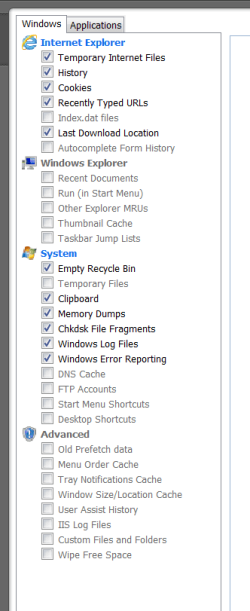
Can I delete everything the ccleaner finds when it comes to the temp internet files, cookies, history etc?

By the way, If I don't want to have to log in to a site everytime, what is it that I DON'T want to delete? Is that cookies, or just the active log in check box? I am using fire fox.
 

My Computer

Computer Manufacturer/Model Number
HP Pavilion dv6-3120us
OS
Windows 7 Home Premium 64bit
CPU
AMD Turion II dual core mobile processor P540
Memory
4 GB DDR3 SDRAM 2 DIMM
Other Info
Linksys WRT 300 N Wireless N Broadband Router
I will give you a screen shot of my very safe set up
 

My Computer

Computer type
PC/Desktop
Computer Manufacturer/Model Number
Dell XPS 420
OS
Windows 10, Home Clean Install
CPU
Intel Core2 processsor Q8200(2.33Ghz 1333FSB) Quad Core Tech
Motherboard
Dell
Memory
6 gb
Graphics Card(s)
ATI Radeon 256MB HD3650
Sound Card
Intergrated 7.1 Channel Audio
Monitor(s) Displays
Dell SP2009W 20"
Hard Drives
640 GB Serial ATA Hard drive
Cooling
Fan
Keyboard
Dell USB Keyboard
Mouse
Dell Premium Optical USB
Internet Speed
DSL 2.85
Capturecccle.PNG

This is what I have
No registry
and I have the cookies that I want in the saved column, right.

After all the bloatware, do a defrag and chkdsk.

For vista and Seven. No reg cleaners, mechanic tune up etc.
Just do this
http://www.sevenforums.com/performa...uggestions-proper-maintenance.html#post764471

Use Microsoft Security Essentials for all windows
Download and use Malwarebytes weekly. These are all free
Use the Windows Firewall.

System Temorary files affects cookies, make sure that you have cookies in the right column if you want them saved

Cookies remembers passwords etc.
 

My Computer

Computer type
PC/Desktop
Computer Manufacturer/Model Number
Dell XPS 420
OS
Windows 10, Home Clean Install
CPU
Intel Core2 processsor Q8200(2.33Ghz 1333FSB) Quad Core Tech
Motherboard
Dell
Memory
6 gb
Graphics Card(s)
ATI Radeon 256MB HD3650
Sound Card
Intergrated 7.1 Channel Audio
Monitor(s) Displays
Dell SP2009W 20"
Hard Drives
640 GB Serial ATA Hard drive
Cooling
Fan
Keyboard
Dell USB Keyboard
Mouse
Dell Premium Optical USB
Internet Speed
DSL 2.85
I just installed Ccleaner, but it's not in my programs under the start menu? Where is it?

What should my security settings be for firefox?


Also, I have system mechanic 10 (or whatever the latest is) and want to know if I should put it on my new laptop, windows 7 (christmas present)? I have been reading the forums and have seen a lot about registry cleaners and suggesting NOT to use them which is what I use system mechanic for a lot. I also use it for a system shield but it's not always been the best. I think I am having issues from using it now that I have read all of the wisdom that this forums has.

If I were to NOT use system mechanic, what would I need to keep my computer safe? I want something that runs in real time to prevent malware/spyware.

Also, when talking about the revo program, is that the free version or do you NEED the full version? I just do the basic minimal install/uninstall.

Give me the perfect combination ;-)
 

My Computer

Computer Manufacturer/Model Number
HP Pavilion dv6-3120us
OS
Windows 7 Home Premium 64bit
CPU
AMD Turion II dual core mobile processor P540
Memory
4 GB DDR3 SDRAM 2 DIMM
Other Info
Linksys WRT 300 N Wireless N Broadband Router
I added a lot to my above post. Read and then any questions ask.
 

My Computer

Computer type
PC/Desktop
Computer Manufacturer/Model Number
Dell XPS 420
OS
Windows 10, Home Clean Install
CPU
Intel Core2 processsor Q8200(2.33Ghz 1333FSB) Quad Core Tech
Motherboard
Dell
Memory
6 gb
Graphics Card(s)
ATI Radeon 256MB HD3650
Sound Card
Intergrated 7.1 Channel Audio
Monitor(s) Displays
Dell SP2009W 20"
Hard Drives
640 GB Serial ATA Hard drive
Cooling
Fan
Keyboard
Dell USB Keyboard
Mouse
Dell Premium Optical USB
Internet Speed
DSL 2.85
So If I do everything you say that is all I need for a good safe set up on my machines?

System Temorary files affects cookies, make sure that you have cookies in the right column if you want them saved

How do I put them in the saved column? Also, I just installed Ccleaner, but it's not in my programs under the start menu? Where is it?
 

My Computer

Computer Manufacturer/Model Number
HP Pavilion dv6-3120us
OS
Windows 7 Home Premium 64bit
CPU
AMD Turion II dual core mobile processor P540
Memory
4 GB DDR3 SDRAM 2 DIMM
Other Info
Linksys WRT 300 N Wireless N Broadband Router
OH my gosh you lost it big trouble now

NO LOL

Go to search
Type ccleaner
when it pops up, right click and then pin to start menu or task bar. mine is on bottom taks bar.
 

My Computer

Computer type
PC/Desktop
Computer Manufacturer/Model Number
Dell XPS 420
OS
Windows 10, Home Clean Install
CPU
Intel Core2 processsor Q8200(2.33Ghz 1333FSB) Quad Core Tech
Motherboard
Dell
Memory
6 gb
Graphics Card(s)
ATI Radeon 256MB HD3650
Sound Card
Intergrated 7.1 Channel Audio
Monitor(s) Displays
Dell SP2009W 20"
Hard Drives
640 GB Serial ATA Hard drive
Cooling
Fan
Keyboard
Dell USB Keyboard
Mouse
Dell Premium Optical USB
Internet Speed
DSL 2.85
Welcome to SF!

Keep the Cookies for sites that you want your browser to "remember", (ie, site-specific Log-ins, settings, etc.)
The latest version of CCleaner has a new option to backup this list.

richc46 is certainly right about the Registry Cleaner- any registry cleaner; they can cause a lot of problems for you- especially if you don't have a good working knowledge of its ins and outs.
Just take a look at all those so-called "unused" file extensions that it's offering to 'clean'; you get rid of them and you're going to have a real mess on your hands. Sure, some of them may not be currently associated with programs on your system, but many of them are.

Windows 7 runs just fine, just the way it is. With earlier versions of Windows a certain amount of Tweaking may have nudged the responsiveness of those OS's a little bit, but I haven't found any real-world speed benefit from messing around with 7.

"If it works, don't fix it." :)
 

My Computer

Computer Manufacturer/Model Number
OEM - Me
OS
Windows 7 Home Premium x64
CPU
AMD Phenom II X6 1600T
Motherboard
GigaByte GZ-990FXA-UD3
Memory
16GB PC3-10700 (1342MHz)
Graphics Card(s)
ATI Radeon 5770 HD (x2) CrossFire
Sound Card
On-board RealTek chipset
Monitor(s) Displays
3x Hanns-G 1920x1080 Monitors
Screen Resolution
3x Hanns-G 1920x1080 Monitors
Hard Drives
Intel 25-V SSD 40GB: 218 MB/s AT: 0.1ms
Intel X-25M SSD 80GB: 230MB/s AT: 0.1ms
Seagate 750GB: 133 MB/s AT: 13ms (perpendicular storage)
Buffalo HD-PCTU3 1TB External drive
PSU
OCZ Stealth X Stream 750W
Case
Cheap (unknown)
Cooling
Stock
Keyboard
HP USB
Mouse
LogiTech USB
Internet Speed
1.5 Mbps - Slow - At the tail-end of a rural network
Other Info
Printer: Epson Stylus C-84
Scanner: HP 3500C Flatbed
DVD-RW: Plextor
DVD-ROM: Unknown
WEI: 7.4
To save the cookies you click on options, then cookies

You will see 2 columns. The left one are all the cookies

The right are the saved
Put the ones you want in saved

Then once a day delete cookies
At the end of the day put all the ones you want in the saved column and delete again
Do this for about a week.

After a week, if you log into an account and then the ID is missing the next time. Log in and go to cc and put it in the right column

http://www.howtogeek.com/howto/3340...kie-cleaning-drive-wiping-and-64-bit-support/
 

My Computer

Computer type
PC/Desktop
Computer Manufacturer/Model Number
Dell XPS 420
OS
Windows 10, Home Clean Install
CPU
Intel Core2 processsor Q8200(2.33Ghz 1333FSB) Quad Core Tech
Motherboard
Dell
Memory
6 gb
Graphics Card(s)
ATI Radeon 256MB HD3650
Sound Card
Intergrated 7.1 Channel Audio
Monitor(s) Displays
Dell SP2009W 20"
Hard Drives
640 GB Serial ATA Hard drive
Cooling
Fan
Keyboard
Dell USB Keyboard
Mouse
Dell Premium Optical USB
Internet Speed
DSL 2.85
Microsoft Security Essentials Is this a virus scanner as well as real time protection against malware/spyware?

What about iobit for real time protection?
 

My Computer

Computer Manufacturer/Model Number
HP Pavilion dv6-3120us
OS
Windows 7 Home Premium 64bit
CPU
AMD Turion II dual core mobile processor P540
Memory
4 GB DDR3 SDRAM 2 DIMM
Other Info
Linksys WRT 300 N Wireless N Broadband Router

My Computer

Computer type
PC/Desktop
Computer Manufacturer/Model Number
Dell XPS 420
OS
Windows 10, Home Clean Install
CPU
Intel Core2 processsor Q8200(2.33Ghz 1333FSB) Quad Core Tech
Motherboard
Dell
Memory
6 gb
Graphics Card(s)
ATI Radeon 256MB HD3650
Sound Card
Intergrated 7.1 Channel Audio
Monitor(s) Displays
Dell SP2009W 20"
Hard Drives
640 GB Serial ATA Hard drive
Cooling
Fan
Keyboard
Dell USB Keyboard
Mouse
Dell Premium Optical USB
Internet Speed
DSL 2.85
Rich has you covered very well.

Here is link for malwarebytes
Free version left button at the top of the page.
Malwarebytes

My 2 cents on this Christmas Eve! :D

Mike
 

My Computer

Computer Manufacturer/Model Number
Hopalong/ Godzilla
OS
Windows7 Pro 64bit SP-1; Windows XP Pro 32bit
CPU
Intel Core i7-870 Lynnfield 2.93GHz LGA 1156 95W Quad-Core
Motherboard
ASUS P7P55D-E PRO
Memory
8GB@1400MHz Crucial Ballistix DDR3-1600 4x2GB
Graphics Card(s)
ASUS ENGTX460 DirectCU/2DI/1GD5 1GB 256-bit GDDR5
Sound Card
VIA Onboard
Monitor(s) Displays
Asus VS248H-P 24"; Samsung SyncMaster 941BW 19"ws
Screen Resolution
1920x1080; 1440x900
Hard Drives
Samsung 830 120GB SSD
Intel 320 120GB SSD
Western Digital Caviar Black WD7501AALS 750GB 7200 RPM SATA 3.0Gb/s
Western Digital Caviar Black WD6401AALS 640GB 7200 RPM SATA 3.0Gb/s
PSU
COOLER MASTER Silent Pro RS850-AMBAJ3-US 850W Modular
Case
COOLER MASTER HAF 932 RC-932-KKN5-GP Black
Cooling
Scythe "Mugen-2 Rev.B" (2 ScytheKaze-Jyuni PWM fans)
Keyboard
Logitech K-320
Mouse
Kensington
Antivirus
Avast Inernet Suite
Browser
IE 9 ; Chrome
Ok, so if some malware was about to attack me, a box would pop up or something to prevent it and tell me?

I have used system mechanic for the past 5 years or so but would like to stop using it. But I need to feel secure in what I am going to use. Is the MSE located in the program files? I won't get my new laptop until the morning ;-)
 

My Computer

Computer Manufacturer/Model Number
HP Pavilion dv6-3120us
OS
Windows 7 Home Premium 64bit
CPU
AMD Turion II dual core mobile processor P540
Memory
4 GB DDR3 SDRAM 2 DIMM
Other Info
Linksys WRT 300 N Wireless N Broadband Router
Stop with the mechanic, in general they cause problems. NOt picking on mechanic in particular
If you encounter a virus, you will be warned. Still run a scan once a week, things get by, with any AV.

See my above post I gave you the download link for Essentsials
 

My Computer

Computer type
PC/Desktop
Computer Manufacturer/Model Number
Dell XPS 420
OS
Windows 10, Home Clean Install
CPU
Intel Core2 processsor Q8200(2.33Ghz 1333FSB) Quad Core Tech
Motherboard
Dell
Memory
6 gb
Graphics Card(s)
ATI Radeon 256MB HD3650
Sound Card
Intergrated 7.1 Channel Audio
Monitor(s) Displays
Dell SP2009W 20"
Hard Drives
640 GB Serial ATA Hard drive
Cooling
Fan
Keyboard
Dell USB Keyboard
Mouse
Dell Premium Optical USB
Internet Speed
DSL 2.85
Listen my friend
I can tell you are all excited about Christmas and your new computer, I think thats great.
Use and enjoy the computer, if you have any questions dont guess come here and we will give you the best course of action.
 

My Computer

Computer type
PC/Desktop
Computer Manufacturer/Model Number
Dell XPS 420
OS
Windows 10, Home Clean Install
CPU
Intel Core2 processsor Q8200(2.33Ghz 1333FSB) Quad Core Tech
Motherboard
Dell
Memory
6 gb
Graphics Card(s)
ATI Radeon 256MB HD3650
Sound Card
Intergrated 7.1 Channel Audio
Monitor(s) Displays
Dell SP2009W 20"
Hard Drives
640 GB Serial ATA Hard drive
Cooling
Fan
Keyboard
Dell USB Keyboard
Mouse
Dell Premium Optical USB
Internet Speed
DSL 2.85
Thank you all for the help! I will always come here for help. You all really know your stuff!! Merry Christmas!
 

My Computer

Computer Manufacturer/Model Number
HP Pavilion dv6-3120us
OS
Windows 7 Home Premium 64bit
CPU
AMD Turion II dual core mobile processor P540
Memory
4 GB DDR3 SDRAM 2 DIMM
Other Info
Linksys WRT 300 N Wireless N Broadband Router

My Computer

Computer type
PC/Desktop
Computer Manufacturer/Model Number
Dell XPS 420
OS
Windows 10, Home Clean Install
CPU
Intel Core2 processsor Q8200(2.33Ghz 1333FSB) Quad Core Tech
Motherboard
Dell
Memory
6 gb
Graphics Card(s)
ATI Radeon 256MB HD3650
Sound Card
Intergrated 7.1 Channel Audio
Monitor(s) Displays
Dell SP2009W 20"
Hard Drives
640 GB Serial ATA Hard drive
Cooling
Fan
Keyboard
Dell USB Keyboard
Mouse
Dell Premium Optical USB
Internet Speed
DSL 2.85
Back
Top