Fit existing HDD to another Pc

Buddy1968

New member
Local time
10:23 PM
Messages
22
Hi,
My current Pc has a HDD which im not sure of its name but its like the size of a packet of cigarettes just half as thin.

I am buying another PC & will fit my HDD also in the case.
The purchased Pc is 64 Bit Windows 10
My existingf Pc is 32 Bit Windows 7 pro

My question is i assume that when the Pc loads its default startup will be the HDD that is in the case & not mine.

What will i have to do to have mine the default.

Second question, The purchased Pc is 64 bit & some software on my HDD runs on 32 Bit.
The 64 bit will run my 32 bit software fine ?

Thanks
 

My Computers My Computers

  • At a glance

    WINDOWS 7 PRO 32 bit but can also use 64 bitAMD Athlon 64 X2 4200+ Brisbane 65nm Technology4 GbGeneric Non-PnP Monitor (1600x1200@60Hz) 1024...
    Computer type
    PC/Desktop
    OS
    WINDOWS 7 PRO 32 bit but can also use 64 bit
    CPU
    AMD Athlon 64 X2 4200+ Brisbane 65nm Technology
    Motherboard
    FOXCONN A6VMX (Socket 940)
    Memory
    4 Gb
    Graphics Card(s)
    Generic Non-PnP Monitor (1600x1200@60Hz) 1024MB ATI AMD Rade
    Sound Card
    AMD High Definition Audio Device
    Monitor(s) Displays
    TV but using as pc screen
    Screen Resolution
    1600 x 1200
    Hard Drives
    KINGSTON SA400S37240G ATA Device (SSD)
    Antivirus
    Malwarebytes
    Browser
    Google Chrome
  • Computer type
    PC/Desktop
This is not clear I assume you old hd is sata if in doubt post a phots showing were the wires fit if its sata no problem

Dont put drive in until new pc has load and installed or it may install on wrong disk

Your old drive is 32 bit but you cant run any software from old disk as the dll wont be registered
You may not be able to connect to folders on old disk as permissions will be wrong you may need to take ownership of folders to access
It would be better to wipe old drive after you got any docs photos etc off it
 

My Computer My Computer

At a glance

win 8 32 bit
Computer type
PC/Desktop
OS
win 8 32 bit
Yes it is data.
So are you saying what is on the old drive when fitted in new Pc will not work ?

if so how do I take all info from old drive to new drive
 

My Computers My Computers

  • At a glance

    WINDOWS 7 PRO 32 bit but can also use 64 bitAMD Athlon 64 X2 4200+ Brisbane 65nm Technology4 GbGeneric Non-PnP Monitor (1600x1200@60Hz) 1024...
    Computer type
    PC/Desktop
    OS
    WINDOWS 7 PRO 32 bit but can also use 64 bit
    CPU
    AMD Athlon 64 X2 4200+ Brisbane 65nm Technology
    Motherboard
    FOXCONN A6VMX (Socket 940)
    Memory
    4 Gb
    Graphics Card(s)
    Generic Non-PnP Monitor (1600x1200@60Hz) 1024MB ATI AMD Rade
    Sound Card
    AMD High Definition Audio Device
    Monitor(s) Displays
    TV but using as pc screen
    Screen Resolution
    1600 x 1200
    Hard Drives
    KINGSTON SA400S37240G ATA Device (SSD)
    Antivirus
    Malwarebytes
    Browser
    Google Chrome
  • Computer type
    PC/Desktop
docs photos etc you can copy its just software that wont work unless its portable applications
 

My Computer My Computer

At a glance

win 8 32 bit
Computer type
PC/Desktop
OS
win 8 32 bit
Ok
please explain this that you wrote.


Dont put drive in until new pc has load and installed or it may install on wrong disk
 

My Computers My Computers

  • At a glance

    WINDOWS 7 PRO 32 bit but can also use 64 bitAMD Athlon 64 X2 4200+ Brisbane 65nm Technology4 GbGeneric Non-PnP Monitor (1600x1200@60Hz) 1024...
    Computer type
    PC/Desktop
    OS
    WINDOWS 7 PRO 32 bit but can also use 64 bit
    CPU
    AMD Athlon 64 X2 4200+ Brisbane 65nm Technology
    Motherboard
    FOXCONN A6VMX (Socket 940)
    Memory
    4 Gb
    Graphics Card(s)
    Generic Non-PnP Monitor (1600x1200@60Hz) 1024MB ATI AMD Rade
    Sound Card
    AMD High Definition Audio Device
    Monitor(s) Displays
    TV but using as pc screen
    Screen Resolution
    1600 x 1200
    Hard Drives
    KINGSTON SA400S37240G ATA Device (SSD)
    Antivirus
    Malwarebytes
    Browser
    Google Chrome
  • Computer type
    PC/Desktop
Simple you install with only one drive if you have 2 drives windows often installs files to the wrong drive and it wont boot unless both drives are ok
 

My Computer My Computer

At a glance

win 8 32 bit
Computer type
PC/Desktop
OS
win 8 32 bit
Ahh

My plan was to fit my working drive from old pc & fit in new Pc.
I would then find out out to h e the new Pc automatically load up the drive I just fitted & I would just then use that drive.

The reason for doing this is the extra ram would help speed things up.
My old pc has its max ram fitted 4Gb and its at least 10 years old now.
 

My Computers My Computers

  • At a glance

    WINDOWS 7 PRO 32 bit but can also use 64 bitAMD Athlon 64 X2 4200+ Brisbane 65nm Technology4 GbGeneric Non-PnP Monitor (1600x1200@60Hz) 1024...
    Computer type
    PC/Desktop
    OS
    WINDOWS 7 PRO 32 bit but can also use 64 bit
    CPU
    AMD Athlon 64 X2 4200+ Brisbane 65nm Technology
    Motherboard
    FOXCONN A6VMX (Socket 940)
    Memory
    4 Gb
    Graphics Card(s)
    Generic Non-PnP Monitor (1600x1200@60Hz) 1024MB ATI AMD Rade
    Sound Card
    AMD High Definition Audio Device
    Monitor(s) Displays
    TV but using as pc screen
    Screen Resolution
    1600 x 1200
    Hard Drives
    KINGSTON SA400S37240G ATA Device (SSD)
    Antivirus
    Malwarebytes
    Browser
    Google Chrome
  • Computer type
    PC/Desktop
My pc is here so I’m ready to continue.
I’ve now checked things out.

It has windows 10 pro installed.
It has the old HDD installed which is say 6 x 4 x 1 1/2 just to advise it’s size.

Windows is all installed & working.

I have removed from my other pc the SSD which has windows 7 pro installed along with all my work.

The two data cables that are in the HDD fit my SSD.

Please advise what I need to do now to have the pc load the windows 7 SSD

Leaving the HDD in the case & not connected at present is fine.
 

My Computers My Computers

  • At a glance

    WINDOWS 7 PRO 32 bit but can also use 64 bitAMD Athlon 64 X2 4200+ Brisbane 65nm Technology4 GbGeneric Non-PnP Monitor (1600x1200@60Hz) 1024...
    Computer type
    PC/Desktop
    OS
    WINDOWS 7 PRO 32 bit but can also use 64 bit
    CPU
    AMD Athlon 64 X2 4200+ Brisbane 65nm Technology
    Motherboard
    FOXCONN A6VMX (Socket 940)
    Memory
    4 Gb
    Graphics Card(s)
    Generic Non-PnP Monitor (1600x1200@60Hz) 1024MB ATI AMD Rade
    Sound Card
    AMD High Definition Audio Device
    Monitor(s) Displays
    TV but using as pc screen
    Screen Resolution
    1600 x 1200
    Hard Drives
    KINGSTON SA400S37240G ATA Device (SSD)
    Antivirus
    Malwarebytes
    Browser
    Google Chrome
  • Computer type
    PC/Desktop
Putting a drive from one computer into a different computer, with the intention of having it be a working system, is not likely to work well, or at all. This sometimes works on Linux, where drivers are not usually a problem, but with Windows it's a different story.

As Samuria said, what makes sense is to either reinstall Windows 7 (assuming you have a retail copy), and copying over your files from wherever you saved them (an external drive, USB etc.). You would also need to install your programs, to the extent that is possible with an old W7 32-bit system. Or, and much easier, just use Windows 10 as your default drive. you can access your files on the W7 drive from W10. Installing your W7 programs on W10 may or not work.

If you want to use the W7 machine for specific purposes (for example I use mine for music creation), a third option is to use the two different computers as they are. The new one as the daily driver (although support for it is up in October), and the W7 for those things you need it for. This is the simplest way to do it, if you don't mind switching between two computers. I do it all the time, between W7 and Linux. I have a wireless mouse and keyboard combo, and I just switch the dongle between them. I use the same monitor for both. The beauty of doing it like this is, you don't alter either machine, so they both work as expected.
 

My Computer My Computer

At a glance

Windows 7 x64 SP1AMD Athlon 64 X2 6000+ / 3.0 GHz6 GB
Computer type
PC/Desktop
Computer Manufacturer/Model Number
Gateway GT5656
OS
Windows 7 x64 SP1
CPU
AMD Athlon 64 X2 6000+ / 3.0 GHz
Motherboard
NVIDIA GeForce 6150 SE
Memory
6 GB
Monitor(s) Displays
Lenovo LED
Screen Resolution
1920 X 1080
Hard Drives
Windows on 500 GB spinner; Ubuntu 16 on Sandisk 250GB SSD; Bodhi5 on Samsung 250GB SSD; another old spinner for fooling around.
PSU
Original that came with computer
Keyboard
Logitech wireless
Mouse
Logitech wireless
Antivirus
Microsoft Sec Essentials
Browser
Vivaldi
Ok
Need to move on with this now.
I’ve ordered a cable splitter so I can install the SSD in the case & connect with HDD.
So then both drives are in one Pc.

I will use the windows 10 software.
When the cable arrives and connected what do I need to do in the bios etc for the SSD to be seen. Or will it just be seen.

Im asking now so I can just continue hem cable arrives as opposed fitting cable then waiting for a reply.

Thanks.
 

My Computers My Computers

  • At a glance

    WINDOWS 7 PRO 32 bit but can also use 64 bitAMD Athlon 64 X2 4200+ Brisbane 65nm Technology4 GbGeneric Non-PnP Monitor (1600x1200@60Hz) 1024...
    Computer type
    PC/Desktop
    OS
    WINDOWS 7 PRO 32 bit but can also use 64 bit
    CPU
    AMD Athlon 64 X2 4200+ Brisbane 65nm Technology
    Motherboard
    FOXCONN A6VMX (Socket 940)
    Memory
    4 Gb
    Graphics Card(s)
    Generic Non-PnP Monitor (1600x1200@60Hz) 1024MB ATI AMD Rade
    Sound Card
    AMD High Definition Audio Device
    Monitor(s) Displays
    TV but using as pc screen
    Screen Resolution
    1600 x 1200
    Hard Drives
    KINGSTON SA400S37240G ATA Device (SSD)
    Antivirus
    Malwarebytes
    Browser
    Google Chrome
  • Computer type
    PC/Desktop
The drive should be seen problem may be that the pc will try and boot 7 not 10 10 needs to be on port 0 so it boots
 

My Computer My Computer

At a glance

win 8 32 bit
Computer type
PC/Desktop
OS
win 8 32 bit
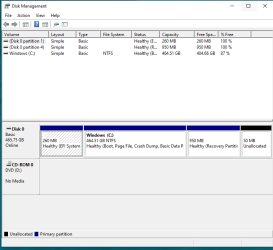
OK i see please advise what i can do to check its current status.
Thanks

- - - Updated - - -

Just found the tool to take screenshot, see screenshot Thanks
Capture.PNG
 

My Computers My Computers

  • At a glance

    WINDOWS 7 PRO 32 bit but can also use 64 bitAMD Athlon 64 X2 4200+ Brisbane 65nm Technology4 GbGeneric Non-PnP Monitor (1600x1200@60Hz) 1024...
    Computer type
    PC/Desktop
    OS
    WINDOWS 7 PRO 32 bit but can also use 64 bit
    CPU
    AMD Athlon 64 X2 4200+ Brisbane 65nm Technology
    Motherboard
    FOXCONN A6VMX (Socket 940)
    Memory
    4 Gb
    Graphics Card(s)
    Generic Non-PnP Monitor (1600x1200@60Hz) 1024MB ATI AMD Rade
    Sound Card
    AMD High Definition Audio Device
    Monitor(s) Displays
    TV but using as pc screen
    Screen Resolution
    1600 x 1200
    Hard Drives
    KINGSTON SA400S37240G ATA Device (SSD)
    Antivirus
    Malwarebytes
    Browser
    Google Chrome
  • Computer type
    PC/Desktop
The disk is set correct as disk 0 but I see your using uefi so its a problem for 7 which likely wont work in uefi mode
 

My Computer My Computer

At a glance

win 8 32 bit
Computer type
PC/Desktop
OS
win 8 32 bit
As you’ve gathered I use the Pc so not complacent with it all & using Win 10 after years of Win 7 has its challenges.

Can the UEFI be changed ?
I don’t even know what it is or what it does.
 

My Computers My Computers

  • At a glance

    WINDOWS 7 PRO 32 bit but can also use 64 bitAMD Athlon 64 X2 4200+ Brisbane 65nm Technology4 GbGeneric Non-PnP Monitor (1600x1200@60Hz) 1024...
    Computer type
    PC/Desktop
    OS
    WINDOWS 7 PRO 32 bit but can also use 64 bit
    CPU
    AMD Athlon 64 X2 4200+ Brisbane 65nm Technology
    Motherboard
    FOXCONN A6VMX (Socket 940)
    Memory
    4 Gb
    Graphics Card(s)
    Generic Non-PnP Monitor (1600x1200@60Hz) 1024MB ATI AMD Rade
    Sound Card
    AMD High Definition Audio Device
    Monitor(s) Displays
    TV but using as pc screen
    Screen Resolution
    1600 x 1200
    Hard Drives
    KINGSTON SA400S37240G ATA Device (SSD)
    Antivirus
    Malwarebytes
    Browser
    Google Chrome
  • Computer type
    PC/Desktop
If you change uefi 10 wont boot Unified Extensible Firmware Interface (UEFI) is a software program that connects a computer's firmware to its operating system (OS). UEFI is intended to replace the traditional BIOS (basic input/output system) firmware.


How does UEFI work?


  • UEFI stores information about system startup in an EFI file on the EFI System Partition (ESP)
  • UEFI uses data tables and service calls to create a standard environment for booting the OS
  • UEFI allows users to run pre-boot applications
  • UEFI passes control of the system to the OS

UEFI benefits


  • UEFI is more secure than BIOS because it supports secure boot, which prevents malicious software from loading during startup


UEFI is more flexible and can be adapted to special hardware environments


UEFI can be extended with special functions and programs, such as digital rights management, games, and web browsers


UEFI supports NVMe storage devices, which provides faster storage access and improved system performance


UEFI is an industry-wide standard managed by the Unified Extended Firmware Interface Forum.
 

My Computer My Computer

At a glance

win 8 32 bit
Computer type
PC/Desktop
OS
win 8 32 bit
Ok
I think I will have to go through what I have and see which software fails & decide from there.
Thanks for now.
Awaiting new cable splitter to arrive
 

My Computers My Computers

  • At a glance

    WINDOWS 7 PRO 32 bit but can also use 64 bitAMD Athlon 64 X2 4200+ Brisbane 65nm Technology4 GbGeneric Non-PnP Monitor (1600x1200@60Hz) 1024...
    Computer type
    PC/Desktop
    OS
    WINDOWS 7 PRO 32 bit but can also use 64 bit
    CPU
    AMD Athlon 64 X2 4200+ Brisbane 65nm Technology
    Motherboard
    FOXCONN A6VMX (Socket 940)
    Memory
    4 Gb
    Graphics Card(s)
    Generic Non-PnP Monitor (1600x1200@60Hz) 1024MB ATI AMD Rade
    Sound Card
    AMD High Definition Audio Device
    Monitor(s) Displays
    TV but using as pc screen
    Screen Resolution
    1600 x 1200
    Hard Drives
    KINGSTON SA400S37240G ATA Device (SSD)
    Antivirus
    Malwarebytes
    Browser
    Google Chrome
  • Computer type
    PC/Desktop
So as mentioned i was waiting for a splitter lead so i can add my SSD in the same new pc.
Th lead has now arrived so above some advice was given & was advised the main HDD needs to be seen as 0 of which it is,

My question before i connect the splitter lead & install the SSD is do i just switch on the pc & all is done or do i need to enter the bios first to check something out & then report back ?

I will continue once im advised.
Thansk
 

My Computers My Computers

  • At a glance

    WINDOWS 7 PRO 32 bit but can also use 64 bitAMD Athlon 64 X2 4200+ Brisbane 65nm Technology4 GbGeneric Non-PnP Monitor (1600x1200@60Hz) 1024...
    Computer type
    PC/Desktop
    OS
    WINDOWS 7 PRO 32 bit but can also use 64 bit
    CPU
    AMD Athlon 64 X2 4200+ Brisbane 65nm Technology
    Motherboard
    FOXCONN A6VMX (Socket 940)
    Memory
    4 Gb
    Graphics Card(s)
    Generic Non-PnP Monitor (1600x1200@60Hz) 1024MB ATI AMD Rade
    Sound Card
    AMD High Definition Audio Device
    Monitor(s) Displays
    TV but using as pc screen
    Screen Resolution
    1600 x 1200
    Hard Drives
    KINGSTON SA400S37240G ATA Device (SSD)
    Antivirus
    Malwarebytes
    Browser
    Google Chrome
  • Computer type
    PC/Desktop
In most cases the bios will just find it but windows may need a drive letter assigned
 

My Computer My Computer

At a glance

win 8 32 bit
Computer type
PC/Desktop
OS
win 8 32 bit
Hi,
Is that just a matter of disk management, right click apply drive letter etc.

- - - Updated - - -

SSD fitted & now pc started.
This is what i see when i click on THIS PC

The SYSTEM RESERVE "E" is it now required ? Do i just leave it there ?
I assume its something to do with the Windows 7 on the SSD ?

Please advise what i should be doing.
Thanks

EaseUS_2025_02_20_13_18_25.jpg
 

My Computers My Computers

  • At a glance

    WINDOWS 7 PRO 32 bit but can also use 64 bitAMD Athlon 64 X2 4200+ Brisbane 65nm Technology4 GbGeneric Non-PnP Monitor (1600x1200@60Hz) 1024...
    Computer type
    PC/Desktop
    OS
    WINDOWS 7 PRO 32 bit but can also use 64 bit
    CPU
    AMD Athlon 64 X2 4200+ Brisbane 65nm Technology
    Motherboard
    FOXCONN A6VMX (Socket 940)
    Memory
    4 Gb
    Graphics Card(s)
    Generic Non-PnP Monitor (1600x1200@60Hz) 1024MB ATI AMD Rade
    Sound Card
    AMD High Definition Audio Device
    Monitor(s) Displays
    TV but using as pc screen
    Screen Resolution
    1600 x 1200
    Hard Drives
    KINGSTON SA400S37240G ATA Device (SSD)
    Antivirus
    Malwarebytes
    Browser
    Google Chrome
  • Computer type
    PC/Desktop
Go into disk manager and remove the drive letter for E so it wont show up. Can you read any files on f?
 

My Computer My Computer

At a glance

win 8 32 bit
Computer type
PC/Desktop
OS
win 8 32 bit
Back
Top