Fixed IP - No network

netsrot

New member
Local time
5:27 AM
Messages
8
We have a network with a number of PC's. Until recently all PC's were WinXP and all set for fixed IP. All PC's accessable over the network and Internet connections working

Now we have installed Win7 on one of the PC's and only when this PC is set for dynamic IP everything works as before. As soon as the Win7 PC is set for a fixed IP this PC becomes inaccessable on the network, however the Internet connection works.
The router is D-Link DIR-615. Fixed IP's all outside routers DHCP range and firewall off.

Sharing is on and if there was anything wrong with these settings the PC's wouldn't be accessable with a dynamic IP ?

Sometimes when I change from dynamic to fixed IP I have connection, but as soon as I reboot I am back to square one.

Have checked this forum for solutions and it seems I am not the only with this problem, but fail to find a solution.

Greatful for suggestions
 

My Computer

OS
Win7 32
Had the same problem last year and got some help at this forum and thought I solved the problem. I could get it to work by switching from dynamic to static IP inside Win7, however after reboot and set to fixed IP no network,

Sorry can't help you as I am still looking for a permanent solution.

There must somebody at this forum that understand what is going on. Just be patient!
 

My Computer

OS
Win 7
Try changing NetBios over TCP/IP settings. Set it from Default (using the settings from the DHCP server) to Enable.
 

My Computer

OS
Windows 7 Enterprise x64 SP1
Try changing NetBios over TCP/IP settings. Set it from Default (using the settings from the DHCP server) to Enable

Have tried that setting also, but problem remains

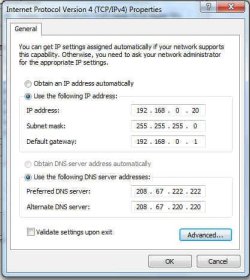
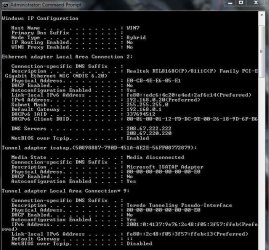
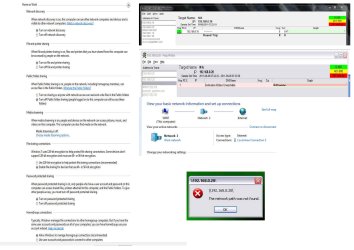
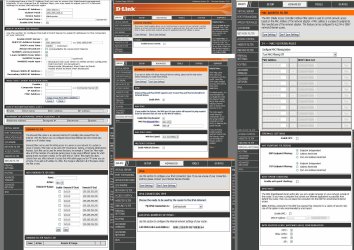
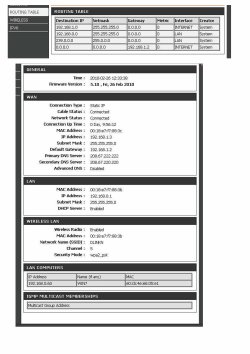
Enclosing I few screen shots that might give some clue to what is going on
 

Attachments

  • dynIP.jpg
    dynIP.jpg
    69.3 KB · Views: 75
  • fixed.jpg
    fixed.jpg
    32.5 KB · Views: 47
  • fixIP.jpg
    fixIP.jpg
    71 KB · Views: 44
  • router.jpg
    router.jpg
    66.5 KB · Views: 70

My Computer

OS
Win7 32
Change the PC's IP address to 192.168.0.20 and then, from another PC, do the following:
Start -> Run and type in ping 192.168.1.20. Does it work? If not, tell me the error message.
Start -> Run and type in \\192.168.0.20\ . Does it work? If not, tell me the error message.

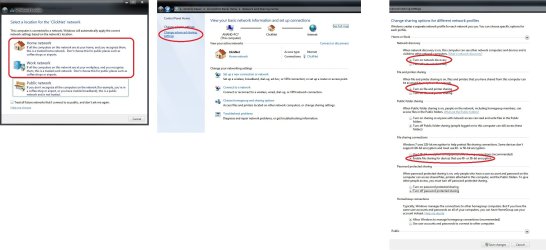
Also, make sure that you have the sharing settings below.
 

Attachments

  • aa.jpg
    aa.jpg
    395.5 KB · Views: 177

My Computer

OS
Windows 7 Enterprise x64 SP1
Thanks your help. Have followed your suggestions. See enclosed screen shots.

As you see I can ping the other computer 192.168.0.10 (WinXP) from the Win7 PC but can not ping the Win7 PC from the WinXP PC.

Regarding the file sharing settings they are as you suggested and are not changed when I go from a dynamic IP to a fixed one. Are there any settings I should change on the WinXP PC's? Maybe I am aiming at the wrong source of the the problem. However we have also a Mac on the network and all the WinXP PC's are accessable from the Mac with present WinXP settings
 

Attachments

  • 7for.jpg
    7for.jpg
    530.7 KB · Views: 77

My Computer

OS
Win7 32
Are all the computers in your network connected to the same physical network device (router/switch)
or are there 2 or more routers between the XP computers and the Win7 computer?

After changing the IP address of your Win7 PC restart the router/switch and see if that helps (save any configuration on the router/switch if you have one).

And last but not least, if the above step doesn't work, your Network Administrator should be able to successfully troubleshoot the ping issue.

LE: At the moment, the fact that one PC can ping another one but the reverse doesn't work is mind-blowing (for me).
 

My Computer

OS
Windows 7 Enterprise x64 SP1
I might have figured it out.
On your Win7 PC:
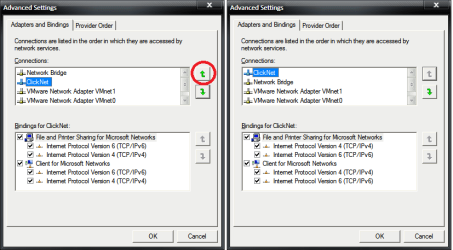
Go to network and sharing center, click Change adapter settings (top left), press Alt (so you can access the menu), click Advanced, Advanced settings and move Local area connection 2 to the top of the list using the up button.
 

Attachments

  • asdfsaf.png
    asdfsaf.png
    44 KB · Views: 321

My Computer

OS
Windows 7 Enterprise x64 SP1
Are all the computers in your network connected to the same physical network device (router/switch)
or are there 2 or more routers between the XP computers and the Win7 computer?
There is only one Router (D-Link DIR-615). Two wired and two wireless WinXP PC's, one wired Mac and one wired Win7

After changing the IP address of your Win7 PC restart the router/switch and see if that helps (save any configuration on the router/switch if you have one).
Have restarted the router plenty of times with both the dynamic and static IP settings.
No change in network accessability.

And last but not least, if the above step doesn't work, your Network Administrator should be able to successfully troubleshoot the ping issue.
I am the Admin but I can not figure out what is going on!

At the moment, the fact that one PC can ping another one but the reverse doesn't work is mind-blowing (for me)
For me too!

I might have figured it out.
On your Win7 PC:
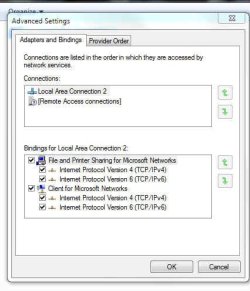
Go to network and sharing center, click Change adapter settings (top left), press Alt (so you can access the menu), click Advanced, Advanced settings and move Local area connection 2 to the top of the list using the up button.
Local area connection 2 already at the top.
 

Attachments

  • local.jpg
    local.jpg
    30.8 KB · Views: 23

My Computer

OS
Win7 32
What kind of sorcery is this?

OK. Let's see if I got this right so far:

  1. When Win7 PC has 192.168.0.60 /24, everything works (file sharing, internet access, ping - all both ways)
  2. When Win7 PC has 192.168.0.20 /24, file sharing only works one way (can see shares but cannot share), internet access, ping only from PC7 to any PC-XP but not from any PC-XP to PC7.
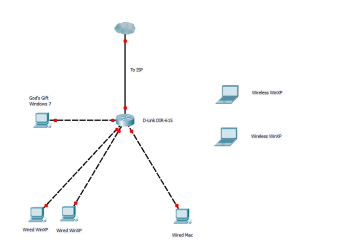
  3. Basic network map looks like the picture below.
I'll have to see some configurations from your router:

  • Any Access Control Lists (ALCs)
  • All device interfaces (including WAN)
  • All firewall rules
  • DHCP server pools/settings
  • Any port forwading/virtual servers/DMZ/NAT settings
  • ARP tables (one with Win7 as 192.168.0.60, one with Win7 as 192.168.0.20 and one with Win7 as 192.168.0.20 after a router restart)
  • Routing tables/static routes/routing protocols.
What I don't need: passwords. Strip/blur them out.
 

Attachments

  • basic net scheme.png
    basic net scheme.png
    27.5 KB · Views: 37

My Computer

OS
Windows 7 Enterprise x64 SP1
Dear ZyanWu,

First of all. Thank you very much for your help. Much appreciated.

Just a reminder. When I change from dynamic IP to static IP that is ALL I do.
No changes in router, network, firewall, etc settings.

When Win7 PC has 192.168.0.60 /24, everything works (file sharing, internet access, ping - all both ways)
As the DHCP range starts with 192.168.0.60 that is what I get when dynamic IP is choosen. When I use 192.168.0.60 as a FIXED IP no network but internet.

When Win7 PC has 192.168.0.20 /24, file sharing only works one way (can see shares but cannot share), internet access, ping only from PC7 to any PC-XP but not from any PC-XP to PC7.
FIXED IP set. Can not see shares, filesharing not working, Internet access OK.

Basic network map looks like the picture below.
Yes. However don't know about god's gift! If I manage to solve this problem we might install and use Win7 on all our PC's

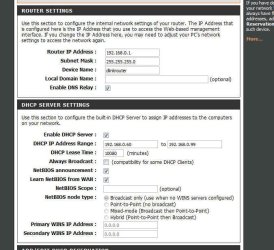
Enclosing screen shots from DIR-615
 

Attachments

  • dir615.jpg
    dir615.jpg
    884.8 KB · Views: 26
  • dir6153.jpg
    dir6153.jpg
    419.4 KB · Views: 14

My Computer

OS
Win7 32
Just modify the DHCP pool to start from 192.168.0.20 and make a static binding for the Win7 PC.
To do that, edit the "DHCP IP Address Range" and set it to start from 192.168.0.20 to 192.168.0.99.
Check "Enable" in the Add/Edit DHCP Reservations, insert the Win7 PC name in the Computer Name field (WIN7), the IP that you want it to have (192.168.0.20) and the Win7 PC's MAC Address (e0cb4ee605e1) and click SAVE.
That way Win7 PC will always have the address 192.168.0.20 /24 reserved for your PC.

DHCP has up to 255 additional options that can be set and are probably required for a full conectivity so, I'm guessing it's a DHCP option (perhaps some NetBIOS setting) that's helping the Win7 PC with sharing or network discovery. (see DHCP codes and options if you want to learn more about DHCP codes).

And that's it. Set the Win7 PC to get an address via DHCP and it will always get the 192.168.0.20 one. You can also add other PCs there if you want more static bindings.

(BTW, just for my info. Do you have the same network space reserved for the wired PCs and the wireless PCs? And when you tried to ping Win7 PC from and XP PC, did you use a wired or wireless PC?)
 
Last edited:

My Computer

OS
Windows 7 Enterprise x64 SP1
I know I can circumvent the problem as you describe. However I am still puzzeled by the behaviour of Windows 7 on this item.
Using a dynamic preferred! IP and set it to fixed just doesn't work! How strange is that?

The WinXP PC's or the Mac has no reserved IP's on the router and I can set any fixed IP both inside and outside the DHCP range and the full network is accessable by all work stations.

So no solution so far. I was hoping we could install Windows 7 on the other work stations but for the moment we will stick with WinXP and Mac. We need to have fixed IP's on all PC'c so that portforwarding can be applied without hickups.
 

My Computer

OS
Win7 32
I told you, it must be a hidden DHCP code that the router is sending your PC and that's what is helping it with network connectivity.
If you set the IP manually, that code doesn't get set.

As I said above, if you use the router to reserve DHCP IPs for clients then the clients you choose will always have the IPs you set in that table (it's EXACTLY like having a static IP, but it's configured in the router).

Can you tell me what IPs are you using for your wireless network?
 
Last edited:

My Computer

OS
Windows 7 Enterprise x64 SP1
If you set the IP manually, that code doesn't get set
Is this a bug in Windows 7?

As I said I can work around the problem, but had hoped it had worked as expected (WinXP and Mac)

Two wired PC's: 192.168.0.10 and 192.168.0.20
Third PC/Mac (Dual boot) 192.168.0.30
Two wireless PC's : 192.168.0.40 and 192.168.0.50
All fixed IP
 

My Computer

OS
Win7 32
Is this a bug in Windows 7?
It's not a bug, you just have to set it manually via registry. I don't know which one though.

Two wired PC's: 192.168.0.10 and 192.168.0.20
Third PC/Mac (Dual boot) 192.168.0.30
Two wireless PC's : 192.168.0.40 and 192.168.0.50
All fixed IP
Well, that's a huge problem. Your router shouldn't let you set the same network on 2 different interfaces without bridging them.
Routing problems occur when you do that. (I'm 95% sure that's the reason why the ping didn't work.)

For example, if you send a packet to the 192.168.0.0 network, which one will the router use? The wired or the wireless? It can't decide and problems occur.


LE: Wait a second. You're not trying to set the same IP address (192.168.0.20) for 2 different PCs, are you?
As I can see from your post, 192.168.0.20 already exists on your network on a WinXP PC.
 
Last edited:

My Computer

OS
Windows 7 Enterprise x64 SP1
LE: Wait a second. You're not trying to set the same IP address (192.168.0.20) for 2 different PCs, are you?
As I can see from your post, 192.168.0.20 already exists on your network on a WinXP PC

Of course it is not the same IP on any of the PC's. I think you getting confused.
I tried Win7 on a spare HDD and put it into the PC that is normally WinXP 192.168.0.20

One wired PC's WinXP: 192.168.0.10
Second wired PC WinXP/Win7 tryout 192.168.0.20
Third PC WinXP/Mac (Dual boot) 192.168.0.30
Two wireless PC's WinXP : 192.168.0.40 and 192.168.0.50
With fixed IP at WinXP/Mac configuration. Network/internet accessability.
With fixed IP at WinXP/Mac/Win7 configuration. Network accessability on WinXP/Mac part. No network access to Windows 7. Internet on all WinXP/Mac/Win7

It's not a bug, you just have to set it manually via registry. I don't know which one though.
Who knows about this setting?
 

My Computer

OS
Win7 32
Basically, if your wired lan and wireless lan are bridged then your network is fine and everything else's fine. I can't pinpoint the problem.

I've forwarded your question to Microsoft's Technet forums.
 

My Computer

OS
Windows 7 Enterprise x64 SP1
Still waiting for a solution to this problem, but it looks we are still stuck.

It's not a bug, you just have to set it manually via registry. I don't know which one though.
If this is the solution how come nobody comes forward?
 

My Computer

OS
Win 7
ZyanWu....I was having a smiliar problem where a static IP wouldn't work on my Win 7 Pro machine. You're tip to enable NetBios fixed it.

Thank you.
 

My Computer

OS
Win 7 x64
Back
Top