
Flash Drive Problem

0080900

New member
Member
Local time
1:59 PM
Messages
53
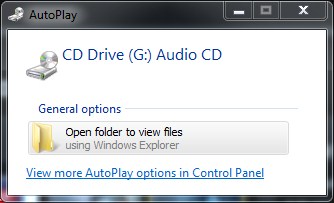
Here's the problem, whenever I pop in my 1GB Cruzer Micro flash drive, autoplay opens up and shows me this
ECnn8.jpg


There is no CD on the flash drive at all, I have tried formatting the flash drive and it still comes up whenever I plug in the flash drive, and it shows up as a CD Drive in "My Computer"

oXHUz.jpg


Is there way I can get rid of that CD Drive that keeps popping up when I plug in my flash drive?
 

My Computer

Computer Manufacturer/Model Number
Compaq Presario CQ60 Notebook PC
OS
Windows 7 Ultimate
CPU
Processor AMD Athlon Dual-Core QL-62, 2000 Mhz, 2 Core(s), 2
Motherboard
Wistron 303C (Socket A)
Memory
2.0GB DDR2
Graphics Card(s)
NVIDIA GeForce 8200M G
Sound Card
Conexant High Definition SmartAudio 221
Screen Resolution
1366 x 768
Hard Drives
232GB SAMSUNG HM251JI ATA Device
Keyboard
tandard PS/2 Keyboard
Mouse
Synaptics PS/2 Port TouchPad
There's nothing wrong with your USB drive.

Cruzer's open as two drives, usually. At least the three of mine do. Windows treats the Cruzer OS (U3 Launcher) as a CD drive, and the actual data section as a normal drive. You can safely ignore the CD messages and just close that window. If you use Windows Explorer to look at the files from that window you see, it makes it hard to remove the USB drive. With a Cruzer, you have to open the drive's Explorer window from the U3 system icon, so it will eject properly.
 

My Computer

Computer type
PC/Desktop
Computer Manufacturer/Model Number
Mellon Labs (custom build)
OS
Win 7 Pro x64/Win 10 Pro x64 dual boot
CPU
AMD FX 8350 Vishera @ 4200
Motherboard
ASUS M5A97 R2.0
Memory
16 GB Mushkin Blackline DDR3-2400 @ 1866 (9-10-10-10-31)
Graphics Card(s)
XFX Radeon R9 280 Double D Black Edition
Sound Card
Realtek HD Audio on MB. Sounds great.
Monitor(s) Displays
Acer 24", Acer 22"
Screen Resolution
3840 x 1080
Hard Drives
1 x Mushkin Chronos 120 GB SSD (Win 10)
1 x Samsung 850 EVO 250 GB SSD (Win 7)
1 x WD 1TB SATA Blue
1 x WD 1TB SATA Green
PSU
Corsair TX-750
Case
CoolerMaster HAF 912+
Cooling
Coolermaster Seidon 240M Liquid AIO. 6 case fans
Keyboard
Logitech G710+
Mouse
Logitech G500s
Internet Speed
Much better since I got fiber, but still way overpriced.
Antivirus
MSE, Malware Bytes for scanning
Browser
Firefox
Other Info
Corsair VOID USB headphones.

A Mellon Labs X-1 - LCD Smartie driven system status display.

Brought to you by the letter E

My Computer

Computer type
Laptop
Computer Manufacturer/Model Number
Toshiba P775-S7100
OS
Windows 7 Professional SP1 64-bit
CPU
Intel Core i5-2450M @2.5 GHz
Memory
6 GB DDR3 1333MHz
Graphics Card(s)
Intel HD 3000
Monitor(s) Displays
Built-in 17.3" LED; 22" Insignia NS-L22Q-10A
Screen Resolution
1600x900; 1360x768
Hard Drives
750 GB Hitachi
1TB Seagate FreeAgent External
Internet Speed
Verizon DSL Speed(Down/Up): 3360 Kbps / 800 Kbps
Antivirus
MSE and MBAM Pro
Browser
IE10
I've tried a few things to make it not happen, myself. No luck for me. The flash drive's OS seems to do something weird to Autoplay. My only beef with Win 7 is the hard to understand Autoplay settings. I just gave up and I let the PC do what it wants to when I plug stuff in.
 

My Computer

Computer type
PC/Desktop
Computer Manufacturer/Model Number
Mellon Labs (custom build)
OS
Win 7 Pro x64/Win 10 Pro x64 dual boot
CPU
AMD FX 8350 Vishera @ 4200
Motherboard
ASUS M5A97 R2.0
Memory
16 GB Mushkin Blackline DDR3-2400 @ 1866 (9-10-10-10-31)
Graphics Card(s)
XFX Radeon R9 280 Double D Black Edition
Sound Card
Realtek HD Audio on MB. Sounds great.
Monitor(s) Displays
Acer 24", Acer 22"
Screen Resolution
3840 x 1080
Hard Drives
1 x Mushkin Chronos 120 GB SSD (Win 10)
1 x Samsung 850 EVO 250 GB SSD (Win 7)
1 x WD 1TB SATA Blue
1 x WD 1TB SATA Green
PSU
Corsair TX-750
Case
CoolerMaster HAF 912+
Cooling
Coolermaster Seidon 240M Liquid AIO. 6 case fans
Keyboard
Logitech G710+
Mouse
Logitech G500s
Internet Speed
Much better since I got fiber, but still way overpriced.
Antivirus
MSE, Malware Bytes for scanning
Browser
Firefox
Other Info
Corsair VOID USB headphones.

A Mellon Labs X-1 - LCD Smartie driven system status display.

Brought to you by the letter E
Back
Top