Flash drive size misrepresented

ellenc

New member
Member
VIP
Local time
7:54 AM
Messages
147
I recently bought several Kingston "8G" memory sticks. I want to back up a single folder that is about 8G. I got a message that 8G won't fit on the stick; the available size was only 715G. This is so very aggravating. I'll have to return the drives, as their properties are misrepresented. I shouldn't have to use 16G sticks when I don't need that much space -- just 8. Thanks for your thoughts. ellen
 

My Computer

Computer Manufacturer/Model Number
Dell Inspiron 546
OS
Windows 7 Professional
CPU
2.70gigahertz AMD Athlon 7750 Dual-Core
Motherboard
Dell, Inc. 0F896N A02
Memory
3328 Megabytes Usable Installed Memory
Graphics Card(s)
ATI Radcon HD 3200 Graphics
Monitor(s) Displays
Dell E1709W 17,2" monitor
Hard Drives
309.54G usable hard drive capacity
161.25G hard drive free space
Seagate FreeAgent Go 500G external drive
Seagate FreeAgent Go 160G external drive
Maxtor One Touch 250G external drive
USB Thumb/Flash drives are usually formatted as FAT32 which has a limit of 4GB size for a single file, NTFS-formatting does not have that limit.

All drives when formatted will not deliver the advertised size, depends upon how the vendor describes what a MB or GB is, an example is my 250GB Western Digital HDD which shows total capacity of 249,954.202,752 Bytes which converted to GB is 232GB [divide the number of Bytes by 1024 or multiples of 1024]. The 250GB before formatting shows an apparent loss of 18GB after formatting. I have a 32GB drive that shows only 29GB capacity. Or in other words your Thumb/Flash drives appear to be quite normal.
 

My Computer

Computer type
PC/Desktop
Computer Manufacturer/Model Number
Customs, Dell, Gateway, HP, Toshiba, Acer, ASUS
OS
Windows 7 Ultimate 64-bit, Windows 8.1 64-bit, Mac OS X 10.10, Linux Mint 17, Windows 10 Pro TP
Keyboard
Microsoft
Mouse
Microsoft
I've got a Kingston 8 GB USB stick attached right now. Capacity shown as 7.44 GB.

It's also possible that you got a counterfeit, not a legitimate Kingston product--depending on where you bought it. I've heard there are such things, although I've never encountered one.
 

My Computer

Computer type
PC/Desktop
Computer Manufacturer/Model Number
Ignatz Special; 4 speed manual gearbox; factory air conditioning; one of one
OS
Windows 7 Home Premium SP1, 64-bit
CPU
Intel Skylake i5-6600K, not overclocked
Motherboard
AsRock Z170M Extreme 4, micro ATX
Memory
8 GB HyperX DDR4-2666 (2 x 4 GB)
Graphics Card(s)
none; graphics are integrated on CPU
Sound Card
onboard: Realtek ALC1150; external: USB Behringer UF0-202
Monitor(s) Displays
Dell S2340M 23 inch IPS
Screen Resolution
1600 x 900
Hard Drives
System: Crucial MX100 series SSD, 128 GB;
Data: Samsung Spinpoint 103SJ, 1 TB;
Backup: WD Caviar Green WD30EZRX-00D8PB0, 3 TB
PSU
Rosewill SilentNight 500 watt fanless, semi-modular
Case
Antec Solo II
Cooling
Noctua NH-U12S; Noctua F12 intake, Noctua S12A exhaust
Keyboard
Microsoft 200 6JH-00001 USB
Mouse
Dell or Microsoft optical wired; USB
Antivirus
Microsoft Security Essentials and Malwarebytes Premium
Browser
Pale Moon
Other Info
All fans PWM; speeds at idle: CPU circa 500 rpm; intake circa 600 rpm; exhaust circa 600 rpm; CPU temps 27 idle and 47 C load in a warm room (27 C/81 F) when running Intel Extreme Tuning Utility stress test.
Drive manufacturers usually advertise capacity defining 1 GB as 1,000,000,000 bytes while in Windows it is 1024 * 1024 * 1024 = 1073741824 bytes. Do the math and an 8 GB drive has a real capacity of about 7.45 GB. With NTFS the reported size of a folder is at best only an approximation. There are many complicating factors that make this so. It is not that Windows is lying, the problem becomes: what is the truth? There are many equally valid answers that can produce quite different results.

A drive from a different manufacturer will likely have much the same capacity.

Edit:
It's also possible that you got a counterfeit, not a legitimate Kingston product--depending on where you bought it. I've heard there are such things, although I've never encountered one.

Unfortunately, counterfeit flash drives are becoming quite common in the larger sizes (32 GB and up). This has become a real problem for outlets like eBay, particularly with sellers in the Orient. Typically a small drive is altered to show a much larger capacity than it actually has. In some cases drives are used that have failed manufacturers testing and have been scheduled for destruction but have been sold by dishonest employees. The packaging of fakes is often very convincing.

This is for interest only. It is unlikely the cause in this case.
 

My Computer

Computer type
PC/Desktop
Computer Manufacturer/Model Number
HP
OS
Windows 7 Pro 64 bit
CPU
Xeon W3520
Memory
8 GB
Graphics Card(s)
Nvidia Geforce 210
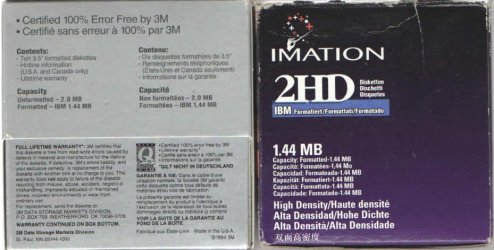
Came across a couple of boxes of floppy disks, looks like that was the last time the formatted size was printed on boxes.
These floppies show 2MB but formatted as 1.44MB.
 

Attachments

  • FloppyDisks.jpg
    FloppyDisks.jpg
    66.7 KB · Views: 1

My Computer

Computer type
PC/Desktop
Computer Manufacturer/Model Number
Customs, Dell, Gateway, HP, Toshiba, Acer, ASUS
OS
Windows 7 Ultimate 64-bit, Windows 8.1 64-bit, Mac OS X 10.10, Linux Mint 17, Windows 10 Pro TP
Keyboard
Microsoft
Mouse
Microsoft
so is there a fix for this probblem?

i would like to repair this thmb drive, ie find out its actual capacity and then format it to that size.
 

My Computer

Computer type
PC/Desktop
Computer Manufacturer/Model Number
custom
OS
win 7 64bit
Welcome to the forum.

What problem do you have?
 

My Computer

Computer type
PC/Desktop
Computer Manufacturer/Model Number
HP
OS
Windows 7 Pro 64 bit
CPU
Xeon W3520
Memory
8 GB
Graphics Card(s)
Nvidia Geforce 210
I've got a thumb drive that supposedly is 1tb in size, I know that is wrong however formatting doesn't help, I would like.to know if there is any way, to find out the actual size and repartition and format it to that
 

My Computer

Computer type
PC/Desktop
Computer Manufacturer/Model Number
custom
OS
win 7 64bit
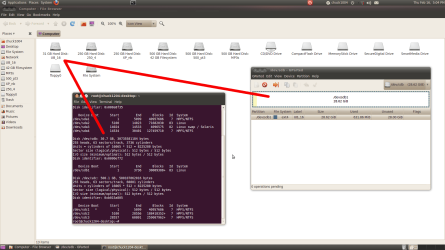
Not entirely accurate there Berton; I got an old Maxtor 30G EIDE, that shows up in Linux as 31G (formatted NTFS).

Although actual usable space, usually LOWER, seems proportionate - 2 x 8Tb's = 745G, 6 Tb = 560G, 2 x 5Tb's = 466G, etc., ...

It has intrigued me since day 1...
 

Attachments

  • Screenshot-5.png
    Screenshot-5.png
    96 KB · Views: 1
Last edited:

My Computer

Computer type
PC/Desktop
OS
Windows XP
If memory serves me, a 1TB HD often formats down to 930-931GB, my 1TB has two 465GB partitions; the formatting, the housekeeping, takes some of the byte-space.
 

My Computer

Computer type
PC/Desktop
Computer Manufacturer/Model Number
Antec desktop; Acer Aspire laptops
OS
Windows 7 Professional 64-bit
CPU
Desktop i5; Acers i5 & i7
Memory
desktop 16GB; 1 Acer 8GB & 1 Acer 16GB
Hard Drives
1TB split into 2 equal partitions [OS and data] usable by RJS
Internet Speed
AT&T DSL
Browser
FF, GChrome, msIE
Other Info
Windows 7 Firewall, Emsisoft AM/AV, MSE [scan-only], SpywareBlaster, Ruiware/BillP combine
I've got a thumb drive that supposedly is 1tb in size, I know that is wrong however formatting doesn't help, I would like.to know if there is any way, to find out the actual size and repartition and format it to that

Manufacturer? Model Name/number? Why are you not giving these details for us to check?

Wherefrom did you buy the 1TB flash drive and at what price? Did you buy it because it was cheap?

Does it carry the manufacturer's warranty? If you buy a genuine flash drive and if it is faulty, the manufacturer will replace it under warranty. If you bought a fake drive you lost your money.

Download and test your flash drive with H2TestW. If it is a fake drive return it to the vendor and try to get back your money ( oftentimes impossible :)).

Testing your 1tb flash drive:

Download and extract h2testw_1.4.zip from H2testw Download

Plugin only your 1TB flash drive ( Please remove all other external drives/Flash drives from your PC so that you do noet accidentally run the test on a wrong drive)

Right click on h2testw.exe and run as administrator. Choose English Language.

Click on Select target and choose your 1TB flash drive. Select all available Space and then click on Write+ Verify. Wait until it finishes scanning the available space on your flash drive.

You will now know the actual capacity of your drive.

If you are unable to run the test, your 1TB drive is already dead.
 

My Computer

OS
Windows 7 Home Premium 32 bit
base explanation -

The SSD/HDD manufacture always calculate in Gigabytes (mathematical base 1000) whereas Windows calculates in GibiBytes (mathematical base 1024).

Therefore 240 GB = 240,000,000 bytes = 228,9 GiB.


note you will also find a disclaimer on the packaging
some of the listed storage capacity is used for formatting and other purposes,

So basically even before you start youv'e lost 2 chunks of space.
(my 525 ssd comes back as 488)

Roy
 

My Computer

Computer type
PC/Desktop
Computer Manufacturer/Model Number
medionl/Aspire 6930G/acer x55a
OS
W7 home premium 32bit/W7HP 64bit/w10 tp insider ring
CPU
E5300 dual core
Motherboard
medion MS7366
Memory
3gb
Graphics Card(s)
Nvidia Geforce 7100 Nforce 630i
Monitor(s) Displays
avixc
Internet Speed
n (isp resticted to 72)
Antivirus
mse/pands
Browser
palemoon
Other Info
Belkin Fd7050 n USB using Railink RT2870 drivers, more upto date
I've got a thumb drive that supposedly is 1tb in size, I know that is wrong however formatting doesn't help, I would like.to know if there is any way, to find out the actual size and repartition and format it to that

There are many utilities that will write/erase a thumb drive to figure out the correct size. This is useful to see if the drive is fake. Do a google search for "fake thumb drive test". I have no experience with these tools so I can't help in recommending which one to use.
 

My Computer

Computer type
PC/Desktop
Computer Manufacturer/Model Number
custom build
OS
Windows 7 Professional 64bit
CPU
Intel i7-5960X
Motherboard
EVGA X99 Classified
Memory
64GB Corsair Dominator 2400MHz
Graphics Card(s)
3 EVGA GTX980's
Sound Card
on board
Monitor(s) Displays
3 Dell E2715H 27"
Screen Resolution
1920x1080 (5760x1080)
Hard Drives
Samsung 950 Pro 1TB M.2 SSD,
Western Digital Black 2TB HDD's x5
Western Digital Black 1TB HDD's x3
PSU
Corsair AX1200i
Case
Corsair 750D
Cooling
Corsair H110i GT
Keyboard
Corsair K70
Mouse
Corsair M45
Internet Speed
250 down/10 up
Antivirus
Microsoft Security Essentials
Browser
IE 11, Google Chrome
As Jumanji mentioned, there are many high capacity USB flash drives that are fake.
I once bought a 64G that was only 2G.
Use the H2testw to find out the real capacity.
 

My Computers

System One System Two

  • Computer type
    PC/Desktop
    Computer Manufacturer/Model Number
    custom build
    OS
    Windows 7 HP 64
    CPU
    i5 6600K - 800MHz to 4200MHz
    Motherboard
    GA-Z170-HD3P
    Memory
    4+4G GSkill DDR4 3000
    Graphics Card(s)
    IG - Intel 530
    Monitor(s) Displays
    Samsung 226BW
    Screen Resolution
    1680x1050
    Hard Drives
    (1) -1 SM951 – 128GB M.2 AHCI PCIe SSD drive for Windows 7 and Lubuntu
    (2) -1 WD SATA 3 - 1T for Data
    (3) -1 WD SATA 3 - 1T for backup
    PSU
    Thermaltake 450W TR2 gold
    Keyboard
    Old and good Chicony mechanical keyboard
    Mouse
    Logitech mX performance - 9 buttons (had to disable some)
    Internet Speed
    500Mb/s
    Browser
    Firefox 64
    Other Info
    TinyWall firewall
  • Computer type
    Laptop
    System Manufacturer/Model Number
    Asus Q550LF
    OS
    Windows 7 Pro
    CPU
    i7-4500U 800MHz to 3.0GHz
    Motherboard
    Asus Q550LF
    Memory
    (4+4)G DDR3 1600
    Graphics Card(s)
    IG intel 4400 + NVIDIA GeForce GT 745M
    Sound Card
    Realtek
    Monitor(s) Displays
    LG Display LP156WF4-SPH1
    Screen Resolution
    1920 x 1080
    Hard Drives
    BX500 120G SSD for Windows and programs +
    1T HDD for data
    Internet Speed
    500 Mb/s
    Browser
    Firefox
    Other Info
    TinyWall firewall
Back
Top