Flashing bios through flash drive

yugzyugz

New member
Member
Local time
9:32 AM
Messages
31
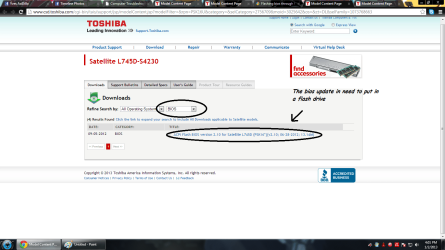
can someone give me an instructions on how to put bios update on a flash drive. i have a toshiba satellite laptop l745d-s4230 with serial number: PSK16U - 009001 .Here's the link where you can find my bios update Toshiba satellite l745d-s4230 Bios update
Any replies will be appreciated and i will give +rep :)
 

Attachments

  • adawd.png
    adawd.png
    71.5 KB · Views: 13

My Computer

Computer type
PC/Desktop
Computer Manufacturer/Model Number
Acer Aspire V5-473PG
OS
Pre installed windows 8 x64. upgraded to 8.1 via windows store
Memory
4g ram
Graphics Card(s)
AMD Radeon™ HD 6520G
Other Info
Intel i5-4200u 1.6ghz / NVIDIA geForce GT 740M
It looks like you download a .rar zipped file sk16v210.exe, then execute that file to expand it to see 2 programs: a Windows based installer and a Diskette based installer.

Toshiba assumes you will put the Diskette based installer (most likely an .exe file) on a floppy or CD and boot to that drive. I would assume the update program will start from there.

I don't see why the same thing can't be done on a USB stick, provided you have the option to boot the USB drive first in the boot order, or by a BIOS boot menu option.

Does that help?
 

My Computer

Computer type
PC/Desktop
Computer Manufacturer/Model Number
Home Built - Jan 2013
OS
Windows 7 64 Bit Home Premium SP1
CPU
i7-3820
Motherboard
Asus P9X79-PRO - Bios 4608
Memory
GSkill F3-14900CL9Q - 16GB
Graphics Card(s)
EVGA GeForce GTX660 - Driver 352.86
Sound Card
On board Realtek ALC898
Monitor(s) Displays
Acer S271HL
Screen Resolution
1920 x 1080
Hard Drives
#1- Samsung 840 Pro Series
#2- Western Digital WD1002FAEX Sata3 Black
#3- Western Digital WD1002FAEX Sata3 Black
PSU
Corsair CMPSU-850TX-V2 - 850 watt (by Seasonic)
Case
Corsair Obsidian 550D
Cooling
Standard 3 120mm case fans, Cooler Master Hyper 212 EVO
Keyboard
MS KC-0405
Mouse
Intellimouse 5-button
Internet Speed
56 Mbits/Sec (on a good day)
Antivirus
Avast & Malwarebytes
Browser
Firefox
Other Info
Asus DVD - DRW-24B1ST 24X
Hi yugzyugz,

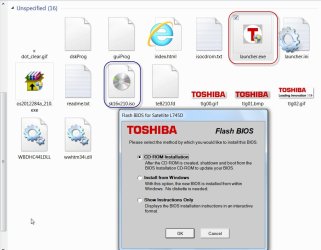
Extract the contents of the downloaded Bios Zip file into a folder.

Run the launcher.exe. You have only two options. 1.CD-ROM installation and 2. Install from Windows. Install from Windows as indicated in the instructions itself, is riskier than installing from the CD-ROM.

02-01-2013 19-05-27.jpg

Load a blank CD-RW into your optical drive, select the Radio button "CD-ROM Installation" and click on OK.

This will bring the native Windows Disk Image Burner ready to burn the bootable ISO sk16v210.iso. Check "Verify Disk after burning" and click on "Burn"

"Once you create the bootable CD-ROM, simply boot your computer from the
resulting CD. To boot from CD, you can either hold down the "C" key while
you turn your computer on, or you can use HWSetup to change the boot priority
so the CD drive boots before the HDD."

Now it should be possible to create bootable flash drive with the same bootable ISO sk16v210.iso. ( In fact I created one using RUFUS -Rufus - Create bootable USB drives )

However as a matter of abundant caution - not very sure how the pendrive image will unfold - I would prefer to stick to the manufacturer's instruction to the dot and run the bios flashing from the CDROM drive.

( It is a different story if it were an executable DOS file. Then without hesitation I would have made a bootable DOS pendrive, moved the executable DOS file into the pendrive, and run it under DOS.)

NOTE: Read all the instructions in the Readme file. Ensure that there is no interruption during the flashing process.

 

My Computer

OS
Windows 7 Home Premium 32 bit
Hi yugzyugz,

Extract the contents of the downloaded Bios Zip file into a folder.

Run the launcher.exe. You have only two options. 1.CD-ROM installation and 2. Install from Windows. Install from Windows as indicated in the instructions itself, is riskier than installing from the CD-ROM.

View attachment 248187

Load a blank CD-RW into your optical drive, select the Radio button "CD-ROM Installation" and click on OK.

This will bring the native Windows Disk Image Burner ready to burn the bootable ISO sk16v210.iso. Check "Verify Disk after burning" and click on "Burn"

"Once you create the bootable CD-ROM, simply boot your computer from the
resulting CD. To boot from CD, you can either hold down the "C" key while
you turn your computer on, or you can use HWSetup to change the boot priority
so the CD drive boots before the HDD."

Now it should be possible to create bootable flash drive with the same bootable ISO sk16v210.iso. ( In fact I created one using RUFUS -Rufus - Create bootable USB drives )

However as a matter of abundant caution - not very sure how the pendrive image will unfold - I would prefer to stick to the manufacturer's instruction to the dot and run the bios flashing from the CDROM drive.

( It is a different story if it were an executable DOS file. Then without hesitation I would have made a bootable DOS pendrive, moved the executable DOS file into the pendrive, and run it under DOS.)

NOTE: Read all the instructions in the Readme file. Ensure that there is no interruption during the flashing process.

Thanks for answering it help me a lot now i've understand everything
You deserve a rep :)
 

My Computer

Computer type
PC/Desktop
Computer Manufacturer/Model Number
Acer Aspire V5-473PG
OS
Pre installed windows 8 x64. upgraded to 8.1 via windows store
Memory
4g ram
Graphics Card(s)
AMD Radeon™ HD 6520G
Other Info
Intel i5-4200u 1.6ghz / NVIDIA geForce GT 740M
It looks like you download a .rar zipped file sk16v210.exe, then execute that file to expand it to see 2 programs: a Windows based installer and a Diskette based installer.

Toshiba assumes you will put the Diskette based installer (most likely an .exe file) on a floppy or CD and boot to that drive. I would assume the update program will start from there.

I don't see why the same thing can't be done on a USB stick, provided you have the option to boot the USB drive first in the boot order, or by a BIOS boot menu option.

Does that help?
Yes , it helps me a lot thanks for the answer , this forum never fails to help me fix my problem.
Thanks a lot you deserve a rep :)
 

My Computer

Computer type
PC/Desktop
Computer Manufacturer/Model Number
Acer Aspire V5-473PG
OS
Pre installed windows 8 x64. upgraded to 8.1 via windows store
Memory
4g ram
Graphics Card(s)
AMD Radeon™ HD 6520G
Other Info
Intel i5-4200u 1.6ghz / NVIDIA geForce GT 740M
Great to see your problem is fixed. If you can mark your topic has solved :).
 

My Computer

Computer type
PC/Desktop
Computer Manufacturer/Model Number
Me :D
OS
Windows 7
CPU
AMD X6 1090T 4.02Ghz
Motherboard
ASUS Crosshair IV Formula
Memory
16.00GB
Graphics Card(s)
Nvidia Geforce 470
Sound Card
ASUS Xonar DX
Monitor(s) Displays
Dell 24" Monitor
Hard Drives
2TB WD
1TB WD
2TB WD
60 SSD
60 SSD
PSU
700W Crosshair
Case
Antec Three hundred
Cooling
Water Cooling
I had a Toshiba Satellite lappy for a long while and I always updated the BIOS from within the OS (that option is provided) without any problems.
Hope it helps.
Cheers,
J
 

My Computer

Computer type
PC/Desktop
Computer Manufacturer/Model Number
Custom built
OS
Windows 7 Ultimate x64 SP1
CPU
AMD FX 8320 4.8GHz, 1.475V
Motherboard
ASUS Crosshair V Formula-Z
Memory
4 x GSkill Ripjaws Z 4GB 1600 CL8
Graphics Card(s)
2 x ASUS HD7870 2GB DirectCu II
Sound Card
M-Audio Firewire 410
Monitor(s) Displays
2 x Samsung Syncmaster SA300
Screen Resolution
1600x900
Hard Drives
1 x Seagate Barracuda 2TB, 7200 rpm, 64 mb cache - Kingston HyperX 3K 120GB (OS) - Corsair FORCE Series 180GB (Games & Apps)
PSU
Corsair TX850M
Case
NZXT Switch 810
Cooling
Custom Water. XSPC Raystorm, Laing DDC 3.2T PWM, 360+120 rad
Keyboard
Corsair Vengeance 650
Mouse
Elephant Leviathan 3200 DPI
Internet Speed
Too slow
Back
Top