Folder and File Sharing - Windows 7

incurablegeek

As requested
Local time
6:06 PM
Messages
180
OK, now that I have a nicely established reputation for asking really dumb questions, here goes another one. Before I ask, I do have one caveat: Lots of people have the same problem with Win 7.

1) I use Windows 7 Ultimate 64 bit.

2) I have two computers on this network: one computer is named "AV"; the other computer is named "Materials".

3) There is no password protection on either computer. (You can't password protect a Windows computer anyway. I kno dat much!)

4) Each computer has multiple 1, 2 and 3 TB hard drives - Total approximately 20 TB all partitioned

5) I do not use "Libraries". I refuse to use "Libraries". I think "Libraries" are a malignant pustule. :sick:

6) I never had trouble setting up File and Folder sharing on Win 3.11, NT 4.0, or XP.

7) Even though I enable all "Permissions" on all files and folders, all I can do from one computer to another is see the files and folders on the other computer. I do not have access to them.

Can somebody kindly tell me what Magic Button I can push so I can share all my files and folders from each computer and move them from one computer to another.

Yes, I know it's a purely retarded question but I AM from Tennessee. So what do you expect? We're all a product of too much inbreeding, you know. :(

Btw, I now have "Readers Cramp" from going through all the many Tutorials on this wonderful site. Wow, so much info. Thanks. :)
 

My Computer

OS
Win 7-64
Thanks for the info -- and especially for not having a good laugh at my expense.

I shall report back on my success - or lack thereof.
 

My Computer

OS
Win 7-64
I'm not laughing, I had a thread on the same issue with no solution. Maybe this will help me too.
 

My Computer

Computer type
PC/Desktop
Computer Manufacturer/Model Number
Home Built Desktop By DataTech
OS
Windows 7 Ultimate X64 SP1
CPU
Intel i5-2550K, Differing ~4.4-4.8GHz No built in GPU
Motherboard
ASUS P8Z68-V PRO/GEN3
Memory
16GB G.Skill Sniper 1866MHz @ 2133MHz 2x8GB
Graphics Card(s)
ASUS GTX650TIB-DC2OC-2GD5, (650TI Boost)
Sound Card
Onboard Realtek 5-1
Monitor(s) Displays
Samsung P2570HD
Screen Resolution
1920x1080
Hard Drives
Samsung 840 Pro 256GB SSD for OS, 500GB Seagate Constellation (Enterprise drive) for Data
PSU
Corsair HX650W
Case
Inwin Dragon Rider
Cooling
Hyper 212 EVO w/two Noctua fans, push-pull, @1300 RPM
Keyboard
E-Z Eyes, bright yellow keys with large characters
Mouse
steelseries SENSEI Laser Pro Gaming
Internet Speed
48-51Mbs Mbs down, 11 Mbs up Xfinity Cable
Antivirus
Norton Internet Security 2013
Browser
IE 10, Opera, Pale Moon if needed
Other Info
4 case fans, LG BluRay-RE, ASUS DVD-RW, Mr. Fusion power supply, 1.21 gigawatts.
Britton30, truth be told I have read (I live on the net per my nickname) where many have had quite a hard time with Win 7 networking, file sharing and permissions. In fact, I recall a statement by a Win 7 guru elsewhere that said MS had really dropped the ball when it came to networking.

More importantly, though, your comment reflects on the nature of this group. As you can tell, I have quite a substantial ego and am therefore not afraid of looking stupid when I ask a question. For I know that there are others out there who know even less than I do. :eek:

In fact, I will often ask a question that I could probably figure out on my own but which I also believe should be asked so others might benefit. So many folks, as one SevenForums' member told me, are really intimidated by computers and quite fearful of trying anything.

Here at SevenForums we feel safe. This is not TH (I shall abbreviate), for example, where some mean-spirited troll will seize upon the opportunity to aggrandize himself with a response like "you idiot, why don't you know that? Everybody knows that!" And, yes, I have seen such responses many times on lesser groups like TH or M (FF) forum. (was I vague enough? ;))

Again, thanks to all for this fine group. I am indeed grateful to all of you for your kindness and help! :)
 

My Computer

OS
Win 7-64
I'm not laughing, I had a thread on the same issue with no solution. Maybe this will help me too.

Sorry britton your post must have been missed. I hope this help the both of you. Let me know if you have any issues.
 

My Computer

OS
Windows 7 Ultimate x64

My Computer

Computer type
PC/Desktop
Computer Manufacturer/Model Number
Home Built Desktop By DataTech
OS
Windows 7 Ultimate X64 SP1
CPU
Intel i5-2550K, Differing ~4.4-4.8GHz No built in GPU
Motherboard
ASUS P8Z68-V PRO/GEN3
Memory
16GB G.Skill Sniper 1866MHz @ 2133MHz 2x8GB
Graphics Card(s)
ASUS GTX650TIB-DC2OC-2GD5, (650TI Boost)
Sound Card
Onboard Realtek 5-1
Monitor(s) Displays
Samsung P2570HD
Screen Resolution
1920x1080
Hard Drives
Samsung 840 Pro 256GB SSD for OS, 500GB Seagate Constellation (Enterprise drive) for Data
PSU
Corsair HX650W
Case
Inwin Dragon Rider
Cooling
Hyper 212 EVO w/two Noctua fans, push-pull, @1300 RPM
Keyboard
E-Z Eyes, bright yellow keys with large characters
Mouse
steelseries SENSEI Laser Pro Gaming
Internet Speed
48-51Mbs Mbs down, 11 Mbs up Xfinity Cable
Antivirus
Norton Internet Security 2013
Browser
IE 10, Opera, Pale Moon if needed
Other Info
4 case fans, LG BluRay-RE, ASUS DVD-RW, Mr. Fusion power supply, 1.21 gigawatts.
Well looks like its solved. So glad you got it figured out.
 

My Computer

OS
Windows 7 Ultimate x64
How do you set NTFS permissions? Is that different than "normal" ones?
 

My Computer

Computer type
PC/Desktop
Computer Manufacturer/Model Number
Home Built Desktop By DataTech
OS
Windows 7 Ultimate X64 SP1
CPU
Intel i5-2550K, Differing ~4.4-4.8GHz No built in GPU
Motherboard
ASUS P8Z68-V PRO/GEN3
Memory
16GB G.Skill Sniper 1866MHz @ 2133MHz 2x8GB
Graphics Card(s)
ASUS GTX650TIB-DC2OC-2GD5, (650TI Boost)
Sound Card
Onboard Realtek 5-1
Monitor(s) Displays
Samsung P2570HD
Screen Resolution
1920x1080
Hard Drives
Samsung 840 Pro 256GB SSD for OS, 500GB Seagate Constellation (Enterprise drive) for Data
PSU
Corsair HX650W
Case
Inwin Dragon Rider
Cooling
Hyper 212 EVO w/two Noctua fans, push-pull, @1300 RPM
Keyboard
E-Z Eyes, bright yellow keys with large characters
Mouse
steelseries SENSEI Laser Pro Gaming
Internet Speed
48-51Mbs Mbs down, 11 Mbs up Xfinity Cable
Antivirus
Norton Internet Security 2013
Browser
IE 10, Opera, Pale Moon if needed
Other Info
4 case fans, LG BluRay-RE, ASUS DVD-RW, Mr. Fusion power supply, 1.21 gigawatts.
NTFS permissions are the permissions in the security tab.
 

My Computer

OS
Windows 7 Ultimate x64
Re NTFS permissions, I had the same confusion. Found this Setting NTFS Permissions

Maybe it will help.

For what it's worth, I'm going to document everything I do, step-by-step, and then post it. Maybe I can actually make a contribution, instead of just asking, asking, asking for help. :cry:
 

My Computer

OS
Win 7-64
i had an experience that you can't access to a computer without user with password on it.
you tye the computer name and then access the file shared..also you must turn off any additional firewalls installed on the target operation.
if you have problem with all of that so SIMPLY use teamviewer to do that, it use your internet speed if you are away or automatically your lan speed to transfer files.
get it from:http://www.teamviewer.com/
 

My Computer

OS
Windows 7 Ultimate x64
CPU
core i7.
"Failure" is my middle name

Please accept my apologies for not reporting back sooner.

Results: Failure

Info:

1) Both the AV computer and the Materials computer have No Passwords

i had an experience that you can't access to a computer without user with password on it.
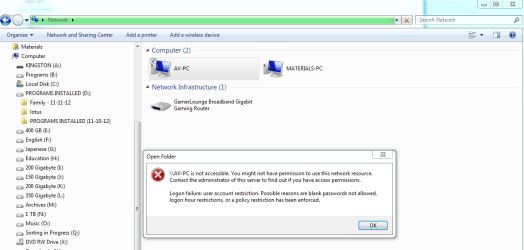
Again, no Computer passwords and no Network password. Could that be the problem?

2) From the two attached snippets, you will see that the folder on the AV computer has Full Permissions granted. It is, however, not even visible on the other computer (computer name Materials)
 

Attachments

  • Network #1.PNG
    Network #1.PNG
    87.6 KB · Views: 13
  • Network #2.PNG
    Network #2.PNG
    94.6 KB · Views: 11

My Computer

OS
Win 7-64
because you dont have password on your AV computer...

set a password if possible

what is your system antivirus ?
 

My Computer

OS
Windows 7 Ultimate x64
CPU
core i7.
Files should be accessible from either PC without a password, I tried it both way and still get the same no access allowed message. I hate sharing and permissions! ;)
 

My Computer

Computer type
PC/Desktop
Computer Manufacturer/Model Number
Home Built Desktop By DataTech
OS
Windows 7 Ultimate X64 SP1
CPU
Intel i5-2550K, Differing ~4.4-4.8GHz No built in GPU
Motherboard
ASUS P8Z68-V PRO/GEN3
Memory
16GB G.Skill Sniper 1866MHz @ 2133MHz 2x8GB
Graphics Card(s)
ASUS GTX650TIB-DC2OC-2GD5, (650TI Boost)
Sound Card
Onboard Realtek 5-1
Monitor(s) Displays
Samsung P2570HD
Screen Resolution
1920x1080
Hard Drives
Samsung 840 Pro 256GB SSD for OS, 500GB Seagate Constellation (Enterprise drive) for Data
PSU
Corsair HX650W
Case
Inwin Dragon Rider
Cooling
Hyper 212 EVO w/two Noctua fans, push-pull, @1300 RPM
Keyboard
E-Z Eyes, bright yellow keys with large characters
Mouse
steelseries SENSEI Laser Pro Gaming
Internet Speed
48-51Mbs Mbs down, 11 Mbs up Xfinity Cable
Antivirus
Norton Internet Security 2013
Browser
IE 10, Opera, Pale Moon if needed
Other Info
4 case fans, LG BluRay-RE, ASUS DVD-RW, Mr. Fusion power supply, 1.21 gigawatts.
it maybe the problem with your firewall, programs like nod would prevent network sharing access, and you should disable their firewall in order to do so

also, to get access to a computer use its computer name like MMK-pc then type this in your add bar: \\MMK-pc
then it asks for user/pass and then you can access to the shared information on the target pc
 

My Computer

OS
Windows 7 Ultimate x64
CPU
core i7.
You may have to type your computer's IP number (for sharing and accessing) to be allowed by your Firewall and/or Anti-virus.

An IP address is an exclusive number online devices use to identify and communicate with each other through computer networks. This process can best be compared to how we receive mail to our home address. An IP address would be most similar to a mailing address, while the network would be compared to the town you live in. Just like our home addresses, information cannot be sent or received by devices without a specific address.
 

My Computer

Computer type
PC/Desktop
Computer Manufacturer/Model Number
Bruce ... somewhere in his 40's
OS
Windows 7 Ultimate 32bit SP1
CPU
Intel(R) Core(TM)2 Quad CPU @ 2.40GHz, 2400 MHz
Motherboard
INTEL/D975XBX2
Memory
4 GB
Graphics Card(s)
ATI Radeon HD 2600 Pro
Monitor(s) Displays
Samsung SyncMaster 914v
Screen Resolution
1280 x 1024
Hard Drives
2/500GB each ... ST3500630AS ATA Device.
One is not connected
PSU
Rocketfish 700 W
Case
G.Skill Gigabyte Chassis
Keyboard
Standard PS/2 Keyboard
Mouse
Microsoft PS/2 Mouse
Internet Speed
DSL
Antivirus
Avira Internet Security
Browser
IE 11
Other Info
ATI HDMI Audio
OK, Folder Sharing was a no-brainer thanks to the fine tutorial "Sharing and Permissions". http://www.sevenforums.com/tutorials/24232-sharing-permissions.html

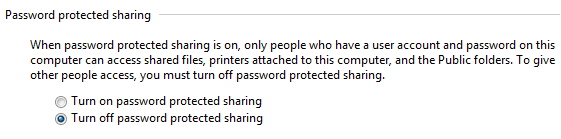
A potentially helpful addition to this tutorial might be to address the assignment of "User name and password". I have no need to do so, since I will be the only one using these computers. (see snippet)

If there already is a tutorial on this, please disregard my suggestion.

Note: I have been through several tutorials and nowhere else on the net have I ever seen procedures laid out so clearly. Thanks.

Now lest I lose my mind, can someone please tell me how to share entire partitions, so that I do not have to "share" folder by folder by folder ...?

To be perfectly honest, I really miss NT 4.0. Networking and file sharing was just: assign an IP address to each computer, a subnet mask, and a default gateway. Anyway, that was my lament for the day. :sarc:
 

Attachments

  • Password Protected Sharing.PNG
    Password Protected Sharing.PNG
    9.6 KB · Views: 4

My Computer

OS
Win 7-64
you should be able to right click the partition in Computer/Properties and see if it has a Sharing tab. If it does click it and then the Share button and follow the prompts. Hope it helps from someone who can't do it, lol.
 

My Computer

Computer type
PC/Desktop
Computer Manufacturer/Model Number
Home Built Desktop By DataTech
OS
Windows 7 Ultimate X64 SP1
CPU
Intel i5-2550K, Differing ~4.4-4.8GHz No built in GPU
Motherboard
ASUS P8Z68-V PRO/GEN3
Memory
16GB G.Skill Sniper 1866MHz @ 2133MHz 2x8GB
Graphics Card(s)
ASUS GTX650TIB-DC2OC-2GD5, (650TI Boost)
Sound Card
Onboard Realtek 5-1
Monitor(s) Displays
Samsung P2570HD
Screen Resolution
1920x1080
Hard Drives
Samsung 840 Pro 256GB SSD for OS, 500GB Seagate Constellation (Enterprise drive) for Data
PSU
Corsair HX650W
Case
Inwin Dragon Rider
Cooling
Hyper 212 EVO w/two Noctua fans, push-pull, @1300 RPM
Keyboard
E-Z Eyes, bright yellow keys with large characters
Mouse
steelseries SENSEI Laser Pro Gaming
Internet Speed
48-51Mbs Mbs down, 11 Mbs up Xfinity Cable
Antivirus
Norton Internet Security 2013
Browser
IE 10, Opera, Pale Moon if needed
Other Info
4 case fans, LG BluRay-RE, ASUS DVD-RW, Mr. Fusion power supply, 1.21 gigawatts.
Hey Britton30, I'll make a deal with you.

I promise to say Thank You

-if-

You promise not to tell people how really stupid I am.

Deal? :o
 

My Computer

OS
Win 7-64
Back
Top