Folder Copy by Cut&Paste : extremely SLOW

wkt

New member
Member
Local time
4:55 AM
Messages
31
I am watching for some time that copying of folders is working extremely slow on my system ( I really wish back the times of Windows 98 when this worked quickly ).

An Example : copy of 696MB onto an USB Stick.
A flash tool tells me about the writing speed of 4,2 MB/s.
But what happens/is shown in the detail of Windows 7 :
it will probably take 23 hours (!) to finish and the speed is believe it or not 45-50 KB/s (!!!) ?
Why are these programmers lying in such a way ? If calculators would similarly work we wouldn't be satisfied I think.

If I copy with e.g. robocopy I can't see any acceleration.

If I shut off the virus scanner I also see no effect ( perhaps a little bit faster...? ).

BTW : if I copy from partition to partition I also get poor results - so 5-10 MB/s.

Is this normal ? Can I in any way tune the system to copy faster ???
 

My Computer

Computer Manufacturer/Model Number
Fujitsu Siemens
OS
Windows 7 Home Premium
CPU
Intel Q6600
Motherboard
MSI G31M V2 (MS-7379)
Memory
3 GB
Graphics Card(s)
NVIDIA GeForce 8600 GS
Monitor(s) Displays
1
Screen Resolution
1680x1050
Hard Drives
1 local 500GB, 2 external 320GB, 500GB
Keyboard
PS/2
Mouse
PS/2
Other Info
Win 7 HP 32Bit, Upgrade Vista HP OEM, WinCE 6.0 and Debian Linux on ARM 8505, PC Linux OS
It's a bit hard to comment without knowing exactly what you're doing. But clearly on the surface of it you have a problem with your PC!. Transfer speed depend on number and size of files etc but 2-4MB/s is reasonable for a drag & drop to a USB. eg I can drag and drop a 100MB zip file in 20secs to a USB 2. flash drive/stick.
I can suggest some standard checks:
1) Check device manager for any warnings.
2) Check you HDD (Computer,Properties,Tools or chkdsk)
3) Run a speed test on your HDD.
4) Try a USB flash to USB flash copy (using different USBs)
5) Run memtest
6) Run Malwarebytes

Edit: I had to leave - but as I said in 1), 2) Check out your HDD performance. Also use the disk manufacturers diagnostic utilities. For speed check try
http://crystalmark.info/download/index-e.html
For other disk info (SMART data) try CrystalDiskInfo on the same site.
Sata partition to partition drag & drop copies should be on the order of 50MB/s or greater. The sequential tests from Crystal Disk info should be on the order of 100+MB/s.
The fact that your HDD partition to partition performance is poor makes the HDD the first thing to check.

USB to USB slow transfers may show may point to USB controller/driver issues.

Memory tests (use the inbuilt Windows) and malware testing are obvious things to check.

Then report back your findings.
 
Last edited:

My Computer

Computer type
PC/Desktop
Computer Manufacturer/Model Number
Own build
OS
Windows 7x64 Home Premium SP1
CPU
Intel i7 2600k
Motherboard
ASUS P8Z68 Deluxe
Memory
G.Skill Ripjaws (DDR3-1600) 2x4GB
Graphics Card(s)
Nvidia GeForce GTS 450; Intel HD Graphics 3000(GT2+)
Monitor(s) Displays
Dell Ultrasharp IPS panel U2311H, Samsung SyncMaster P2350
Screen Resolution
1920x1080
Hard Drives
Samsung 850 Pro SSD 256GB, Samsung SSD 840 120GB, Seagates 1TB Barracuda ST31000528AS x2
PSU
Seasonic M12II 520W
Case
Lian Li Lancool PC-K60
Cooling
Case: 1x120mm, 3x140mm CPU: Hyper 212+
Keyboard
Logitech MK520 (wireless)
Mouse
Logitech MK520
Internet Speed
6-7 Mbps
Antivirus
Norton Security Premium, Malwarebytes on 2 (MSE on 3rd PC)
Browser
FireFox
Other Info
Audio: Logitech Z523 2.1
There's so much to cover on this topic. Instead I'll just hit a few key points to start.
- Bing/Google a utility called DiskBench.exe to benchmark your data transfer times on various disks
- If you have an unreasonably slow hard drive, check your S.M.A.R.T. statitistics. Search for hard drive health utilities
- What's your configuration? Windows 7 experience numbers? etc.
 

My Computer

Computer type
Laptop
Computer Manufacturer/Model Number
Dell Insprion 7559 next to a Toshiba Portege
OS
Win 7 Pro 64-bit
CPU
Intel Core i5
Motherboard
Intel
Memory
16 GB Dell, 6 GB Toshiba
Graphics Card(s)
Intel crap on both but Dell also has nVidia GeForce GTX960M
Sound Card
RealTek
Monitor(s) Displays
internal and external ACER KA270H 27"
Screen Resolution
1920x1080
Hard Drives
SSD 256 GB plus numerous WD Red or Purple on USB3 docks. Used to buy a lot of Seagate but tossed them the second time I got unrecoverable disc corruption in the midst of use.
Keyboard
Garage Mouse SW and some cheap Amazon China made USB device
Mouse
Garage Mouse and some cheap Amazon China made USB device
Internet Speed
50 Mbps (allegedly, depends on server)
Antivirus
Defender, Malwarebytes Premium and Kaspersky
Browser
IE 11, and Chrome something
I can suggest some standard checks:
1) Check device manager for any warnings.
2) Check you HDD (Computer,Properties,Tools or chkdsk)
3) Run a speed test on your HDD.
4) Try a USB flash to USB flash copy (using different USBs)
5) Run memtest
6) Run Malwarebytes
......
Then report back your findings.

Sorry for the delay,
1.) No warnings in the device manager.
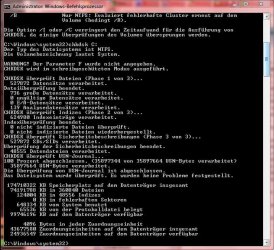
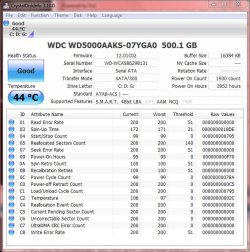
2.) I ran chkdsk : no problems found on partition C: ( see attachment 1 )
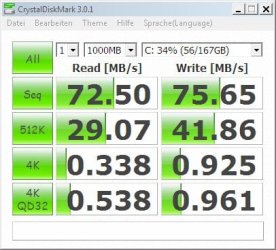
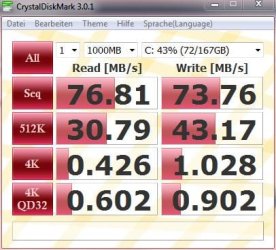
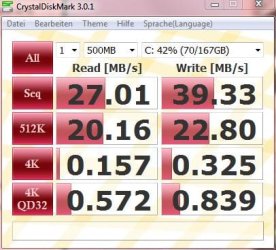
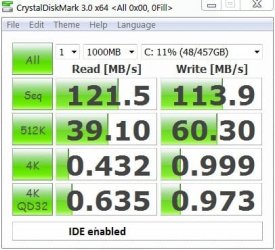
3.) I ran a speed test : poor values ? ( see attachment 2, 3)
are there many READ ERRORS ???
5.) Don't know how to run "memtest". The command is not known on my system.

I will make further tests ( probably over the weekend ).
 

Attachments

  • Screen Snaper Image 0.jpg
    Screen Snaper Image 0.jpg
    80.6 KB · Views: 40
  • Screen Snaper Image.jpg
    Screen Snaper Image.jpg
    32.8 KB · Views: 21
  • Screen Snaper Image 2.jpg
    Screen Snaper Image 2.jpg
    88.1 KB · Views: 40

My Computer

Computer Manufacturer/Model Number
Fujitsu Siemens
OS
Windows 7 Home Premium
CPU
Intel Q6600
Motherboard
MSI G31M V2 (MS-7379)
Memory
3 GB
Graphics Card(s)
NVIDIA GeForce 8600 GS
Monitor(s) Displays
1
Screen Resolution
1680x1050
Hard Drives
1 local 500GB, 2 external 320GB, 500GB
Keyboard
PS/2
Mouse
PS/2
Other Info
Win 7 HP 32Bit, Upgrade Vista HP OEM, WinCE 6.0 and Debian Linux on ARM 8505, PC Linux OS
......
- If you have an unreasonably slow hard drive, check your S.M.A.R.T. statitistics. Search for hard drive health utilities
- What's your configuration? Windows 7 experience numbers? etc.

Please have a look at the configuration in my profile.

Windows 7 experience numbers : data transfer of primary hdd is - 5.9
processor, RAM - 7.1
graphics - 4.7,4.9

How do I check S.M.A.R.T statistics and which - I have some tools for system information. For instance HWiNFO32 :

Sectors Per Interrupt: Total: 16, Active: 16
Max. PIO Transfer Mode: 4
Multiword DMA Mode: Total: 2, Active: -
Singleword DMA Mode: Total: -, Active: -
Ultra-DMA Mode: Total: 6 (ATA-133), Active: 5 (ATA-100)
Max. Multiword DMA Transfer Rate: 16.7 MBytes/s
Max. PIO with IORDY Transfer Rate: 16.7 MBytes/s
Max. PIO w/o IORDY Transfer Rate: 16.7 MBytes/s
Transfer Width: 16-bit
Native Command Queuing: Supported, Max. Depth: 32

Sectors Per Interrupt: Total: 16, Active: 16
Max. PIO Transfer Mode: 4
Multiword DMA Mode: Total: 2, Active: -
Singleword DMA Mode: Total: -, Active: -
Ultra-DMA Mode: Total: 6 (ATA-133), Active: 5 (ATA-100)
Max. Multiword DMA Transfer Rate: 16.7 MBytes/s
Max. PIO with IORDY Transfer Rate: 16.7 MBytes/s
Max. PIO w/o IORDY Transfer Rate: 16.7 MBytes/s
Transfer Width: 16-bit
Native Command Queuing: Supported, Max. Depth: 32
Raw Read Error Rate: 200/51, Worst: 200
Spin Up Time: 172/21, Worst: 171 (Data = 6366)
Start/Stop Count: 99/Always OK, Worst: 99 (Data = 1941)
Reallocated Sector Count: 200/140, Worst: 200
Seek Error Rate: 200/51, Worst: 200
Power-On Time Count: 95/Always OK, Worst: 95 (Data = 3953)
Spin Retry Count: 100/51, Worst: 100
Calibration Retry Count: 100/51, Worst: 100
Power Cycle Count: 99/Always OK, Worst: 99 (Data = 1930)
Power-Off Retract Count: 200/Always OK, Worst: 200 (Data = 197)
Load/Unload Cycle Count: 200/Always OK, Worst: 200 (Data = 1941)
Temperature 107/Always OK, Worst: 97 (Data = 43.0 °C)
Reallocation Event Count: 200/Always OK, Worst: 200
Current Pending Sector Count: 200/Always OK, Worst: 200
Off-Line Uncorrectable Sector Count: 200/Always OK, Worst: 200
UltraDMA CRC Error Rate: 200/Always OK, Worst: 200
Write Error Rate: 200/51, Worst: 200

SORRY, BUT I CAN NOT INTERPRET THESE DATA !!!
 

My Computer

Computer Manufacturer/Model Number
Fujitsu Siemens
OS
Windows 7 Home Premium
CPU
Intel Q6600
Motherboard
MSI G31M V2 (MS-7379)
Memory
3 GB
Graphics Card(s)
NVIDIA GeForce 8600 GS
Monitor(s) Displays
1
Screen Resolution
1680x1050
Hard Drives
1 local 500GB, 2 external 320GB, 500GB
Keyboard
PS/2
Mouse
PS/2
Other Info
Win 7 HP 32Bit, Upgrade Vista HP OEM, WinCE 6.0 and Debian Linux on ARM 8505, PC Linux OS
I can suggest some standard checks:
1) Check device manager for any warnings.
2) Check you HDD (Computer,Properties,Tools or chkdsk)
3) Run a speed test on your HDD.
4) Try a USB flash to USB flash copy (using different USBs)
5) Run memtest
6) Run Malwarebytes
......
Then report back your findings.

Sorry for the delay,
1.) No warnings in the device manager.
2.) I ran chkdsk : no problems found on partition C: ( see attachment 1 )
3.) I ran a speed test : poor values ? ( see attachment 2, 3)
are there many READ ERRORS ???
5.) Don't know how to run "memtest". The command is not known on my system.

I will make further tests ( probably over the weekend ).
I understand your frustration!

Your HDD health looks good to me. Your speed performance is very poor for a sata internal HDD! They look more like an external USB 2 HDD. Here are mine
ide speed.JPG

Have you run Malwarebytes with the latest updates???

I'm puzzled. Here are a couple of options to try.
(1) Have a look at what's consuming resources with Resource Monitor.

(2) Boot into SAFE MODE and see what your performance is like.

(3) Down load a light weight linux - Puppy linux (I use it sometimes).
Boot the linux OS from the CD. Mount your HDD. Play around with a few files transfers and get a handle on performance from this angle.
 

My Computer

Computer type
PC/Desktop
Computer Manufacturer/Model Number
Own build
OS
Windows 7x64 Home Premium SP1
CPU
Intel i7 2600k
Motherboard
ASUS P8Z68 Deluxe
Memory
G.Skill Ripjaws (DDR3-1600) 2x4GB
Graphics Card(s)
Nvidia GeForce GTS 450; Intel HD Graphics 3000(GT2+)
Monitor(s) Displays
Dell Ultrasharp IPS panel U2311H, Samsung SyncMaster P2350
Screen Resolution
1920x1080
Hard Drives
Samsung 850 Pro SSD 256GB, Samsung SSD 840 120GB, Seagates 1TB Barracuda ST31000528AS x2
PSU
Seasonic M12II 520W
Case
Lian Li Lancool PC-K60
Cooling
Case: 1x120mm, 3x140mm CPU: Hyper 212+
Keyboard
Logitech MK520 (wireless)
Mouse
Logitech MK520
Internet Speed
6-7 Mbps
Antivirus
Norton Security Premium, Malwarebytes on 2 (MSE on 3rd PC)
Browser
FireFox
Other Info
Audio: Logitech Z523 2.1
Your data also seem more normal to me. May my migration from Vista have somehow influenced this behaviour of my system with regard to the hdd ?

I have to admit I have a very bloated system : about 135 processes, about 135000 handles ( whatever this means ).

I don't have this program Malwarebytes : I will try to find it.

As a Linux system I prefer PCLinuxOS. But I am only a casual user of Linux and don't know how to get the performance data of the hdd there.
 

My Computer

Computer Manufacturer/Model Number
Fujitsu Siemens
OS
Windows 7 Home Premium
CPU
Intel Q6600
Motherboard
MSI G31M V2 (MS-7379)
Memory
3 GB
Graphics Card(s)
NVIDIA GeForce 8600 GS
Monitor(s) Displays
1
Screen Resolution
1680x1050
Hard Drives
1 local 500GB, 2 external 320GB, 500GB
Keyboard
PS/2
Mouse
PS/2
Other Info
Win 7 HP 32Bit, Upgrade Vista HP OEM, WinCE 6.0 and Debian Linux on ARM 8505, PC Linux OS
I would say "bloated" was an understatement. As I type this I have 58 processes running.
Get rid of the bloat. Find out what are the "hangers on" and stop them. You have to start using some judgement here.
Have a look at your startup processes and prune them back.

I strongly suggest you look at performance when booting into SAFE MODE.
To do this boot and tap F8. Select boot in safe mode (it's normal for your screen to look low resolution in this mode).

I'm not a big linux user either. It's a windowed OS and only takes a bit of a play to do some file copy tests.

If it all gets a bit much then consider backup, Clean install.

Malwarebytes download.
 
Last edited:

My Computer

Computer type
PC/Desktop
Computer Manufacturer/Model Number
Own build
OS
Windows 7x64 Home Premium SP1
CPU
Intel i7 2600k
Motherboard
ASUS P8Z68 Deluxe
Memory
G.Skill Ripjaws (DDR3-1600) 2x4GB
Graphics Card(s)
Nvidia GeForce GTS 450; Intel HD Graphics 3000(GT2+)
Monitor(s) Displays
Dell Ultrasharp IPS panel U2311H, Samsung SyncMaster P2350
Screen Resolution
1920x1080
Hard Drives
Samsung 850 Pro SSD 256GB, Samsung SSD 840 120GB, Seagates 1TB Barracuda ST31000528AS x2
PSU
Seasonic M12II 520W
Case
Lian Li Lancool PC-K60
Cooling
Case: 1x120mm, 3x140mm CPU: Hyper 212+
Keyboard
Logitech MK520 (wireless)
Mouse
Logitech MK520
Internet Speed
6-7 Mbps
Antivirus
Norton Security Premium, Malwarebytes on 2 (MSE on 3rd PC)
Browser
FireFox
Other Info
Audio: Logitech Z523 2.1
Thank you so much for your effort to help me.

Sorry, I don't want to install from the beginning because I am lazy and don't want to lose the work of 2 years ( starting with Vista... ).

I was somewhat successful : first I ran the memtest ( Windows inbuilt via F8 on booting ) and got no errors.

Then I ran Malwarebytes and was very surprised to find some .sys and .dll files and also registry items which were suspicious. I removed them all.

Then I rebooted in SAFE MODE an run the CrystalDiskMark program again. You see the result in the 1st attachment. This was a little bit better than before.

In the 2nd atachment you see the speed of a 3GB copy process - not so fast but about 2 times faster than I remember it was before I started this thread.

Then I rebooted into my non-administrative user account : 98 processes before I started to work ( I must say that I ran the autoruns program and deleted/deactivated some processes - alas I don't quite understand how to handle this program ). Then I repeated the CDM program and was VERY SURPRISED to find the data shown in the 3rd attachment below.

But I am still far away from the speed of your disk.
 

Attachments

  • CDMAfterReboot.jpg
    CDMAfterReboot.jpg
    33.1 KB · Views: 11
  • CopyPartToPart.JPG
    CopyPartToPart.JPG
    22.7 KB · Views: 12
  • CDMResult.JPG
    CDMResult.JPG
    38.3 KB · Views: 10

My Computer

Computer Manufacturer/Model Number
Fujitsu Siemens
OS
Windows 7 Home Premium
CPU
Intel Q6600
Motherboard
MSI G31M V2 (MS-7379)
Memory
3 GB
Graphics Card(s)
NVIDIA GeForce 8600 GS
Monitor(s) Displays
1
Screen Resolution
1680x1050
Hard Drives
1 local 500GB, 2 external 320GB, 500GB
Keyboard
PS/2
Mouse
PS/2
Other Info
Win 7 HP 32Bit, Upgrade Vista HP OEM, WinCE 6.0 and Debian Linux on ARM 8505, PC Linux OS
Windows should do it automatically - but try defragmenting your disk. Type defragment in your start box and follow the guides.

My results are probably as high I'm going to get with this type of spinning disk.
Speeds will also depend on where on the disks the tests are run.
Note the blue graph. When you start filling the disk (working on the inner tracks) see how the speed drops - radial velocity for you.
HDT_1TB.JPG

I would think you should be getting 90+ MB/s on the sequential test.
 

My Computer

Computer type
PC/Desktop
Computer Manufacturer/Model Number
Own build
OS
Windows 7x64 Home Premium SP1
CPU
Intel i7 2600k
Motherboard
ASUS P8Z68 Deluxe
Memory
G.Skill Ripjaws (DDR3-1600) 2x4GB
Graphics Card(s)
Nvidia GeForce GTS 450; Intel HD Graphics 3000(GT2+)
Monitor(s) Displays
Dell Ultrasharp IPS panel U2311H, Samsung SyncMaster P2350
Screen Resolution
1920x1080
Hard Drives
Samsung 850 Pro SSD 256GB, Samsung SSD 840 120GB, Seagates 1TB Barracuda ST31000528AS x2
PSU
Seasonic M12II 520W
Case
Lian Li Lancool PC-K60
Cooling
Case: 1x120mm, 3x140mm CPU: Hyper 212+
Keyboard
Logitech MK520 (wireless)
Mouse
Logitech MK520
Internet Speed
6-7 Mbps
Antivirus
Norton Security Premium, Malwarebytes on 2 (MSE on 3rd PC)
Browser
FireFox
Other Info
Audio: Logitech Z523 2.1
I want to add that I also deleted all my restore points ( 15GB ) and added 1 new one.
Don't know whether the improvement in hdd access is in any context with that or whether its a seeming repair.

I'll report after defragmentation.
 

My Computer

Computer Manufacturer/Model Number
Fujitsu Siemens
OS
Windows 7 Home Premium
CPU
Intel Q6600
Motherboard
MSI G31M V2 (MS-7379)
Memory
3 GB
Graphics Card(s)
NVIDIA GeForce 8600 GS
Monitor(s) Displays
1
Screen Resolution
1680x1050
Hard Drives
1 local 500GB, 2 external 320GB, 500GB
Keyboard
PS/2
Mouse
PS/2
Other Info
Win 7 HP 32Bit, Upgrade Vista HP OEM, WinCE 6.0 and Debian Linux on ARM 8505, PC Linux OS
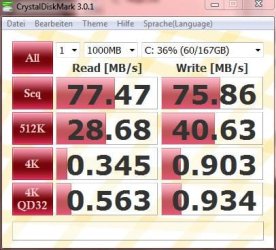
Here the results after defrag : no change towards the 90MB/s to be seen.
By the way : what is the Windows Experience Index of your ( Hitachi ) HDD ?

I think we can then finish the thread as by your tips I got a real improvement.
Any way to fine tune the hdd access with the help of Windows 7 ?

Report from SiSoftware Sandra Lite :

SiSoftware Sandra

Benchmark Results
Drive Score : 65MB/s
Results Interpretation : Higher scores are better.
Random Access Time : 19.63ms
Results Interpretation : Lower scores are better.

Windows Experience Index
Current Drive : 5.9
Results Interpretation : Higher scores are better.

Performance vs. Speed
Drive Score : 9.25kB/s/rpm
Random Access Time : 2.727µs/rpm
Results Interpretation : Higher scores are better.

Detailed Benchmark Results
Speed at position 0% : 73.22MB/s (19.62MB/s - 86.22MB/s) (113%)
Speed at position 3% : 80.36MB/s (41MB/s - 85MB/s) (124%)
Speed at position 7% : 79.78MB/s (38.46MB/s - 87.58MB/s) (123%)
Speed at position 10% : 76MB/s (43MB/s - 84MB/s) (117%)
Speed at position 13% : 79.35MB/s (33MB/s - 120.6MB/s) (122%)
Speed at position 17% : 78MB/s (39.63MB/s - 118.71MB/s) (120%)
Speed at position 20% : 76MB/s (43.43MB/s - 83.5MB/s) (117%)
Speed at position 23% : 74.83MB/s (47.36MB/s - 91.85MB/s) (115%)
Speed at position 27% : 75.48MB/s (51.4MB/s - 79.66MB/s) (116%)
Speed at position 30% : 70MB/s (44.5MB/s - 77MB/s) (108%)
Speed at position 33% : 68.49MB/s (11.2MB/s - 178MB/s) (105%)
Speed at position 37% : 72.61MB/s (37.18MB/s - 95.14MB/s) (112%)
Speed at position 40% : 67.79MB/s (43.84MB/s - 77.75MB/s) (104%)
Speed at position 43% : 70.79MB/s (37.74MB/s - 75.7MB/s) (109%)
Speed at position 47% : 66.7MB/s (33.7MB/s - 117MB/s) (103%)
Speed at position 50% : 66.29MB/s (5.8MB/s - 80MB/s) (102%)
Speed at position 53% : 69MB/s (38.7MB/s - 74MB/s) (106%)
Speed at position 57% : 64.38MB/s (35.45MB/s - 107.82MB/s) (99%)
Speed at position 60% : 66.15MB/s (34.48MB/s - 71.41MB/s) (102%)
Speed at position 63% : 64MB/s (38MB/s - 68.1MB/s) (99%)
Speed at position 67% : 62.23MB/s (33.85MB/s - 75.66MB/s) (96%)
Speed at position 70% : 61.76MB/s (32MB/s - 67.87MB/s) (95%)
Speed at position 73% : 59.73MB/s (31.24MB/s - 70.12MB/s) (92%)
Speed at position 77% : 59.15MB/s (34.38MB/s - 97.85MB/s) (91%)
Speed at position 80% : 55MB/s (37.2MB/s - 58MB/s) (84%)
Speed at position 83% : 53.38MB/s (34.78MB/s - 54.62MB/s) (82%)
Speed at position 87% : 50.13MB/s (37MB/s - 73.8MB/s) (77%)
Speed at position 90% : 47.16MB/s (31.9MB/s - 49.67MB/s) (73%)
Speed at position 93% : 44.8MB/s (31.3MB/s - 54.64MB/s) (69%)
Speed at position 97% : 43.4MB/s (31.8MB/s - 45MB/s) (67%)
Speed at position 100% : 40.3MB/s (25.47MB/s - 43MB/s) (62%)
Random Access Time : 19.63ms
Full Stroke Access Time : 19.55ms

Performance Test Status
Result ID : WDC WD5000AAKS-07YGA0 (500.1GB, SATA300, 3.5", 7200rpm, 16MB Cache)
Platform Compliance : x86
System Timer : 2.34MHz
Use Overlapped I/O : Yes
I/O Queue Depth : 8 request(s)
Block Size : 1MB

Volume Information
Capacity : 465.76GB

Physical Disk
Model : WDC WD5000AAKS-07YGA0
Version : 12.01C02
Serial Number : 2020202057202d44435753413638393231383133
Interface : SATA
Rotational Speed : 7200rpm
Removable Drive : No
Queueing On : Yes
 

Attachments

  • CDMAfterDefrag.jpg
    CDMAfterDefrag.jpg
    32.6 KB · Views: 3
  • HDTune.jpg
    HDTune.jpg
    52.6 KB · Views: 5

My Computer

Computer Manufacturer/Model Number
Fujitsu Siemens
OS
Windows 7 Home Premium
CPU
Intel Q6600
Motherboard
MSI G31M V2 (MS-7379)
Memory
3 GB
Graphics Card(s)
NVIDIA GeForce 8600 GS
Monitor(s) Displays
1
Screen Resolution
1680x1050
Hard Drives
1 local 500GB, 2 external 320GB, 500GB
Keyboard
PS/2
Mouse
PS/2
Other Info
Win 7 HP 32Bit, Upgrade Vista HP OEM, WinCE 6.0 and Debian Linux on ARM 8505, PC Linux OS
Back
Top