
arawndinog
New member
Hi guys,
I've recently attempted to patch my folder icons manually with Resource Hacker. It didn't work, in fact it had worked for some folders but most folders remains the same beige icons.
I got frustrated since every step seems correct, but anyways I decided to revert back to normal, by replacing the custom imageres.dll file with the original to both System32 and SysWOW64 folder, and deleting iconcache.db for it to rebuilt.
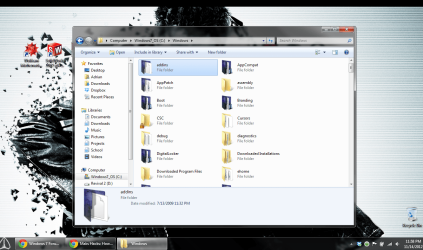
Most icons revert back to normal after that, but except the folder icons in the C:\Windows folder, where some of them are still showing up with the custom icon.
I've restarted, tried changing the icon and rebuilt the cache file so many times, I even restored to a backup point before the change is made, but still no luck.
I've taken ownership for the necessary files and have run as admin when necessary.
Any ideas why this is happening? and if anyone can provide some tips to successfully change all folder icons, I will be really appreciated. Thanks.
I've recently attempted to patch my folder icons manually with Resource Hacker. It didn't work, in fact it had worked for some folders but most folders remains the same beige icons.
I got frustrated since every step seems correct, but anyways I decided to revert back to normal, by replacing the custom imageres.dll file with the original to both System32 and SysWOW64 folder, and deleting iconcache.db for it to rebuilt.
Most icons revert back to normal after that, but except the folder icons in the C:\Windows folder, where some of them are still showing up with the custom icon.
I've restarted, tried changing the icon and rebuilt the cache file so many times, I even restored to a backup point before the change is made, but still no luck.
I've taken ownership for the necessary files and have run as admin when necessary.
Any ideas why this is happening? and if anyone can provide some tips to successfully change all folder icons, I will be really appreciated. Thanks.
Attachments
My Computer
At a glance
Windows 7 Pro 64 bitIntel i5 2450mIntel 3000
- Computer Manufacturer/Model Number
- ThinkPad T420
- OS
- Windows 7 Pro 64 bit
- CPU
- Intel i5 2450m
- Graphics Card(s)
- Intel 3000
- Hard Drives
- Kingston HyperX 3K SSD 120GB
WD Black 300 GB
- Keyboard
- Das Keyboard Ultimate S
- Mouse
- Razer Abyssus
- Internet Speed
- radio wave
- Other Info
- I like owls


