Solved How to revert back to default after using mass_icon_changer.bat

mejoh73

New member
Local time
11:13 PM
Messages
8
Last edited by a moderator:

My Computer My Computer

At a glance

Windows 7 Ultimate 32bitPentium Dual-Core CPU T4200 @ 2.00Ghz5 GB
Computer Manufacturer/Model Number
Acer 4736z
OS
Windows 7 Ultimate 32bit
CPU
Pentium Dual-Core CPU T4200 @ 2.00Ghz
Memory
5 GB
Screen Resolution
1366 x 768
Welcome to the Seven Forums
I asked the maker of that bat file to look at this post when he has time.
Jerry
 

My Computer My Computer

At a glance

Win 7 Pro x64 / Win 10 ProIntel(R) Core(TM) i7-3630QM CPU @ 2.40GHz12 GB(1) Intel(R) HD Graphics 4000 (2) NVIDIA GeFo...
Computer type
Laptop
Computer Manufacturer/Model Number
Sager NP9170
OS
Win 7 Pro x64 / Win 10 Pro
CPU
Intel(R) Core(TM) i7-3630QM CPU @ 2.40GHz
Motherboard
CLEVO P170EM
Memory
12 GB
Graphics Card(s)
(1) Intel(R) HD Graphics 4000 (2) NVIDIA GeForce GTX 675M
Sound Card
(1) Realtek High Definition Audio (2) Intel(R) Display Aud
Monitor(s) Displays
17.3
Screen Resolution
1920x1080
Hard Drives
(1) Samsung 860 EVO 500GB(OS) (1) Samsung 860 EVO 500GB(Data)
Keyboard
Backlite
Antivirus
MSE, Malwarebytes Pro
Browser
Firefox
Other Info
DESKTOP: Custom-built.
OS: Win 10 Pro x64.
CASE: Rosewill R5.
CPU: Intel I5 4670K CPU @ 3.40GHz.
CPU COOLER: Cool Master Hyper 212 EVO.
MOTHERBOARD: Asus Z87-A.
MEMORY: Kingston HyperX 2x4 GB.
GPU: Nvidia Geforce 650 TI.
PSU: Corsair TX750.
DRIVES: (1) Samsung 840 120 GB SSD (2) Western Digital blue 500 GB 7200 RPM.
Script was not meant to be applied to system folders. I have deleted original script file, but fixed version is available (link will follow).

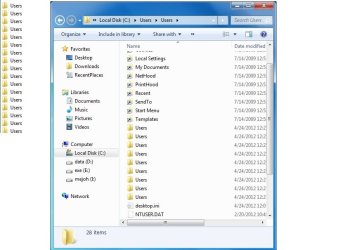
What have happened is just another proove that script does it's job with conditions I have described when I uploaded it - it copies desktop.ini file from master folder to nested folders.

What I have never thought of is that system folders usually have their aliases a.k.a "LocalizedResourceName" in desktop.ini files.
Script have never actually renamed your folders. You can verify this with third party file managers like Total Commander etc.

Make search in all subfolders for desktop.ini file and delete all copies of desktop.ini in nested folders (inside master folder) except one for the master folder. (Delete desktop.ini only in affected folders, NOT EVERYWHERE)
Close Explorer, reopen. Now they should return to original state.

Please check a newer FIXED version at this post.
PLEASE READ NEW INSTRUCTIONS IN THAT POST.


.
 
Last edited:

My Computer My Computer

At a glance

Windows 8.1 ; Windows 7 x86 (Dec2008-Jan2013)
Computer type
PC/Desktop
OS
Windows 8.1 ; Windows 7 x86 (Dec2008-Jan2013)
Other Info
"The scale icon at the top right of a post or tutorial is how you can give rep to the member."
ty for replying.i will look into it after this.
 

My Computer My Computer

At a glance

Windows 7 Ultimate 32bitPentium Dual-Core CPU T4200 @ 2.00Ghz5 GB
Computer Manufacturer/Model Number
Acer 4736z
OS
Windows 7 Ultimate 32bit
CPU
Pentium Dual-Core CPU T4200 @ 2.00Ghz
Memory
5 GB
Screen Resolution
1366 x 768
looks like its fine now
everything revert to default.
thanks for the help
 

My Computer My Computer

At a glance

Windows 7 Ultimate 32bitPentium Dual-Core CPU T4200 @ 2.00Ghz5 GB
Computer Manufacturer/Model Number
Acer 4736z
OS
Windows 7 Ultimate 32bit
CPU
Pentium Dual-Core CPU T4200 @ 2.00Ghz
Memory
5 GB
Screen Resolution
1366 x 768
Back
Top