Hey guys,
I'm having a problem that when I open my Music Folder it makes my explorer.exe CPU usage go to 25% and only reseting my PC solves the problem. No other folder makes my PC behave like this.
The music folder is quite big... It has a lot of files and uses lot of space.
I tried to google the problem and found some tips to try solving this, but none helped me.
What I already did:
- Divided the music files into sub folders (Didn't help)
- Chkdsk to try finding an error (No errors found)
The music folder is inside a brand new HD - Seagate ST 1000 DM003 - 1TB
So I'm here trying to find some light to my problem
Anybody can help me?
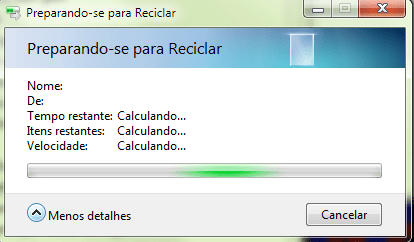
Ps.: I've uploaded two screenshots, one is what happens when I open the music folder, it never ends the "refreshing".
I'm having a problem that when I open my Music Folder it makes my explorer.exe CPU usage go to 25% and only reseting my PC solves the problem. No other folder makes my PC behave like this.
The music folder is quite big... It has a lot of files and uses lot of space.
I tried to google the problem and found some tips to try solving this, but none helped me.
What I already did:
- Divided the music files into sub folders (Didn't help)
- Chkdsk to try finding an error (No errors found)
The music folder is inside a brand new HD - Seagate ST 1000 DM003 - 1TB
So I'm here trying to find some light to my problem
Anybody can help me?
Ps.: I've uploaded two screenshots, one is what happens when I open the music folder, it never ends the "refreshing".
Attachments


My Computer
- OS
- Microsoft Windows 7 Ultimate 64-bit 7601 Multiprocessor Free Service Pack 1
- CPU
- Intel(R) Core(TM)2 Quad CPU Q8400 @ 2.66GHz
- Motherboard
- ASUSTeK Computer INC. P5QPL-AM
- Memory
- 4,00 GB
- Graphics Card(s)
- NVIDIA GeForce GTX 460
- Sound Card
- (1) NVIDIA High Definition Audio (2) NVIDIA High Definitio
- Monitor(s) Displays
- AOC 511Vwb
- Screen Resolution
- 1920 x 1080 x 32 bits (4294967296 colors) @ 60 Hz
- Hard Drives
- (1) SAMSUNG HD250HJ ATA Device (2) ST1000DM003-9YN162 ATA Device