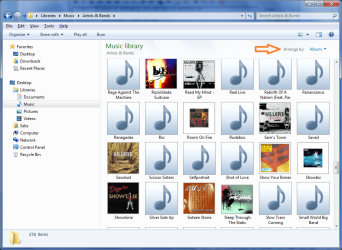
folder.jpg not working (7077)

Well I made a desktop.ini file, copy pasted that text in there, saved, applied system+hidden attributes, copied the file in and it had no effect. So my question remains.

it doesn't work. using the customize feature, windows will write to the desktop.ini, but not reference the data from it (which can be demonstrated by renaming or moving a folder and deleting it's thumbs.db). that's because it's also storing the image picture path in the bags as well which is where it seems to be pulling from.
 

My Computer My Computer

At a glance

Windows 7 x64 Ultimate Retail
OS
Windows 7 x64 Ultimate Retail
I changed the thumbnails in one folder tree to refer to their included folder.jpg manually. When I renamed the parent folder the thumbnails went out again. Meaning the info is stored in the registry right? Meaning they will go out after reinstall too. Without the thumbs I feel like I'm using Windows 2000 again. What was the latest build that didn't have this problem?
 

My Computer My Computer

At a glance

x86 Build 7100
OS
x86 Build 7100
the customizations are stored in the bags in the registry. they will be lost not only by reinstall, but also if windows hits the limit for folder customizations it remembers. also as the bags are per user, customizations made in one user profile won't be visible in another.
 

My Computer My Computer

At a glance

Windows 7 x64 Ultimate Retail
OS
Windows 7 x64 Ultimate Retail
RE:

I can confirm this is happening in build 7100 x64 for me too. fresh install.

Reminds me of when M$ decided to remove menus from MsAccess... or use a completely different menu structure in O2007 (the infamous 'ribbon').

There's no point in whinging, you will not be listened to.

Barman58, that doesn't work for me.
baarod, can I please highlight your arrogance?

I've completely avoided vista and still am not convinced about 7... I mean sure 'nuff.. it's fast... but speed + eye candy UI don't do it for me. I want M$ to take directions which *make sense* (please enlight me if that one does... and don't tell me they were trying to save 4K worth of Ram!)


m2c's worth.


Ciera & cafevincent: see attached... it's not exactly the expected behaviour - reads id3 tags over folder structure.
 

Attachments

  • Untitled.png
    Untitled.png
    93.6 KB · Views: 572
Last edited:

My Computer My Computer

At a glance

openSUSE
OS
openSUSE
7127 have resolved the problem
 

My Computer My Computer

At a glance

windows 7
OS
windows 7
I can confirm this is happening in build 7100 x64 for me too. fresh install.

Reminds me of when M$ decided to remove menus from MsAccess... or use a completely different menu structure in O2007 (the infamous 'ribbon').

There's no point in whinging, you will not be listened to.

Barman58, that doesn't work for me.
baarod, can I please highlight your arrogance?
Ryders, can I please highlight your impatience? You're right, none of you were being listened to. ;)

7127 have resolved the problem
Amazing what that feedback link can do...
 

My Computer My Computer

At a glance

El Capitan / Windows 10i7-4980HQ16GBIris 5200
Computer type
Laptop
Computer Manufacturer/Model Number
Apple
OS
El Capitan / Windows 10
CPU
i7-4980HQ
Memory
16GB
Graphics Card(s)
Iris 5200
brb downloading now :D
 

My Computer My Computer

At a glance

Windows 7 x64 Ultimate Retail
OS
Windows 7 x64 Ultimate Retail
installed and confirmed ;)

cheers
 

My Computer My Computer

At a glance

Windows 7 x64 Ultimate Retail
OS
Windows 7 x64 Ultimate Retail
Are things like this likely to be fixed with any kind of patch and is there anyway of "upgrading" to the latest build?

As I only installed Windows 7 yesterday (build 7100) will I have to do a complete format and reinstall of the new build or can I put it over the top?

At least somebody saw this and sorted it out I really couldnt face going through my thousands of folders and manually putting the thumbnails.

It will be worth a complete reinstall if that is required.

Thanks.
 

My Computer My Computer

At a glance

Windows 7
OS
Windows 7
launch the install disk from within windows 7 to do an upgrade install. it will import all of your programs, preferences and settings.
 

My Computer My Computer

At a glance

Windows 7 x64 Ultimate Retail
OS
Windows 7 x64 Ultimate Retail
Yeah......I would like my my folders to look good again! I am using 7100.
 

My Computer My Computer

At a glance

Windows 7 (beta version 7100)No biggy, just a year old "Q9450" Quad 2 CPU ...My memory isnt that great lately! So I stoppe...Just a Geforce 8800 GT using 512 video ram.
Computer Manufacturer/Model Number
INTEL from top to bottom. ( AMD is eating INTEL's dust)
OS
Windows 7 (beta version 7100)
CPU
No biggy, just a year old "Q9450" Quad 2 CPU @ 2.66 GHz.
Motherboard
DP35DP Yet soon upgrading though, CPU & All!
Memory
My memory isnt that great lately! So I stopped smoking weed
Graphics Card(s)
Just a Geforce 8800 GT using 512 video ram.
Sound Card
Been satisfied with DP35DP's High Definition Audio!
Monitor(s) Displays
Its all about the SCREEN - mine is the "Samsung 2693hm"
Hard Drives
500 sata by seagate & a new terabyte sate by western digital running the new Windows 7 as of last week.

I like it I like it! HEY MIKEY! Its fast, and reminds me of Vista in the form of a sports car! only even better! I like a
PSU
PSU? I know not!
Case
Its a case that I will soon replace!
Cooling
Liquid helium--ULTRA CONDUCTIVITY - My PC FLOATS!
I've completely avoided vista and still am not convinced about 7... I mean sure 'nuff.. it's fast... but speed + eye candy UI don't do it for me. I want M$ to take directions which *make sense* (please enlight me if that one does... and don't tell me they were trying to save 4K worth of Ram!)

I guess it's market forces. They want people to use WMP to organize their music instead of doing it manually.

**** M$ for this, hate it :P

I was bold enough even to wish for a option that cached the folder.jpg in a big temp-file in Win 7.
 

My Computer My Computer

At a glance

Windopws XP x86, Windows 7 x64
OS
Windopws XP x86, Windows 7 x64
Back
Top