
Hi, I'm really in need of help, I've tried everything to correct this issue but nothing has worked.
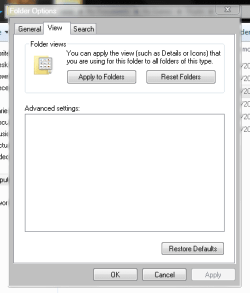
I'm in need of showing my hidden files, but when I go to the folder options, there is nothing under Advanced Settings. The box is there and everything, but it's completely blank.
I googled my problem and found a guide that said my HKEY_LOCAL_MACHINE\SOFTWARE\Microsoft\Windows\CurrentVersion\Explorer\Advanced\Folder
could be missing, and that the could be resolved by downloading and running a registry fix from a clean and default browser. So I did that, but nothing changed.
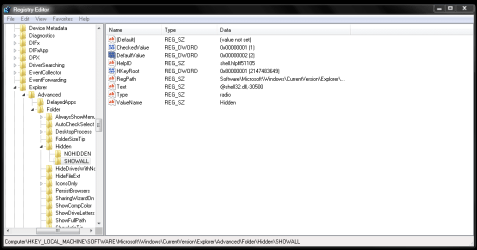
After that I found something that said I needed to have checkedvalue in the registry set as 1 to show hidden files. I went to my registry (to find that the folders that the first guide said might be missing were there) and the thing that had to be set to 1 already was. This is what it looks like, I don't understand any of it, but I'm sure somebody here will.
So after all that trouble, I'm still here with no advanced settings and no ability to show hidden folders. I'm not computer savvy at all and I've spent hours searching the internet and trying to fix this to no avail; if anybody can help me I'd really appreciate it.
I'm in need of showing my hidden files, but when I go to the folder options, there is nothing under Advanced Settings. The box is there and everything, but it's completely blank.
I googled my problem and found a guide that said my HKEY_LOCAL_MACHINE\SOFTWARE\Microsoft\Windows\CurrentVersion\Explorer\Advanced\Folder
could be missing, and that the could be resolved by downloading and running a registry fix from a clean and default browser. So I did that, but nothing changed.
After that I found something that said I needed to have checkedvalue in the registry set as 1 to show hidden files. I went to my registry (to find that the folders that the first guide said might be missing were there) and the thing that had to be set to 1 already was. This is what it looks like, I don't understand any of it, but I'm sure somebody here will.
So after all that trouble, I'm still here with no advanced settings and no ability to show hidden folders. I'm not computer savvy at all and I've spent hours searching the internet and trying to fix this to no avail; if anybody can help me I'd really appreciate it.
My Computer
- Computer type
- PC/Desktop
- OS
- Windows 7 Ultimate x64

