folder options / single-click or double-click

doclouis

New member
Local time
11:38 PM
Messages
8
Hello,

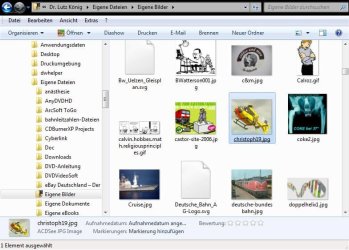
I came up to a problem that I cannot solve. Using the Explorer (not IE but the plain explorer to organize folders and files) I cannot change the behaviour of an Active Desktop like in WinXP or others.

I am very used to this procedure: single click = mark an object / doubleclick = execute an object.

Unfortunately, the Explorer just uses the option single click = execute. I remembered the option in XP/Vista, that you can go to Extras -> folder options -> Select Elements and tick a radio button for the Active Desktop method or the classic method (execute via doubleclick). Just as described in the tutorial "Single-Click or Double-Click to Open an Item" within this forum.

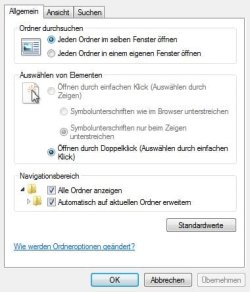
I tried this, and now I'm getting nuts: The radio button is already put on the classic mode (execute by doubleclick, select by single click). The other option is grey, i.e. it cannot be selected. :cry:

I guess, there's some tick wrong in the registry or else, but I cannot find out which. Does anyone has an idea what can be done?
 

Attachments
  • problem1.jpg
    problem1.jpg
    24.1 KB · Views: 116
  • problem2.jpg
    problem2.jpg
    67.2 KB · Views: 64
Last edited:

My Computer

OS
Windows 7 / Windows XP/SP3
The checkbox/radio button option is under the View tab in the same dialog.
 

My Computer

OS
7264x64/7260x86
...yes it is. But it is deactivated (grey font). So I cannot choose between the two options. "Single-Click to select / Double-Click to Execute" is the only checkbox that can be selected (see screenshot)

And the weird thing: The option I want (double-click to execute) *is* selected, but Win7 doesn't do it :mad:
 

My Computer

OS
Windows 7 / Windows XP/SP3
Try getting used to single click. Seriously, after a short period of accomodation, you'll probably come to realize it's better anyway.
 

My Computer

Computer Manufacturer/Model Number
HP DV8t quad
OS
Windows 7 Ultimate x64 (Retail)
CPU
i7-Q 720
Motherboard
Motherboard Chipset Intel Ibex Peak-M PM55, Intel Lynnfield
Memory
6 GB
Graphics Card(s)
nVidia GeForce GT 230M (1GB)
Sound Card
IDT High Definition Audio CODEC
Monitor(s) Displays
18.4 inch HP Infinity FHD (Samsung 184HT03-001)
Screen Resolution
1920 x 1080
Hard Drives
Hitachi 500GB 7200 rpm (x2)
Seagate FreeAgent 1.5 TB External USB (x2)
Thermaltake BlacX eSATA/USB 2.0 3.5/2.5 HD dock
Cooling
Zalman NC-2000 notebook cooling pad
Keyboard
laptop
Mouse
Logitech VX Revolution
Other Info
Backup Unit: Lenovo T61p
Hello Doclouis, and welcome to Seven Forums.

A repair install should be able to restore this for you without losing anything.

Hope this helps,
Shawn
 

My Computer

Computer type
PC/Desktop
Computer Manufacturer/Model Number
Self built custom
OS
64-bit Windows 11 Pro for Workstations
CPU
Intel i7-8700K OC'd to 5 GHz
Motherboard
ASUS ROG Maximus XI Formula Z390
Memory
64 GB (4x16GB) G.SKILL TridentZ RGB DDR4 3600 MHz
Graphics Card(s)
ASUS ROG-STRIX-GTX1080TI-O11G-GAMING
Sound Card
Integrated
Monitor(s) Displays
2 x Samsung Odyssey G7 27"
Screen Resolution
2560x1440
Hard Drives
1TB Samsung 990 PRO M.2,
4TB Samsung 990 PRO PRO M.2,
TerraMaster F8 SSD Plus NAS
PSU
Seasonic Prime Titanium 850W
Case
Thermaltake Core P3
Cooling
Corsair Hydro H115i
Keyboard
Logitech wireless K800
Mouse
Logitech MX Master 4
Internet Speed
2 Gb/s Download and 100 Mb/s Upload
Antivirus
Malwarebyte Anti-Malware Premium
Browser
Google Chrome
Other Info
Logitech Z625 speaker system,
Logitech BRIO 4K Pro webcam,
HP Color LaserJet Pro MFP M477fdn,
APC SMART-UPS RT 1000 XL - SURT1000XLI,
Galaxy S23 Plus phone
Hello Brink,

thank you for your advice - the repair install made it all fine again.

:D
 

My Computer

OS
Windows 7 / Windows XP/SP3
You're welcome Doclouis. :)
 

My Computer

Computer type
PC/Desktop
Computer Manufacturer/Model Number
Self built custom
OS
64-bit Windows 11 Pro for Workstations
CPU
Intel i7-8700K OC'd to 5 GHz
Motherboard
ASUS ROG Maximus XI Formula Z390
Memory
64 GB (4x16GB) G.SKILL TridentZ RGB DDR4 3600 MHz
Graphics Card(s)
ASUS ROG-STRIX-GTX1080TI-O11G-GAMING
Sound Card
Integrated
Monitor(s) Displays
2 x Samsung Odyssey G7 27"
Screen Resolution
2560x1440
Hard Drives
1TB Samsung 990 PRO M.2,
4TB Samsung 990 PRO PRO M.2,
TerraMaster F8 SSD Plus NAS
PSU
Seasonic Prime Titanium 850W
Case
Thermaltake Core P3
Cooling
Corsair Hydro H115i
Keyboard
Logitech wireless K800
Mouse
Logitech MX Master 4
Internet Speed
2 Gb/s Download and 100 Mb/s Upload
Antivirus
Malwarebyte Anti-Malware Premium
Browser
Google Chrome
Other Info
Logitech Z625 speaker system,
Logitech BRIO 4K Pro webcam,
HP Color LaserJet Pro MFP M477fdn,
APC SMART-UPS RT 1000 XL - SURT1000XLI,
Galaxy S23 Plus phone
Hello everyone,

The repair install should not necessary. This fix in the Registry-editor re-enables selections in the Folder options menu.

The trick is to set ClassicShell to 0 in [HKEY_CURRENT_USER\Software\Microsoft\Windows\CurrentVersion\Policies\Explorer].

Regards from the Netherlands,
Opportunitor


By the way, I really loves this great forum, please keep up the good work in this community!
 

My Computer

OS
Windows 7 Ultimate (64 Bit) - Version 6.1
CPU
Amd Phenom Core 2 Quad 9750
Memory
2047 MB
Thank You !!!

Been looking for this fix all morning. Worked like a charm!
 

My Computer

Computer type
PC/Desktop
OS
Colorado
Back
Top