Font Names and Chinese Programs gibberish!

kahs899

New member
Local time
3:31 PM
Messages
5
In Windows 7 Ultimate, Font names in MS Word display in English with "DF" in front of them. Is there any way to make them display Chinese? The system is English with Chinese (Trad.) MUI, and Office 2003 Cht.

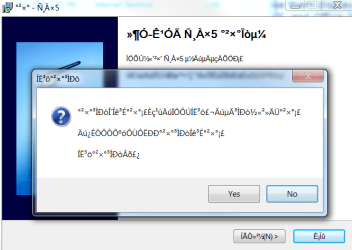
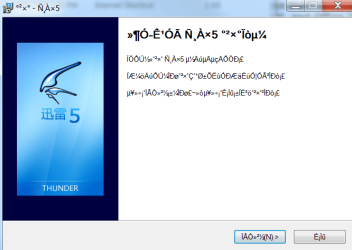
Also, a lot of Chinese programs display gibberish (*&!@^%#$) when launched, such as the install for Office and Xunlei. Is there a way to fix this?

I attached two screenshots. Help please???
 

Attachments
  • 1.png
    1.png
    27.7 KB · Views: 71
  • 2.png
    2.png
    26.5 KB · Views: 118
Last edited:

My Computer My Computer

At a glance

Windows 7 Ultimate
OS
Windows 7 Ultimate
This is driving me crazy :(
 

My Computer My Computer

At a glance

Windows 7 Ultimate
OS
Windows 7 Ultimate
Set the System Locale to Chinese, then it displays correctly
 

My Computer My Computer

At a glance

Windows 7 RTM x64AMD Athlon 64 X2, 4200+4GBATI Radeon X1900
Computer Manufacturer/Model Number
Self Build
OS
Windows 7 RTM x64
CPU
AMD Athlon 64 X2, 4200+
Motherboard
Asus A8N-E
Memory
4GB
Graphics Card(s)
ATI Radeon X1900
Sound Card
Realtek AC97
Monitor(s) Displays
Benq FP882
You mean the "location"? I have changed the time zone, keyboard, location, display language, and it still doesn't display correctly! Help?
 

My Computer My Computer

At a glance

Windows 7 Ultimate
OS
Windows 7 Ultimate
kash

Im wondering where you got your download from? if you need the chinese to display propererly, you could install simple chinese language pack (if your running ultimate)

Ken
 

My Computer My Computer

At a glance

Win 8 Release candidate 8400[email protected]4 gigsNvidia 9600M
Computer Manufacturer/Model Number
HP Pavillion dv-7 1005 Tx
OS
Win 8 Release candidate 8400
CPU
[email protected]
Memory
4 gigs
Graphics Card(s)
Nvidia 9600M
Sound Card
HD built-in
Monitor(s) Displays
17" Wxga
Screen Resolution
1440x900
Cooling
none
Internet Speed
45Mb down 5Mb up
I found out how to make it work: I have to make it look at non-unicode programs as Chinese encoding. Thanks for the help
 

My Computer My Computer

At a glance

Windows 7 Ultimate
OS
Windows 7 Ultimate
Sorry. Can you be more specific as to how it can be fixed? I'm having the exact same problem and it is driving me up the wall...
 

My Computer My Computer

At a glance

Windows 7 Ultimate
OS
Windows 7 Ultimate
You go to Control Panel > Change Input Methods > Administrative > Change System Locale > UAC > then Simplified or Trad Chinese depending on what you are trying to run
 

My Computer My Computer

At a glance

Windows 7 Ultimate
OS
Windows 7 Ultimate
Interesting, thanks for the tips man. I am sure I'll hit this problem eventually.

I recently upgraded from Windows XP to Windows 7. Prior Windows 7, when I was using Windows XP, I always rely on NJStar CJK Viewer to get the Chinese to display correctly. Unfortunately NJStar CJK Viewer doesn't work on Windows 7 even I upgraded to the latest version which is 1.95 at this point.

The last two night, I have been spending my time manually converting all BIG5 encoded file names and MP3 tags to use Unicode. That is a painful experience but I am very happy now because all my files and MP3 tags are displayed correctly.
 

My Computer My Computer

At a glance

Windows 7 ProfessionalIntel Core 2 Quad Q6600G.SKILL 4GB DDR2 800Gecube ATI Radeon HD 3850
Computer Manufacturer/Model Number
Custom Build - Beyonddc Edition
OS
Windows 7 Professional
CPU
Intel Core 2 Quad Q6600
Motherboard
MSI P6N SLI Platinum
Memory
G.SKILL 4GB DDR2 800
Graphics Card(s)
Gecube ATI Radeon HD 3850
Sound Card
Onboard
PSU
Cooler Master Real Power Pro 750 wattz
Case
Cooler Master Elite 330
Back
Top