
Hi there,
Before we get started, I would like to note the following. I have 4 different operating systems and they all behave differently. I have:
Windows 2008 R2 x64
Windows 7 Pro x64
Windows Vista Business x86
Windows XP x86
All machines have their Region and Language, Language for non-Unicode programs set to Chinese (Simplified, PRC) as their system locale. Two of the operating systems are perfectly fine while the other two have gibberish as shown in the screenshot.
Windows 2008 R2 and Windows XP are fine.
Windows 7 and Vista are the trouble ones.
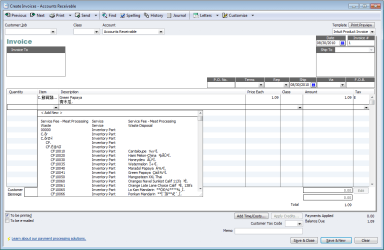
From the screenshot (this is Quickbooks program as example but its the same for some other programs too so not only an issue for Quickbooks), only the stuff from the drop down menu are appearing in gibberish when there is chinese. However, after selecting the item, all chinese appear to be fine on the invoice! It might not seem like a big issue but it makes choosing the item really hard when the employee cannot read english and they have to guess their way through an item list with 3000 items...
I did some search but wasn't able to find the solution... Any help would be appreciated.
Before we get started, I would like to note the following. I have 4 different operating systems and they all behave differently. I have:
Windows 2008 R2 x64
Windows 7 Pro x64
Windows Vista Business x86
Windows XP x86
All machines have their Region and Language, Language for non-Unicode programs set to Chinese (Simplified, PRC) as their system locale. Two of the operating systems are perfectly fine while the other two have gibberish as shown in the screenshot.
Windows 2008 R2 and Windows XP are fine.
Windows 7 and Vista are the trouble ones.
From the screenshot (this is Quickbooks program as example but its the same for some other programs too so not only an issue for Quickbooks), only the stuff from the drop down menu are appearing in gibberish when there is chinese. However, after selecting the item, all chinese appear to be fine on the invoice! It might not seem like a big issue but it makes choosing the item really hard when the employee cannot read english and they have to guess their way through an item list with 3000 items...
I did some search but wasn't able to find the solution... Any help would be appreciated.
Attachments
My Computer
- OS
- Windows 7 Pro x64


