
Fonts - Install

How to Install a Font in Windows 7 and Windows 8


   Information
This tutorial will show you how to install a font that you have downloaded in Windows 7 and Windows 8.

For a list of all default fonts that come supplied with Windows 7, see: Fonts supplied with Windows 7

For a list of all default fonts that come supplied with Windows 8, see: Fonts supplied with Windows 8

   Note
Windows comes with TrueType fonts and OpenType fonts. They work with a variety of computers, printers, and programs.

  • TrueType fonts (.ttf/.ttc) can be scaled to any size and are clear and readable in all sizes. They can be sent to any printer or other output device supported by Windows.
  • OpenType fonts (.otf) are related to TrueType fonts, but typically incorporate a greater extension of the basic character set, such as small capitalization, old-style numerals, and more detailed shapes, such as glyph and ligatures. OpenType fonts are also clear and readable in all sizes and can be sent to any printer or other output device supported by Windows.
  • PostScript fonts are fonts created by Adobe Systems that are smooth, detailed, and of high quality. They are often used for printing, especially professional-quality printing, such as books or magazines.
   Tip
If you need a default Windows font, then please just post a request for it here, and I'll be happy to post a clean copy of it for you. :)

   Warning
If you install a TrueType font with exactly the same name as a PostScript font on the same computer, Windows won't know which one to access, which could result in a font type being altered. To avoid this, don't install different types of fonts with the same name.


Here's How:
1. Download the font that you want to install.
NOTE: You can download fonts from a software program, the Internet, or your organization's network. You can get free fonts from the links at Microsoft Typography - Font foundries.
WARNING: Before you download a font, make sure you trust the source.

2. Unblock the font.

3. Do step 4, 5, or 6 below for how you would like to install the font.

4. Install Font Option One
A) Right click or press and hold on the downloaded font, click/tap on Install, and go to step 7 below.
5. Install Font Option Two
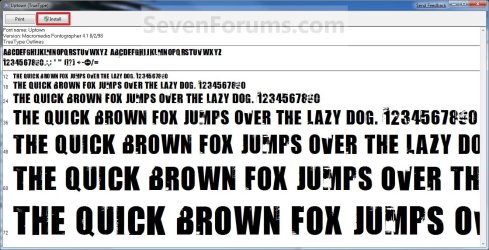
A) Double click/tap on the downloaded font, click/tap on the Install button, and go to step 7 below. (See screeenshot below)
Font_Preview.jpg
6. Install Font Option Three
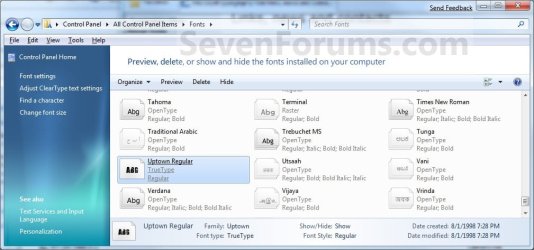
A) Drag and drop the downloaded font into the Fonts Control Panel page location, and go to step 7 below. (See screenshot below)
NOTE: You can either navigate to C:\Windows\Fonts in Windows Explorer or open the Control Panel (icons view) and click/tap on the Fonts icon to open the Fonts Control Panel page.
Location-2.jpg
7. You can verify that the font is installed by seeing if it is listed in the Fonts Control Panel page.
NOTE: You can either navigate to C:\Windows\Fonts in Windows Explorer or open the Control Panel (icons view) and click on the Fonts icon to open the Fonts Control Panel page.
That's it,
Shawn


Last edited:
Could you post a screenshot showing what is wrong with the fonts and saying what it should be to see if there may be something that we could help to fix?
 

My Computer

Computer type
PC/Desktop
Computer Manufacturer/Model Number
Self built custom
OS
64-bit Windows 11 Pro for Workstations
CPU
Intel i7-8700K OC'd to 5 GHz
Motherboard
ASUS ROG Maximus XI Formula Z390
Memory
64 GB (4x16GB) G.SKILL TridentZ RGB DDR4 3600 MHz
Graphics Card(s)
ASUS ROG-STRIX-GTX1080TI-O11G-GAMING
Sound Card
Integrated
Monitor(s) Displays
2 x Samsung Odyssey G7 27"
Screen Resolution
2560x1440
Hard Drives
1TB Samsung 990 PRO M.2,
4TB Samsung 990 PRO PRO M.2,
TerraMaster F8 SSD Plus NAS
PSU
Seasonic Prime Titanium 850W
Case
Thermaltake Core P3
Cooling
Corsair Hydro H115i
Keyboard
Logitech wireless K800
Mouse
Logitech MX Master 4
Internet Speed
2 Gb/s Download and 100 Mb/s Upload
Antivirus
Malwarebyte Anti-Malware Premium
Browser
Google Chrome
Other Info
Logitech Z625 speaker system,
Logitech BRIO 4K Pro webcam,
HP Color LaserJet Pro MFP M477fdn,
APC SMART-UPS RT 1000 XL - SURT1000XLI,
Galaxy S23 Plus phone
Upload please

Sir,my default fonts had gone so i cant to anything now.All of them are wingding?Can u give me zipped font that used by the system because i cannot download large file with my speed.
 

My Computer

OS
Ultimate x32
Hello PortgazHyde,

Sorry, but the size of that file for all the default fonts would just be way to big to upload. :(

If you have a restore point dated before this happened available, then you could do a system restore at boot with that restore point selected to undo and fix this issue.

Hope this helps,
Shawn
 

My Computer

Computer type
PC/Desktop
Computer Manufacturer/Model Number
Self built custom
OS
64-bit Windows 11 Pro for Workstations
CPU
Intel i7-8700K OC'd to 5 GHz
Motherboard
ASUS ROG Maximus XI Formula Z390
Memory
64 GB (4x16GB) G.SKILL TridentZ RGB DDR4 3600 MHz
Graphics Card(s)
ASUS ROG-STRIX-GTX1080TI-O11G-GAMING
Sound Card
Integrated
Monitor(s) Displays
2 x Samsung Odyssey G7 27"
Screen Resolution
2560x1440
Hard Drives
1TB Samsung 990 PRO M.2,
4TB Samsung 990 PRO PRO M.2,
TerraMaster F8 SSD Plus NAS
PSU
Seasonic Prime Titanium 850W
Case
Thermaltake Core P3
Cooling
Corsair Hydro H115i
Keyboard
Logitech wireless K800
Mouse
Logitech MX Master 4
Internet Speed
2 Gb/s Download and 100 Mb/s Upload
Antivirus
Malwarebyte Anti-Malware Premium
Browser
Google Chrome
Other Info
Logitech Z625 speaker system,
Logitech BRIO 4K Pro webcam,
HP Color LaserJet Pro MFP M477fdn,
APC SMART-UPS RT 1000 XL - SURT1000XLI,
Galaxy S23 Plus phone
Fixed some problem

The problem is i have no restore point because i deleted it earlier with CCleaner.I had downloaded Tahoma and it fix almost all the display.What i should download next to make my OS 100% readable?
 

My Computer

OS
Ultimate x32
Well, the problem is not just Windows itself, but everything (included and installed programs) that used the fonts that are now no longer there.

You might consider doing a repair install to add them all back if that's an option for you.
 

My Computer

Computer type
PC/Desktop
Computer Manufacturer/Model Number
Self built custom
OS
64-bit Windows 11 Pro for Workstations
CPU
Intel i7-8700K OC'd to 5 GHz
Motherboard
ASUS ROG Maximus XI Formula Z390
Memory
64 GB (4x16GB) G.SKILL TridentZ RGB DDR4 3600 MHz
Graphics Card(s)
ASUS ROG-STRIX-GTX1080TI-O11G-GAMING
Sound Card
Integrated
Monitor(s) Displays
2 x Samsung Odyssey G7 27"
Screen Resolution
2560x1440
Hard Drives
1TB Samsung 990 PRO M.2,
4TB Samsung 990 PRO PRO M.2,
TerraMaster F8 SSD Plus NAS
PSU
Seasonic Prime Titanium 850W
Case
Thermaltake Core P3
Cooling
Corsair Hydro H115i
Keyboard
Logitech wireless K800
Mouse
Logitech MX Master 4
Internet Speed
2 Gb/s Download and 100 Mb/s Upload
Antivirus
Malwarebyte Anti-Malware Premium
Browser
Google Chrome
Other Info
Logitech Z625 speaker system,
Logitech BRIO 4K Pro webcam,
HP Color LaserJet Pro MFP M477fdn,
APC SMART-UPS RT 1000 XL - SURT1000XLI,
Galaxy S23 Plus phone
Sir, i cant repair install because im using laptop.
I searched for fonts but i got no fonts that helps.
Oh, do u got Arial Regular? My .NF keep requesting for it.
And my apps cannot be resize and the text is bigger.
I installed marlett but it didnt work.
 

My Computer

OS
Ultimate x32
PortgazHyde,

Here's a couple default fonts in a ZIP file below to install that may help some. If you need any more specific fonts, then please just let me know. :)
 

Attachments

My Computer

Computer type
PC/Desktop
Computer Manufacturer/Model Number
Self built custom
OS
64-bit Windows 11 Pro for Workstations
CPU
Intel i7-8700K OC'd to 5 GHz
Motherboard
ASUS ROG Maximus XI Formula Z390
Memory
64 GB (4x16GB) G.SKILL TridentZ RGB DDR4 3600 MHz
Graphics Card(s)
ASUS ROG-STRIX-GTX1080TI-O11G-GAMING
Sound Card
Integrated
Monitor(s) Displays
2 x Samsung Odyssey G7 27"
Screen Resolution
2560x1440
Hard Drives
1TB Samsung 990 PRO M.2,
4TB Samsung 990 PRO PRO M.2,
TerraMaster F8 SSD Plus NAS
PSU
Seasonic Prime Titanium 850W
Case
Thermaltake Core P3
Cooling
Corsair Hydro H115i
Keyboard
Logitech wireless K800
Mouse
Logitech MX Master 4
Internet Speed
2 Gb/s Download and 100 Mb/s Upload
Antivirus
Malwarebyte Anti-Malware Premium
Browser
Google Chrome
Other Info
Logitech Z625 speaker system,
Logitech BRIO 4K Pro webcam,
HP Color LaserJet Pro MFP M477fdn,
APC SMART-UPS RT 1000 XL - SURT1000XLI,
Galaxy S23 Plus phone
Installed the fonts and got no error but my application windows cannot fit the screen.
I somehow cannot fix it.
 

My Computer

OS
Ultimate x32
Looks like you may need to consider doing a OEM factory restore of Windows 7. :(
 

My Computer

Computer type
PC/Desktop
Computer Manufacturer/Model Number
Self built custom
OS
64-bit Windows 11 Pro for Workstations
CPU
Intel i7-8700K OC'd to 5 GHz
Motherboard
ASUS ROG Maximus XI Formula Z390
Memory
64 GB (4x16GB) G.SKILL TridentZ RGB DDR4 3600 MHz
Graphics Card(s)
ASUS ROG-STRIX-GTX1080TI-O11G-GAMING
Sound Card
Integrated
Monitor(s) Displays
2 x Samsung Odyssey G7 27"
Screen Resolution
2560x1440
Hard Drives
1TB Samsung 990 PRO M.2,
4TB Samsung 990 PRO PRO M.2,
TerraMaster F8 SSD Plus NAS
PSU
Seasonic Prime Titanium 850W
Case
Thermaltake Core P3
Cooling
Corsair Hydro H115i
Keyboard
Logitech wireless K800
Mouse
Logitech MX Master 4
Internet Speed
2 Gb/s Download and 100 Mb/s Upload
Antivirus
Malwarebyte Anti-Malware Premium
Browser
Google Chrome
Other Info
Logitech Z625 speaker system,
Logitech BRIO 4K Pro webcam,
HP Color LaserJet Pro MFP M477fdn,
APC SMART-UPS RT 1000 XL - SURT1000XLI,
Galaxy S23 Plus phone
Looks like you may need to consider doing a OEM factory restore of Windows 7. :(
 

My Computer

Computer type
PC/Desktop
Computer Manufacturer/Model Number
Self built custom
OS
64-bit Windows 11 Pro for Workstations
CPU
Intel i7-8700K OC'd to 5 GHz
Motherboard
ASUS ROG Maximus XI Formula Z390
Memory
64 GB (4x16GB) G.SKILL TridentZ RGB DDR4 3600 MHz
Graphics Card(s)
ASUS ROG-STRIX-GTX1080TI-O11G-GAMING
Sound Card
Integrated
Monitor(s) Displays
2 x Samsung Odyssey G7 27"
Screen Resolution
2560x1440
Hard Drives
1TB Samsung 990 PRO M.2,
4TB Samsung 990 PRO PRO M.2,
TerraMaster F8 SSD Plus NAS
PSU
Seasonic Prime Titanium 850W
Case
Thermaltake Core P3
Cooling
Corsair Hydro H115i
Keyboard
Logitech wireless K800
Mouse
Logitech MX Master 4
Internet Speed
2 Gb/s Download and 100 Mb/s Upload
Antivirus
Malwarebyte Anti-Malware Premium
Browser
Google Chrome
Other Info
Logitech Z625 speaker system,
Logitech BRIO 4K Pro webcam,
HP Color LaserJet Pro MFP M477fdn,
APC SMART-UPS RT 1000 XL - SURT1000XLI,
Galaxy S23 Plus phone
Maybe there is another way?
By installing fonts that control size maybe..
I once copy fonts from my friend and it works..
Badly my friend went for an hike.
 

My Computer

OS
Ultimate x32
If able, you could copy all the default fonts included in Windows from his computer and install them in yours to see if that may help.
 

My Computer

Computer type
PC/Desktop
Computer Manufacturer/Model Number
Self built custom
OS
64-bit Windows 11 Pro for Workstations
CPU
Intel i7-8700K OC'd to 5 GHz
Motherboard
ASUS ROG Maximus XI Formula Z390
Memory
64 GB (4x16GB) G.SKILL TridentZ RGB DDR4 3600 MHz
Graphics Card(s)
ASUS ROG-STRIX-GTX1080TI-O11G-GAMING
Sound Card
Integrated
Monitor(s) Displays
2 x Samsung Odyssey G7 27"
Screen Resolution
2560x1440
Hard Drives
1TB Samsung 990 PRO M.2,
4TB Samsung 990 PRO PRO M.2,
TerraMaster F8 SSD Plus NAS
PSU
Seasonic Prime Titanium 850W
Case
Thermaltake Core P3
Cooling
Corsair Hydro H115i
Keyboard
Logitech wireless K800
Mouse
Logitech MX Master 4
Internet Speed
2 Gb/s Download and 100 Mb/s Upload
Antivirus
Malwarebyte Anti-Malware Premium
Browser
Google Chrome
Other Info
Logitech Z625 speaker system,
Logitech BRIO 4K Pro webcam,
HP Color LaserJet Pro MFP M477fdn,
APC SMART-UPS RT 1000 XL - SURT1000XLI,
Galaxy S23 Plus phone
Maybe missing fonts

A week ago i copied some of my friend fonts.And i can resize back.I forgot to make backup so idk which fonts control resizing.
 

My Computer

OS
Ultimate x32
Fonts are just fonts, they don't control anything and are just used for the text.

If you changed their size, then it may have been in the Advanced Appearance Settings for the size of items. See steps 7 and 8 in OPTION TWO of the tutorial below to see if that looks like were you changed the size at.

http://www.sevenforums.com/tutorials/282-window-color-appearance-change.html
 

My Computer

Computer type
PC/Desktop
Computer Manufacturer/Model Number
Self built custom
OS
64-bit Windows 11 Pro for Workstations
CPU
Intel i7-8700K OC'd to 5 GHz
Motherboard
ASUS ROG Maximus XI Formula Z390
Memory
64 GB (4x16GB) G.SKILL TridentZ RGB DDR4 3600 MHz
Graphics Card(s)
ASUS ROG-STRIX-GTX1080TI-O11G-GAMING
Sound Card
Integrated
Monitor(s) Displays
2 x Samsung Odyssey G7 27"
Screen Resolution
2560x1440
Hard Drives
1TB Samsung 990 PRO M.2,
4TB Samsung 990 PRO PRO M.2,
TerraMaster F8 SSD Plus NAS
PSU
Seasonic Prime Titanium 850W
Case
Thermaltake Core P3
Cooling
Corsair Hydro H115i
Keyboard
Logitech wireless K800
Mouse
Logitech MX Master 4
Internet Speed
2 Gb/s Download and 100 Mb/s Upload
Antivirus
Malwarebyte Anti-Malware Premium
Browser
Google Chrome
Other Info
Logitech Z625 speaker system,
Logitech BRIO 4K Pro webcam,
HP Color LaserJet Pro MFP M477fdn,
APC SMART-UPS RT 1000 XL - SURT1000XLI,
Galaxy S23 Plus phone
After installing fonts from a web page...

I am using WINDOWS 7, and loading free fonts from the internet.

Once I have the fonts I want downloaded and installed in the "FONTS" section, can I delete all the misc. folders that each font downloaded on my computer?

The fonts are installed and in the correct section... but now I have tons of folders in my "download" file. Can I safely delete them, and still have access to the fonts I installed?

I'd appreciate anyone's help on this. TY so much :)
 

My Computer

Computer type
PC/Desktop
Computer Manufacturer/Model Number
Custom Build Unknown
OS
Windows 7 Home Edition ,x 64
CPU
AMD Phenom 9150E Quad-Core Processor 1.8GHZ
Memory
4.00 GB
Hard Drives
ATAPI DVD A DH1616L-C SCSI Cdrom Device
Antivirus
AVG
Browser
Google Chrome
Hello MsPacker, and welcome to Seven Forums.

Yes. Once you install the fonts, you no longer need to keep the downloads. You might keep a copy of them saved somewhere though incase you may ever need to reinstall Windows. This way you will have the fonts available to quickly reinstall afterwards as well. :)
 

My Computer

Computer type
PC/Desktop
Computer Manufacturer/Model Number
Self built custom
OS
64-bit Windows 11 Pro for Workstations
CPU
Intel i7-8700K OC'd to 5 GHz
Motherboard
ASUS ROG Maximus XI Formula Z390
Memory
64 GB (4x16GB) G.SKILL TridentZ RGB DDR4 3600 MHz
Graphics Card(s)
ASUS ROG-STRIX-GTX1080TI-O11G-GAMING
Sound Card
Integrated
Monitor(s) Displays
2 x Samsung Odyssey G7 27"
Screen Resolution
2560x1440
Hard Drives
1TB Samsung 990 PRO M.2,
4TB Samsung 990 PRO PRO M.2,
TerraMaster F8 SSD Plus NAS
PSU
Seasonic Prime Titanium 850W
Case
Thermaltake Core P3
Cooling
Corsair Hydro H115i
Keyboard
Logitech wireless K800
Mouse
Logitech MX Master 4
Internet Speed
2 Gb/s Download and 100 Mb/s Upload
Antivirus
Malwarebyte Anti-Malware Premium
Browser
Google Chrome
Other Info
Logitech Z625 speaker system,
Logitech BRIO 4K Pro webcam,
HP Color LaserJet Pro MFP M477fdn,
APC SMART-UPS RT 1000 XL - SURT1000XLI,
Galaxy S23 Plus phone
Hey Brink,

I was sent here from eightforums[dot]com. I have a few corrupted fonts, I did a fresh install and they are bad again so it might be the way they are. Any chance if you have these could I get them off you please.

The fonts are;

MS Sans Serif standard
MS Serif Standard
Courier

They all are very blocky almost impossible to read, as if you zoomed into 250% rasterised font. They neither show up as OTF or TTF, they don't give a font type as the rest do in font manager or Photoshop CC.

I really appreciate it mate, thanks in advance!
 

My Computer

Computer type
PC/Desktop
OS
Windows 8.1 64bit
Hello Astrixau, and welcome to Seven Forums.

Since these are system files, you might see if running a sfc /scannow command may be able to repair them first.

I attached the requested fonts in a ZIP file below. You didn't specify which Courier font, so I included all of them.

Hope this helps, :)
Shawn
 

Attachments

My Computer

Computer type
PC/Desktop
Computer Manufacturer/Model Number
Self built custom
OS
64-bit Windows 11 Pro for Workstations
CPU
Intel i7-8700K OC'd to 5 GHz
Motherboard
ASUS ROG Maximus XI Formula Z390
Memory
64 GB (4x16GB) G.SKILL TridentZ RGB DDR4 3600 MHz
Graphics Card(s)
ASUS ROG-STRIX-GTX1080TI-O11G-GAMING
Sound Card
Integrated
Monitor(s) Displays
2 x Samsung Odyssey G7 27"
Screen Resolution
2560x1440
Hard Drives
1TB Samsung 990 PRO M.2,
4TB Samsung 990 PRO PRO M.2,
TerraMaster F8 SSD Plus NAS
PSU
Seasonic Prime Titanium 850W
Case
Thermaltake Core P3
Cooling
Corsair Hydro H115i
Keyboard
Logitech wireless K800
Mouse
Logitech MX Master 4
Internet Speed
2 Gb/s Download and 100 Mb/s Upload
Antivirus
Malwarebyte Anti-Malware Premium
Browser
Google Chrome
Other Info
Logitech Z625 speaker system,
Logitech BRIO 4K Pro webcam,
HP Color LaserJet Pro MFP M477fdn,
APC SMART-UPS RT 1000 XL - SURT1000XLI,
Galaxy S23 Plus phone
Back
Top