For the write caching experts

whs

New member
Guru
VIP
Local time
4:57 PM
Messages
26,200
Location
Florida in winter, Black Forest/Germany
On another thread I had stated that there will be a performance hit if you turn off write caching for a SSD. But on second thought, I am not so sure any more.

What write caching allows (in my understanding) is to accumulate records in a buffer so that so that they can be written to the disk in one big swoop. That is an advantage on a spinning disk because all those records are written during the same rotation - and there is also only one seek for the arm.

I wonder though whether that brings the same advantage to the SSD where access time to any place is the same - and it is usually only 0.1ms. There would be an advantage if the records were written in larger blocks from the buffer because the SSD's write performance grows as the block size grows. But if records are still being written e.g. 4K at a time, there may not be an advantage.

Does anybody know whether the blocksize for the write operations increases with caching?
 

My Computer

Computer Manufacturer/Model Number
HP, Dell, Gateway, Toshiba - 4 laptops and 2 desktops
OS
Vista, Windows7, Mint Mate, Zorin, Windows 8
CPU
from 1.6GHz Duo to i7
Monitor(s) Displays
2x HP w2207
Hard Drives
5x HDD, 7x SSD, 12x Externals
Keyboard
with trackball - no mices
Mouse
Trackball mice
Internet Speed
DSL 6000
Hi whs - I see your point about the "write caching" and the SSD. Actually I think SSD's do write smaller blocks of data even faster than large sequential blocks so you could very well be right.

It would be interesting to run a series of tests with the "write caching" turned both on and off- Checking the Windows Disk WEI and checking the results of some of the disk benchmarking utilities (like HD Tune and ATTO). :):):)

At the moment I have my "write caching" turned on.
 

My Computer

Computer Manufacturer/Model Number
Alienware Aurora
OS
Win 7 Ultimate x64
CPU
Core I7 980X O.C. to 4.0 Ghz
Motherboard
Custom Intel mATX (Bios ver A10)
Memory
12GB 1600 mhz triple channel DDR3 - Kingston
Graphics Card(s)
ATI Radeon HD 5970 2GB Video Card
Sound Card
Creative Labs Titanium sound blaster
Monitor(s) Displays
30" Dell LCD
Screen Resolution
2560 x 1600
Hard Drives
240 GB OCZ Vertex 2 SSD
256 GB Samsung V2 SSD
2TB WD Black Caviar 7200 rpm SATA3
600GB WD Velociraptor 10,000 rpm SATA3
3TB WD MyBook Essential USB 3.0 7200 rpm External
PSU
850 Watt
Case
Alienware Aurora
Cooling
Water
Keyboard
Logitech G15 (original version)
Mouse
Logitech MX1000 Laser - Wireless
Internet Speed
Cable 22 Mb/sec download
Other Info
USB 3.0,
Blue Ray DVD Read/Writer
Bose Companion 3 Speakers
WRT54G Wireless Router
To my knowledge, SSDs do not have cache buffers.

In Windows, write caching means that a disk write is addressed to the disk's cache buffer and not to a disk write.

Write-caching does not occur in the PCs RAM.
 

My Computer

OS
Windows 7 Ultimate x64
CPU
P4 3.2
Motherboard
Intel 815GM
Memory
DDR 400
Graphics Card(s)
ATI HD3850
Sound Card
C-Media 7.1
Monitor(s) Displays
SyncMaster 244T
Screen Resolution
1920*1200
Hard Drives
Several
PSU
500
Case
PowerSpec $24
Cooling
ThermalTake copper
Internet Speed
Blazing
To my knowledge, SSDs do not have cache buffers.

In Windows, write caching means that a disk write is addressed to the disk's cache buffer and not to a disk write.

Write-caching does not occur in the PCs RAM.

Hi DeVanda - I think whs WAS referring to a buffer in the SSD, not in RAM :):):)
 

My Computer

Computer Manufacturer/Model Number
Alienware Aurora
OS
Win 7 Ultimate x64
CPU
Core I7 980X O.C. to 4.0 Ghz
Motherboard
Custom Intel mATX (Bios ver A10)
Memory
12GB 1600 mhz triple channel DDR3 - Kingston
Graphics Card(s)
ATI Radeon HD 5970 2GB Video Card
Sound Card
Creative Labs Titanium sound blaster
Monitor(s) Displays
30" Dell LCD
Screen Resolution
2560 x 1600
Hard Drives
240 GB OCZ Vertex 2 SSD
256 GB Samsung V2 SSD
2TB WD Black Caviar 7200 rpm SATA3
600GB WD Velociraptor 10,000 rpm SATA3
3TB WD MyBook Essential USB 3.0 7200 rpm External
PSU
850 Watt
Case
Alienware Aurora
Cooling
Water
Keyboard
Logitech G15 (original version)
Mouse
Logitech MX1000 Laser - Wireless
Internet Speed
Cable 22 Mb/sec download
Other Info
USB 3.0,
Blue Ray DVD Read/Writer
Bose Companion 3 Speakers
WRT54G Wireless Router
Here are the results for a winsat -v on an OCZ Vertex2 60GB:

Write-caching enabled
Code:
Microsoft Windows [Version 6.1.7600]
Copyright (c) 2009 Microsoft Corporation.  All rights reserved.
C:\Windows\system32>winsat -v disk
Windows System Assessment Tool
> Command Line 'winsat  -v disk'
> DWM running... leaving it on
> System processor power policy saved and set to 'max performance'
> Running: Feature Enumeration ''
> Gathering System Information
> Operating System                        : 6.1 Build-7600
> Processor                               : Intel(R) Core(TM) i7 CPU         860  @ 2.80GHz
> TSC Frequency                           : 0
> Number of Processors                    : 1
> Number of Cores                         : 4
> Number of CPUs                          : 8
> Number of Cores per Processor           : 4
> Number of CPUs Per Core                 : 2
> Cores have logical CPUs                 : YES
> L1 Cache and line Size                  : 32768  64
> L2 Cache and line Size                  : 262144  64
> Total physical mem available to the OS  : 7.99 GB (8,580,902,912 bytes)
> Adapter Description                     : NVIDIA GeForce GTS 250
> Adapter Manufacturer                    : NVIDIA
> Adapter Driver Version                  : 8.17.12.6099
> Adapter Driver Date (yy/mm/dd)          : 2010\10\16
> Has DX9 or better                       : Yes
> Has Pixel shader 2.0 or better          : Yes
> Has LDDM Driver                         : Yes
> Dedicated (local) video memory          : 997.563MB
> System memory dedicated as video memory : 0MB
> System memory shared as video memory    : 3071.91MB
> Primary Monitor Size                    : 1920 X 1080  (2073600 total pixels)
> WinSAT is Official                       : Yes
> Run Time 00:00:00.00
> Running: Storage Assessment '-seq -read -n 0'
Mode Flags = 0x%08x
Disk Number = 0
Iterations = 1
IO Count = 256
Sequential IO Size = 65536
Random IO Size = 16384
Run[1] Type[0x01080001] Zone[0] - 236.468359 MB/s
Run[1] Type[0x01080001] Zone[1] - 186.774393 MB/s
Run[1] Type[0x01080001] Zone[2] - 227.343106 MB/s
Run[1] Type[0x01080001] Zone[3] - 266.466850 MB/s
Run[1] Type[0x01080001] Zone[4] - 237.182919 MB/s
Run[1] Type[0x01080001] Zone[5] - 269.477468 MB/s
Run[1] Type[0x01080001] Zone[6] - 268.505970 MB/s
Run[1] Type[0x01080001] Zone[7] - 267.059338 MB/s
> Run Time 00:00:02.37
> Running: Storage Assessment '-ran -read -n 0'
Mode Flags = 0x%08x
Disk Number = 0
Iterations = 1
IO Count = 1000
Sequential IO Size = 65536
Random IO Size = 16384
Run[1] Type[0x01000002] Zone[0] - 225.589126 MB/s
> Run Time 00:00:00.31
> Running: Storage Assessment '-scen 2009 -drive C:'
Mode Flags = 0x%08x
Disk Number = 0
Iterations = 1
IO Count = 9000
Sequential IO Size = 65536
Random IO Size = 16384
        Requesting a file of size 1073741824 located at physical offset 0x6ffe80200.
Expected number of IOs: 9000
Number of IOs in trace file:9298
> Run Time 00:00:51.71
> Running: Storage Assessment '-seq -write -drive C:'
Mode Flags = 0x%08x
Disk Number = 0
Iterations = 8
IO Count = 1000
Sequential IO Size = 65536
Random IO Size = 16384
        Requesting a file of size 65536000 located at physical offset 0x6500200.
Run[1] Type[0x02000001] Zone[0] - 182.029038 MB/s
Run[2] Type[0x02000001] Zone[0] - 152.466911 MB/s
Run[3] Type[0x02000001] Zone[0] - 152.163698 MB/s
Run[4] Type[0x02000001] Zone[0] - 168.728641 MB/s
Run[5] Type[0x02000001] Zone[0] - 261.451744 MB/s
Run[6] Type[0x02000001] Zone[0] - 262.118284 MB/s
Run[7] Type[0x02000001] Zone[0] - 262.092538 MB/s
Run[8] Type[0x02000001] Zone[0] - 230.172001 MB/s
> Run Time 00:00:04.48
> Running: Storage Assessment '-flush -drive C: -seq'
Mode Flags = 0x%08x
Disk Number = 0
Iterations = 1
IO Count = 2501
Sequential IO Size = 65536
Random IO Size = 16384
        Requesting a file of size 67108864 located at physical offset 0x6ffe80200.
Expected number of IOs: 2501
Number of IOs in trace file:2536
> Run Time 00:00:00.84
> Running: Storage Assessment '-flush -drive C: -ran'
Mode Flags = 0x%08x
Disk Number = 0
Iterations = 1
IO Count = 2501
Sequential IO Size = 65536
Random IO Size = 16384
        Requesting a file of size 67108864 located at physical offset 0x6ffe80200.
Expected number of IOs: 2501
Number of IOs in trace file:2528
> Run Time 00:00:00.98
> Running: Storage Assessment '-hybrid -ran -read -n 0 -ransize 4096'
Mode Flags = 0x%08x
Disk Number = 0
Iterations = 1
IO Count = 1000
Sequential IO Size = 65536
Random IO Size = 4096
NV Cache not present.
> Run Time 00:00:00.00
> Running: Storage Assessment '-hybrid -ran -read -n 0 -ransize 16384'
Mode Flags = 0x%08x
Disk Number = 0
Iterations = 1
IO Count = 1000
Sequential IO Size = 65536
Random IO Size = 16384
NV Cache not present.
> Run Time 00:00:00.00
> Disk  Sequential 64.0 Read                   246.55 MB/s          7.5
> Disk  Random 16.0 Read                       227.76 MB/s          7.9
> Responsiveness: Average IO Rate              0.68 ms/IO          7.9
> Responsiveness: Grouped IOs                  8.06 units          7.5
> Responsiveness: Long IOs                     1.51 units          7.9
> Responsiveness: Overall                      12.20 units          7.9
> Responsiveness: PenaltyFactor                0.0
> Disk  Sequential 64.0 Write                  230.90 MB/s          7.4
> Average Read Time with Sequential Writes     0.284 ms          7.9
> Latency: 95th Percentile                     0.575 ms          7.9
> Latency: Maximum                             1.978 ms          7.9
> Average Read Time with Random Writes         0.298 ms          7.9
> Total Run Time 00:01:01.34
> The System processor power policy was restored
C:\Windows\system32>

and

Write Caching Disabled
Code:
C:\Windows\system32>winsat -v disk
Windows System Assessment Tool
> Command Line 'winsat  -v disk'
> DWM running... leaving it on
> System processor power policy saved and set to 'max performance'
> Running: Feature Enumeration ''
> Gathering System Information
> Operating System                        : 6.1 Build-7600
> Processor                               : Intel(R) Core(TM) i7 CPU         860  @ 2.80GHz
> TSC Frequency                           : 0
> Number of Processors                    : 1
> Number of Cores                         : 4
> Number of CPUs                          : 8
> Number of Cores per Processor           : 4
> Number of CPUs Per Core                 : 2
> Cores have logical CPUs                 : YES
> L1 Cache and line Size                  : 32768  64
> L2 Cache and line Size                  : 262144  64
> Total physical mem available to the OS  : 7.99 GB (8,580,902,912 bytes)
> Adapter Description                     : NVIDIA GeForce GTS 250
> Adapter Manufacturer                    : NVIDIA
> Adapter Driver Version                  : 8.17.12.6099
> Adapter Driver Date (yy/mm/dd)          : 2010\10\16
> Has DX9 or better                       : Yes
> Has Pixel shader 2.0 or better          : Yes
> Has LDDM Driver                         : Yes
> Dedicated (local) video memory          : 997.563MB
> System memory dedicated as video memory : 0MB
> System memory shared as video memory    : 3071.91MB
> Primary Monitor Size                    : 1920 X 1080  (2073600 total pixels)
> WinSAT is Official                       : Yes
> Run Time 00:00:00.00
> Running: Storage Assessment '-seq -read -n 0'
Mode Flags = 0x%08x
Disk Number = 0
Iterations = 1
IO Count = 256
Sequential IO Size = 65536
Random IO Size = 16384
Run[1] Type[0x01080001] Zone[0] - 236.151589 MB/s
Run[1] Type[0x01080001] Zone[1] - 186.819886 MB/s
Run[1] Type[0x01080001] Zone[2] - 226.875917 MB/s
Run[1] Type[0x01080001] Zone[3] - 264.418481 MB/s
Run[1] Type[0x01080001] Zone[4] - 237.694862 MB/s
Run[1] Type[0x01080001] Zone[5] - 269.530631 MB/s
Run[1] Type[0x01080001] Zone[6] - 268.370815 MB/s
Run[1] Type[0x01080001] Zone[7] - 266.927265 MB/s
> Run Time 00:00:02.40
> Running: Storage Assessment '-ran -read -n 0'
Mode Flags = 0x%08x
Disk Number = 0
Iterations = 1
IO Count = 1000
Sequential IO Size = 65536
Random IO Size = 16384
Run[1] Type[0x01000002] Zone[0] - 225.472374 MB/s
> Run Time 00:00:00.30
> Running: Storage Assessment '-scen 2009 -drive C:'
Mode Flags = 0x%08x
Disk Number = 0
Iterations = 1
IO Count = 9000
Sequential IO Size = 65536
Random IO Size = 16384
        Requesting a file of size 1073741824 located at physical offset 0x6ffe80200.
Expected number of IOs: 9000
Number of IOs in trace file:9302
> Run Time 00:00:51.85
> Running: Storage Assessment '-seq -write -drive C:'
Mode Flags = 0x%08x
Disk Number = 0
Iterations = 8
IO Count = 1000
Sequential IO Size = 65536
Random IO Size = 16384
        Requesting a file of size 65536000 located at physical offset 0x6500200.
Run[1] Type[0x02000001] Zone[0] - 150.148530 MB/s
Run[2] Type[0x02000001] Zone[0] - 152.072238 MB/s
Run[3] Type[0x02000001] Zone[0] - 160.795368 MB/s
Run[4] Type[0x02000001] Zone[0] - 258.688198 MB/s
Run[5] Type[0x02000001] Zone[0] - 262.075243 MB/s
Run[6] Type[0x02000001] Zone[0] - 231.898206 MB/s
Run[7] Type[0x02000001] Zone[0] - 262.074037 MB/s
Run[8] Type[0x02000001] Zone[0] - 262.088516 MB/s
> Run Time 00:00:04.34
> Running: Storage Assessment '-flush -drive C: -seq'
Mode Flags = 0x%08x
Disk Number = 0
Iterations = 1
IO Count = 2501
Sequential IO Size = 65536
Random IO Size = 16384
        Requesting a file of size 67108864 located at physical offset 0x6ffe80200.
Expected number of IOs: 2501
Number of IOs in trace file:2539
> Run Time 00:00:00.84
> Running: Storage Assessment '-flush -drive C: -ran'
Mode Flags = 0x%08x
Disk Number = 0
Iterations = 1
IO Count = 2501
Sequential IO Size = 65536
Random IO Size = 16384
        Requesting a file of size 67108864 located at physical offset 0x6ffe80200.
Expected number of IOs: 2501
Number of IOs in trace file:2526
> Run Time 00:00:00.98
> Running: Storage Assessment '-hybrid -ran -read -n 0 -ransize 4096'
Mode Flags = 0x%08x
Disk Number = 0
Iterations = 1
IO Count = 1000
Sequential IO Size = 65536
Random IO Size = 4096
NV Cache not present.
> Run Time 00:00:00.00
> Running: Storage Assessment '-hybrid -ran -read -n 0 -ransize 16384'
Mode Flags = 0x%08x
Disk Number = 0
Iterations = 1
IO Count = 1000
Sequential IO Size = 65536
Random IO Size = 16384
NV Cache not present.
> Run Time 00:00:00.00
> Disk  Sequential 64.0 Read                   246.41 MB/s          7.5
> Disk  Random 16.0 Read                       227.78 MB/s          7.9
> Responsiveness: Average IO Rate              0.68 ms/IO          7.9
> Responsiveness: Grouped IOs                  8.08 units          7.5
> Responsiveness: Long IOs                     1.52 units          7.9
> Responsiveness: Overall                      12.24 units          7.9
> Responsiveness: PenaltyFactor                0.0
> Disk  Sequential 64.0 Write                  239.70 MB/s          7.5
> Average Read Time with Sequential Writes     0.294 ms          7.9
> Latency: 95th Percentile                     0.969 ms          7.9
> Latency: Maximum                             31.188 ms          7.9
> Average Read Time with Random Writes         0.389 ms          7.9
> Total Run Time 00:01:01.39
> The System processor power policy was restored
C:\Windows\system32>

Is that sufficient to make a judgement on whether caching is better on or off from a performance point of view?
 

My Computer

Computer type
PC/Desktop
Computer Manufacturer/Model Number
Golden Mk. I.4
OS
Windows 10 Pro x64 ; Xubuntu x64
CPU
Intel i7 860 @ 2.80 GHz O/C'ed to 4.0GHz
Motherboard
Gigabyte P55A-UD3R Rev.1. Award BIOS F13
Memory
16GB Corsair Vengance DDR3 @ 661 MHz Dual Channel (9-9-9-24)
Graphics Card(s)
EVGA NVidia GTX 560 1024MB
Sound Card
Realtek Integrated
Monitor(s) Displays
Dual Samsung SyncMaster 2494HS
Screen Resolution
1920*1080 and 1920*1080
Hard Drives
1*Samsung 840 EVO 120GB SSD;
1*OCZ Vertex 2 60GB SSD;
2*Samsung F3 SpinPoint 1TB in RAID0;
1*Samsung F1 SpinPoint 1TB;
2*Western Digital 1TB External USB 3.0
1*Western Digital 500GB External USB 3.0
1*Seagate 500GB External USB 2.0
PSU
Thermaltake ToughPower QFan 750W
Case
Thermaltake Element S VK60001W2Z
Cooling
Corsair H60 Water Cooling, 2*230mm and 2*80mm case fans
Keyboard
Logitech G110
Mouse
Logitech MX518
To my knowledge, SSDs do not have cache buffers.

In Windows, write caching means that a disk write is addressed to the disk's cache buffer and not to a disk write.

Write-caching does not occur in the PCs RAM.

Hi DeVanda - I think whs WAS referring to a buffer in the SSD, not in RAM :):):)
You are right. Somewhere I read that the Intel X25M (?) has a buffer and I was wondering about the others.

Is that sufficient to make a judgement on whether caching is better on or off from a performance point of view?

Thanks Golden for making the test. Looks more or less the same to me.
 

My Computer

Computer Manufacturer/Model Number
HP, Dell, Gateway, Toshiba - 4 laptops and 2 desktops
OS
Vista, Windows7, Mint Mate, Zorin, Windows 8
CPU
from 1.6GHz Duo to i7
Monitor(s) Displays
2x HP w2207
Hard Drives
5x HDD, 7x SSD, 12x Externals
Keyboard
with trackball - no mices
Mouse
Trackball mice
Internet Speed
DSL 6000
There seems to be a higher maximum latency with caching disabled, but I'm not sure sure what that really means.

Enabled : Latency: Maximum 1.978 ms 7.9
Disabled : Latency: Maximum 31.188 ms 7.9
 

My Computer

Computer type
PC/Desktop
Computer Manufacturer/Model Number
Golden Mk. I.4
OS
Windows 10 Pro x64 ; Xubuntu x64
CPU
Intel i7 860 @ 2.80 GHz O/C'ed to 4.0GHz
Motherboard
Gigabyte P55A-UD3R Rev.1. Award BIOS F13
Memory
16GB Corsair Vengance DDR3 @ 661 MHz Dual Channel (9-9-9-24)
Graphics Card(s)
EVGA NVidia GTX 560 1024MB
Sound Card
Realtek Integrated
Monitor(s) Displays
Dual Samsung SyncMaster 2494HS
Screen Resolution
1920*1080 and 1920*1080
Hard Drives
1*Samsung 840 EVO 120GB SSD;
1*OCZ Vertex 2 60GB SSD;
2*Samsung F3 SpinPoint 1TB in RAID0;
1*Samsung F1 SpinPoint 1TB;
2*Western Digital 1TB External USB 3.0
1*Western Digital 500GB External USB 3.0
1*Seagate 500GB External USB 2.0
PSU
Thermaltake ToughPower QFan 750W
Case
Thermaltake Element S VK60001W2Z
Cooling
Corsair H60 Water Cooling, 2*230mm and 2*80mm case fans
Keyboard
Logitech G110
Mouse
Logitech MX518
There seems to be a higher maximum latency with caching disabled, but I'm not sure sure what that really means.

Enabled : Latency: Maximum 1.978 ms 7.9
Disabled : Latency: Maximum 31.188 ms 7.9
Yeah, right - I did not catch that one. That is worth exploring some more. It would suggest that the access time increases dramatically in the disabled case.
 

My Computer

Computer Manufacturer/Model Number
HP, Dell, Gateway, Toshiba - 4 laptops and 2 desktops
OS
Vista, Windows7, Mint Mate, Zorin, Windows 8
CPU
from 1.6GHz Duo to i7
Monitor(s) Displays
2x HP w2207
Hard Drives
5x HDD, 7x SSD, 12x Externals
Keyboard
with trackball - no mices
Mouse
Trackball mice
Internet Speed
DSL 6000
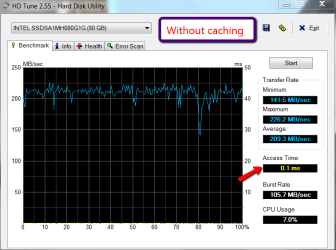
I ran HD Tune on my old Intel Gen1 (which is a leftover from Vista days but still going strong) both with and without write caching. At least HD Tune did not find any difference in access time. Now I am really puzzled and wonder what the implications of this big latency difference are.
 

Attachments

  • 2011-01-21_1119.png
    2011-01-21_1119.png
    77.8 KB · Views: 51
  • 2011-01-21_1236.png
    2011-01-21_1236.png
    70.1 KB · Views: 48

My Computer

Computer Manufacturer/Model Number
HP, Dell, Gateway, Toshiba - 4 laptops and 2 desktops
OS
Vista, Windows7, Mint Mate, Zorin, Windows 8
CPU
from 1.6GHz Duo to i7
Monitor(s) Displays
2x HP w2207
Hard Drives
5x HDD, 7x SSD, 12x Externals
Keyboard
with trackball - no mices
Mouse
Trackball mice
Internet Speed
DSL 6000
It's not just the Latency, look at the "Read Time with Random Writes" too

.298 msec with caching enabled (better)
.389 msec with caching disabled

But then the "Sequential Write"

230.9 mb/sec with caching enabled
239.7 mb/sec with caching disabled (better)


I did some checking and many of the OCZ drives have 64 or 128 MB cache buffers.

But looking at the overall data it looks like there is little to gain with any write caching. And Winsat gave both modes a 7.9 rating

So, Go Figure :rolleyes::rolleyes::rolleyes:

But in the above Winsat tests was the Write Cache Buffer Flushing turned "On" or "Off" :eek:
And should it have been "On" when the Caching was enabled ????
And "Off" when it was disabled ????
 

My Computer

Computer Manufacturer/Model Number
Alienware Aurora
OS
Win 7 Ultimate x64
CPU
Core I7 980X O.C. to 4.0 Ghz
Motherboard
Custom Intel mATX (Bios ver A10)
Memory
12GB 1600 mhz triple channel DDR3 - Kingston
Graphics Card(s)
ATI Radeon HD 5970 2GB Video Card
Sound Card
Creative Labs Titanium sound blaster
Monitor(s) Displays
30" Dell LCD
Screen Resolution
2560 x 1600
Hard Drives
240 GB OCZ Vertex 2 SSD
256 GB Samsung V2 SSD
2TB WD Black Caviar 7200 rpm SATA3
600GB WD Velociraptor 10,000 rpm SATA3
3TB WD MyBook Essential USB 3.0 7200 rpm External
PSU
850 Watt
Case
Alienware Aurora
Cooling
Water
Keyboard
Logitech G15 (original version)
Mouse
Logitech MX1000 Laser - Wireless
Internet Speed
Cable 22 Mb/sec download
Other Info
USB 3.0,
Blue Ray DVD Read/Writer
Bose Companion 3 Speakers
WRT54G Wireless Router
I guess we are in the state of total confusion - LOL
 

My Computer

Computer Manufacturer/Model Number
HP, Dell, Gateway, Toshiba - 4 laptops and 2 desktops
OS
Vista, Windows7, Mint Mate, Zorin, Windows 8
CPU
from 1.6GHz Duo to i7
Monitor(s) Displays
2x HP w2207
Hard Drives
5x HDD, 7x SSD, 12x Externals
Keyboard
with trackball - no mices
Mouse
Trackball mice
Internet Speed
DSL 6000
I have run my vertex2 with and without. Benchmarks may show a difference, but none that I was able to observe.

And, according to the OCZ forums- disable is better and the vertex2 does have a cache. FWIW
 

My Computers

System One System Two

  • Computer type
    PC/Desktop
    Computer Manufacturer/Model Number
    ALWAYS UNDER CONSTRUCTION
    OS
    Windows 11 Pro
    CPU
    Ryzen 9 5900X
    Motherboard
    Asus X570 Crosshair Viii Hero
    Memory
    32GB G Skill DDR4-3600
    Graphics Card(s)
    EVGA RTX 3080 FTW 3 Ultra
    Sound Card
    On Board/Sennheiser PC37X Headset
    Monitor(s) Displays
    3 X Asus 27"
    Screen Resolution
    2560x1440
    Hard Drives
    2 X 1 TB NVME drives
    PSU
    EVGA 850
    Case
    Phanteks Eclipse P400A
    Cooling
    EVGA 280 AIO
    Keyboard
    Logitech G510s/ Logitech G13
    Mouse
    Logitech G502
    Internet Speed
    24/1
    Antivirus
    ESET/MBAM Pro/SAS Pro
    Browser
    Chrome/ Firefox/ Edge
  • Computer type
    Laptop
    System Manufacturer/Model Number
    Dell 16 Plus
    OS
    Windows 11 Pro
    CPU
    Intel Ultra 9 288V
    Memory
    32 GB LPDDR5X 8533
    Monitor(s) Displays
    16" Mini-LED HDR600 Touch 90 Hz
    Screen Resolution
    2560X1600
    Hard Drives
    1 TB NVME
And, according to the OCZ forums- disable is better and the vertex2 does have a cache. FWIW
Hmm, what is the purpose of the cache then? Very confusing.
 

My Computer

Computer Manufacturer/Model Number
HP, Dell, Gateway, Toshiba - 4 laptops and 2 desktops
OS
Vista, Windows7, Mint Mate, Zorin, Windows 8
CPU
from 1.6GHz Duo to i7
Monitor(s) Displays
2x HP w2207
Hard Drives
5x HDD, 7x SSD, 12x Externals
Keyboard
with trackball - no mices
Mouse
Trackball mice
Internet Speed
DSL 6000
WHS, the answer to that question is above my pay grade. Unlike you, I don't understand the technical aspects of write cashing although I do know basically what it is. I would provide links for you if you could find anything on OCZ's forum.:p As I recall, it has a very small write cache but it does have one. The guy who said to disable write cache said after disabling it you had to wait a minimum of 24 hours and restart in excess of 10 times before you start noticing the difference. I could never notice, maybe benchmarks could tell, but real world performance is quite often different than benchmark ratings - in my experience.
 

My Computers

System One System Two

  • Computer type
    PC/Desktop
    Computer Manufacturer/Model Number
    ALWAYS UNDER CONSTRUCTION
    OS
    Windows 11 Pro
    CPU
    Ryzen 9 5900X
    Motherboard
    Asus X570 Crosshair Viii Hero
    Memory
    32GB G Skill DDR4-3600
    Graphics Card(s)
    EVGA RTX 3080 FTW 3 Ultra
    Sound Card
    On Board/Sennheiser PC37X Headset
    Monitor(s) Displays
    3 X Asus 27"
    Screen Resolution
    2560x1440
    Hard Drives
    2 X 1 TB NVME drives
    PSU
    EVGA 850
    Case
    Phanteks Eclipse P400A
    Cooling
    EVGA 280 AIO
    Keyboard
    Logitech G510s/ Logitech G13
    Mouse
    Logitech G502
    Internet Speed
    24/1
    Antivirus
    ESET/MBAM Pro/SAS Pro
    Browser
    Chrome/ Firefox/ Edge
  • Computer type
    Laptop
    System Manufacturer/Model Number
    Dell 16 Plus
    OS
    Windows 11 Pro
    CPU
    Intel Ultra 9 288V
    Memory
    32 GB LPDDR5X 8533
    Monitor(s) Displays
    16" Mini-LED HDR600 Touch 90 Hz
    Screen Resolution
    2560X1600
    Hard Drives
    1 TB NVME
essenbe, well we are shedding some light on the subject. But there are still a lot of open questions and a fair amount of contradictions. Maybe others have more insights. The subject is interesting and challenges my old brain. LOL

From what you quoted from the OCZ forum, I would not give this guy a lot of credibility - sounds too obscure.
 

My Computer

Computer Manufacturer/Model Number
HP, Dell, Gateway, Toshiba - 4 laptops and 2 desktops
OS
Vista, Windows7, Mint Mate, Zorin, Windows 8
CPU
from 1.6GHz Duo to i7
Monitor(s) Displays
2x HP w2207
Hard Drives
5x HDD, 7x SSD, 12x Externals
Keyboard
with trackball - no mices
Mouse
Trackball mice
Internet Speed
DSL 6000
WHS, I do agree with that. That is my problem with OCZ forums - it is difficult to find specific information and you never know who to believe.

I was having trouble with my computer and posted once simply to ask if there was a diagnostic program to test the Vertex2 smart attributes to see if it was operating correctly. I got responses to increase Vcore voltage to increase the northbridge voltage. I just don't go there anymore.
 

My Computers

System One System Two

  • Computer type
    PC/Desktop
    Computer Manufacturer/Model Number
    ALWAYS UNDER CONSTRUCTION
    OS
    Windows 11 Pro
    CPU
    Ryzen 9 5900X
    Motherboard
    Asus X570 Crosshair Viii Hero
    Memory
    32GB G Skill DDR4-3600
    Graphics Card(s)
    EVGA RTX 3080 FTW 3 Ultra
    Sound Card
    On Board/Sennheiser PC37X Headset
    Monitor(s) Displays
    3 X Asus 27"
    Screen Resolution
    2560x1440
    Hard Drives
    2 X 1 TB NVME drives
    PSU
    EVGA 850
    Case
    Phanteks Eclipse P400A
    Cooling
    EVGA 280 AIO
    Keyboard
    Logitech G510s/ Logitech G13
    Mouse
    Logitech G502
    Internet Speed
    24/1
    Antivirus
    ESET/MBAM Pro/SAS Pro
    Browser
    Chrome/ Firefox/ Edge
  • Computer type
    Laptop
    System Manufacturer/Model Number
    Dell 16 Plus
    OS
    Windows 11 Pro
    CPU
    Intel Ultra 9 288V
    Memory
    32 GB LPDDR5X 8533
    Monitor(s) Displays
    16" Mini-LED HDR600 Touch 90 Hz
    Screen Resolution
    2560X1600
    Hard Drives
    1 TB NVME
WHS, the answer to that question is above my pay grade. Unlike you, I don't understand the technical aspects of write cashing although I do know basically what it is. I would provide links for you if you could find anything on OCZ's forum.:p As I recall, it has a very small write cache but it does have one. The guy who said to disable write cache said after disabling it you had to wait a minimum of 24 hou:sarc:rs and restart in excess of 10 times before you start noticing the difference. I could never notice, maybe benchmarks could tell, but real world performance is quite often different than benchmark ratings - in my experience.

Ah, I understand - "Cashing" is better than "Caching" and it's more fun. :D
There ARE answers to all of this. From an enginerring standpoint, personally, I would think that an SSD would not have as great a need for a write cache as a std. HDD would. But it could still benefit.

Hating to say it, but the Winsat tests that were posted with Write Caching enabled and disabled need be performed again with BOTH the "flush write cache buffer" option turned on and off.
Oh, isnt it FUN :rolleyes::rolleyes::rolleyes:
 

My Computer

Computer Manufacturer/Model Number
Alienware Aurora
OS
Win 7 Ultimate x64
CPU
Core I7 980X O.C. to 4.0 Ghz
Motherboard
Custom Intel mATX (Bios ver A10)
Memory
12GB 1600 mhz triple channel DDR3 - Kingston
Graphics Card(s)
ATI Radeon HD 5970 2GB Video Card
Sound Card
Creative Labs Titanium sound blaster
Monitor(s) Displays
30" Dell LCD
Screen Resolution
2560 x 1600
Hard Drives
240 GB OCZ Vertex 2 SSD
256 GB Samsung V2 SSD
2TB WD Black Caviar 7200 rpm SATA3
600GB WD Velociraptor 10,000 rpm SATA3
3TB WD MyBook Essential USB 3.0 7200 rpm External
PSU
850 Watt
Case
Alienware Aurora
Cooling
Water
Keyboard
Logitech G15 (original version)
Mouse
Logitech MX1000 Laser - Wireless
Internet Speed
Cable 22 Mb/sec download
Other Info
USB 3.0,
Blue Ray DVD Read/Writer
Bose Companion 3 Speakers
WRT54G Wireless Router
WHS, I do agree with that. That is my problem with OCZ forums - it is difficult to find specific information and you never know who to believe.

I was having trouble with my computer and posted once simply to ask if there was a diagnostic program to test the Vertex2 smart attributes to see if it was operating correctly. I got responses to increase Vcore voltage to increase the northbridge voltage. I just don't go there anymore.

Hi whs and essenbe - I am very, very happy with my Vertex 2, but I am not AT ALL impressed with OCZ's tech support. I have spoken to them several times and they dont impress me whatsoever. They dont seem to really care, and some of them are totally "clueless". But thier drives are really wonderful.

So we have to make do with what we have. Terrible that they may have suggested to you essenbe, that you need to change the Vcore voltage on your CPU because of OCZ drive problems. That makes NO SENSE whatsoever - The Vcore voltage applied to your CPU has nothing directly to do with the operation of any OCV drive.
 

My Computer

Computer Manufacturer/Model Number
Alienware Aurora
OS
Win 7 Ultimate x64
CPU
Core I7 980X O.C. to 4.0 Ghz
Motherboard
Custom Intel mATX (Bios ver A10)
Memory
12GB 1600 mhz triple channel DDR3 - Kingston
Graphics Card(s)
ATI Radeon HD 5970 2GB Video Card
Sound Card
Creative Labs Titanium sound blaster
Monitor(s) Displays
30" Dell LCD
Screen Resolution
2560 x 1600
Hard Drives
240 GB OCZ Vertex 2 SSD
256 GB Samsung V2 SSD
2TB WD Black Caviar 7200 rpm SATA3
600GB WD Velociraptor 10,000 rpm SATA3
3TB WD MyBook Essential USB 3.0 7200 rpm External
PSU
850 Watt
Case
Alienware Aurora
Cooling
Water
Keyboard
Logitech G15 (original version)
Mouse
Logitech MX1000 Laser - Wireless
Internet Speed
Cable 22 Mb/sec download
Other Info
USB 3.0,
Blue Ray DVD Read/Writer
Bose Companion 3 Speakers
WRT54G Wireless Router
"flush write cache buffer" option turned on and off.
Dumb question - How do you do that?

PS: my experience with the OCZ technicians was pretty good. Though that was 2 years ago. They were persons of few words though.
 

My Computer

Computer Manufacturer/Model Number
HP, Dell, Gateway, Toshiba - 4 laptops and 2 desktops
OS
Vista, Windows7, Mint Mate, Zorin, Windows 8
CPU
from 1.6GHz Duo to i7
Monitor(s) Displays
2x HP w2207
Hard Drives
5x HDD, 7x SSD, 12x Externals
Keyboard
with trackball - no mices
Mouse
Trackball mice
Internet Speed
DSL 6000
My only question is (and this is not meant to be sarcastic) If in practical use, you can tell no difference, what difference does it really make. Mine is on and my WEI is 7.7 . I'm not sure I can improve on that.
 

My Computers

System One System Two

  • Computer type
    PC/Desktop
    Computer Manufacturer/Model Number
    ALWAYS UNDER CONSTRUCTION
    OS
    Windows 11 Pro
    CPU
    Ryzen 9 5900X
    Motherboard
    Asus X570 Crosshair Viii Hero
    Memory
    32GB G Skill DDR4-3600
    Graphics Card(s)
    EVGA RTX 3080 FTW 3 Ultra
    Sound Card
    On Board/Sennheiser PC37X Headset
    Monitor(s) Displays
    3 X Asus 27"
    Screen Resolution
    2560x1440
    Hard Drives
    2 X 1 TB NVME drives
    PSU
    EVGA 850
    Case
    Phanteks Eclipse P400A
    Cooling
    EVGA 280 AIO
    Keyboard
    Logitech G510s/ Logitech G13
    Mouse
    Logitech G502
    Internet Speed
    24/1
    Antivirus
    ESET/MBAM Pro/SAS Pro
    Browser
    Chrome/ Firefox/ Edge
  • Computer type
    Laptop
    System Manufacturer/Model Number
    Dell 16 Plus
    OS
    Windows 11 Pro
    CPU
    Intel Ultra 9 288V
    Memory
    32 GB LPDDR5X 8533
    Monitor(s) Displays
    16" Mini-LED HDR600 Touch 90 Hz
    Screen Resolution
    2560X1600
    Hard Drives
    1 TB NVME
Back
Top